
Can My Employer Listen Through My Laptop Microphone?
During calls and recorded meetings, yes. Outside calls, only if a program on the laptop turns the microphone on. Device management such as Intune or Jamf does not stream audio, and Windows and macOS both show when an app uses the mic. How to check, and where the law draws the line.
Your employer can hear you through your laptop microphone during calls and meetings, and later in any meeting that was recorded or transcribed. Outside calls, they can hear you only if a program on the laptop turns the microphone on. Standard IT tools such as Intune or Jamf manage settings and apps; they do not stream audio. Windows 11 and macOS both show when an app uses the microphone and keep a list of which apps used it, so a hidden recorder is hard to hide from someone who checks.
Secret audio recording is also the one kind of monitoring that most often breaks the law, because recording conversations without consent falls under wiretap rules in the US and under data protection law in the EU and UK. That is why so few monitoring products offer it.
We build Slack Green, which keeps your Slack status green from our servers with nothing installed on the work laptop, so we track what employers can see and hear on work devices. The camera version of this question is in can my employer see me through my laptop camera.
When your employer can hear you
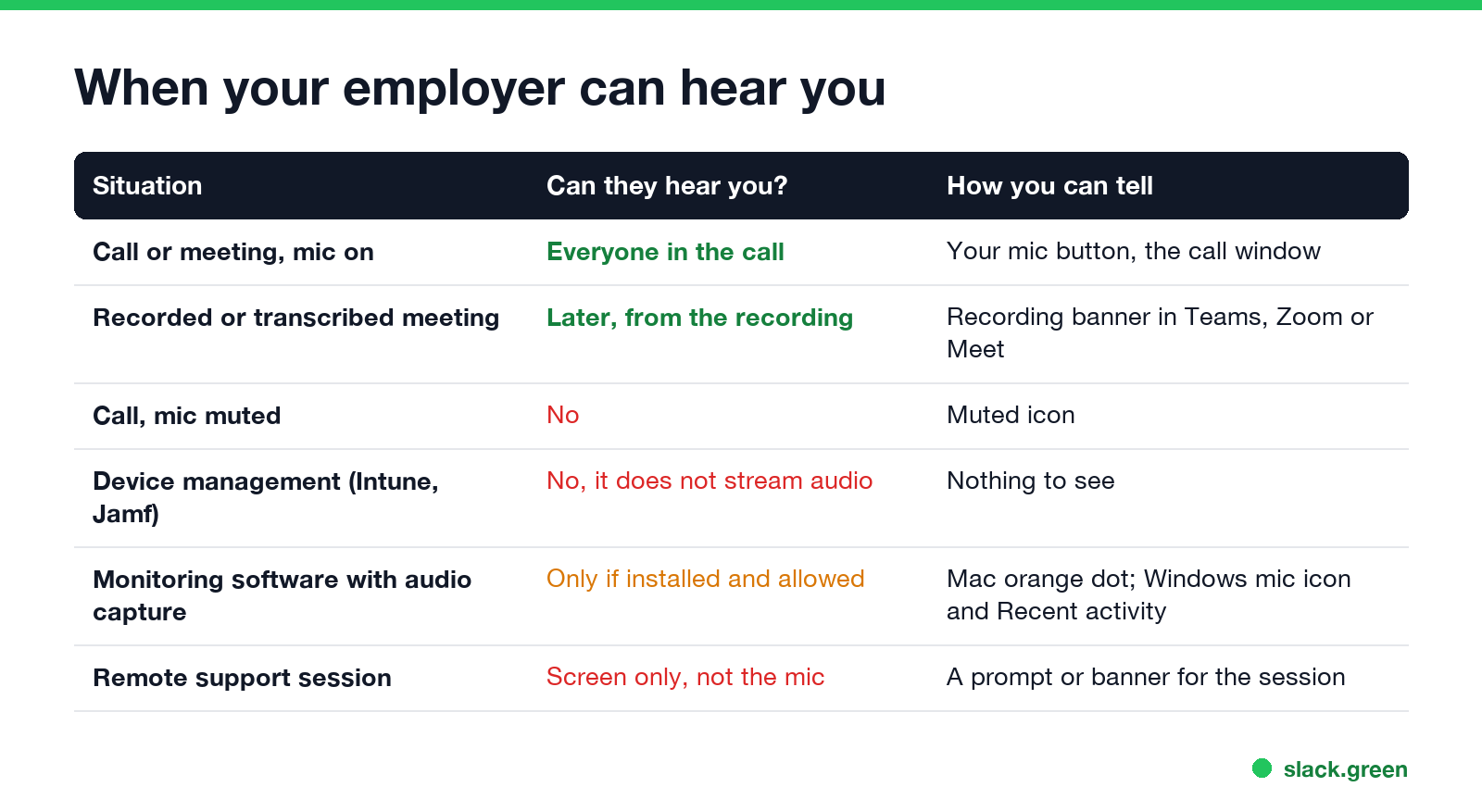
| Situation | Can they hear you? | How you can tell |
|---|---|---|
| Call or meeting with your mic on (Teams, Zoom, Meet, Slack huddle) | Yes, everyone in the call | Your mic button, the call window |
| A recorded or transcribed meeting | Yes, later, from the recording | Teams, Zoom and Meet show a recording or transcription notice |
| A call with your mic muted | No | The muted icon |
| Device management (Intune, Jamf, Workspace ONE) | No, it does not stream audio | Nothing to see |
| Monitoring software with audio capture | Only if it is installed and allowed | Mac orange dot; Windows mic icon and Recent activity |
| Remote support session (Quick Assist, Remote Help) | They see your screen, not your mic | A prompt or banner for the session |
The recording row is the one people forget. A Teams or Zoom meeting recording is stored in the company's account, and the company can keep and search it like email. What that means for calls is in can my employer listen to my Teams calls.
Can monitoring software turn on the microphone?
Only if the software is installed on the laptop and the operating system lets it use the mic. Most employee monitoring products record screens, apps, websites and keyboard activity. Microphone recording is rare in them, for legal reasons, and where it exists the employer has to turn it on.
Any program that records audio has to ask the operating system first:
- • macOS asks you to allow microphone access for each app. Apple's device management rules let a company block microphone access for an app, but not grant it silently, so the permission still needs a click from the user. While any app uses the mic, an orange dot shows in the menu bar.
- • Windows 11 lists every app with microphone access under Settings, Privacy & security, Microphone. On a managed PC, IT policy can set those switches for you, but Windows still shows a microphone icon near the clock while an app records, and lists the app under Recent activity for 7 days.
A laptop has no light for the microphone, unlike the camera. These two indicators are how you can tell.
How to check if your laptop microphone is on
Never appear "away" on Slack again
Cloud-based. No downloads. Works 24/7 even when your laptop is off.
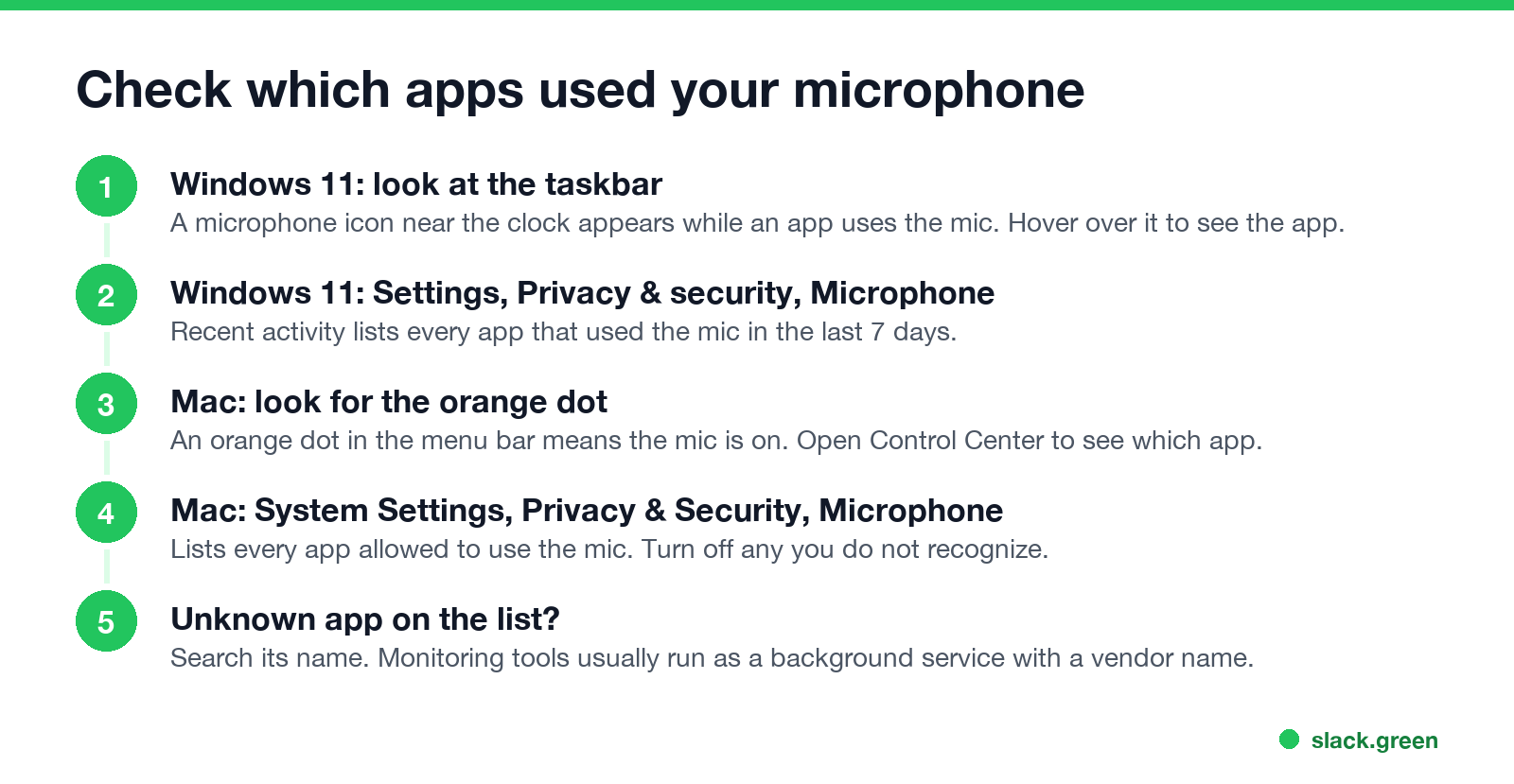
On Windows 11:
On a Mac:
If a name on the list is new to you, search it. Monitoring tools usually run as a background service named after the vendor. How to spot the common ones is in how to tell if you are being monitored at work, and for a Mac, how to check if a work Mac is monitored.
Is it legal for an employer to record you through your laptop?
It depends on where you are and who is recorded. Audio has stricter rules than screenshots or website logs.
Meeting recordings are a different case, because Teams, Zoom and Meet announce them to everyone in the call. More on the rules by country is in is it legal for my employer to monitor me.
What employers track more often than your microphone
Audio is rare. What companies do collect, and more often:
If you want privacy for a personal call, use your phone rather than the work laptop, or mute the laptop's mic in the call app and in the system settings.
FAQ
Never appear "away" on Slack again
Cloud-based. No downloads. Works 24/7 even when your laptop is off.
Can my employer turn on my microphone remotely? Not with standard IT tools. Only a program on the laptop that has microphone permission can record, and Windows and macOS show when it does.
Can Teams or Zoom listen when I am not in a call? No. They use the mic during calls, meetings and voice messages, and the operating system shows it.
Can my work laptop listen to me when it is closed or asleep? No. The mic does not record while the laptop sleeps, and on most recent MacBooks the microphone is cut off in hardware when the lid is closed.
Does muting in Teams turn off the microphone? Teams stops sending your audio when you mute. For a full stop, also turn the mic off in the system settings or with the laptop's mute key.
Can my employer hear me through my phone? Not through device management. The phone shows a mic indicator (orange on iPhone, green on Android) whenever an app records. See can my employer see what I do on my phone.
Stop Jiggling Your Mouse.
Join hundreds of remote workers who never worry about their Slack status. Set it up once, stay green forever.
Related Articles
Can My Employer See What I Watch on YouTube at Work?
On a work laptop or the office network, your employer can see that you used YouTube, when, and for how long. With HTTPS inspection or monitoring software, they can see which videos, because the video address and the browser tab title both name it. On your own phone on mobile data, they see nothing.
Can My Employer See My iMessages on a Work Mac?
Not through device management or the network: Jamf or Intune cannot read Messages, and iMessage is end-to-end encrypted. But if you sign in to Messages on a work Mac, your texts are stored on that Mac, where monitoring screenshots, backups and admin access can reach them. How to check, and how to take iMessage off the Mac without deleting it from your iPhone.
Can My Boss See My Private Outlook Calendar Events?
Usually not the details. When you mark an Outlook event Private, someone who can read your calendar sees only Private appointment, the time and a lock. The exceptions are delegates you gave Can view private items, the people invited to the event, anyone with full access to your mailbox in new Outlook or the web, and compliance admins. How to check who has which access, and what Private does not hide.