
Can My Employer See If I Have a Second Job? How They Find Out
Your employer cannot look up a second job in any government or payroll database. They find out through employment verification services such as The Work Number, the multiple-jobs box on your W-4, LinkedIn, activity on the work laptop, and overlapping hours. What each channel shows, what it does not, and how to check your own record.
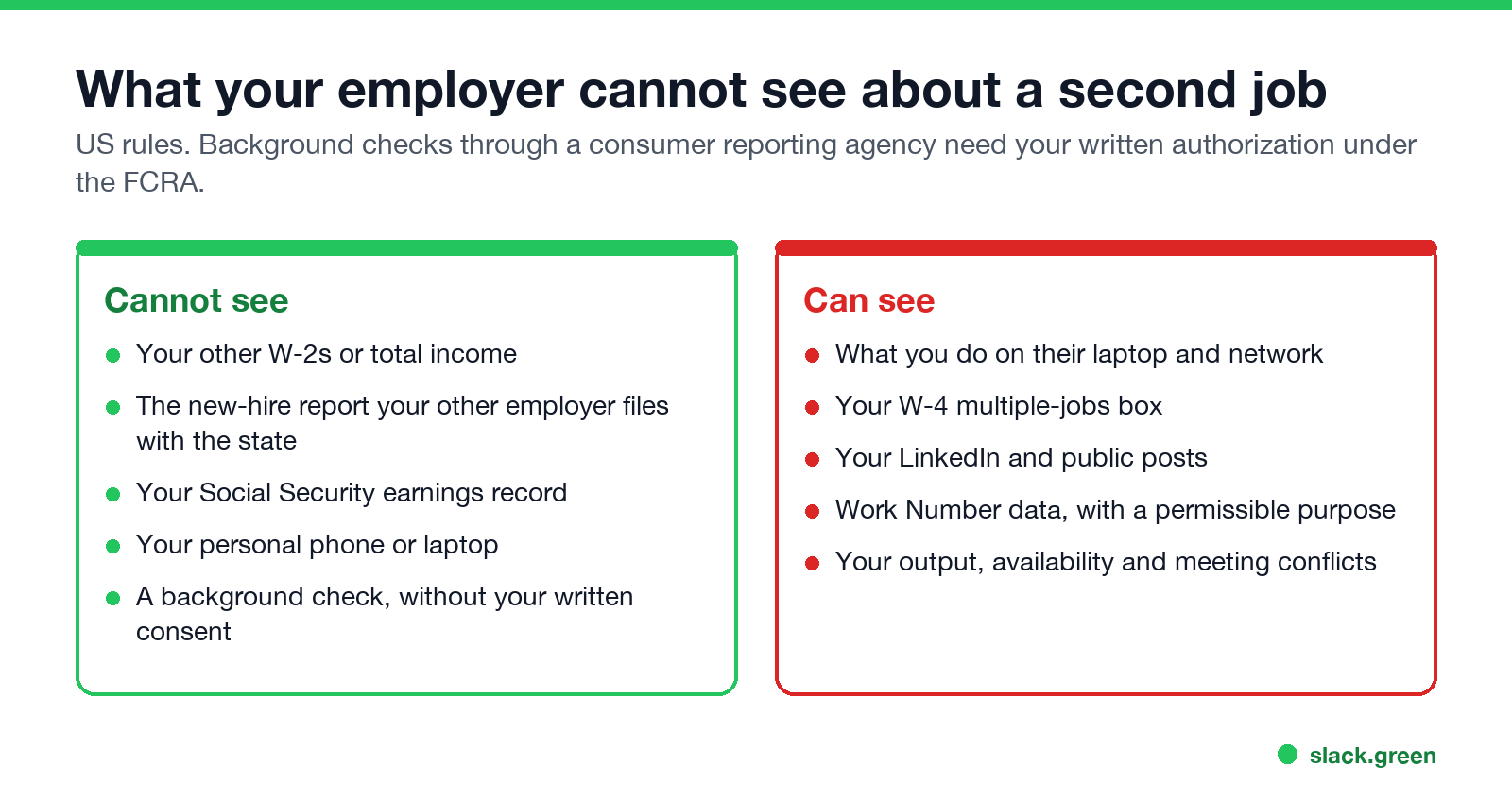
No, not directly. In the US there is no government or payroll database your employer can search to see where else you work. Your W-2s, tax return and Social Security earnings stay between you, the other employer and the government. Employers find out in other ways: an employment verification service such as Equifax's The Work Number, the multiple jobs box on your Form W-4, a second current role on LinkedIn, the other job's apps or email on a company laptop, and hours that clash. Most second jobs come out through the last two, not through a records search.
People who hold two remote jobs also run into a smaller problem: two chat apps that each want you green. Slack turns you grey after 10 minutes without input in each workspace's window. Slack Green keeps your Slack status active during the hours you set, from the cloud, for up to three workspaces, on no company device.
How employers find out about a second job
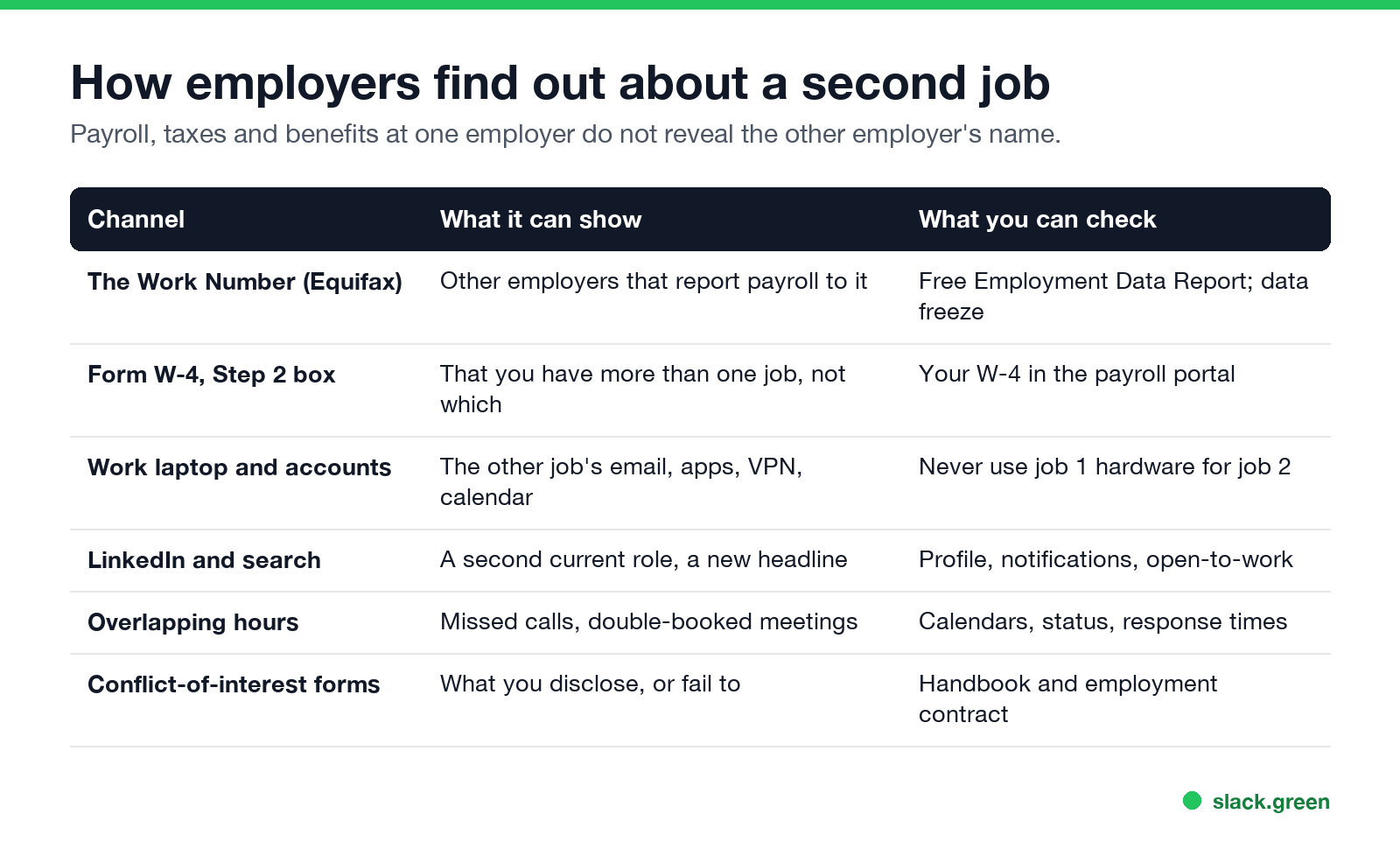
| Channel | What it can show | What you can check |
|---|---|---|
| The Work Number (Equifax) | Other employers that send payroll data to it | Your free Employment Data Report; a data freeze |
| Form W-4, Step 2 | That you have more than one job, not which | The W-4 on file in your payroll portal |
| Work laptop and accounts | The other job's email, Slack, VPN or calendar | Keep job 2 entirely off job 1's hardware |
| LinkedIn and search | A second current position, a new headline | Your profile, share-updates setting, open-to-work |
| Overlapping hours | Missed calls, double-booked meetings, slow replies | Your calendars and response times |
| Conflict-of-interest forms | What you disclose, or failed to | Your handbook and contract |
The Work Number and employment verification
The Work Number is Equifax's employment and income database. Many large employers and payroll providers send it pay data, and lenders, landlords and new employers query it to verify a job. If your second employer reports to it, a verifier can see that job.
Can your current employer run that search? Under the Fair Credit Reporting Act an employer can get a consumer report for employment purposes, including decisions about keeping you, but it needs your written authorization and must follow the FCRA's notice rules. Some employers collect a standing authorization at hiring, so read what you signed.
What you can do, from Equifax's own employee site:
- • Request your Employment Data Report. It is free and lists the employers on your file and who has pulled your data. If your employer ran a check, it shows up there.
- • Place a data freeze. Equifax says a freeze means "many verifiers will be unable to view your data". Its freeze form covers requests for credit, public aid, rental and new employment. You lift it when you need a verification, for example for a mortgage.
The reverse direction matters more often. Your second employer's background check usually verifies your current job, sometimes by calling it. Ask the new employer how it verifies employment, and give a pay stub if you do not want your current employer called.
Your W-4, taxes and payroll
Never appear "away" on Slack again
Cloud-based. No downloads. Works 24/7 even when your laptop is off.
Payroll does not show your other employer. Each employer sends its own W-2, and neither sees the other. The one place a second job surfaces is Step 2 of Form W-4, "Multiple Jobs or Spouse Works". If you check that box, or use the multiple-jobs worksheet, your employer's payroll team sees that you have more than one job or a working spouse. It does not say which, or where.
Skipping Step 2 means too little tax is withheld and you owe more in April. The IRS Tax Withholding Estimator lets you enter both jobs and put the extra withholding in Step 4(c) as a dollar amount instead, which does not flag multiple jobs. The total tax is the same either way.
State new-hire reports, which every employer files, go to child-support agencies. Employers cannot search them.
What gives most second jobs away
How people keep the two separate, from calendars to hardware, is in how to work two remote jobs.
Is it legal to have a second job?
In most of the US, yes, unless your contract or company policy forbids it. Look for three things in what you signed:
Several states, including California, New York and Colorado, protect lawful activity outside working hours, which can include a second job that does not conflict with your employer's business. Government employees and licensed professions often have their own outside-employment rules. Breaking a policy is usually a firing matter, not a crime, but lying on a conflict-of-interest form can make it worse.
FAQ
Never appear "away" on Slack again
Cloud-based. No downloads. Works 24/7 even when your laptop is off.
Can my employer see my other job on my W-2?
No. Each employer issues its own W-2 and does not see the other.
Will a background check show my second job?
It can, if it includes employment verification through a service like The Work Number and your second employer reports to it. Your current employer needs your written consent to run one.
Can my employer see my LinkedIn if I don't accept their connection?
Yes, if your profile is public. Check what your public profile shows in LinkedIn's visibility settings.
Do I have to tell my employer about a second job?
Only if your contract, handbook or a conflict-of-interest form requires it. Read those first.
Can my employer see who I work for through payroll software like ADP or Gusto?
No. Payroll providers keep each employer's data separate. Employment verification services are the exception.
Stop Jiggling Your Mouse.
Join hundreds of remote workers who never worry about their Slack status. Set it up once, stay green forever.
Related Articles
How to Keep Skype Status Active: Skype for Business Idle Timers
To keep your Skype for Business status active, open Options, Status, and raise both idle timers, Inactive and then Away, from 5 minutes to as much as 360 minutes each. Consumer Skype shut down on May 5, 2025 and Skype for Business Online in 2021, so for most people the real question is now Teams. What still works, status icons, Outlook, and status not updating.
Is It Legal for My Employer to Monitor Me? US, EU and UK Rules
In the US it is mostly legal for an employer to monitor company devices, accounts and premises, often without asking. The limits are state notice laws in New York, Connecticut and Delaware, consent rules for audio recording and biometrics, bans on cameras in restrooms, and your personal devices. The EU, UK and parts of Canada and Australia add notice and proportionality rules.
Can My Employer See My Personal Email on My Work Computer?
Your employer cannot sign in to your Gmail, and doing so without permission can break the Stored Communications Act. But on a work computer, screenshot and keystroke monitoring, browser history, HTTPS inspection and Outlook's local cache can all expose personal email. Work email is fully visible, deleted messages included. Case by case, with what to do.