
Can My Employer See What I Do on My Hotspot? It Depends on the Laptop
On a work laptop, usually yes: a personal hotspot replaces the office Wi-Fi, but the company VPN, a cloud proxy such as Zscaler and any monitoring agent keep working on every network. On your own laptop or phone, your employer sees nothing of your hotspot browsing. How to check which case you are in.
It depends on the device, not the network. A work laptop on your phone's hotspot is often as visible as on the office Wi-Fi: a company VPN, a cloud proxy such as Zscaler or Netskope, and any monitoring agent all run on the laptop and report to your employer on every network. What the hotspot removes is the office network itself, the firewall and Wi-Fi logs. Your own laptop or phone on your hotspot is a different story: your employer sees nothing of it.
So "use my hotspot instead of the work Wi-Fi" hides your browsing only when there is no company software doing the watching on the laptop. On many work laptops there is. The mobile carrier sees the site names in either case, but it does not pass them to your employer.
We build Slack Green, which keeps your Slack status green from our servers with nothing installed on the work laptop, so we track what employers can see across networks and devices. All browsing, network by network, is in can my employer see my browsing history.
What your employer sees on a personal hotspot
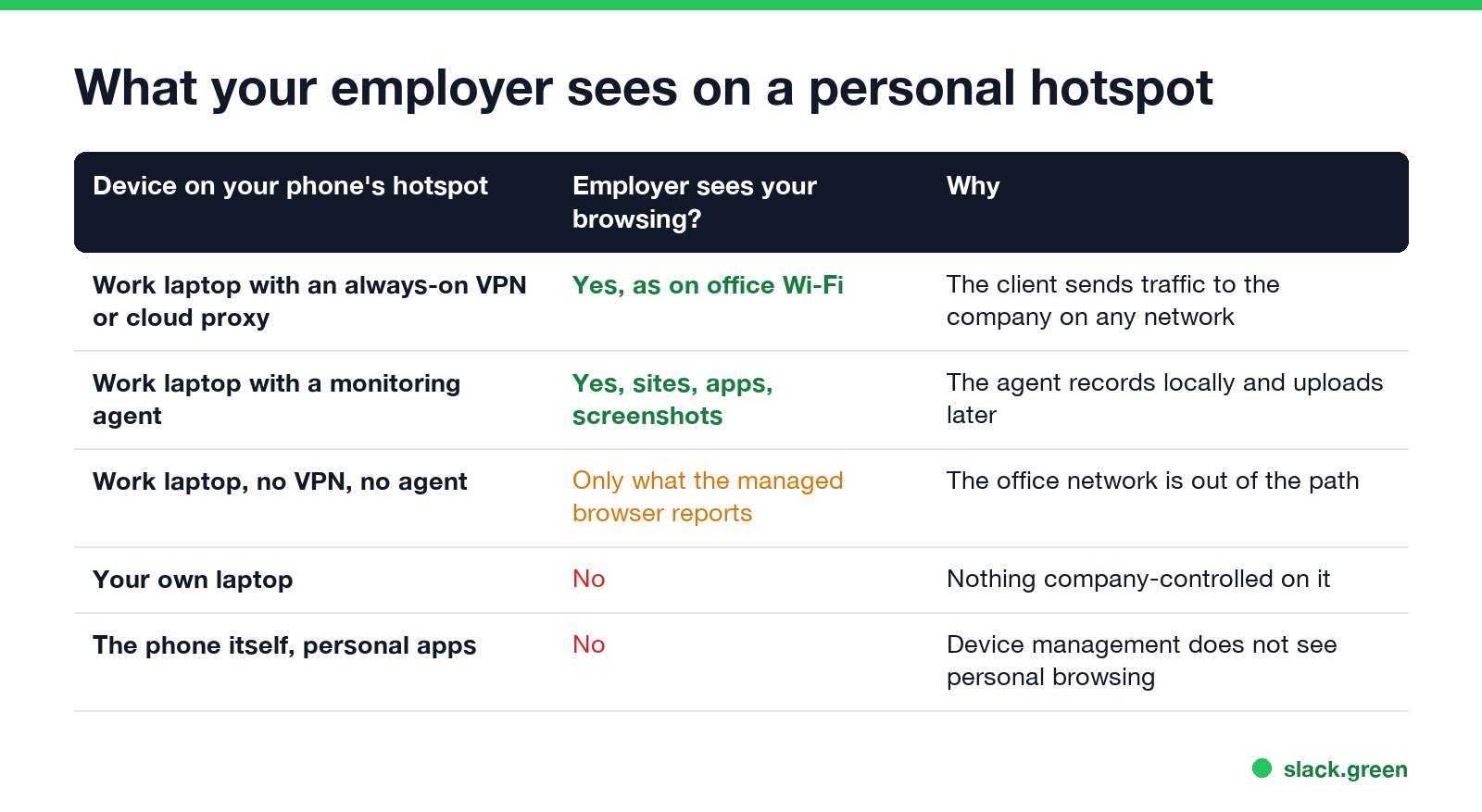
| Device on your phone's hotspot | Does your employer see your browsing? | Why |
|---|---|---|
| Work laptop with an always-on VPN or cloud proxy client | Yes, the same as on office Wi-Fi | The client sends your traffic through the company on any network |
| Work laptop with a monitoring agent | Yes: sites, apps, often screenshots | The agent records on the laptop and uploads when it can |
| Work laptop with no VPN, proxy or agent | Only what a managed browser reports | The office network is no longer in the path |
| Your own laptop | No | Nothing the company controls is on it |
| The phone that makes the hotspot | No, for personal apps | Device management does not see personal browsing |
Why a work laptop still reports on a hotspot
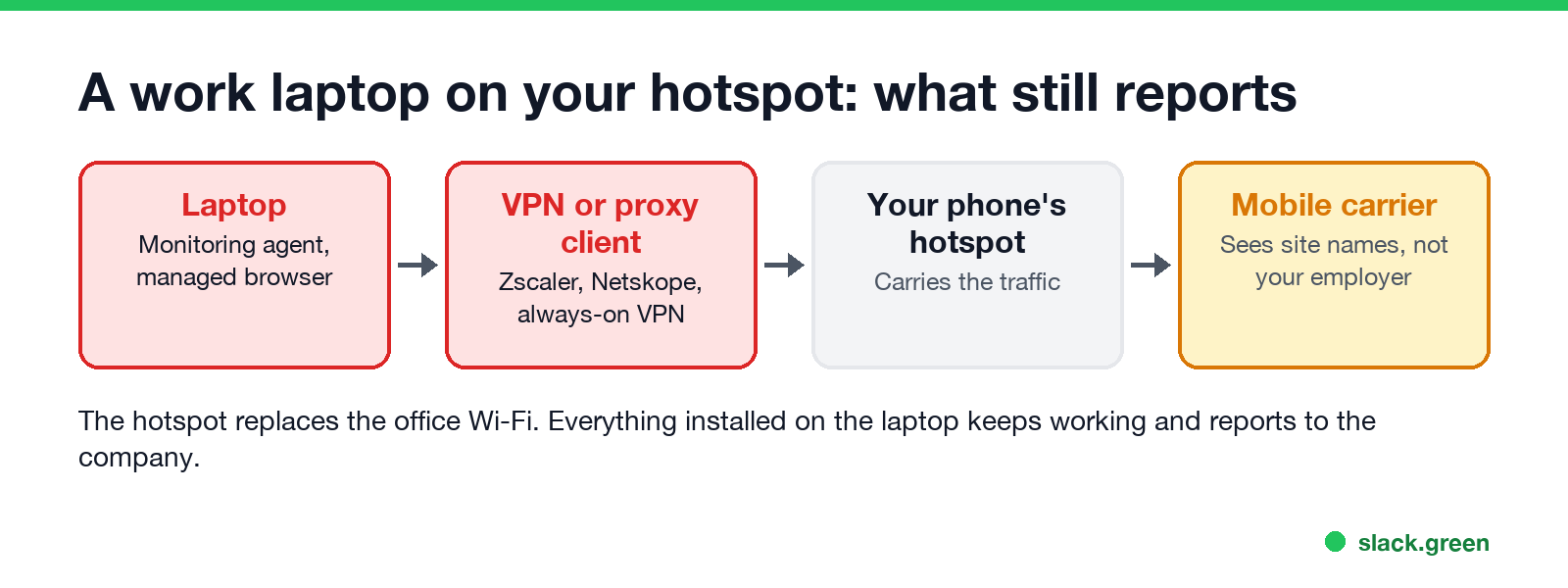
Most company monitoring used to live in the office: a firewall and a web filter on the building's network. Remote work moved it onto the laptop.
- • Always-on VPN. Many companies set the VPN to connect by itself on any network, and some block the internet until it does. Your traffic then goes through the company, hotspot or not. What the VPN sees is covered in can my employer see my browsing if I use a VPN.
- • Cloud proxy clients. Zscaler Client Connector, Netskope and similar tools send your web traffic to the company's security cloud from any network. With a company certificate on the laptop, they can see full pages, not only site names.
- • Monitoring agents. They record the sites and apps you use on the laptop itself. With no connection they store the data and send it later, so switching networks only delays the upload.
- • Managed browsers. Chrome or Edge managed by your company applies its policies and reports on every network.
Incognito does not change any of this; see can my employer see my Incognito history.
Can my employer see that I used a hotspot?
Never appear "away" on Slack again
Cloud-based. No downloads. Works 24/7 even when your laptop is off.
Often, yes, even when they cannot see the browsing. Security and management tools record which network a laptop is on and its public IP address, and a mobile carrier's IP address looks different from a home broadband one. Some companies also block unknown networks or require the VPN before anything else works. Using a hotspot is rarely against the rules on its own; turning off the company VPN to use it often is.
Check whether your work laptop reports on any network
Look for a VPN or proxy that follows you from network to network:
# Mac (Terminal): VPN services and the current proxy settings
scutil --nc list
scutil --proxy
:: Windows (Command Prompt): system proxy, then look for VPN or Zscaler adapters
netsh winhttp show proxy
ipconfig /allA line marked (Connected) in scutil --nc list, a proxy address or a .pac file, or an adapter named after Zscaler, Netskope, GlobalProtect, AnyConnect or your company in ipconfig /all means your traffic can go to the company from any network. Then check for a monitoring agent; the signs are in how to tell if you are being monitored at work.
Keep personal browsing personal
FAQ
Never appear "away" on Slack again
Cloud-based. No downloads. Works 24/7 even when your laptop is off.
Does using a hotspot hide my browsing from my employer? On your own device, yes. On a work laptop, only if it has no VPN, proxy client or monitoring agent.
Can my employer see my hotspot data usage? Not your phone's data plan, unless the phone and plan are company-paid. Then the company bill shows the data used.
Can my employer see what I do on my phone's hotspot from my personal laptop? No. Your employer has no software on the personal laptop and no access to your phone plan.
Is a hotspot safer than the office Wi-Fi for personal browsing? Only for your own devices. For a work laptop, the software on it matters more than the network.
Stop Jiggling Your Mouse.
Join hundreds of remote workers who never worry about their Slack status. Set it up once, stay green forever.
Related Articles
Can My Employer See What I Watch on YouTube at Work?
On a work laptop or the office network, your employer can see that you used YouTube, when, and for how long. With HTTPS inspection or monitoring software, they can see which videos, because the video address and the browser tab title both name it. On your own phone on mobile data, they see nothing.
Can My Employer See My iMessages on a Work Mac?
Not through device management or the network: Jamf or Intune cannot read Messages, and iMessage is end-to-end encrypted. But if you sign in to Messages on a work Mac, your texts are stored on that Mac, where monitoring screenshots, backups and admin access can reach them. How to check, and how to take iMessage off the Mac without deleting it from your iPhone.
Can My Boss See My Private Outlook Calendar Events?
Usually not the details. When you mark an Outlook event Private, someone who can read your calendar sees only Private appointment, the time and a lock. The exceptions are delegates you gave Can view private items, the people invited to the event, anyone with full access to your mailbox in new Outlook or the web, and compliance admins. How to check who has which access, and what Private does not hide.