
Slack Desktop App Blank or White Screen? Fix It in This Order
A blank, white or black Slack window is usually a failed load, a corrupt cache, a blocked connection or a graphics driver issue. Reload with Cmd or Ctrl+R, use Help, Troubleshooting, Clear Cache and Restart, test Slack in a browser, update, then reinstall cleanly. Steps for Windows and Mac.
A blank, white or black Slack window usually has one of four causes: the app failed to load its content, the local cache is corrupt, the connection is blocked, or the graphics driver is misbehaving. Fix it in this order. Press Cmd+R (Mac) or Ctrl+R (Windows) to reload. If that fails, open Help, Troubleshooting, Clear Cache and Restart; on Windows press Alt if the menu bar is hidden. Then open app.slack.com in a browser: if Slack works there, the problem is the desktop app, not your account or network. Update Slack and your graphics driver, and as a last step reinstall cleanly.
While Slack is blank, it is not getting your input, so your dot goes grey after 10 minutes. Slack Green keeps your presence active during the working hours you set, from the cloud, whatever the app on your computer is doing.
Fix a blank Slack window, in order
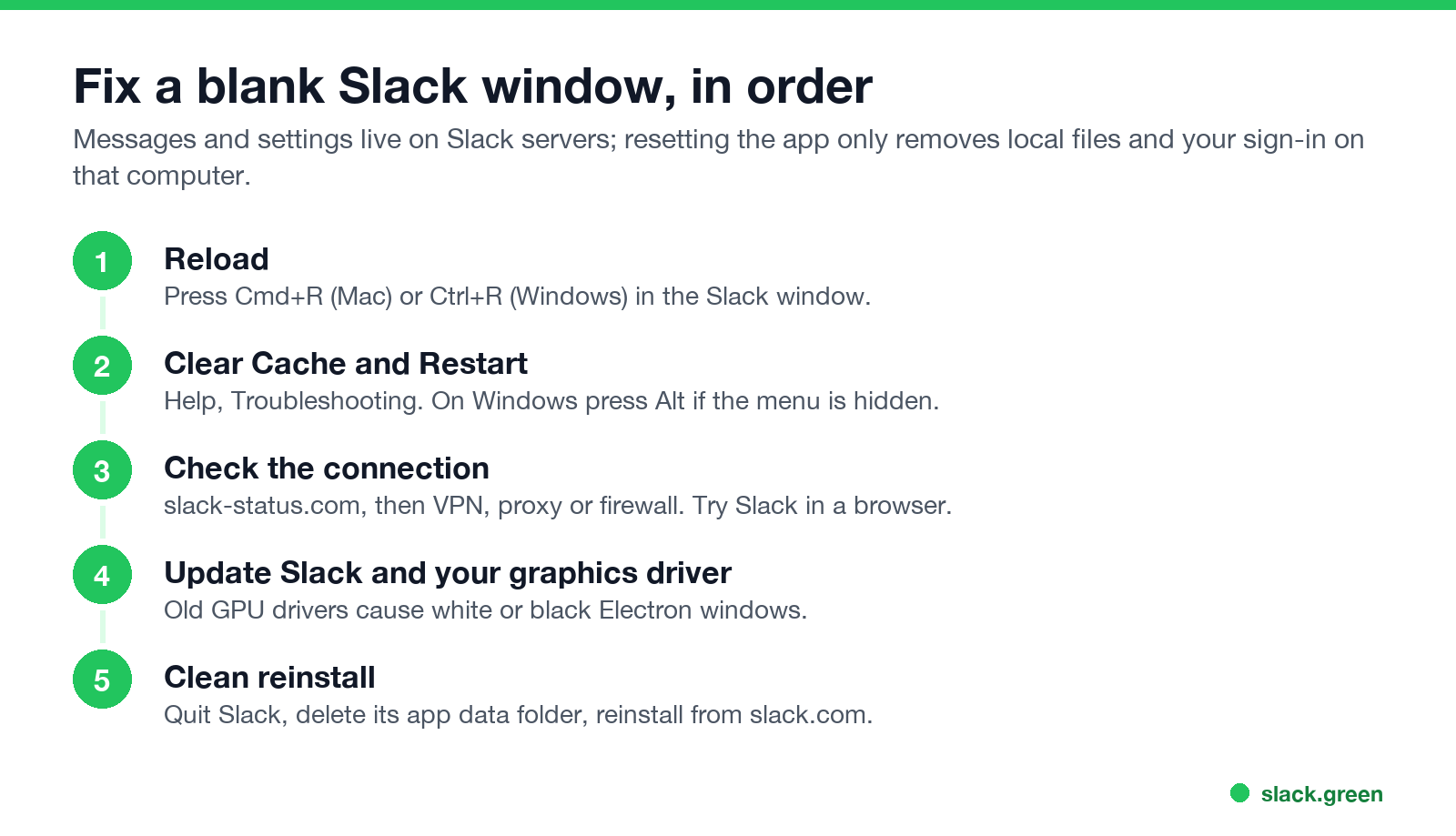
- Reload. Click the Slack window and press Cmd+R or Ctrl+R.
- Clear Cache and Restart. Help, Troubleshooting, Clear Cache and Restart. Your messages stay on Slack's servers; see how to clear the Slack cache.
- Check the connection. Look at slack-status.com for an incident, then try another network or turn your VPN off and on. Strict proxies and firewalls can block the app.
- Update Slack and your graphics driver. Old GPU drivers are a common cause of white or black windows in Electron apps like Slack.
- Reinstall cleanly. Quit Slack, delete its app data folder, and reinstall from slack.com. On a Mac the folder is
~/Library/Application Support/Slack(App Store version:~/Library/Containers/com.tinyspeck.slackmacgap); on Windows it is%AppData%\Slack. You will need to sign in again.
What a blank Slack window usually means
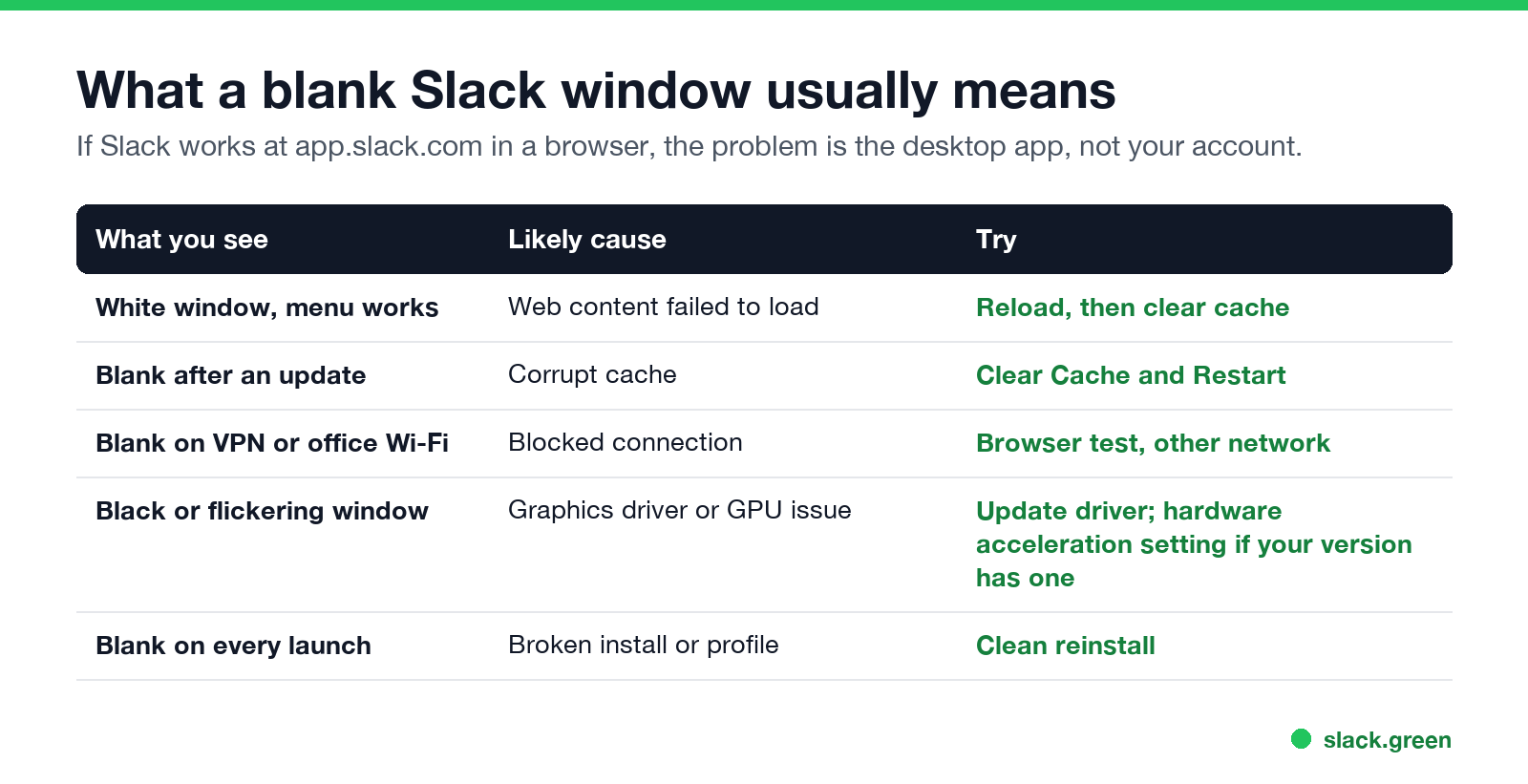
| What you see | Likely cause | Try |
|---|---|---|
| White window, menu works | Content failed to load | Reload, then clear cache |
| Blank after an update | Corrupt cache | Clear Cache and Restart |
| Blank on VPN or office Wi-Fi | Blocked connection | Browser test, another network |
| Black or flickering window | Graphics driver or GPU | Update the driver |
| Blank on every launch | Broken install | Clean reinstall |
Slack white screen on Windows 11
لا تظهر أبداً كـ "غائب" على Slack
يعمل على السحابة. بدون تنزيلات. يعمل 24/7 حتى عندما يكون الكمبيوتر مغلقاً.
Slack blank screen on Mac
Slack app not loading at all
If the app does not open or closes at once, restart the computer, then reinstall. If Slack loads in the browser but not in the app, use the browser while you fix the app; see Slack desktop app vs browser. If everyone looks offline once it loads, see Slack showing everyone offline. If Slack is slow rather than blank, see why Slack uses so much memory.
FAQ
لا تظهر أبداً كـ "غائب" على Slack
يعمل على السحابة. بدون تنزيلات. يعمل 24/7 حتى عندما يكون الكمبيوتر مغلقاً.
Why is my Slack desktop app blank?
Usually a failed load or a corrupt cache. Reload with Cmd or Ctrl+R, then Clear Cache and Restart.
Why is Slack showing a white screen?
The app's content did not load. Reload, clear the cache, and check your connection.
Why is Slack black on Windows?
Often a graphics driver problem. Update the driver and Slack.
Will reinstalling Slack delete my messages?
No. Messages stay on Slack's servers. You only need to sign in again.
Slack works in the browser but not the app. Why?
The desktop app's local files or install are broken. Clear the cache or reinstall cleanly.
توقف عن تحريك الماوس.
مئات العاملين عن بعد لم يعودوا قلقين بشأن حالة Slack. قم بالإعداد مرة واحدة، ابقَ أخضر للأبد.
Related Articles
Slack Huddle Not Working? Fixes for No Sound, Mic, Camera and Connection
When a Slack huddle will not connect, has no sound, or others cannot hear you, run Slack's audio and video test, check the microphone and speaker in Preferences, re-grant Slack mic and camera access in your OS, and try Chrome or your phone to find a network block. Fixes by symptom for Mac, Windows, browser and mobile.
Slack Red Dot Won't Go Away? What It Counts and How to Clear It
A red dot on the Slack icon means unread activity somewhere; a red number means DMs, mentions, keywords or followed thread replies. Press Shift+Esc to mark all read, check Threads, Activity, Later and other workspaces, then clear the cache or reset the OS badge.
How to Keep Your Outlook Status Green (It Comes From Teams)
Your Outlook status shows your Microsoft Teams presence, so to keep Outlook green you keep Teams Available: Teams signed in and running, input on the computer, no lock or sleep, and no leftover status. What sets you Away, and what you can change.