
Slack Huddles vs Zoom: Which to Use for Team Calls
Slack huddles are quick calls inside Slack: 1:1 on the free plan, up to 50 people on paid plans, no recording. Zoom is built for scheduled, recorded and large meetings, with a free plan of 100 people for 40 minutes. Limits, cost, recording and privacy side by side.
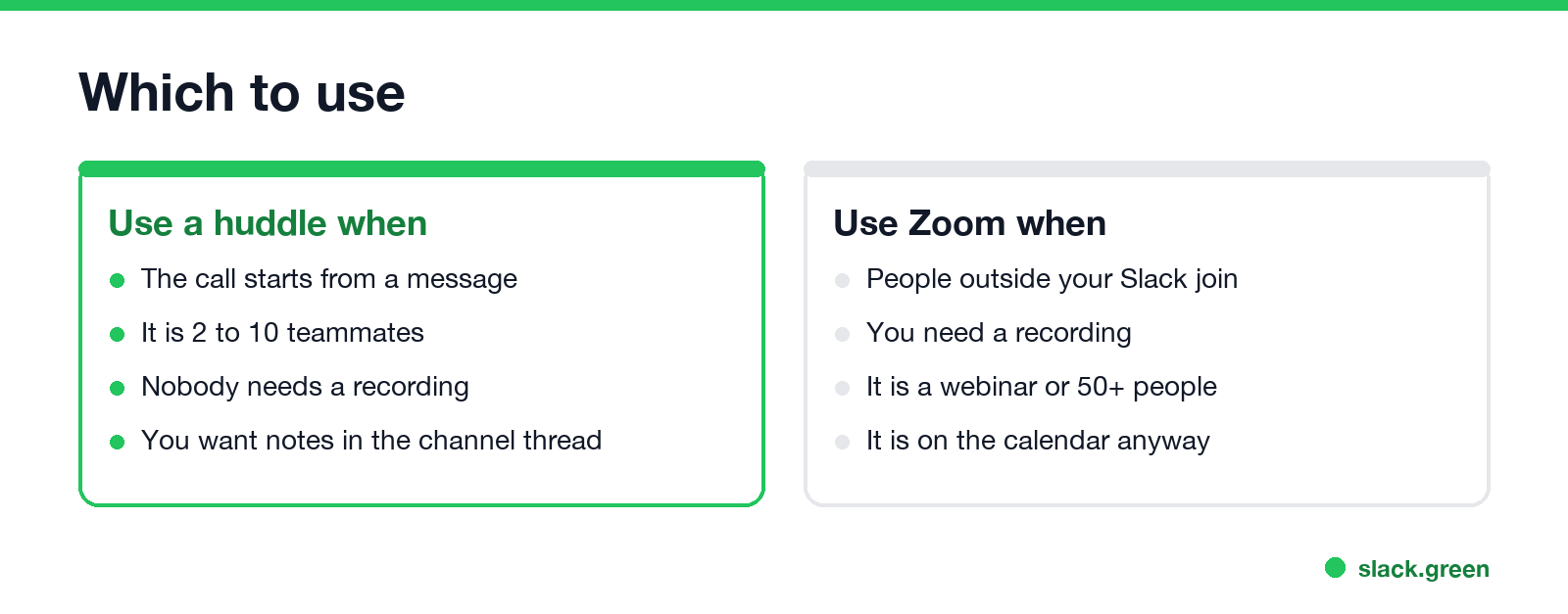
Use a Slack huddle for quick calls with teammates that start from a message, and Zoom for scheduled meetings, meetings with people outside your Slack, and anything you need recorded. On Slack's paid plans a huddle holds up to 50 people, 25 of them on video, and costs nothing beyond your Slack seat. On the free plan huddles are one-on-one. Slack does not record huddles at all. Zoom's free plan holds 100 people for 40 minutes per meeting, and paid Zoom plans run meetings up to 30 hours with cloud recording.
Joining a huddle keeps you active in Slack, but your dot still goes grey 10 minutes after your last input in Slack once you leave. Slack Green keeps it green during the working hours you set, from the cloud.
Slack huddles vs Zoom, side by side
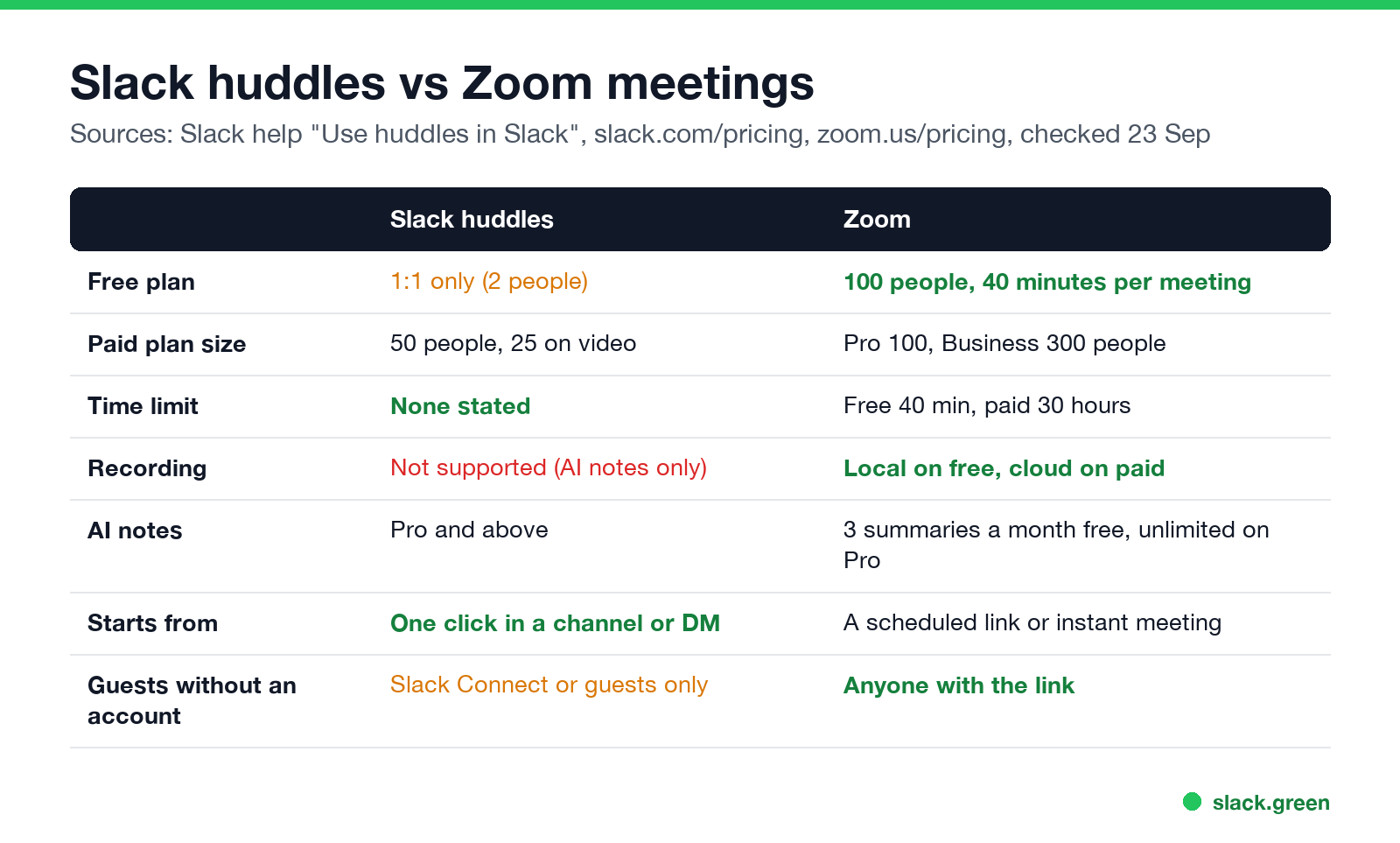
| Slack huddles | Zoom | |
|---|---|---|
| Free plan | 1:1 only (2 people) | 100 people, 40 minutes per meeting |
| Paid plan size | 50 people, 25 on video | Pro 100 people, Business 300 |
| Meeting length | No limit stated by Slack | Free 40 minutes, paid 30 hours |
| Recording | Not supported; AI notes only | Local on free, cloud recording on paid |
| AI notes | Pro and above | 3 meeting summaries a month on free, unlimited on Pro |
| Screen sharing | Up to 2 people at once, with drawing | Yes |
| Who can join | People in your Slack, including invited guests and Slack Connect | Anyone with the link |
| Starts from | A click on the headphones icon in any channel or DM | A scheduled or instant meeting link |
Sources: Slack help "Use huddles in Slack", slack.com/pricing and zoom.us/pricing, checked on 23 September.
Are Slack huddles free?
Yes, on every plan, with a limit. On the free plan a huddle can have two people, so it works for one-on-one calls in DMs. Group huddles need Pro ($7.25 a user a month, paid yearly) or higher. The other free plan limits are in Slack free plan limits.
Slack huddle vs Zoom cost
لا تظهر أبداً كـ "غائب" على Slack
يعمل على السحابة. بدون تنزيلات. يعمل 24/7 حتى عندما يكون الكمبيوتر مغلقاً.
If you already pay for Slack Pro, huddles cost nothing extra. Zoom is a second per-user subscription: third-party price trackers put Zoom Workplace Pro at about $13 to $14 a user a month in the US, paid yearly, and zoom.us shows the price in your local currency. For a team that already pays for Slack and mostly talks internally, dropping paid Zoom seats is the saving people mean when they ask whether huddles have replaced Zoom.
Most teams keep a few Zoom licenses for client calls, webinars and recorded sessions, and move internal calls to huddles.
Is a Slack huddle the same as a call?
Close to it. A huddle is an audio call you can turn into video, with screen sharing, a message thread, a notes canvas and reactions. The differences from a Zoom call:
- • It lives in a conversation. Anyone in the channel or DM can see the huddle and join.
- • It is informal by default. No invite or calendar event; it starts when someone clicks the headphones icon.
- • It is not recorded. Slack keeps the thread and the canvas, and AI notes if someone turns them on. See are Slack huddles recorded.
- • It holds fewer people. 50 per huddle, against 100 to 300 on Zoom's paid plans.
Can my boss hear my Slack huddles?
Only by joining the huddle, which everyone in it can see. Slack does not save huddle audio or video, and it tells everyone in the huddle when AI notes are turned on. What admins can see in general is in can Slack admins see DMs.
Which one to use
لا تظهر أبداً كـ "غائب" على Slack
يعمل على السحابة. بدون تنزيلات. يعمل 24/7 حتى عندما يكون الكمبيوتر مغلقاً.
If your company runs Microsoft Teams, the same trade-off applies to Teams meetings; see Slack vs Teams. If huddles fail to connect, see Slack huddle not working.
FAQ
Is Slack better than Zoom?
For internal quick calls, yes, because huddles start from the conversation and cost nothing extra on a paid plan. For large, external or recorded meetings, Zoom is better.
What is the Slack huddle participant limit?
Two people on the free plan. Up to 50 people on paid plans, with 25 on video at a time.
Can you record a Slack huddle?
Not in Slack. You can turn on AI notes on Pro and above, or use a screen recorder.
Do huddles have a time limit?
Slack's help center does not list one. Zoom's free plan stops meetings at 40 minutes.
Has Slack huddles replaced Zoom?
For many teams' internal calls, yes. Most still keep Zoom for external calls, recordings and webinars.
توقف عن تحريك الماوس.
مئات العاملين عن بعد لم يعودوا قلقين بشأن حالة Slack. قم بالإعداد مرة واحدة، ابقَ أخضر للأبد.
Related Articles
Slack Lists Tutorial: Create, Organize and Share a List
Slack lists are tables of tasks inside Slack, with fields, assignees, due dates, a board view and a comment thread on every item. How to create a list from scratch or a template, set up fields, turn it into a kanban board, add messages to it, share it, and what the plan limits are.
Slack Jira Integration: Setup, /jira Commands and Notifications
Install the Jira Cloud for Slack app, type /jira connect in a channel to send a Jira space's updates there, /jira notify for personal notifications as DMs, and create work items from any message with More actions. Every /jira command, Jira automation to Slack, and fixes when previews or notifications stop.
How to Create a Slack Workspace, on Desktop or Phone
Go to slack.com/get-started, enter your email, type the confirmation code, and click Create a Workspace. It is free to start, you become the Primary Owner, and it takes about five minutes. Steps for desktop, iPhone and Android, and what to set up next.