
Can My Employer See My iMessages on a Work Mac?
Not through device management or the network: Jamf or Intune cannot read Messages, and iMessage is end-to-end encrypted. But if you sign in to Messages on a work Mac, your texts are stored on that Mac, where monitoring screenshots, backups and admin access can reach them. How to check, and how to take iMessage off the Mac without deleting it from your iPhone.
Your employer cannot read your iMessages through device management or the network. Tools like Jamf, Kandji or Intune manage a Mac's settings and apps, not the content of Messages, and iMessage is end-to-end encrypted, so the office Wi-Fi, the VPN and an HTTPS proxy see nothing of it. But when you sign in to Messages on a work Mac, your conversations download to that Mac and live in your user folder. From there, three things can reach them: monitoring software that takes screenshots, backup tools that copy your home folder, and anyone in IT with admin access to the Mac.
So the answer depends on what else runs on the Mac. The safest setup is to keep Messages off the work Mac. The steps below remove it without deleting anything from your iPhone.
We build Slack Green, which keeps your Slack status green from our servers with nothing installed on the work Mac, so we track what employers can see on work laptops. How to check a work Mac for monitoring is in how to check if a work Mac is monitored.
What can see iMessages on a work Mac
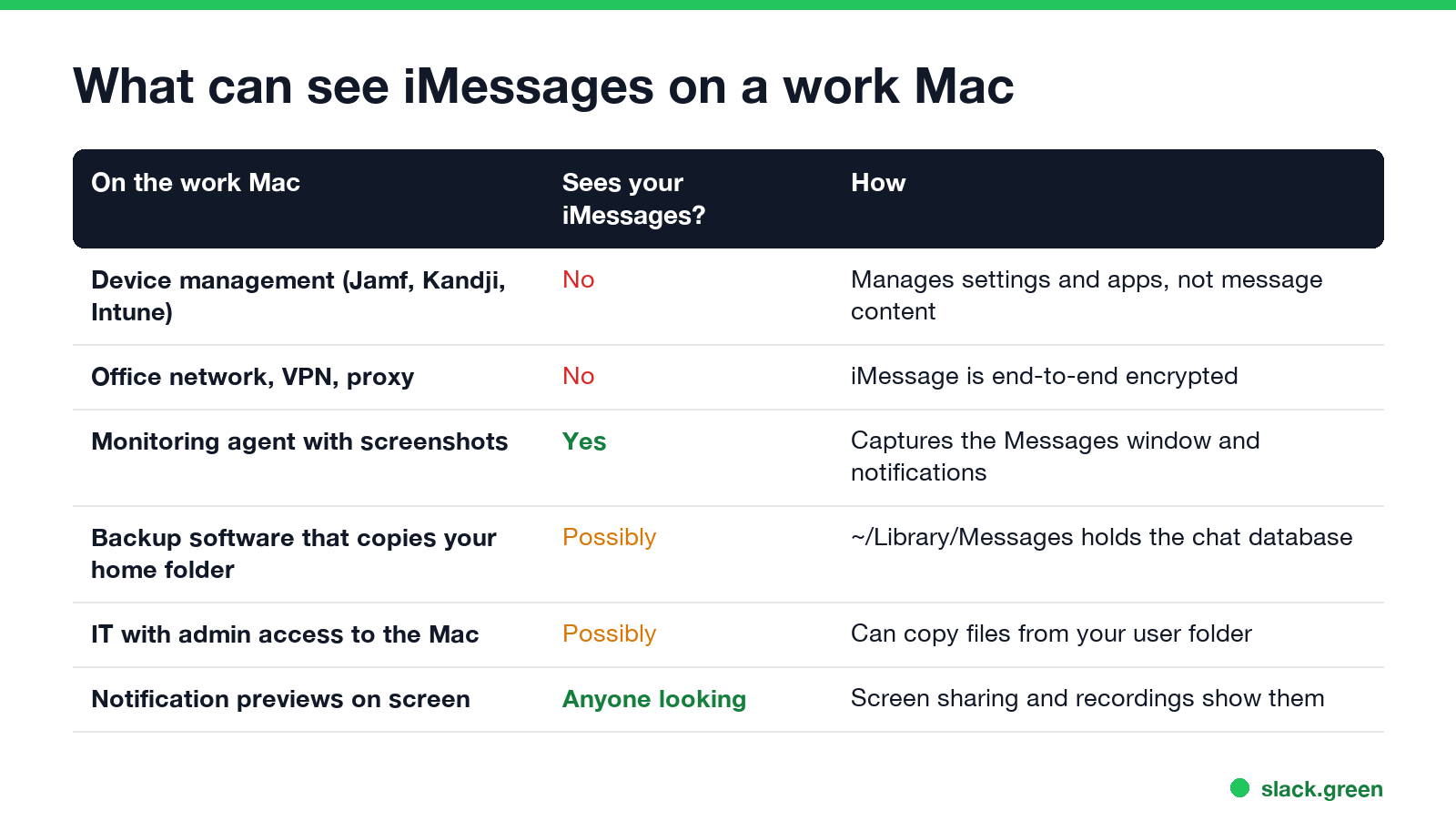
| On the work Mac | Sees your iMessages? | How |
|---|---|---|
| Device management (Jamf, Kandji, Intune) | No | It manages settings and apps; it has no feature to read Messages |
| Office network, VPN, HTTPS proxy | No | iMessage is end-to-end encrypted between Apple devices |
| Monitoring agent with screenshots or screen recording | Yes | It captures the Messages window and notification banners |
| Backup software that copies your home folder | Possibly | ~/Library/Messages holds the message database and attachments |
| IT staff with admin access | Possibly | An admin can copy files out of your user folder |
| Notification previews | Yes, to anyone watching | Banners show during screen shares and recordings |
The screenshot row matters most. Employee monitoring tools on a Mac need Screen & System Audio Recording permission, and with it they capture whatever is on screen, Messages included. Text message previews also pop up during a Zoom or Teams screen share unless you turn them off.
Where your iMessages live on the Mac
Messages keeps a local database on every Mac where you sign in, with a copy of each conversation it has downloaded. You can see it in Terminal:
# The Messages database for your user account
ls -lh ~/Library/Messages/chat.db

# Is this Mac enrolled in company device management?
profiles status -type enrollment
If chat.db exists and is more than a few hundred kilobytes, this Mac holds message history. MDM enrollment: Yes means the company manages the Mac; the check itself does not show whether monitoring software is installed. macOS protects the Messages folder, so an app needs Full Disk Access to read it. Check System Settings, Privacy & Security, Full Disk Access for apps you do not recognize, and Screen & System Audio Recording for screen capture.
Take iMessage off a work Mac
Never appear "away" on Slack again
Cloud-based. No downloads. Works 24/7 even when your laptop is off.
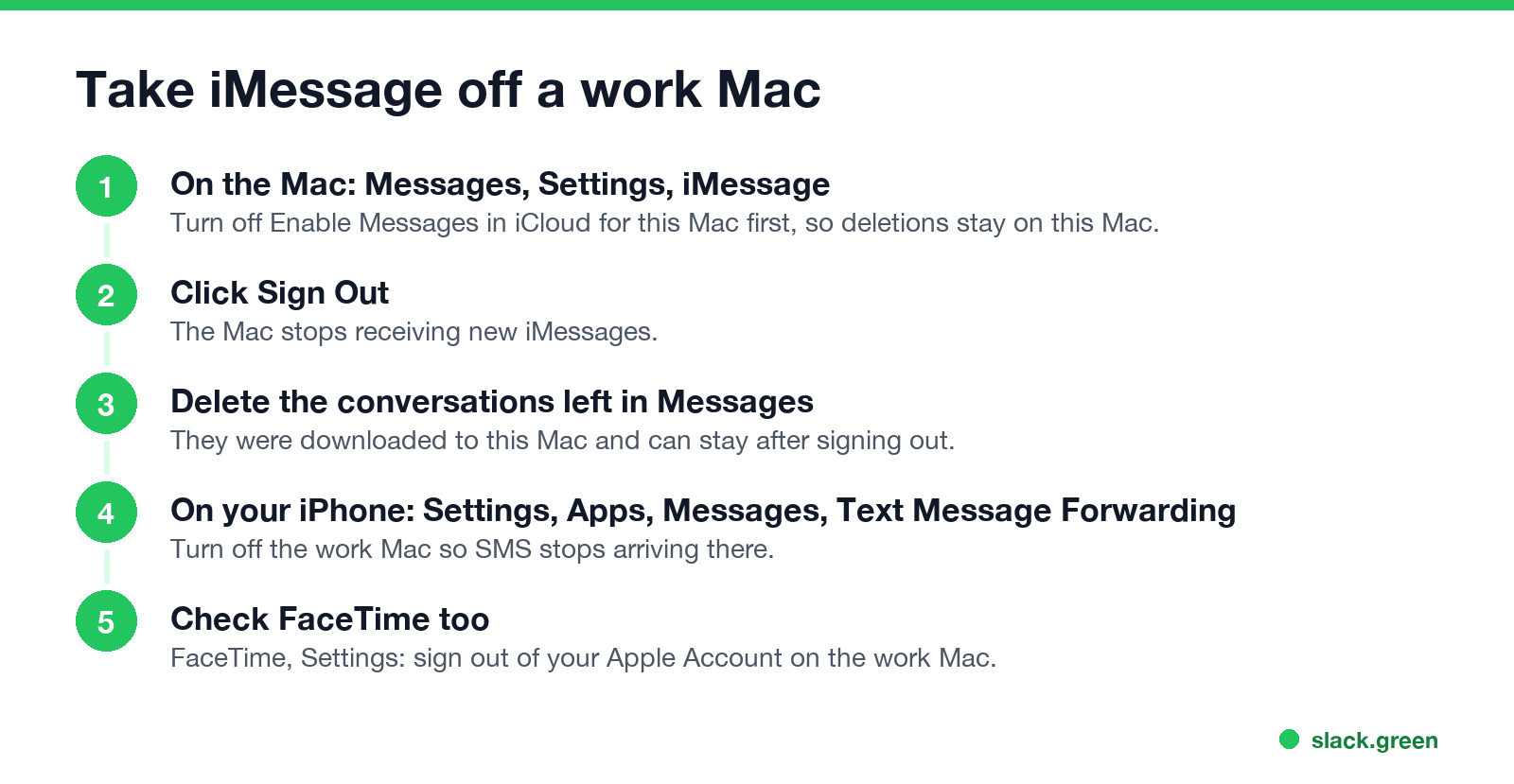
Order matters. With Messages in iCloud on, deleting a conversation on the Mac deletes it from your iPhone too. Turn that off for the Mac first.
- On the Mac, open Messages, then Messages, Settings, iMessage.
- Clear Enable Messages in iCloud, and when asked, choose Disable This Device.
- Click Sign Out.
- Delete the conversations still listed in Messages. They were downloaded to this Mac and can stay after you sign out.
- On your iPhone, open Settings, Apps, Messages, Text Message Forwarding, and turn off the work Mac, so SMS texts stop arriving there.
- In FaceTime, Settings, sign out of your Apple Account on the work Mac as well.
If you keep Messages on the Mac, at least turn off previews: System Settings, Notifications, Messages, set Show previews to Never, and turn off Allow notifications when mirroring or sharing the display.
Should you use iMessage on a work laptop?
Most IT policies say personal accounts do not belong on company devices, and some companies block personal Apple Accounts on work Macs through device management. Beyond policy, a work Mac is returned or wiped when you leave, and a copy of your message history may sit in company backups until then. Your phone does everything Messages on the Mac does.
The same logic covers other personal apps on a work laptop: can my employer see my personal email on my work computer, and for the phone side, can my employer see what I do on my phone.
FAQ
Can my employer see my iMessages if I use them on a work Mac? Not through device management or the network. Monitoring screenshots, backups of your user folder and admin access to the Mac can reach them.
Can Jamf read my iMessages? No. Jamf manages settings, apps and inventory. It has no feature to read message content.
Can my employer see my iMessages on my personal iPhone? No. A work profile or company app on your iPhone does not see Messages; see what can my employer see with Intune.
If I sign out of iMessage on the work Mac, are my messages gone from it? Not always. Conversations already downloaded can stay in the Messages app. Turn off Messages in iCloud for that Mac first, then delete them.
Can my employer see my FaceTime calls on a work Mac? Not the calls themselves, which are encrypted. The call history on the Mac, and anything on screen during a call, can be seen by the same tools that see Messages.
Stop Jiggling Your Mouse.
Join hundreds of remote workers who never worry about their Slack status. Set it up once, stay green forever.
Related Articles
Can My Employer See What I Watch on YouTube at Work?
On a work laptop or the office network, your employer can see that you used YouTube, when, and for how long. With HTTPS inspection or monitoring software, they can see which videos, because the video address and the browser tab title both name it. On your own phone on mobile data, they see nothing.
Can My Boss See My Private Outlook Calendar Events?
Usually not the details. When you mark an Outlook event Private, someone who can read your calendar sees only Private appointment, the time and a lock. The exceptions are delegates you gave Can view private items, the people invited to the event, anyone with full access to your mailbox in new Outlook or the web, and compliance admins. How to check who has which access, and what Private does not hide.
Productivity Theater: Meaning, Numbers and How It Starts
Productivity theater is work done to look busy rather than to get results: extra messages, status updates, meetings to show progress, and keeping a green dot on. Slack's 2023 survey of 18,000 desk workers put it at 32% of the working week. Microsoft ties it to productivity paranoia, where 85% of leaders doubt remote staff are productive.