
How to Change Your Time Zone in Slack (Desktop and Mobile)
To change your time zone in Slack, click your profile picture, open Preferences, choose Language & region, and pick a zone under Time zone. Untick Set time zone automatically to stop Slack from switching it. On iPhone and Android you can only toggle automatic. Fixes for a Slack time zone that is wrong or keeps changing.
To change your time zone in Slack on desktop, click your profile picture in the sidebar, choose Preferences, select Language & region, and pick a zone from the drop-down under Time zone. To have Slack follow your computer when you travel, tick Set time zone automatically. To keep the zone you picked, untick it. On iPhone and Android, Slack's preferences only have the automatic switch, which makes Slack follow the phone's time zone.
These steps are from Slack's help article "Manage your time zone preferences", checked on 27 September.
Your time zone decides the local time coworkers see on your profile and when your notification schedule runs. It does not change how long you stay green: Slack marks you away after about 10 minutes without input in the Slack window in any zone. Slack Green keeps your status green from a server during the working hours you set, in your time zone.
How to change your time zone in Slack on desktop
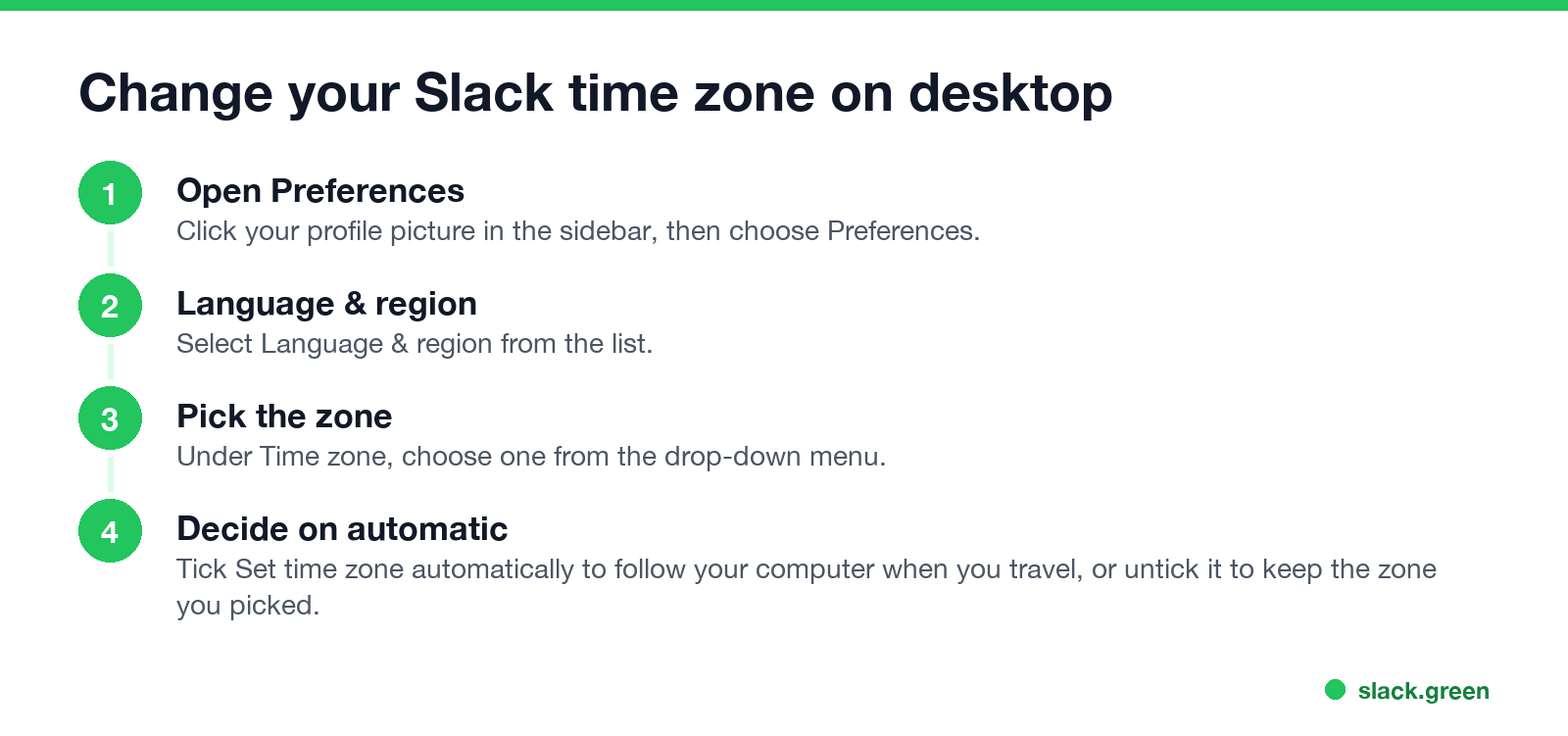
- Click your profile picture in the sidebar.
- Select Preferences from the menu.
- Choose Language & region.
- Under Time zone, select a zone from the drop-down menu.
- Tick Set time zone automatically if you want Slack to update it when you travel. Leave it unticked to keep your choice.
The steps are the same in the Mac, Windows and Linux apps and in Slack in a browser.
How to change your Slack time zone on iPhone and Android
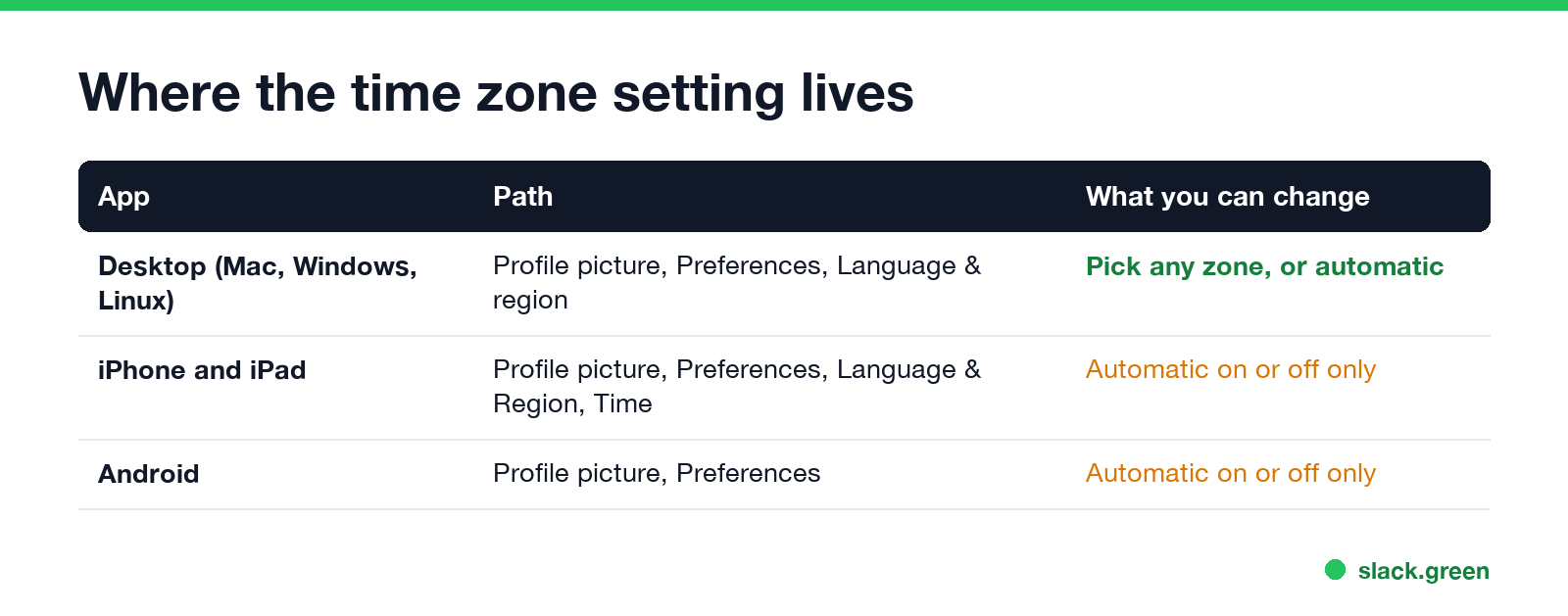
iPhone and iPad: tap your profile picture at the top of the screen, tap Preferences, and under Language & Region select Time. Toggle Set Time Zone Automatically on or off.
Android: tap your profile picture, tap Preferences, and toggle Set time zone automatically on or off.
The mobile apps have no drop-down of zones. With automatic on, Slack uses the phone's zone. To show a specific zone from your phone, set that zone in the phone's own settings first, then turn Slack's automatic setting off so it stays.
Slack time zone wrong or keeps changing?
Never appear "away" on Slack again
Cloud-based. No downloads. Works 24/7 even when your laptop is off.
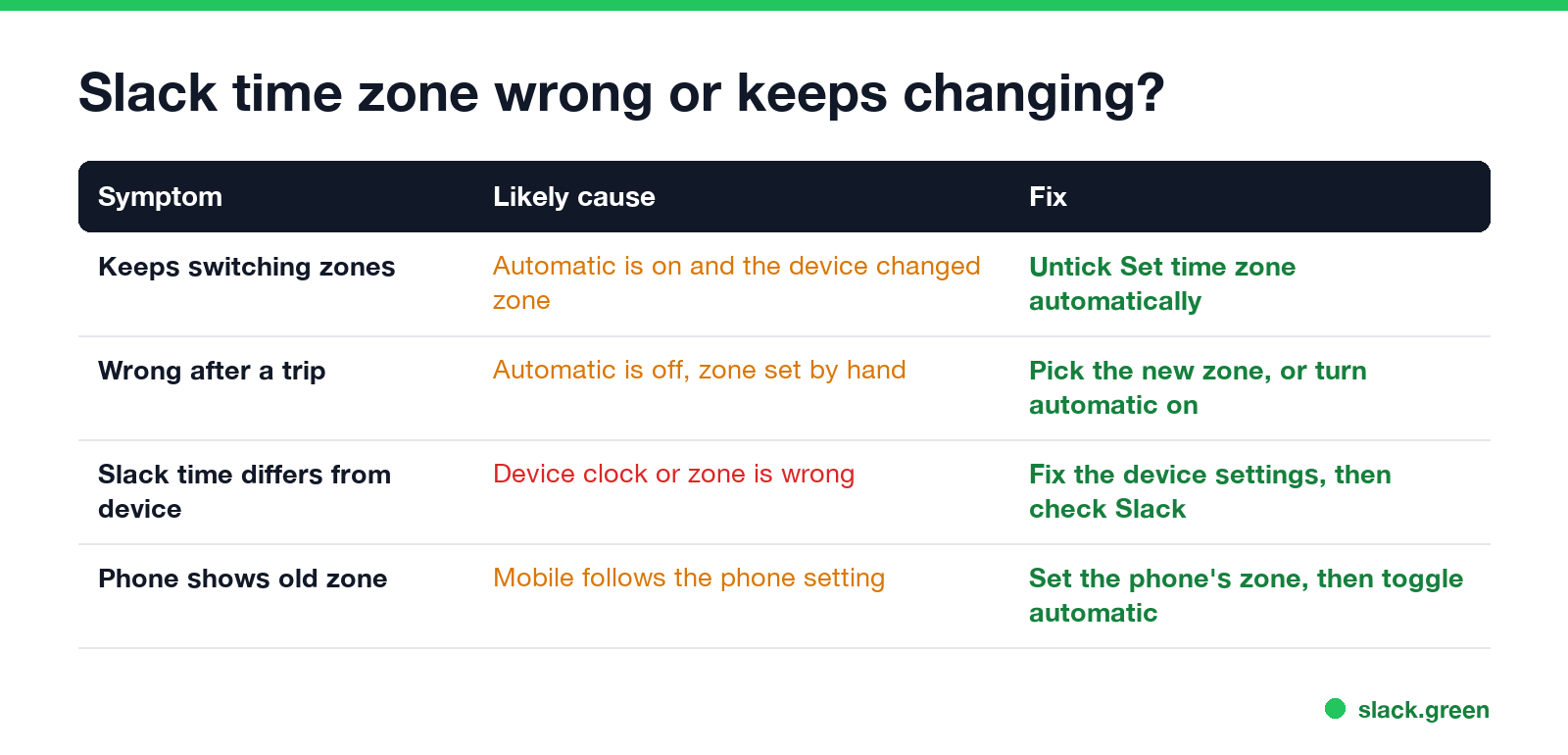
It keeps switching. Set time zone automatically is on, and one of your devices reports a different zone, for example a laptop set to update its zone by location, or a phone that just landed somewhere. Untick automatic and pick your zone by hand.
It is still the old zone after a trip. Automatic is off, so Slack kept the zone you chose. Pick the new one, or turn automatic on.
Slack's time does not match your device. Slack's help says to fix the time in your device settings, then come back to Slack and check that the zone in Preferences matches. To see which zone your computer uses, run one of these:
# macOS: the zone file the system uses
readlink /etc/localtime

# Windows (Command Prompt or PowerShell)
tzutil /g

# Linux with systemd
timedatectl show --property=Timezone
On our MacBook Pro in Seoul, readlink /etc/localtime printed /var/db/timezone/zoneinfo/Asia/Seoul. If that zone is wrong, fix it in the system settings first; Slack's automatic setting will then follow it.
What changes when you change your Slack time zone
To plan meetings across zones, add your team to our Slack timezone converter, which shows the hours everyone overlaps. For messages that should arrive in someone else's morning, see how to delay and schedule Slack messages.
FAQ
How do I change my time zone in Slack?
Click your profile picture, choose Preferences, then Language & region, and pick a zone under Time zone.
Why does my Slack time zone keep changing?
Set time zone automatically is on, and your computer or phone changed zones. Untick it and choose a zone by hand.
Can I change my Slack time zone on my phone?
Only the automatic switch. Set the zone on the phone itself, or pick one in the desktop app.
Does changing my Slack time zone change my status?
No. It changes the local time on your profile and your schedules, not your status or the green dot.
Can other people see my time zone in Slack?
They see your current local time when they open your profile, based on the zone you set.
Stop Jiggling Your Mouse.
Join hundreds of remote workers who never worry about their Slack status. Set it up once, stay green forever.
Related Articles
Slack Emoji for Announcements, Updates and Reminders
The standard Slack emoji for an announcement is 📣 :mega: or 📢 :loudspeaker: at the start of the post. Use 🚨 :rotating_light: only for real emergencies, 🆕 :new: for updates, ⏰ :alarm_clock: for reminders, and ask readers to react with ✅ :white_check_mark: once they have read it. Templates and a custom emoji idea.
Slack Status for a Doctor Appointment: 24 Statuses and Emoji
A Slack status for a doctor appointment says you are out and when you are back, such as 🏥 'At an appointment, back at 2 PM.' You do not have to say what kind. 24 statuses for doctor, dentist and other appointments, the emoji codes, and how to schedule the status so it clears by itself.
Slack Status for Limited Availability: 30 Statuses to Copy
A Slack status for limited availability says you are around but slow, until when, and how to reach you if it is urgent, such as ⏳ 'Limited availability today, replies after 3 PM. Urgent: @mention me.' 30 statuses for busy days, slow replies and catching up, the emoji to use, and when to pause notifications too.