
What Does the Purple Arrow Mean on Teams? Out of Office
The purple circle with a left-pointing arrow in Microsoft Teams means Out of office. Teams shows it while automatic replies are on, or while an Outlook event marked Out of office is running. How to set it, remove it and fix one that is stuck.
The purple arrow on Microsoft Teams means Out of office. It is a purple circle with a white arrow pointing left, and Teams shows it in two cases: the person turned on automatic replies, or their Outlook calendar has an event right now with Show as set to Out of office. It does not mean they are offline. Someone can be at work in Teams and still show the purple arrow, because the reply or the calendar event decides it, not their activity.
The arrow goes away when the automatic reply period ends and no Out of office event is running. The rest of this page covers what others see, how to set it, and how to clear a purple arrow that stays after you are back. If you are also in Slack, which has no Out of office status, the equivalent is a status with an end time; Slack Green handles the other half of Slack presence, keeping you green from a server during the hours you set.
What sets the purple arrow in Teams
Microsoft's presence documentation says Out of office "is used when an automatic reply is set or your calendar has an event set to show as 'Out of Office.'" Those are the only two sources:
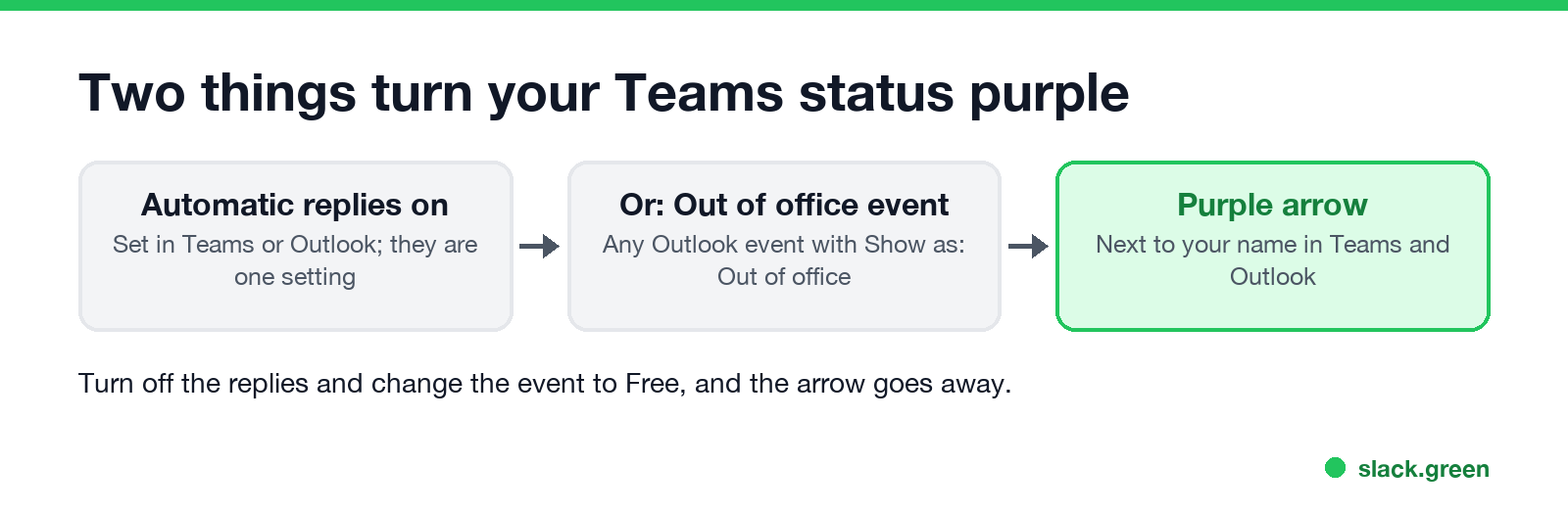
| Source | Where it is set | When the arrow shows |
|---|---|---|
| Automatic replies | Teams Schedule out of office, or Outlook Automatic replies | For the whole reply period, or until you turn replies off |
| Calendar event with Show as: Out of office | Any Outlook calendar event, often a vacation or a holiday block | For the length of the event |
Teams and Outlook share the same automatic replies. Turn them on in one and they are on in the other.
What others see when you show the purple arrow
- • The purple arrow next to your name, in chats, the people list and Outlook contact cards.
- • Your out of office message, at the top of a chat when someone starts writing to you, and on your profile card.
- • Your activity, if you are active. Microsoft notes that if you use Teams during an out of office period, your presence shows next to the Out of office indicator. A profile card can read "Available, Out of office" or "In a call, Out of office".
- • An email auto-reply in Outlook to anyone who emails you in the period.
Messages still arrive and notify you as usual. Out of office does not mute anything.
Out of office vs Away vs Offline in Teams
Never appear "away" on Slack again
Cloud-based. No downloads. Works 24/7 even when your laptop is off.
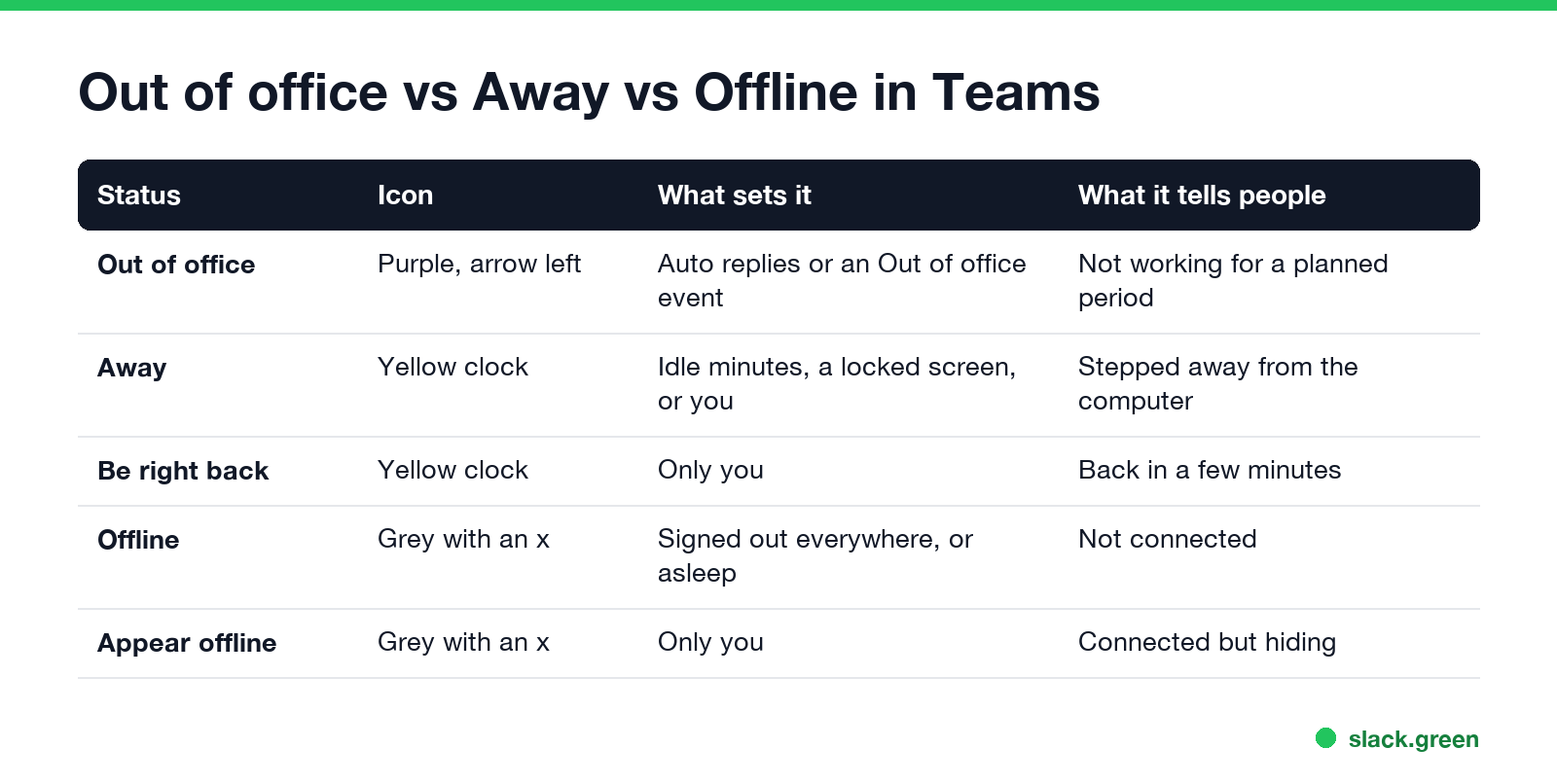
| Status | Icon | What sets it | What it tells people |
|---|---|---|---|
| Out of office | Purple, arrow pointing left | Automatic replies, or an Out of office calendar event | Not working for a planned period |
| Away | Yellow clock | A few minutes with no input, a locked screen, or you | Stepped away from the computer |
| Be right back | Yellow clock | Only you | Back in a few minutes |
| Offline | Grey, with an x | Signed out everywhere, or asleep | Not connected |
| Appear offline | Grey, with an x | Only you | Connected but hiding |
Away is about the next few minutes; Out of office is about days. The yellow clock is covered in what does inactive mean on Teams, and every icon is in Microsoft Teams status icons meaning.
How to set the purple arrow in Teams
From your profile picture (desktop or web)
The same screen is under Settings and more, Settings, General, Out of office, Schedule.
Phone app. Tap your profile picture, tap your status, then Out of office. Turn on Set auto reply, write the message, and set the start and end dates.
From Outlook. An event with Show as set to Out of office turns you purple for its length, without any auto-reply. That suits a half-day away where you do not want to email everyone.
Message examples, and the difference between a status message and a full out of office, are in how to set an away message in Teams.
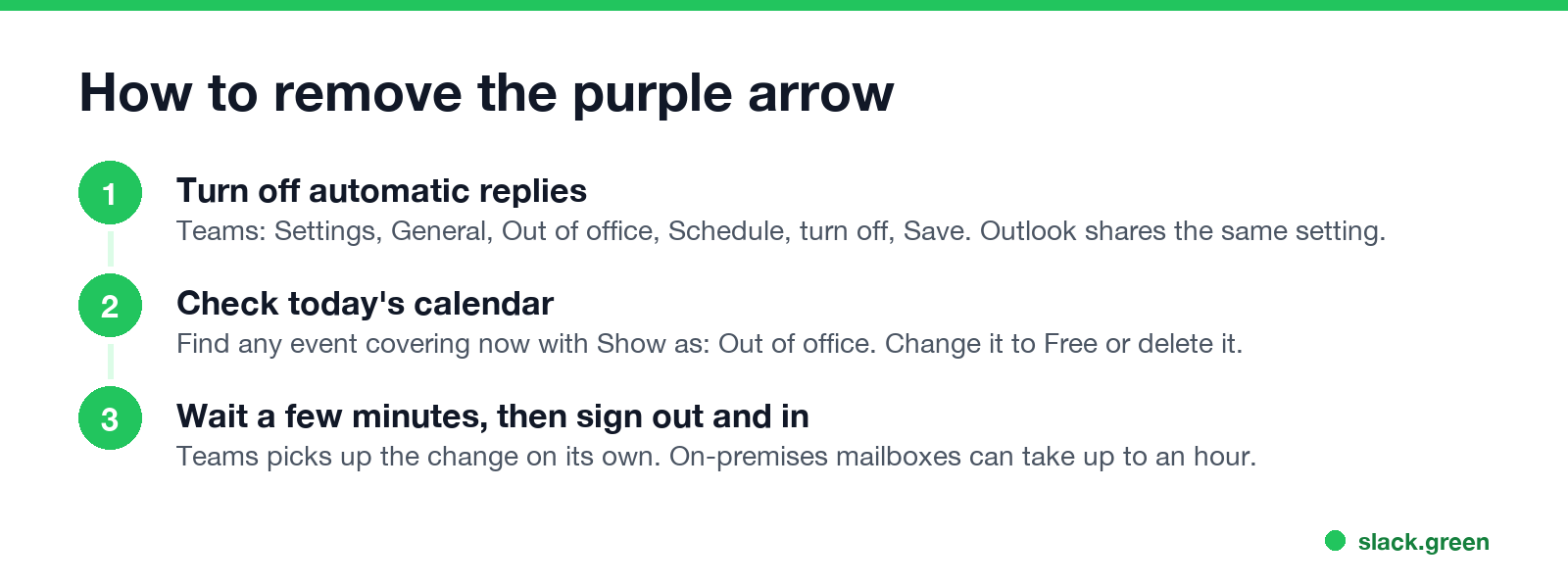
How to remove the purple arrow
Purple arrow stuck on Teams after you are back
Never appear "away" on Slack again
Cloud-based. No downloads. Works 24/7 even when your laptop is off.
If you turned off automatic replies and still show purple, one of these is usually why:
For a status stuck on the yellow clock instead, see Teams status stuck on Away.
The purple arrow in Outlook
Outlook takes presence from Teams, so the same purple arrow shows on contact cards and in the email header of someone who is out of office. The colors in Outlook are in Outlook status colors meaning.
Out of office on Slack
Slack has no purple arrow. People set a status such as :palm_tree: "Vacationing" with an end date, and pause notifications for the same period. The steps and message examples are in Slack out of office.
FAQ
Never appear "away" on Slack again
Cloud-based. No downloads. Works 24/7 even when your laptop is off.
What does the purple arrow mean on Teams? Out of office. The person has automatic replies on, or an Outlook event marked Out of office is running.
Does the purple arrow mean the person is offline? No. They may be active in Teams. The arrow comes from their reply settings or calendar, not their activity.
How do I get rid of the purple arrow on Teams? Turn off automatic replies in Teams or Outlook, and change any current calendar event shown as Out of office to Free.
Why is my Teams status purple when I am not out of office? An Outlook event marked Out of office covers the current time, or automatic replies are still on.
What is the difference between Out of office and Away in Teams? Out of office is a planned absence from your replies or calendar. Away is a few minutes of no activity or a locked screen.
Can people still message me when I show the purple arrow? Yes. Messages arrive as usual, and senders see your out of office message in the chat.
Stop Jiggling Your Mouse.
Join hundreds of remote workers who never worry about their Slack status. Set it up once, stay green forever.
Related Articles
Can My Employer See My Browsing If I Use a VPN? It Depends Whose
A personal VPN hides the sites you visit from the office network, but not from monitoring software, a managed browser or IT on a work laptop. The company VPN shows your employer every site it carries. What each setup hides.
Teams Status on Multiple Devices: The Last Device You Used Wins
Signed in to Teams on a computer and a phone? Your status comes from the device you used most recently. That is why a quick look at your phone can turn you Away, and why a phone in your pocket shows Away instead of Offline at night.
Zoom Do Not Disturb: How to Turn It On, Schedule It, and What It Blocks
To turn on Do not disturb in Zoom, click your profile picture, point at your status and choose Do not disturb, then a time from 20 minutes to 24 hours, or Custom for a daily schedule. It blocks pop-up notifications for Zoom Team Chat and Zoom Phone calls. Busy, by contrast, mutes nothing. How the two differ, and how to keep a Zoom meeting free of pop-ups.