
How to Show Spotify in Your Slack Status (3 Ways, One Free Script)
Slack has no built-in Spotify status. To show the song you are playing, add a Slack Marketplace app such as SpotMyStatus or Now Playing, sign in to Spotify, and it writes the track and artist into your status and clears it when you stop. Setup for each option, a free script for Mac, and what the status does not change.
To show what you are listening to on Spotify in your Slack status, add a third-party Slack app that syncs the two, because Slack has no built-in Spotify status. The two main options are SpotMyStatus, listed in the Slack Marketplace, and Now Playing (nowplaying.dev). You click Add to Slack, sign in to Spotify, and the app writes the current track and artist into your status with an emoji such as 🎧, then clears it when you pause. Zapier can do the same with a Spotify-to-Slack Zap, and a short script on a Mac can do it for free.
If your company requires admin approval for Slack apps, the install turns into a request that an admin has to approve.
Statuses are what we work on. We build Slack Green, which keeps your Slack presence dot green during the hours you set. A music status and the green dot are separate things, as explained below.
Ways to put Spotify in your Slack status
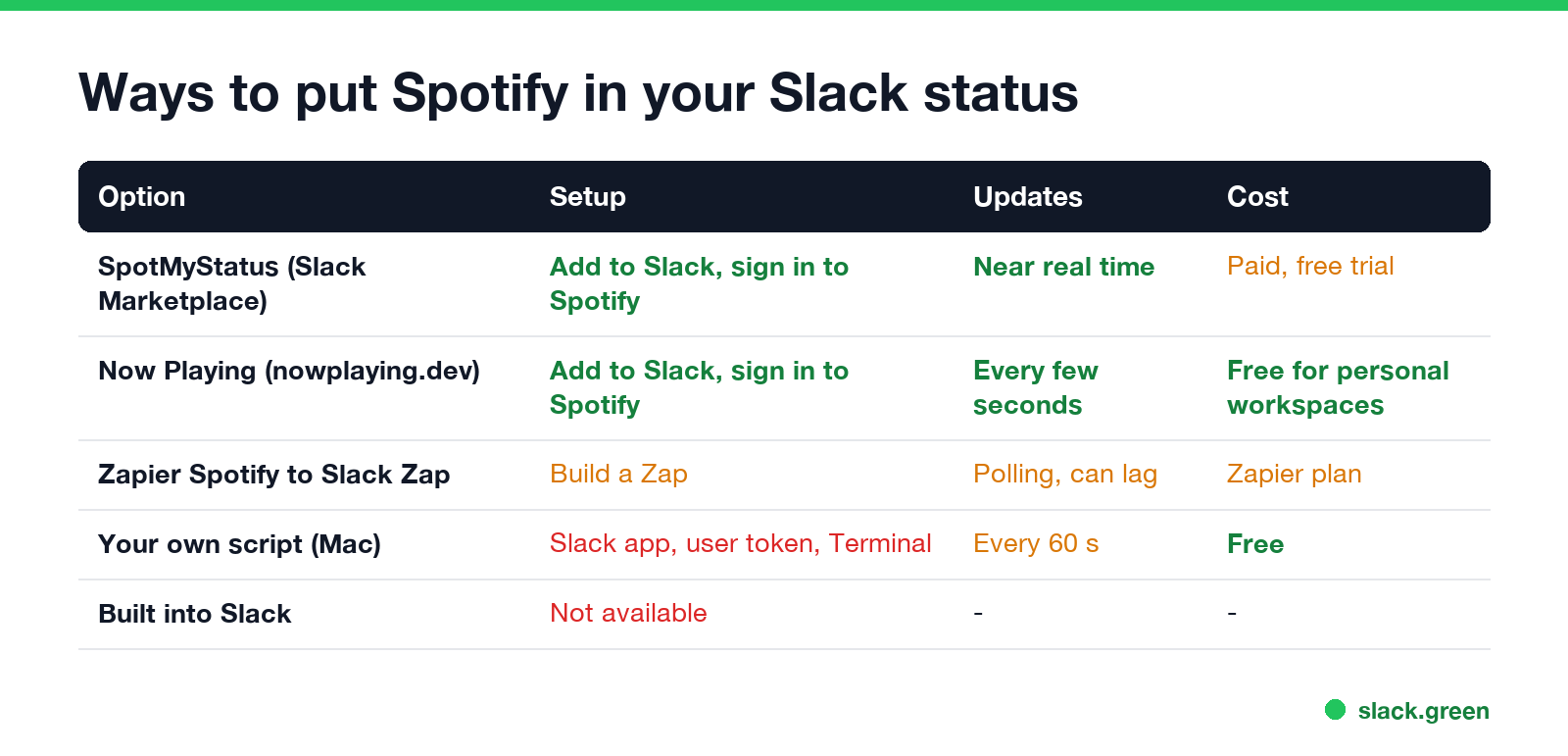
| Option | Setup | How fast it updates | Cost (checked 27 September) |
|---|---|---|---|
| SpotMyStatus | Add to Slack from the Slack Marketplace, sign in to Spotify | Close to real time | Paid, with a free trial |
| Now Playing | Add to Slack from nowplaying.dev, sign in to Spotify | Checks every few seconds | Free for personal workspaces |
| Zapier | Build a Zap with a Spotify trigger and a Slack "set status" action | Zapier checks on a schedule, so it can lag | Needs a Zapier plan for frequent checks |
| Your own script on a Mac | Create a Slack app, copy a user token, run a script | Every 60 seconds | Free |
| Built into Slack | Not available |
SpotMyStatus. Its Marketplace listing says it "syncs user's currently playing song from Spotify to Slack status". You can choose to sync music, podcasts or both, pick a set of emojis it rotates through, and limit it to certain Spotify devices, so music on your home speaker does not show at work. It stops updating if you pause syncing, go offline, or set a status by hand.
Now Playing. It reads only the track and artist Spotify is playing, polls every few seconds, and clears your status within a few seconds of you pausing. Its site says it does not read your Slack messages, channels or DMs.
How to set up a Spotify status app
- Open the app's page: search the Slack Marketplace for SpotMyStatus, or go to nowplaying.dev.
- Click Add to Slack and choose your workspace.
- Review the permissions. The app needs to change your profile status, and nothing else should be required.
- Sign in to Spotify and allow the app to read what you are playing.
- Play a song. Within a few seconds your status shows the song, and it clears when you pause.
If you want your usual status back at the end of the day, turn the sync off in the app, or set a status by hand; SpotMyStatus stops overwriting a status you set yourself.
How it works, and what it changes
Never appear "away" on Slack again
Cloud-based. No downloads. Works 24/7 even when your laptop is off.
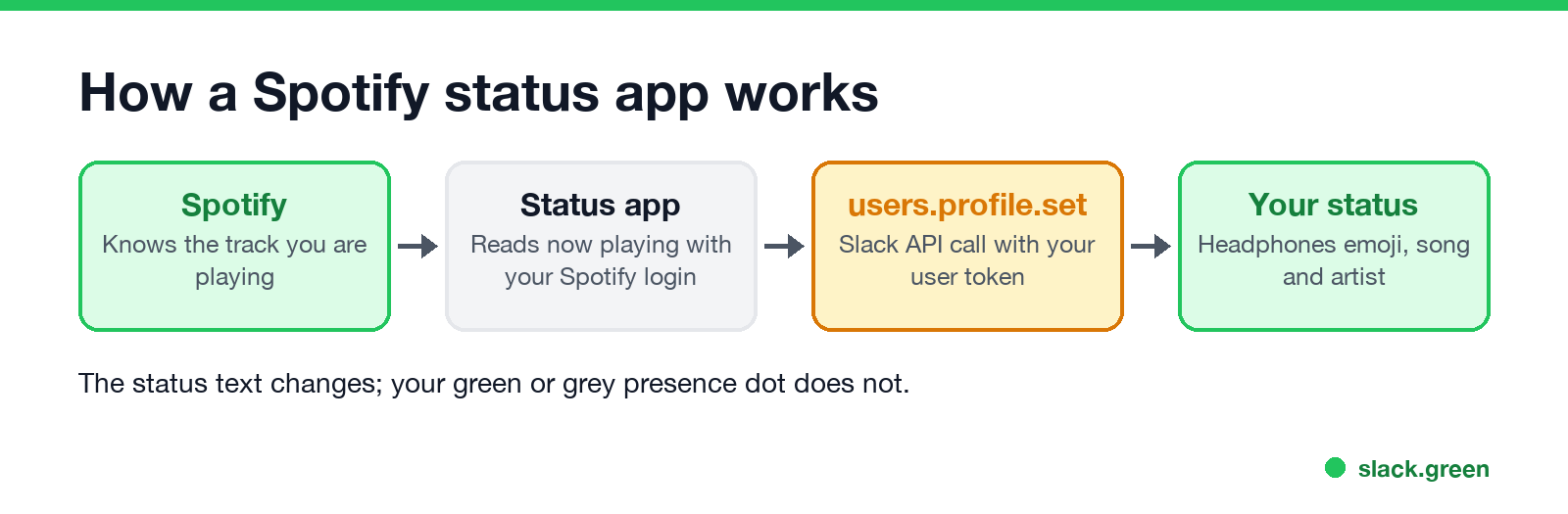
Every one of these tools does the same thing. It asks Spotify what you are playing, then calls Slack's users.profile.set method with your permission to set status_text and status_emoji. Slack status text has a 100-character limit, so long titles are cut.
What it does not change is your presence, the green or grey dot next to your name. Slack sets that from your activity in Slack, and a status update does not count as activity. You can have "🎧 Peach - Kevin Abstract" in your status and a grey dot at the same time. If the dot is what you want to control, how Slack decides when you are away explains the rule, and does YouTube keep Slack active covers the same question for playing media.
Free option: a script on your Mac
If you would rather not give a third-party app access to your Slack and Spotify accounts, a short script can do it on your own Mac with the Spotify desktop app.
First, get a user token:
users.profile:write.xoxp-.Then save this as spotify-slack-status.sh, put your token in it, and run bash spotify-slack-status.sh in Terminal:
#!/bin/bash
# Put the Spotify track playing on this Mac into your Slack status.
# Needs a Slack user token (xoxp-...) with the users.profile:write scope.
TOKEN="xoxp-your-token"

while true; do
  STATE=$(osascript -e 'if application "Spotify" is running then tell application "Spotify" to player state as string')
  if [ "$STATE" = "playing" ]; then
    SONG=$(osascript -e 'tell application "Spotify" to (name of current track) & " - " & (artist of current track)')
    EXPIRES=$(( $(date +%s) + 120 ))   # clears itself 2 minutes after the last update
    BODY=$(jq -n --arg t "${SONG:0:100}" --argjson e "$EXPIRES" \
      '{profile: {status_text: $t, status_emoji: ":headphones:", status_expiration: $e}}')
    curl -s -X POST https://slack.com/api/users.profile.set \
      -H "Authorization: Bearer $TOKEN" \
      -H "Content-Type: application/json; charset=utf-8" \
      --data "$BODY" > /dev/null
  fi
  sleep 60
done
The script checks Spotify once a minute and sets a status that expires 2 minutes later, so when you pause or quit, the status clears by itself. It uses osascript, jq and curl, which ship with current macOS (jq since macOS 15). Press Control-C to stop it. Keep the token private: anyone who has it can change your profile. More on Slack tokens and what each type can do is in Slack xoxc and xoxd tokens, and a script that keeps Slack active is a different thing, covered in script to keep Slack active.
Status ideas when you are not playing music
A music status works for heads-down time. For other moments, Slack status examples and funny Slack status ideas have lists to copy, and how to change your status on Slack covers the clear-after settings. Our free Slack status ideas generator writes one for you.
FAQ
Never appear "away" on Slack again
Cloud-based. No downloads. Works 24/7 even when your laptop is off.
Does Slack have a Spotify integration for status? Not built in. Slack's built-in status sync covers calendars, such as Google Calendar and Outlook meetings. Spotify needs a third-party app.
Is SpotMyStatus free? Its Slack Marketplace listing says "Paid with free trial". Now Playing says it is free for personal workspaces.
Can my coworkers see what I listen to? Yes, anyone who can see your profile sees your status. Limit the app to your work devices, or turn the sync off, if you do not want that.
Does a Spotify status keep me active on Slack? No. The status text and the presence dot are separate.
Stop Jiggling Your Mouse.
Join hundreds of remote workers who never worry about their Slack status. Set it up once, stay green forever.
Related Articles
Can My Employer See My iMessages on a Work Mac?
Not through device management or the network: Jamf or Intune cannot read Messages, and iMessage is end-to-end encrypted. But if you sign in to Messages on a work Mac, your texts are stored on that Mac, where monitoring screenshots, backups and admin access can reach them. How to check, and how to take iMessage off the Mac without deleting it from your iPhone.
Can My Boss See My Private Outlook Calendar Events?
Usually not the details. When you mark an Outlook event Private, someone who can read your calendar sees only Private appointment, the time and a lock. The exceptions are delegates you gave Can view private items, the people invited to the event, anyone with full access to your mailbox in new Outlook or the web, and compliance admins. How to check who has which access, and what Private does not hide.
Productivity Theater: Meaning, Numbers and How It Starts
Productivity theater is work done to look busy rather than to get results: extra messages, status updates, meetings to show progress, and keeping a green dot on. Slack's 2023 survey of 18,000 desk workers put it at 32% of the working week. Microsoft ties it to productivity paranoia, where 85% of leaders doubt remote staff are productive.