
Slack Bolt Lazy Listeners: Fix the 3-Second Timeout
We made a Bolt for Python slash command sleep 8 seconds and recorded what Slack did: an operation_timeout for the user and three copies of every event reply. Then we fixed both with a lazy listener.
A Bolt lazy listener splits one handler in two: an ack function that answers Slack right away, and one or more lazy functions that Bolt runs after the HTTP response has gone out. You need it when process_before_response=True is set, which is what AWS Lambda and other function hosts require, because in that mode Bolt holds the response until your whole listener returns. Slack waits 3 seconds for that response. If the listener takes longer, a slash command fails with operation_timeout and every event is sent again, so slow work runs two or three times.
We tested both sides on 26 November 2026 with slack_bolt 1.30.0 in a Free test workspace. A throwaway app ran in HTTP mode behind a Cloudflare quick tunnel, with one slash command, /sg-report, and an app_mention event. Each handler slept 8 seconds to stand in for an LLM call or a slow API. A second member of the workspace ran the command and mentioned the bot.
What a slow ack does to a slash command
The first version did the slow work before calling ack():
@app.command("/sg-report")
def report(ack, respond, command):
    time.sleep(8)                     # the slow work runs first...
    respond(f"Report ready: {command['text']}")
    ack()                             # ...so this ack is 8 s too late
In the Slack web client the member got this, from Slackbot, visible only to them:
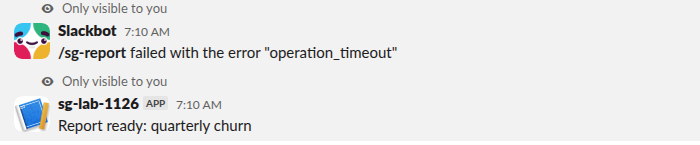
Two things are worth noticing. The error came at about the 3-second mark: when we ran the same command through the API with chat.command, Slack returned {"ok": false, "error": "operation_timeout"} after 3.33 seconds. And the late respond() call still worked. The response_url stays valid after the timeout, so the user saw an error and then the real answer. That is the worst of both: the user thinks it failed and then gets a result anyway. Our dispatch_failed guide covers the case where Slack cannot reach your URL at all, which is a different error.
What a slow listener does to events
Events are worse, because Slack retries them. With process_before_response=True and an 8-second app_mention listener, one mention produced three identical replies:
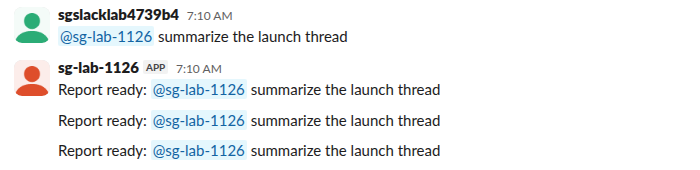
Our middleware logged the retry headers on each request (clock times are local):
15:07:23 mode=slow listening on :3031
15:10:28 in   retry_num=- retry_reason=-
15:10:37 slow work done
"POST /slack/events HTTP/1.1" 200
15:10:37 in   retry_num=1 retry_reason=http_timeout
15:10:45 slow work done
"POST /slack/events HTTP/1.1" 200
15:11:35 in   retry_num=2 retry_reason=http_timeout
15:11:43 slow work done
"POST /slack/events HTTP/1.1" 200
The first retry carried x-slack-retry-num: 1 and x-slack-retry-reason: http_timeout. Slack sent it about 3 seconds after the original, but Bolt's built-in development server handles one request at a time, so it was only read at 15:10:37. The second retry came about a minute after the first event. Each one ran the slow work and posted again. Slack's retry rules and the headers to check are in our Events API retry guide.
The fix: ack first, run the slow part lazily
Here is the same app with lazy listeners. The ack function answers at once, and Bolt starts each lazy function after the response is sent. On a normal server it runs them in a thread pool; you write nothing extra.
import os, time
from slack_bolt import App

app = App(
    token=os.environ["SLACK_BOT_TOKEN"],
    signing_secret=os.environ["SLACK_SIGNING_SECRET"],
    process_before_response=True,  # required on AWS Lambda and other FaaS hosts
)

def ack_now(ack):
    ack("Working on it...")          # Slack gets its 200 here, in milliseconds

def run_report(respond, body):
    time.sleep(8)                     # stands in for an LLM call or a slow API
    respond(f"Report ready: {body['text']}")

def ack_event(ack):
    ack()

def run_mention(event, say):
    time.sleep(8)
    say(f"Report ready: {event['text']}")

app.command("/sg-report")(ack=ack_now, lazy=[run_report])
app.event("app_mention")(ack=ack_event, lazy=[run_mention])

if __name__ == "__main__":
    app.start(port=3031)
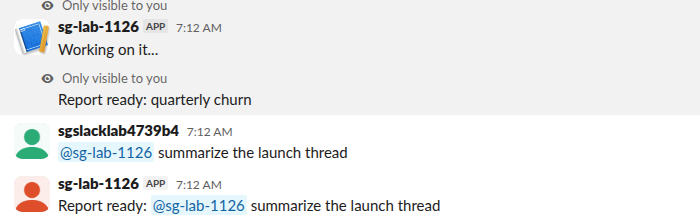
The member now got the ack text first, and the report about 9 seconds later. The mention got exactly one reply:
15:12:21 mode=lazy listening on :3031
15:12:28 in   retry_num=- retry_reason=-
15:12:28 ack sent after 0.000s
"POST /slack/events HTTP/1.1" 200
15:12:37 slow work done
15:12:41 in   retry_num=- retry_reason=-
"POST /slack/events HTTP/1.1" 200
15:12:50 slow work done
No request carried a retry header, and chat.command returned ok: true in 0.74 seconds, measured from our machine through the tunnel.
| Setup (8 s of work) | Slash command | app_mention event |
|---|---|---|
Work before ack(), process_before_response=True | operation_timeout after about 3 s, late respond() still posts | 3 deliveries (original + 2 retries), 3 replies |
ack + lazy=[...], process_before_response=True | Ack text at once, result about 9 s later | 1 delivery, 1 reply |
Never appear "away" on Slack again
Cloud-based. No downloads. Works 24/7 even when your laptop is off.
Rules that keep lazy listeners working
- • The
ackfunction must be fast and must not call slow APIs. Its argument list works like any Bolt listener, so it can takeack,body,commandand the rest. - • A lazy function cannot call
ack(); by the time it runs, the response is gone. Userespond()for slash commands and actions, orsay()and theclientfor events. - • Give the lazy function the data it needs through
body,commandorevent. They are passed again to each lazy function. - • On a long-running server without
process_before_response, you do not need lazy listeners at all: Bolt acks events for you, and in a command you can callack()first and then do the work. Lazy listeners matter when the platform stops your code once the response is sent.
On AWS Lambda
Lambda is the main reason process_before_response exists: once the function returns, Lambda can freeze it, so background threads are not safe. Bolt's Lambda adapter runs each lazy function as a new asynchronous invocation of the same Lambda function, so the function's role needs permission to invoke itself (lambda:InvokeFunction and lambda:GetFunction on its own ARN). The handler looks like this; we ran the HTTP version above, not this Lambda deployment.
from slack_bolt import App
from slack_bolt.adapter.aws_lambda import SlackRequestHandler

app = App(process_before_response=True)
app.command("/sg-report")(ack=ack_now, lazy=[run_report])

def handler(event, context):
    return SlackRequestHandler(app=app).handle(event, context)
For local testing of the same listeners, our Bolt testing guide shows how to drive them without a workspace, and Bolt vs the plain Slack SDK shows the ack work you would otherwise write by hand.
FAQ
Does Bolt for JavaScript have lazy listeners?
No. Bolt JS has processBeforeResponse for function hosts but no lazy option. On a long-running server, call await ack() first and then do the work. On Lambda, keep the listener under 3 seconds or hand the work to a queue or a second function.
Can I raise the 3-second limit?
No. Slack does not offer a setting for it. Ack within 3 seconds and post the result later with respond() or the Web API.
Why did my slash command show operation_timeout but still post the answer?
Because the work finished after Slack gave up waiting, and respond() uses the response_url, which keeps working after the timeout. Ack first and the error goes away.
Stop Jiggling Your Mouse.
Join hundreds of remote workers who never worry about their Slack status. Set it up once, stay green forever.
Related Articles
Slack MSI Installer: Gone After 4.48.102, Use MSIX
Slack's last MSI is 4.48.102 from March 2026; every later version 404s. We read both old MSIs and the current MSIX package to show what each installs and how to move a deployment to MSIX.
Slack LaTeX and Math: What Renders, What Doesn't, What Works
Slack shows LaTeX as raw text in messages and canvases, even though its web client ships KaTeX. We tested every route and give the two that work: Unicode math and a formula rendered to an image with 15 lines of Python.
Slack Canvas Images: Add, Size and Insert Them by API
We inserted a PNG, an animated GIF and a 6000 px image into a Slack canvas with canvases.edit. Slack files rendered; an outside image URL became a link card even though the API said ok.