
Slack Bolt Modal: Open, Validate, Push and Clear, Tested
A complete Bolt for Python modal: views.open from a slash command, field errors with response_action, a pushed confirm view and clear. Every step screenshotted in the Slack web app.
A Bolt modal takes three listeners: a command or action handler that calls client.views_open with the request's trigger_id, a @app.view("<callback_id>") handler that reads view["state"]["values"] when the user clicks Submit, and an ack() in that view handler that either closes the modal, returns field errors, or pushes or updates a view. The ack is the important part: what you pass to it decides what the user sees next.
We built the whole flow in Bolt for Python on 29 November 2026 (slack_bolt 1.30.0, slack_sdk 3.48.0) on a throwaway app in HTTP mode in a Free test workspace, and clicked through it as a second member of the workspace in the Slack web app. The screenshots below are from that run.
The code: open, validate, push, clear
import json, re
import os
from slack_bolt import App

app = App(token=os.environ["SLACK_BOT_TOKEN"],
          signing_secret=os.environ["SLACK_SIGNING_SECRET"])

def feedback_view(channel_id):
    return {
        "type": "modal",
        "callback_id": "feedback",
        "private_metadata": json.dumps({"channel": channel_id}),
        "title": {"type": "plain_text", "text": "Send feedback"},
        "submit": {"type": "plain_text", "text": "Next"},
        "close": {"type": "plain_text", "text": "Cancel"},
        "blocks": [
            {"type": "input", "block_id": "title_b",
             "label": {"type": "plain_text", "text": "Title"},
             "element": {"type": "plain_text_input", "action_id": "title"}},
            {"type": "input", "block_id": "email_b", "optional": True,
             "label": {"type": "plain_text", "text": "Reply-to email"},
             "element": {"type": "plain_text_input", "action_id": "email"}},
        ],
    }

@app.command("/sg-feedback")
def open_modal(ack, body, client):
    ack()
    client.views_open(trigger_id=body["trigger_id"],
                      view=feedback_view(body["channel_id"]))

@app.view("feedback")
def handle_feedback(ack, view):
    values = view["state"]["values"]
    title = values["title_b"]["title"]["value"]
    email = values["email_b"]["email"]["value"]      # None when left empty
    errors = {}
    if len(title) < 5:
        errors["title_b"] = "Use at least 5 characters."
    if email and not re.fullmatch(r"[^@\s]+@[^@\s]+\.[^@\s]+", email):
        errors["email_b"] = "That does not look like an email address."
    if errors:
        ack(response_action="errors", errors=errors)
        return
    meta = json.loads(view["private_metadata"])
    ack(response_action="push", view={
        "type": "modal", "callback_id": "confirm",
        "private_metadata": json.dumps({**meta, "title": title}),
        "title": {"type": "plain_text", "text": "Confirm"},
        "submit": {"type": "plain_text", "text": "Send"},
        "blocks": [{"type": "section", "text": {"type": "mrkdwn",
                    "text": "Post *" + title + "* to <#" + meta["channel"] + ">?"}}],
    })

@app.view("confirm")
def handle_confirm(ack, view, client):
    ack(response_action="clear")          # closes every view in the stack
    meta = json.loads(view["private_metadata"])
    client.chat_postMessage(channel=meta["channel"], text="Feedback: " + meta["title"])
The private_metadata string carries the channel ID from the slash command into the modal and then into the pushed view, because the view_submission payload has no channel. Our private_metadata guide covers its 3,000-character limit.
What the user saw at each step
1. Required field left empty. Clicking Next with an empty Title never reached our app. The Slack client checked the required input itself, and our log showed no view_submission request:
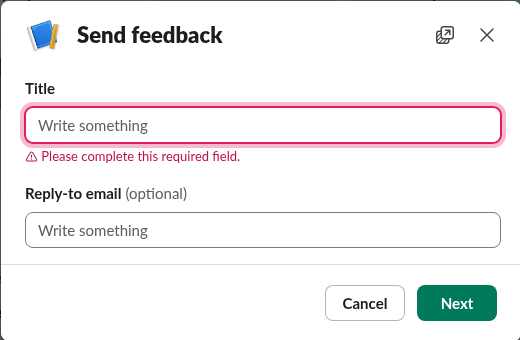
So you do not need server code for "this field is required". Mark the input optional ("optional": True) when it may be empty, as we did for the email field.
2. Values that fail your own checks. With "Hi" as the title and "jane at example" as the email, our handler returned response_action: errors. Bolt logged the exact response it sent:
Responding with status: 200 body: "{"response_action": "errors", "errors": {"title_b": "Use at least 5 characters.", "email_b": "That does not look like an email address."}}" (12 millis)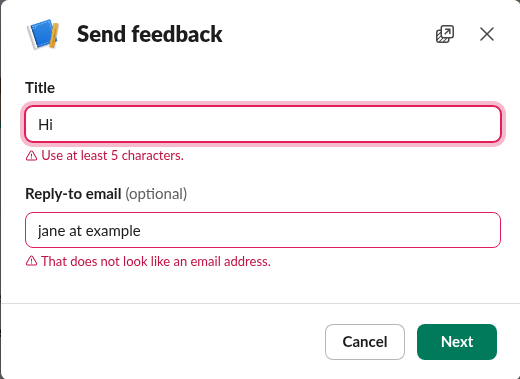
Each key in errors is a block_id of an input block, and Slack showed the text under that block. The typed values stayed in the fields.
3. Valid values: push a second view. response_action: push put a Confirm view on top of the first one:
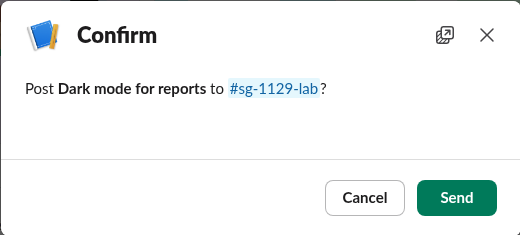
4. Send: clear the stack. response_action: clear closed both views at once, and the message "Feedback: Dark mode for reports" appeared in the channel.
Never appear "away" on Slack again
Cloud-based. No downloads. Works 24/7 even when your laptop is off.
What the view_submission payload contains
We logged the payload keys from the submission so you know what to read:
payload keys: ['api_app_id', 'enterprise', 'is_enterprise_install', 'response_urls', 'team', 'token', 'trigger_id', 'type', 'user', 'view']
view keys: ['app_id', 'app_installed_team_id', 'blocks', 'bot_id', 'callback_id', 'clear_on_close', 'close', 'external_id', 'hash', 'id', 'notify_on_close', 'previous_view_id', 'private_metadata', 'root_view_id', 'state', 'submit', 'team_id', 'title', 'type']
state.values: {"title_b": {"title": {"type": "plain_text_input", "value": "Hi"}}, "email_b": {"email": {"type": "plain_text_input", "value": "jane at example"}}}- •
state.valuesis keyed byblock_id, thenaction_id. Give both fixed names, or Slack generates random block IDs and your lookups break between deploys. - • There is a fresh
trigger_idin the submission, so a view handler can open another modal withviews.openinstead of pushing. - •
view.idandview.hashare what views.update needs to change a modal that is already open, for example after a button click inside it. - •
@app.view_closed("feedback")only fires if the view was opened with"notify_on_close": True; our view did not set it, so clicking Cancel sent nothing.
Two ways the modal fails to open
A trigger from the API does not open a modal. We first fired the slash command through the chat.command API with the member's session token. Slack delivered the command and a trigger_id to our app, but views.open with that trigger failed:
slack_sdk.errors.SlackApiError: The request to the Slack API failed. (url: https://slack.com/api/views.open)
The server responded with: {'ok': False, 'error': 'internal_error'}
Typing /sg-feedback in the message box sent a trigger that opened the modal at once (views.open ok=True). If you test modals with a script, type the command in a real client instead.
An old trigger expires. A trigger_id works for 3 seconds. Call views_open right after ack(), before any slow work; expired_trigger_id shows the error and the fixes. In Bolt JS the same flow is app.view('feedback', async ({ ack, view }) => { await ack({ response_action: 'errors', errors: {...} }); }), and the Block Kit Builder lets you draw the view JSON before you code it.
FAQ
Can a modal have more than one Submit button? No. A view has one submit and one close. For more choices, put buttons in an actions block; a button click sends a block_actions request, which you handle with @app.action and answer with views.update.
Where does the response_action go? Into ack() itself, which becomes the HTTP response to Slack. Sending it any other way, such as chat.postMessage or a response_url, does nothing to the open modal.
How many views can I push? Slack's documentation allows a stack of 3 views. We pushed 1 on top of the first view.
Stop Jiggling Your Mouse.
Join hundreds of remote workers who never worry about their Slack status. Set it up once, stay green forever.
Related Articles
Slack MSI Installer: Gone After 4.48.102, Use MSIX
Slack's last MSI is 4.48.102 from March 2026; every later version 404s. We read both old MSIs and the current MSIX package to show what each installs and how to move a deployment to MSIX.
Slack LaTeX and Math: What Renders, What Doesn't, What Works
Slack shows LaTeX as raw text in messages and canvases, even though its web client ships KaTeX. We tested every route and give the two that work: Unicode math and a formula rendered to an image with 15 lines of Python.
Slack Canvas Images: Add, Size and Insert Them by API
We inserted a PNG, an animated GIF and a 6000 px image into a Slack canvas with canvases.edit. Slack files rendered; an outside image URL became a link card even though the API said ok.