
When Do Keywords Trigger a Notification in Slack? Tested
Slack keywords notify you when someone else posts the whole word or exact phrase in an unmuted channel or a followed thread. We had a bot post 12 test messages: plurals, longer words, muted channels and unfollowed threads did not notify.
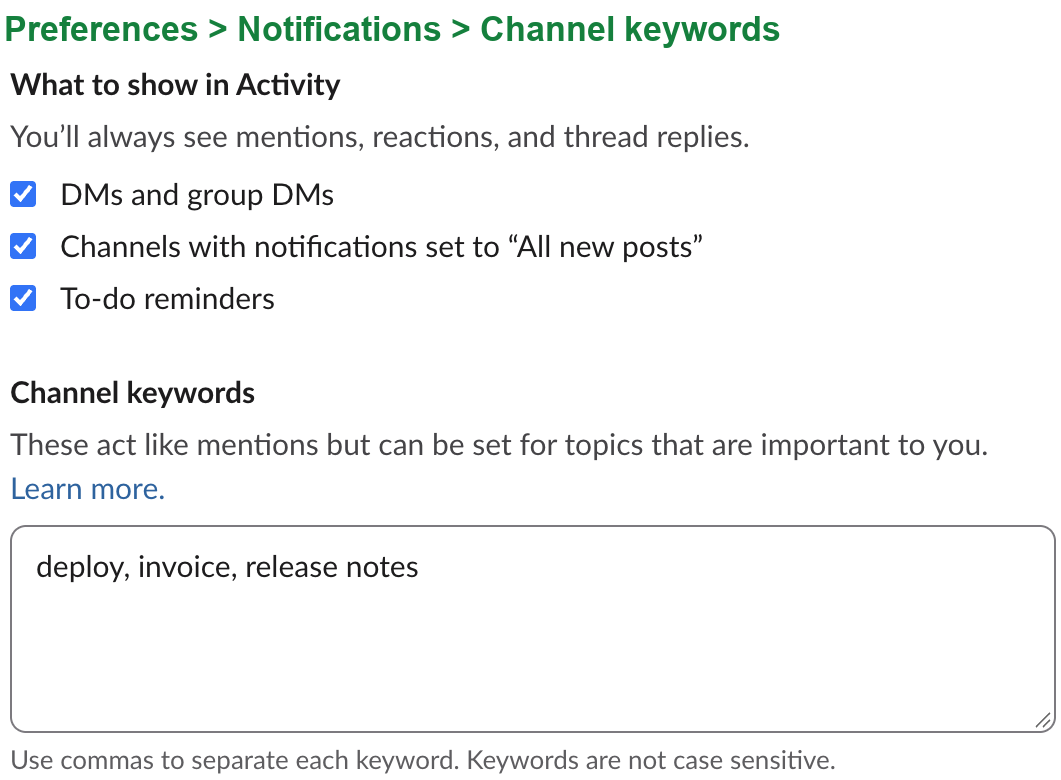
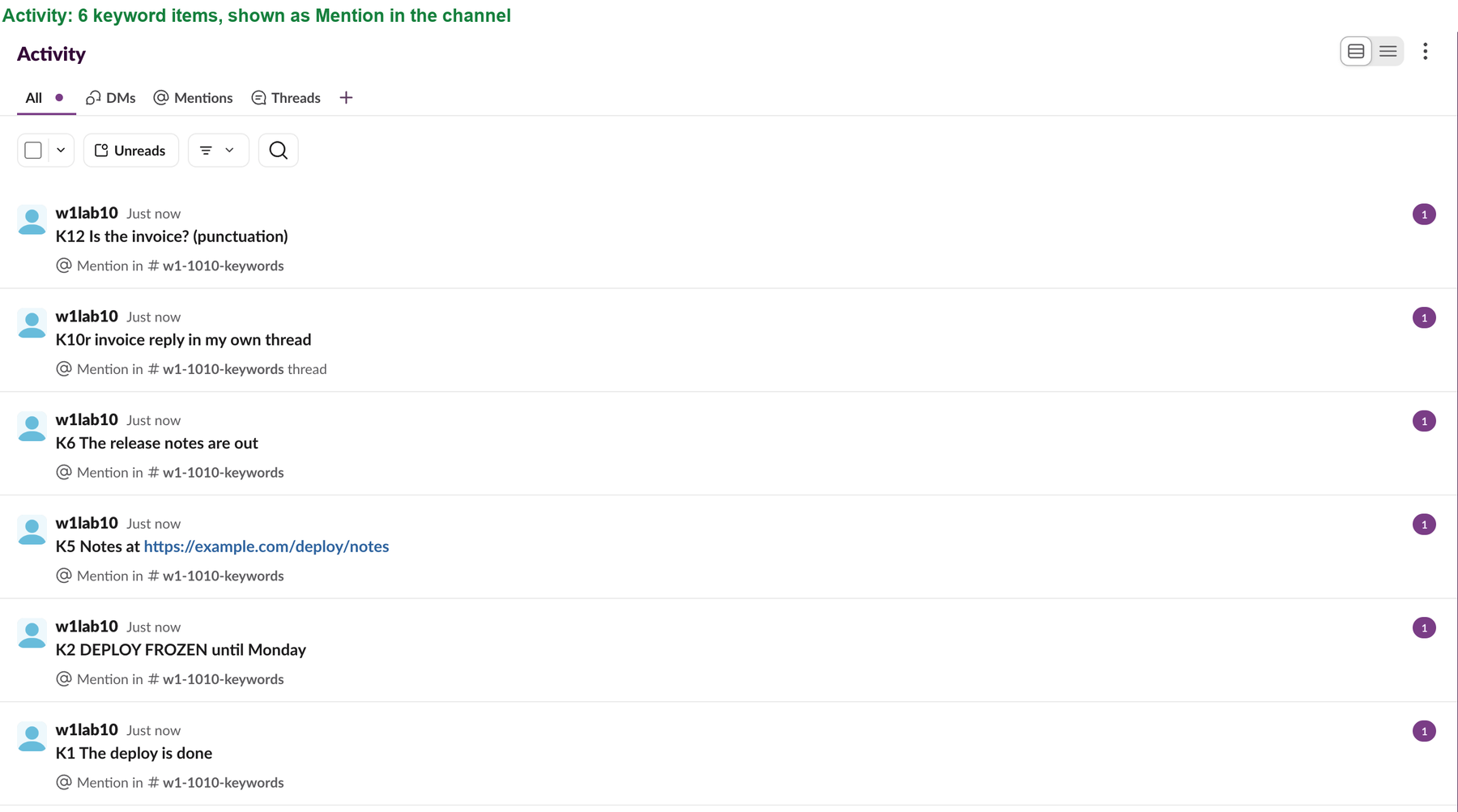
Slack keywords trigger a notification when someone else posts the whole word or the exact phrase, in any letter case, in a channel you are in and have not muted, or in a thread you follow. To set them up, open Preferences, then Notifications, and type the word in the Channel keywords box. Older guides call this box My keywords; the web app named it Channel keywords when we tested on 10 October 2026. A keyword then works like a mention: it shows up in Activity as "Mention in #channel" and adds to the red badge. We added three keywords and had a test bot post 12 messages. Six notified and six did not, and the misses are why keyword alerts seem broken.
How to set up keyword notifications
- Click your profile picture, then Preferences.
- Open Notifications and scroll to Channel keywords.
- Type your words, separated by commas, for example
deploy, invoice, release notes. - • A keyword matches the whole word in any case, so "deploys" and "redeploy" do not count as "deploy".
- • A keyword with two words matches only when the words appear together.
- • A word inside a link counts, so a URL path can trigger a keyword.
Slack's own hint under the box says "Keywords are not case sensitive", and our test agreed. Slack's web client code, which we read on 26 November 2026, adds two limits the box does not show: the list holds at most 100 keywords ("A maximum of 100 keywords are allowed."), and it saves itself about one second after you stop typing, with no Save button. It is stored as one comma-separated preference, global_keywords, so the same list follows you to every device.
When a keyword triggers a notification: our test
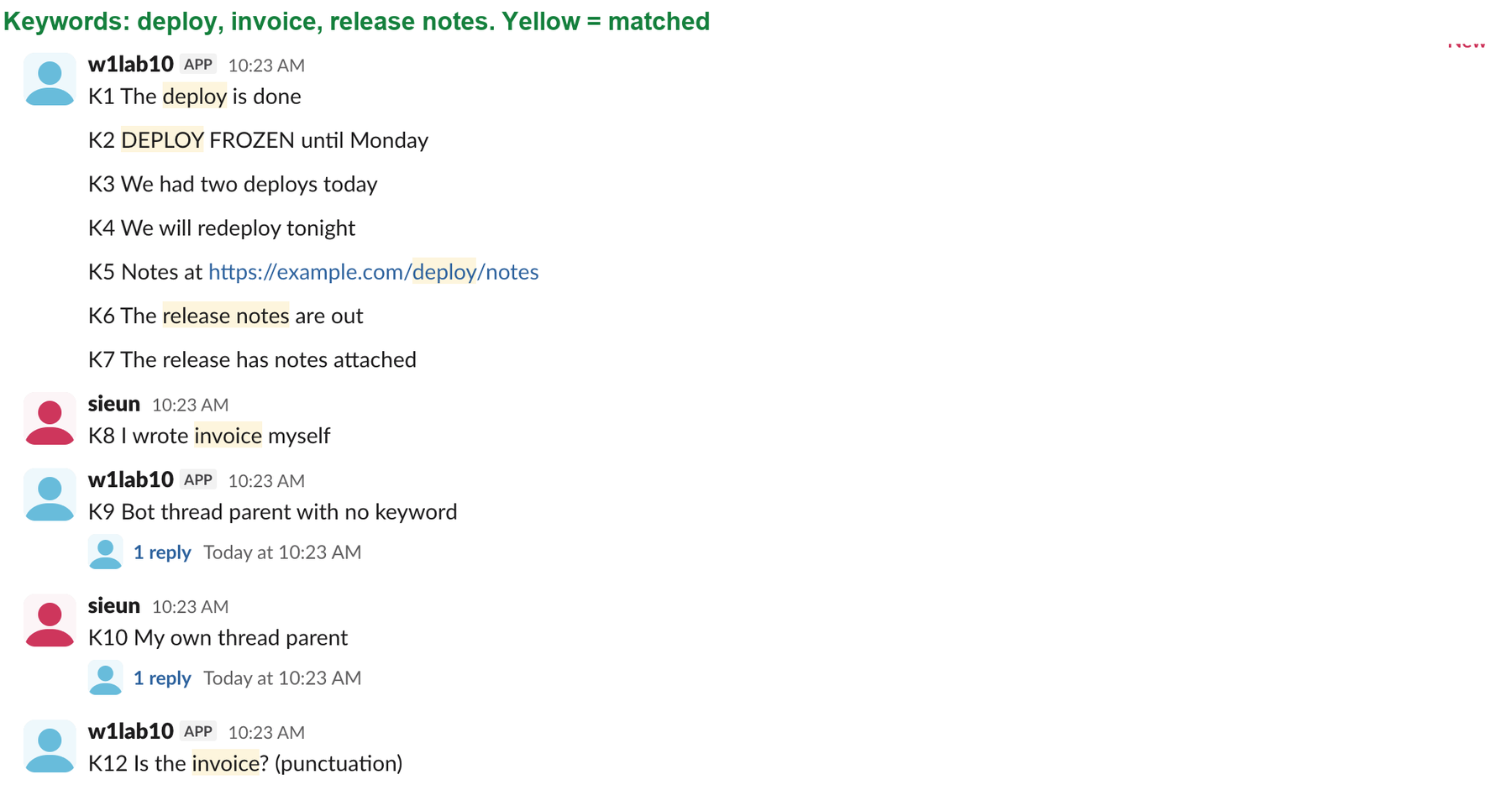
The keywords were deploy, invoice and release notes. A test bot posted each line below. We read the result from the Activity feed and the channel's mention count.
| Message | Notified |
|---|---|
| "The deploy is done" | Yes |
| "DEPLOY FROZEN until Monday" | Yes |
| "Notes at https://example.com/deploy/notes" | Yes |
| "The release notes are out" | Yes |
| "Is the invoice? (punctuation)" | Yes |
| Reply with "invoice" in a thread we started | Yes |
| "We had two deploys today" | No |
| "We will redeploy tonight" | No |
| "The release has notes attached" | No |
| Reply with "invoice" in a thread we did not follow | No |
| "deploy" in a muted channel | No |
| Our own message with "invoice" | No |
Three rules explain the table:
Never appear "away" on Slack again
Cloud-based. No downloads. Works 24/7 even when your laptop is off.
Why a keyword notification is not working
Check these in order. Each one came from a miss in our test:
deploy, deploys, redeploy.If none of these fit and no notifications arrive at all, the problem is wider than keywords. Work through Slack notifications not working.
Keyword notifications per channel
The keyword list is global. The Channel keywords box applies to every channel you are in, and no per-channel keyword list exists in the web app. What you can set per channel is the channel's own notification level, from its bell menu. A muted channel blocks keywords, as the table shows, and All new posts notifies you for every message, so keywords stop mattering there.
For one keyword in one channel only, the usual way is a small bot that reads that channel and DMs you, which needs an app with channels:history.
Questions
Do keywords work for messages from bots and apps?
Yes. Every message in our test came from a bot, and the matching ones notified.
Can I use a phrase as a keyword?
Yes. release notes matched "The release notes are out" and did not match "The release has notes attached".
Do keywords show on my phone?
We tested the web app only. Slack stores the list in your account preferences (the API calls it global_keywords), not on one device, so the same list applies wherever you sign in.
Stop Jiggling Your Mouse.
Join hundreds of remote workers who never worry about their Slack status. Set it up once, stay green forever.
Related Articles
Slack MSI Installer: Gone After 4.48.102, Use MSIX
Slack's last MSI is 4.48.102 from March 2026; every later version 404s. We read both old MSIs and the current MSIX package to show what each installs and how to move a deployment to MSIX.
Slack LaTeX and Math: What Renders, What Doesn't, What Works
Slack shows LaTeX as raw text in messages and canvases, even though its web client ships KaTeX. We tested every route and give the two that work: Unicode math and a formula rendered to an image with 15 lines of Python.
Slack Canvas Images: Add, Size and Insert Them by API
We inserted a PNG, an animated GIF and a 6000 px image into a Slack canvas with canvases.edit. Slack files rendered; an outside image URL became a link card even though the API said ok.