
Slack Marketplace Requirements: What the Console Checks, Tested on a New App
We took a new app from 'Activate Public Distribution' greyed out to a working listing form on 2 October 2026. Four checks gate distribution, one HTTP redirect URL is enough to fail the HTTPS check, and the Marketplace asks for 10 active workspaces before you can submit.
To get an app into the Slack Marketplace you need two things: public distribution turned on for the app, and installs on at least 10 active workspaces before Slack lets you submit. We took a new app through the console on 2 October 2026 in our own test workspace. Public distribution has four checks, and the button stays grey until all four pass. One plain-HTTP redirect URL is enough to fail the HTTPS check, even when an HTTPS one sits next to it. After that, the listing form marks 11 fields as required, and the review takes up to 10 days for the first pass and 10 weeks for the functional review.
The four checks before "Activate Public Distribution"
Open your app at api.slack.com/apps, then Manage Distribution. Our app had a bot user, a slash command, an incoming webhook and one redirect URL, http://localhost:8871/callback, which we used to install it during development. This is what the page showed:
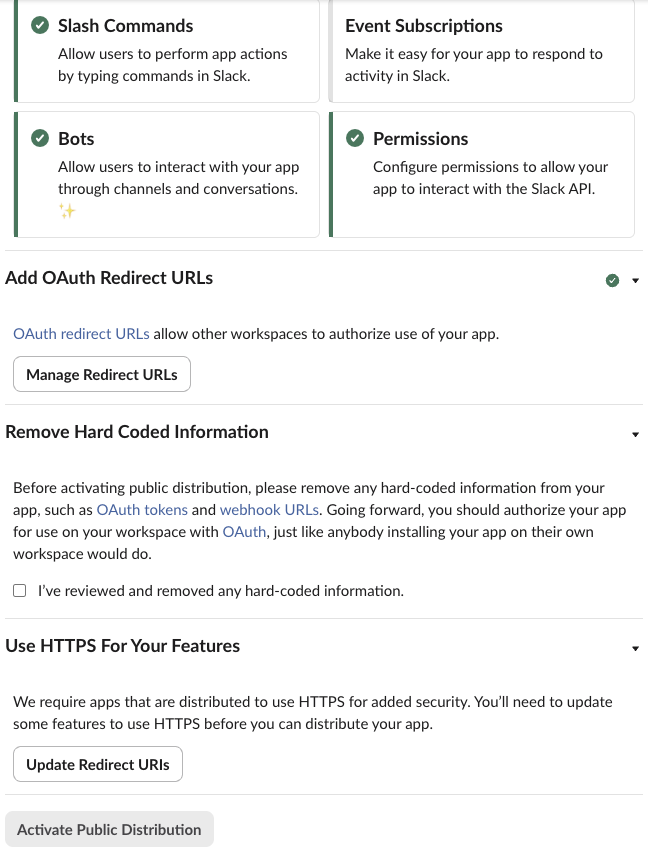
| Check | What passed it in our test | What failed it |
|---|---|---|
| Enable Features & Functionality | at least one feature on; ours had Incoming Webhooks, Slash Commands, Bots and Permissions ticked | not tested; an app with no feature at all |
| Add OAuth Redirect URLs | one redirect URL saved, even an http://localhost one | not tested; no redirect URL |
| Remove Hard Coded Information | ticking "I've reviewed and removed any hard-coded information." | the box unticked. Slack does not scan your code; the box is your promise |
| Use HTTPS For Your Features | every redirect URL on https:// | any http:// redirect URL, even next to an https:// one |
The last row cost us one extra round. We added an HTTPS redirect URL next to the localhost one and reloaded the page. The HTTPS check still had no green tick:
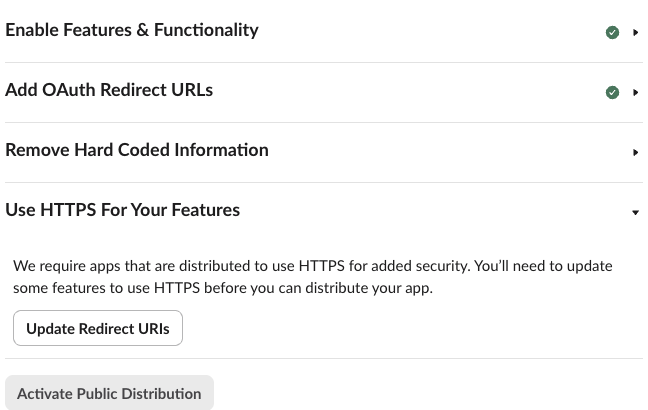
The check passed only after we removed the http:// URL. We changed the redirect list with apps.manifest.update (the same edit works in OAuth & Permissions), and Slack answered:
{"ok": true, "app_id": "A0C71JQPB4G", "permissions_updated": true}The manifest now held one URL, "redirect_urls": ["https://<tunnel>.trycloudflare.com/callback"], and the page showed a green tick on HTTPS. So for local development, use an HTTPS tunnel URL as the redirect, or keep a second app for development; see OAuth redirect URLs on localhost for that setup.
With all four checks green and the box ticked, Activate Public Distribution turned green. One click, no confirmation dialog.
What changes when distribution is on
The page swapped the checklist for a Deactivate Public Distribution button and a new Installation Count block:
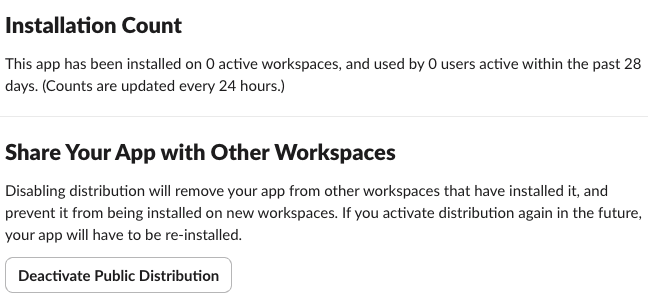
Three other changes we saw:
- • The Sharable URL and Add to Slack button now work for any workspace. When we opened the shareable URL, the "Where do you want to use" picker on the consent page listed every workspace our account belongs to, plus "Add a new workspace". Before activation the same picker was greyed out and locked to the home workspace.
- • 1. Your App Listing in the sidebar became a link. Steps 2 to 5 (Review scopes, Security and compliance, Testing information, Automated checks) stayed grey until step 1 is saved.
- • Slack warns that turning distribution off later "will remove your app from other workspaces that have installed it", and turning it on again means everyone has to reinstall.
Public distribution does not list the app anywhere. People can install it only from your link. Listing is the separate Marketplace review below.
Never appear "away" on Slack again
Cloud-based. No downloads. Works 24/7 even when your laptop is off.
The 10-workspace rule and the review wait
The Marketplace review guide that the console links to says: "Your app has been installed on 10 or more active workspaces", where an active workspace is "a workspace that has been used in the past 28 days", and "apps that do not meet this requirement will be blocked from submitting".
The number has moved twice, which is why other pages disagree:
| Slack changelog entry | Installs required |
|---|---|
| 8 July 2025 | 10, cut to 5 active workspaces from 11 August 2025 |
| 1 September 2026 | back to 10 "as of July 2026", and the app "needs to stay at 10 or more installed workspaces throughout the entire duration of the review" |
So a guide that says 5 workspaces describes the 2025 to 2026 rule. The counter in the screenshot above is the number to watch. It counts active workspaces and updates every 24 hours. Our app was installed in our own workspace and still showed 0 on the day we activated distribution.
The submission page also printed the review wait on the day we looked:
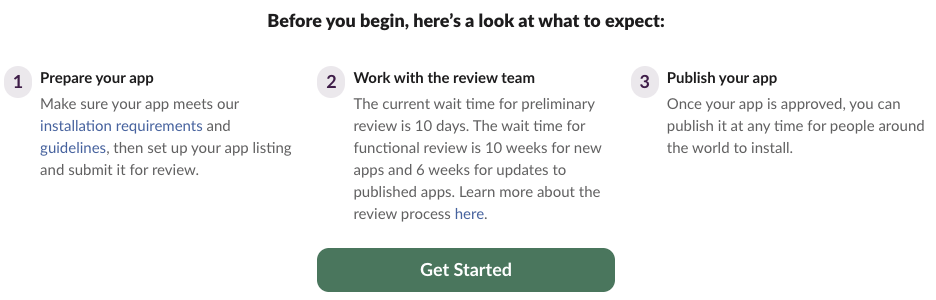
So a new app needs about 10 days for the first feedback and up to 10 weeks for the functional review. Plan a launch around that; the guide says Slack cannot shorten or skip it.
The listing form: every required field
Get Started opens "1. Your app listing". We pressed Next: Scopes Your App Uses with the form empty to see every rule at once:
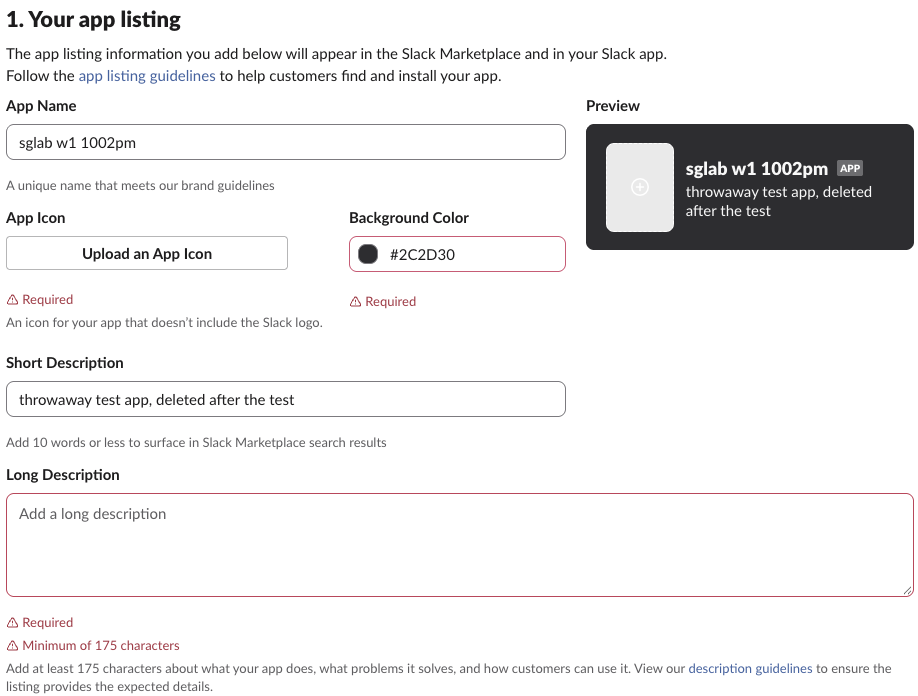
| Field | Rule shown in the form |
|---|---|
| App Name | filled from your app; "A unique name that meets our brand guidelines" |
| App Icon | required; must not include the Slack logo |
| Background Color | required, hex |
| Short Description | 10 words or fewer; shows in Marketplace search |
| Long Description | required, at least 175 characters |
| YouTube video | optional |
| Screenshots | required, up to 6, each 1600 x 1000 px |
| Categories | required, up to 3 |
| Installation landing page URL | required; must have an Add to Slack button or install steps |
| Privacy policy URL | required |
| App support URL | required; support without creating a new account |
| Support email | required; our empty field said "This doesn't seem like an email address" |
| Supported languages | required |
| Pricing | required, from a list |
The screenshot size is the one people miss: 1600 x 1000 exactly. The landing page, privacy policy and support page must exist before you start, because each field needs a live URL.
FAQ
Can I share my app without the Marketplace?
Yes. After you activate public distribution, the Sharable URL installs the app on any workspace. You only need the Marketplace review if you want a listing that people can find. The scopes and token handling are the same either way; oauth.v2.access shows what each install returns.
Does a Free plan workspace work for building a distributed app?
It did for us. Our test workspace is on the Free plan, and every step on this page, including activation, worked there.
Do I have to tick the hard-coded information box?
Yes, it is one of the four checks. Slack does not scan your code when you tick it. Load tokens per workspace from your OAuth install, not from an environment variable that holds one bot token.
Stop Jiggling Your Mouse.
Join hundreds of remote workers who never worry about their Slack status. Set it up once, stay green forever.
Related Articles
assistant.threads.setStatus vs agents.sessions.setStatus: Both Tested in Slack
We called assistant.threads.setStatus and agents.sessions.setStatus on a test app before and after turning on the agent feature, clicked the stop button, and timed how long the status line stays. Every response, the stop event, and what Slack showed.
Slack Slash Command Payload: Every Field, Responses, and response_url Limits
We caught the payload a slash command sends, answered it as ephemeral, in_channel, plain text and empty, posted to its response_url until it failed, and typed the command inside a thread. Every result is from a test app on 2 October 2026.
Slackbot MCP Client: We Connected a 17-Line MCP Server and Slackbot Called It
We wrote a one-tool MCP server, added it to a Slack app with the mcp_servers manifest field, switched it on in Slackbot and asked for the time. Every request Slackbot sent to the server, the permission prompt, and what Slackbot said when the server was down.