
Slack Block Kit Markdown: mrkdwn, the Markdown Block and Lists
Block Kit text objects with type mrkdwn use Slack's own syntax: *bold*, _italic_, <url|text> links and <@U123> mentions. The markdown block takes standard markdown, with lists, headings and tables, up to 12,000 characters per payload. Syntax tables, JSON you can paste, bullet lists, links and mentions.
Slack Block Kit has two kinds of markup. A text object with "type": "mrkdwn", used in section and context blocks, reads Slack's own syntax: *bold*, _italic_, ~strike~, <https://example.com|link text> and <@U012AB3CD> for a mention. The markdown block, "type": "markdown", reads standard markdown instead: **bold**, [text](url), - lists, # headings and even tables, up to 12,000 characters across all markdown blocks in one message. If your text comes from an LLM or a README, use the markdown block. If you build the message yourself and need mentions, dates or buttons, use mrkdwn.
This page covers apps, bots and webhooks. People typing in Slack's composer can now use [text](link) in markup mode, but API and bot mrkdwn still needs <url|text>.
We build Slack Green, and our free Markdown to Slack converter turns standard markdown into mrkdwn when you cannot use the markdown block.
mrkdwn vs the markdown block
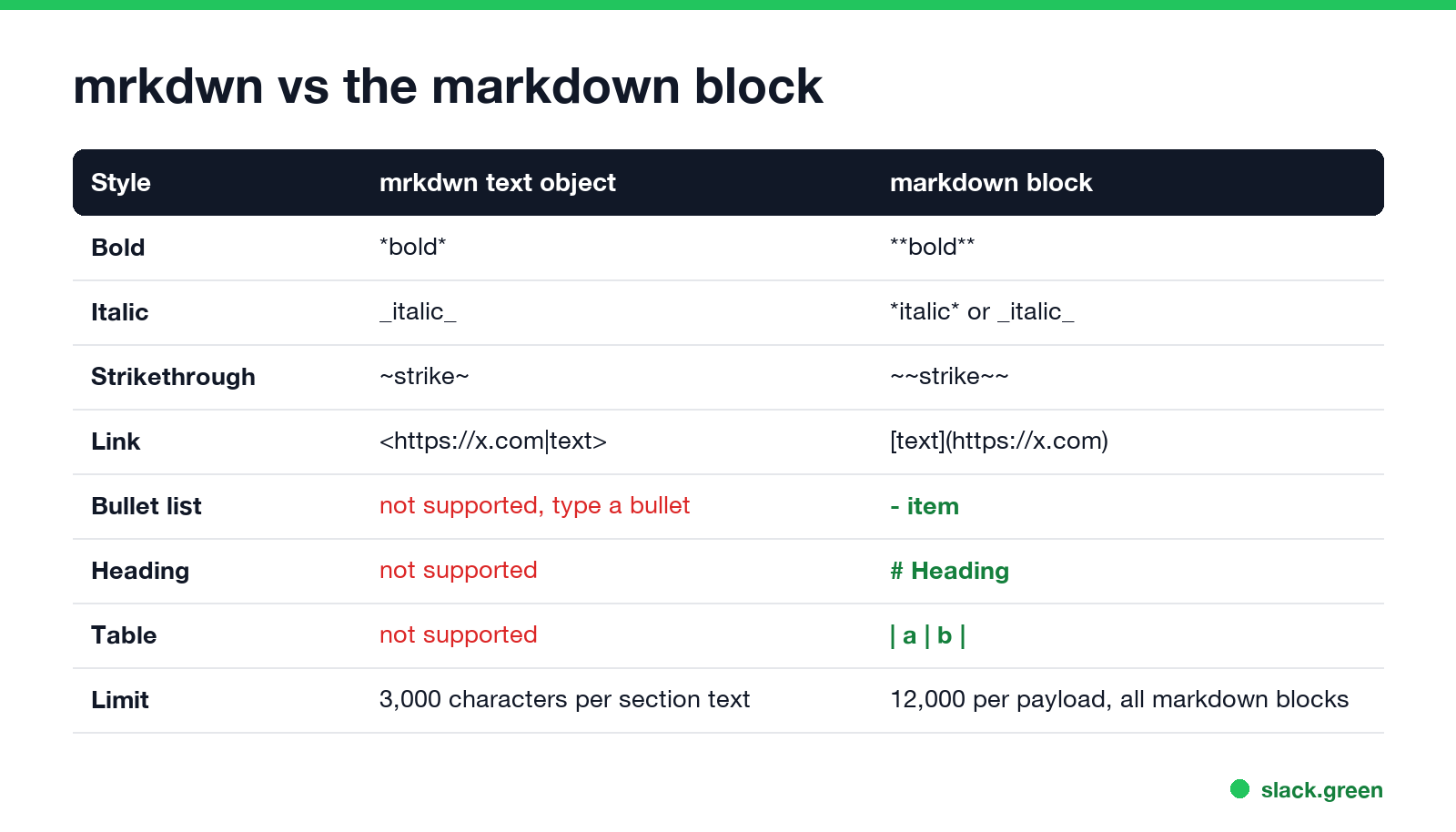
| Style | mrkdwn text object | markdown block |
|---|---|---|
| Bold | *bold* | **bold** or __bold__ |
| Italic | _italic_ | *italic* or _italic_ |
| Strikethrough | ~strike~ | ~~strike~~ |
| Link | Angle brackets, shown below | [text](https://x.com) |
| Bullet list | Not supported, type • | - item |
| Numbered list | Not supported | 1. item |
| Heading | Not supported | # Heading (all levels render the same size) |
| Table | Not supported | Pipe table |
| Code block | Three backticks | Three backticks, with a language for highlighting |
| Limit | 3,000 characters per section text | 12,000 per payload, all markdown blocks together |
The asterisk is the trap. *this* is bold in mrkdwn and italic in the markdown block. Text written for one reads wrong in the other.
The markdown block
Slack's reference describes the markdown block as the way to post markdown from an LLM without translating it yourself. Slack does the conversion, and one markdown block may turn into several blocks in the posted message.
{
  "blocks": [
    {
      "type": "markdown",
      "text": "## Deploy report\n**Status:** passed\n\n- api: 42 s\n- web: 1 min 10 s\n\n| Service | Version |\n| --- | --- |\n| api | 3.4.1 |\n| web | 3.4.0 |\n\n[Open the run](https://github.com/acme/app/actions)"
    }
  ]
}
Things to know:
- •
block_idis ignored and not kept. - • Images written as
turn into a link with the alt text, not an image. Use an image block for pictures. - • Task lists (
- [ ]) and horizontal rules (---) render. - • Escape a markdown character with a backslash, such as
\*not bold\*.
mrkdwn in section blocks
Never appear "away" on Slack again
Cloud-based. No downloads. Works 24/7 even when your laptop is off.
Most Block Kit layouts still use section blocks with a mrkdwn text object:
{
  "blocks": [
    {
      "type": "section",
      "text": {
        "type": "mrkdwn",
        "text": "*Build failed* on `main`\n<https://github.com/acme/app/actions|Open the run> and ping <@U012AB3CD>"
      }
    }
  ]
}
Some fields only accept plain_text, such as header blocks and button labels. In those, asterisks stay asterisks. Slack's developer docs mark which fields allow which type. The top-level text of chat.postMessage uses mrkdwn by default; set "mrkdwn": false to turn formatting off.
Links, mentions and dates in mrkdwn
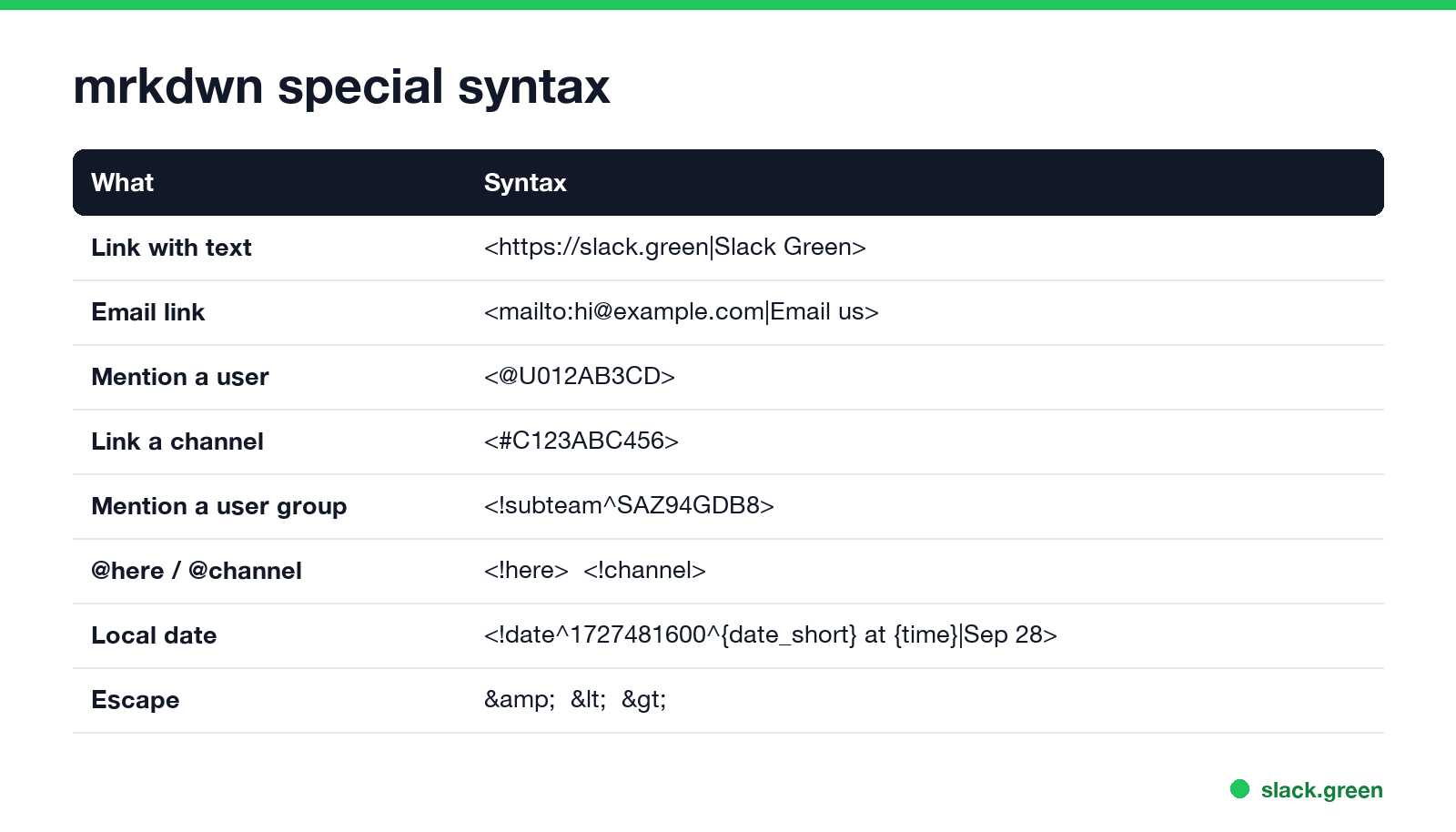
Link with text          <https://slack.green|Slack Green>
Email link              <mailto:hi@example.com|Email us>
Mention a user          <@U012AB3CD>
Link a channel          <#C123ABC456>
Mention a user group    <!subteam^SAZ94GDB8>
@here, @channel         <!here>  <!channel>  <!everyone>
Date in reader's zone   <!date^1727481600^{date_short} at {time}|Sep 28>
Mentions need IDs, not names; <@jane> does not work. Slack's docs add that a user mentioned by an app is notified only if they are already in the channel. Date strings are easier to build in our Slack timestamp generator, and the full link rules are in how to add a hyperlink in Slack.
Slack treats &, < and > as control characters. Replace them with &, < and > in any text you pass through, and only those three.
Bullet lists in Block Kit
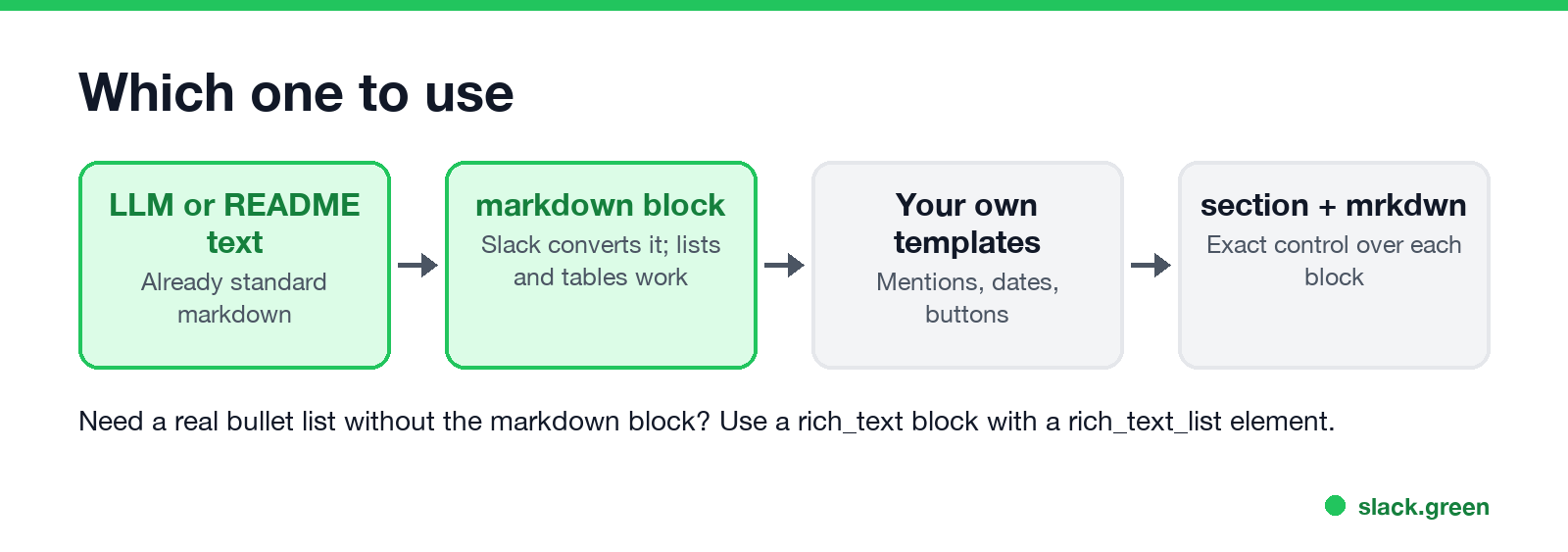
Slack's formatting docs say plainly that there is no list syntax in app-published mrkdwn. You have three options:
"• first\n• second" in a mrkdwn text. Looks like a list, but long items do not indent when they wrap.- first works there.{
"type": "rich_text",
"elements": [
{
"type": "rich_text_list",
"style": "bullet",
"elements": [
{ "type": "rich_text_section", "elements": [{ "type": "text", "text": "first item" }] },
{ "type": "rich_text_section", "elements": [{ "type": "text", "text": "second item" }] }
]
}
]
}Use "style": "ordered" for a numbered list. People typing in Slack get lists from the composer; see how to make bullet points in Slack.
Test before you send
Never appear "away" on Slack again
Cloud-based. No downloads. Works 24/7 even when your laptop is off.
Paste any payload into Slack's Block Kit Builder to see it rendered. For the mrkdwn part alone, our Slack message formatter previews the text. If formatting shows up as raw asterisks, Slack markdown not working lists the causes. Length limits for each field are in Slack message character limit, and tables are in how to make a table in Slack.
To post a whole markdown file, such as a README, create a canvas from it instead; see Slack markdown file preview.
FAQ
Does Slack Block Kit support markdown? Yes, two ways: mrkdwn text objects with Slack's own syntax, and the markdown block with standard markdown.
What is the difference between mrkdwn and markdown in Slack?
mrkdwn is Slack's syntax: *bold*, <url|text>. The markdown block reads standard markdown: **bold**, [text](url).
How do I make a bullet list in Block Kit?
Use - item in a markdown block, or a rich_text block with a rich_text_list. mrkdwn has no list syntax.
How do I mention a user in Block Kit?
<@U012AB3CD> with the user ID, inside a mrkdwn text.
How long can a markdown block be? 12,000 characters for all markdown blocks in one payload together.
Stop Jiggling Your Mouse.
Join hundreds of remote workers who never worry about their Slack status. Set it up once, stay green forever.
Related Articles
Slack Huddle API: What Apps Can Read and Do
Slack has no API to start, join or record a huddle. Apps can read whether a user is in one from huddle_state on the user profile, see which channel from huddle_state_channel_id, and get the user_huddle_changed event when it changes. Code for both, plus audit log events on Enterprise.
How to Create a Slack Webhook URL in 4 Steps
Create a Slack app at api.slack.com/apps, turn on Incoming Webhooks, click Add New Webhook to Workspace and pick a channel. Slack gives you a hooks.slack.com URL that posts to that channel. Private channels, DMs, several channels, the Workflow Builder alternative, and the errors you may see.
Slack Markdown File Preview: How to Read .md Files in Slack
Slack shows an uploaded .md file as raw text, with the # and ** characters visible. To read it formatted, paste the rendered text into a canvas, create the canvas from markdown with the API, or send it in a markdown block. HTML files and Mermaid diagrams do not render either; the workarounds are below.