
Why Does Slack Use So Much Memory? 8 Ways to Cut It
Slack uses a lot of memory because the desktop app is Electron, a Chromium browser running Slack's web app, and each workspace, busy channel, GIF and huddle adds to it. Slack engineering measured about 130 MB to 960 MB per workspace. What drives it, and how to cut it.
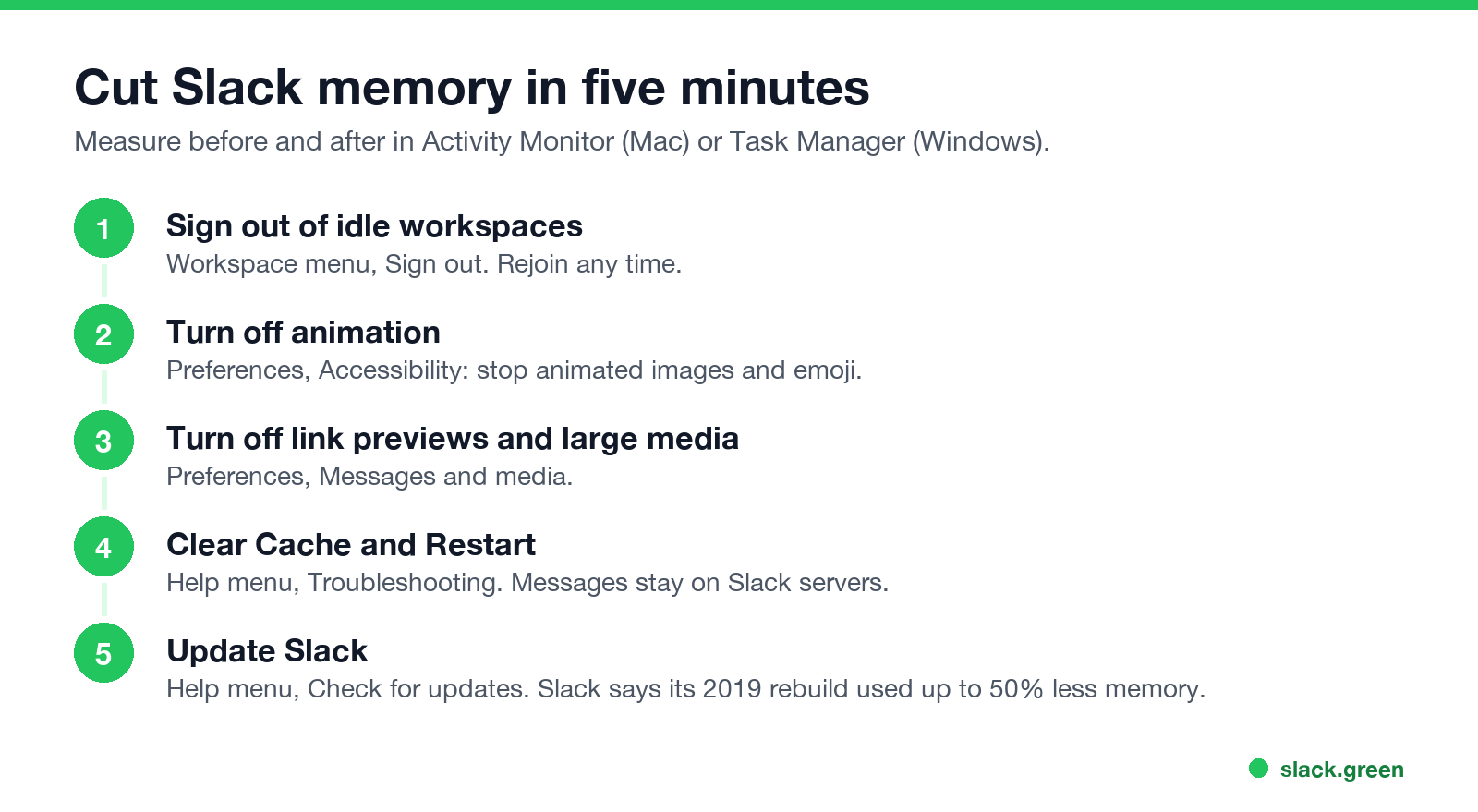
Slack uses a lot of memory because the desktop app is built on Electron: it is a Chromium browser running Slack's web app, split into several processes. Everything you keep open adds to it: each signed-in workspace, busy channels with long history, GIFs and animated emoji, link previews, and huddles or calls. Slack's engineers measured a single workspace at about 130 MB to 960 MB of memory, depending on activity. To cut it, sign out of workspaces you rarely use, turn off animations and link previews, leave huddles when they end, update Slack, and use Help, Troubleshooting, Clear Cache and Restart when it grows over the day.
Some people keep Slack open all day for one reason: to keep their dot green. That does not work well anyway, because Slack turns you grey 10 minutes after your last input in its window. Slack Green keeps your presence active from the cloud during your working hours, so you can quit Slack when you need the memory and still show as active.
Why Slack uses so much memory
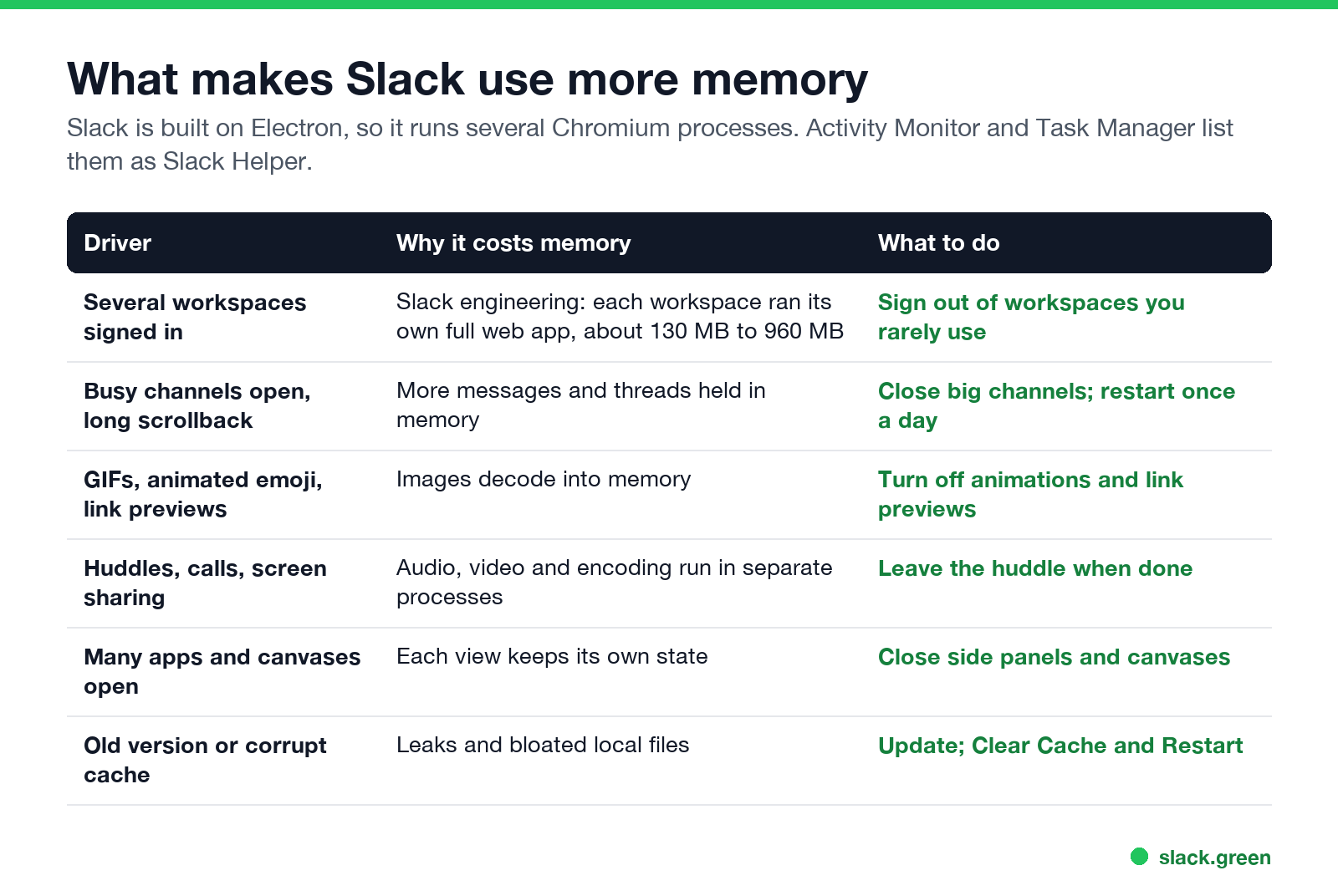
It is a browser. Electron bundles Chromium, the engine behind Chrome. Slack runs a main process, a GPU process, and renderer processes that hold the app itself. In Activity Monitor on a Mac they show as Slack and several Slack Helper processes; add them together to get the real total.
Each workspace used to be a whole app. Slack's engineering blog explained in 2017 that each workspace ran its own copy of the web app, using about 130 MB at the 10th percentile and about 960 MB at the 99th. Their fix at the time was a thin background client for workspaces you had not looked at in a while. In 2019 Slack rebuilt the desktop app and said it used up to 50% less memory than before. Multiple workspaces still cost more than one.
Content lives in memory. A channel with thousands of messages, big threads, images and animated GIFs all decode into memory while visible or recently viewed.
Calls cost more. Huddles, video and screen sharing run audio and video processing and can raise both memory and CPU until you leave.
How to check Slack's memory usage
- • Mac: open Activity Monitor, choose the Memory tab, and type "Slack" in the search field. Add up Slack and every Slack Helper row.
- • Windows: open Task Manager with Ctrl+Shift+Esc, expand Slack under Apps, and read the total.
- • Linux: run
ps -C slack -o rss= | awk '{s+=$1} END {print s/1024 " MB"}'in a terminal.
Check it right after launch and again late in the day. A number that climbs steadily points at a leak or a heavy channel; a number that is high from the start points at the number of workspaces.
How to reduce Slack memory usage
Nunca más aparezcas como "ausente" en Slack
Basado en la nube. Sin descargas. Funciona 24/7 incluso con tu laptop apagada.
Using Slack in a browser tab instead of the app can help if you already keep that browser open, since the tab shares the browser's processes. It still needs memory for the web app itself.
Why does Slack use so much CPU?
High CPU usually comes from animation, a huddle or call, a very active channel on screen, or a stuck process. Close the huddle, switch to a quiet channel, and turn off animations. If Slack Helper stays near 100% CPU while idle, quit and reopen Slack, then clear the cache.
Slack keeps freezing or crashing on Mac
~/Library/Application Support/Slack (the App Store version keeps it under ~/Library/Containers/com.tinyspeck.slackmacgap). You will need to sign in again.Before deleting data, check slack-status.com in case Slack itself has an incident.
Is high memory usage normal?
Nunca más aparezcas como "ausente" en Slack
Basado en la nube. Sin descargas. Funciona 24/7 incluso con tu laptop apagada.
Often, yes. macOS and Windows use free memory for caches and give it back when another app needs it, so a high total with no slowdown is fine. What matters is memory pressure (Mac) or whether other apps slow down. If they do, the steps above make the biggest difference, starting with extra workspaces.
Do you need Slack open all day?
Many people keep Slack running only so their dot stays green. It does not: Slack sets you away 10 minutes after your last input in its window, open or not; see how long does Slack stay active. With Slack Green, your presence stays active on your working-hours schedule from a server, so you can quit Slack during deep work and open it when you want to read. Other ways are compared in how to keep Slack always active on desktop.
FAQ
Why does Slack use so much memory?
The desktop app is a Chromium browser running Slack's web app, and each workspace, channel, image and call adds memory. Slack engineering measured about 130 MB to 960 MB per workspace.
How much memory should Slack use?
It depends on workspaces and activity. A few hundred MB is common for one workspace; more workspaces and huddles push it past 1 GB.
Does the Slack web version use less memory?
It can, if your browser is already open, because it shares the browser's processes. The web app itself still needs memory.
Does clearing Slack's cache delete messages?
No. Messages stay on Slack's servers. Clearing the cache resets local files and restarts the app.
Why is Slack so slow on my Mac?
Usually too many workspaces, animations, a large cache or an old version. Update Slack, clear the cache, and sign out of workspaces you do not use.
Deja de Mover el Ratón.
Cientos de trabajadores remotos ya no se preocupan por su estado de Slack. Configúralo una vez, mantente verde para siempre.
Related Articles
Slack Green vs Idle Pilot: Price, Platforms and Setup
Idle Pilot and Slack Green both keep you available from the cloud with the laptop closed. Idle Pilot covers Slack or Teams for $9 a month. Slack Green covers Slack only for $3.99. The full comparison.
Slack Huddle Not Working? Fixes for No Sound, Mic, Camera and Connection
When a Slack huddle will not connect, has no sound, or others cannot hear you, run Slack's audio and video test, check the microphone and speaker in Preferences, re-grant Slack mic and camera access in your OS, and try Chrome or your phone to find a network block. Fixes by symptom for Mac, Windows, browser and mobile.
Slack Red Dot Won't Go Away? What It Counts and How to Clear It
A red dot on the Slack icon means unread activity somewhere; a red number means DMs, mentions, keywords or followed thread replies. Press Shift+Esc to mark all read, check Threads, Activity, Later and other workspaces, then clear the cache or reset the OS badge.