
Best Calendar App for Slack: Official Apps and Add-Ons Compared
Slack has no calendar of its own. The best calendar app for most teams is Slack's free Google Calendar or Outlook Calendar app, whichever matches your email: reminders, invites, a daily agenda and automatic In a meeting status. Add Calendly, Reclaim, a leave tracker or a birthday bot only for the job those miss.
Slack does not have a built-in calendar. The best calendar app for Slack is the one Slack builds for your calendar provider: Google Calendar for Slack if your team uses Google Workspace, Outlook Calendar for Slack if it uses Microsoft 365. Both are free, and Slack lists them on its Calendar apps for Slack page. They send reminders with a join button, let you answer invites in Slack, post a daily agenda, share a team calendar into a channel, and set your status to In a meeting while you are in one. Add a third-party app only for what those two do not do: booking links, focus time, leave tracking or birthdays.
A calendar status is text next to your name. Your green or grey dot is separate, and it turns grey after 10 minutes without input in the Slack window, meetings included. Slack Green keeps the dot active during the hours you set, from the cloud, and works alongside any calendar app.
Calendar apps for Slack compared
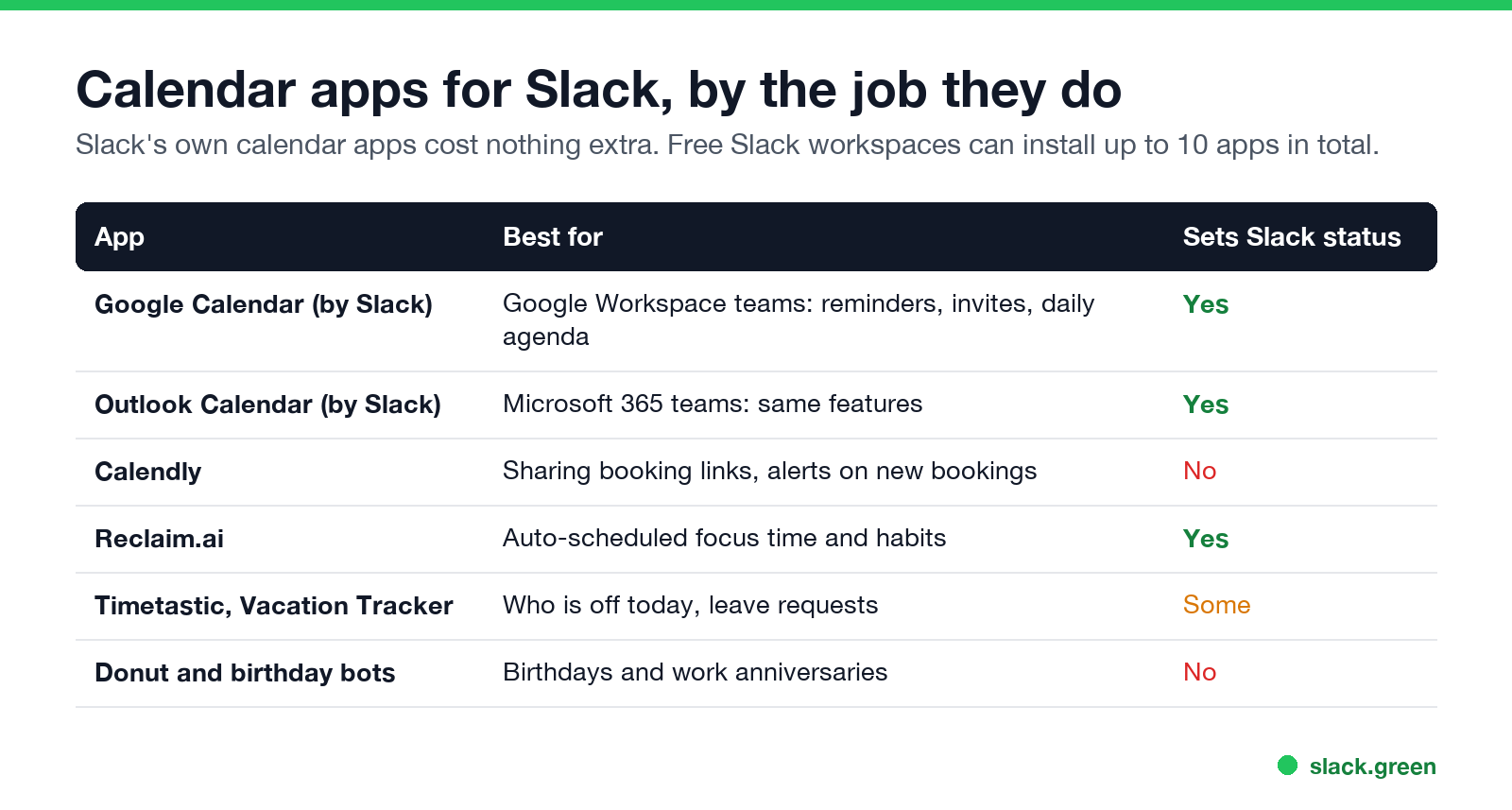
| App | Best for | Sets Slack status | Cost |
|---|---|---|---|
| Google Calendar for Slack | Google Workspace teams | Yes: In a meeting, Out of office | Free, built by Slack |
| Outlook Calendar for Slack | Microsoft 365 teams | Yes: In a meeting, Working remotely, Out of Office | Free, built by Slack |
| Calendly | Sending booking links from Slack, alerts on new bookings | No | Free plan, paid tiers |
| Reclaim.ai | Automatic focus time, habits and meeting buffers | Yes, from its calendar blocks | Free plan, paid tiers |
| Timetastic, Vacation Tracker | Leave requests and who is off today | Some set an out-of-office status | Paid, free trial |
| Donut and birthday bots | Birthday and work anniversary posts | No | Paid, free trial |
Free Slack workspaces can install up to 10 apps in total, so on the free plan each calendar add-on takes a slot.
Google Calendar and Outlook Calendar for Slack
These two cover what most teams mean by "Slack calendar integration":
- • Reminders with a join button for events that carry a Zoom, Teams, Meet or huddle link.
- • Invites and changes you can accept or decline without opening your calendar.
- • A daily agenda message, and a Home tab with today's and tomorrow's events.
- • Status sync. Slack shows In a meeting during accepted, busy events, and Out of office from out-of-office events. Neither app overrides a status you set yourself.
- • Channel notifications. Add the app to a channel to post a shared calendar's events there. This is how most teams build a team calendar in Slack: a shared Google or Outlook calendar for on-call, releases or office days, piped into one channel.
Setup for each: sync Slack status with Google Calendar and Slack Outlook Calendar integration, which also lists why status sometimes does not update.
When to add a third-party calendar app
Never appear "away" on Slack again
Cloud-based. No downloads. Works 24/7 even when your laptop is off.
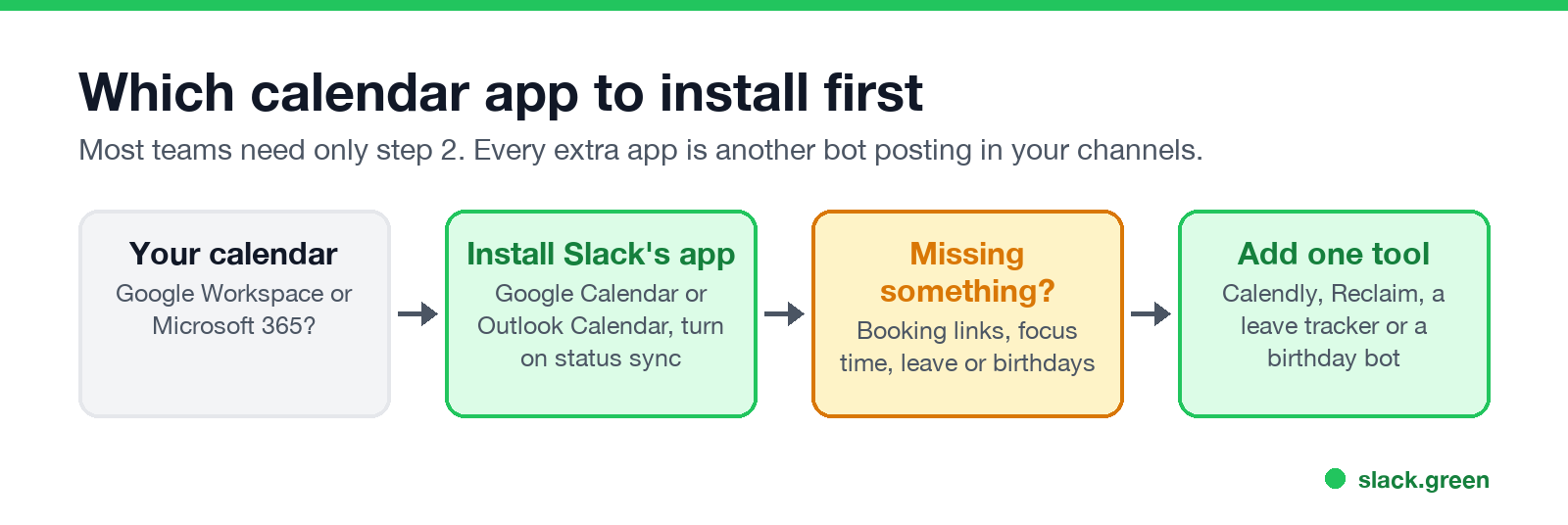
Booking meetings with people outside Slack. Calendly's Slack app lets you share your scheduling links in a conversation and posts a message when someone books. Useful for sales, recruiting and support. It does not change your status.
Protecting focus time. Reclaim.ai schedules focus blocks and habits around your meetings and can sync your Slack status to match, so a focus block shows as busy. If you only need to be left alone for a few hours, Slack's own notification pause and focus settings may be enough.
Leave and who is off. Leave trackers such as Timetastic and Vacation Tracker take time-off requests in Slack, post who is out today, and in some setups set an out-of-office status. For a simple team, a shared "Out of office" calendar posted to a channel does the same job for free.
Birthdays and anniversaries. A birthday calendar in Slack usually means a bot. Donut and dedicated birthday apps collect dates from each person and post a message in a channel on the day. There is no birthday field in Slack profiles by default, which is why these apps ask each person for the date.
Does Slack have a calendar? What it has instead
Slack has no calendar view of its own. Features that cover some calendar jobs:
/remind sets one-off or recurring reminders for you or a channel; examples are in Slack remind command examples.Which one should you install?
Each extra app is another bot posting in your channels and another permission to review. For most teams, one official calendar app is enough.
FAQ
Never appear "away" on Slack again
Cloud-based. No downloads. Works 24/7 even when your laptop is off.
Does Slack have a built-in calendar?
No. Slack connects to Google Calendar or Outlook through its own free apps. Scheduled messages, reminders and Workflow Builder cover some calendar jobs.
What is the best calendar app for Slack?
Slack's own Google Calendar or Outlook Calendar app, matching your email provider. They are free and set your status from your meetings.
How do I create a team calendar in Slack?
Make a shared calendar in Google Calendar or Outlook, then add Slack's calendar app to a channel and turn on channel notifications for that calendar.
Can Slack show my calendar availability?
Your status shows In a meeting during busy events when status sync is on. Slack does not show your full free/busy calendar to others.
Is there a Slack birthday calendar?
Not built in. Birthday bots such as Donut ask each person for their date and post on the day.
Stop Jiggling Your Mouse.
Join hundreds of remote workers who never worry about their Slack status. Set it up once, stay green forever.
Related Articles
How to Keep Skype Status Active: Skype for Business Idle Timers
To keep your Skype for Business status active, open Options, Status, and raise both idle timers, Inactive and then Away, from 5 minutes to as much as 360 minutes each. Consumer Skype shut down on May 5, 2025 and Skype for Business Online in 2021, so for most people the real question is now Teams. What still works, status icons, Outlook, and status not updating.
Is It Legal for My Employer to Monitor Me? US, EU and UK Rules
In the US it is mostly legal for an employer to monitor company devices, accounts and premises, often without asking. The limits are state notice laws in New York, Connecticut and Delaware, consent rules for audio recording and biometrics, bans on cameras in restrooms, and your personal devices. The EU, UK and parts of Canada and Australia add notice and proportionality rules.
Can My Employer See My Personal Email on My Work Computer?
Your employer cannot sign in to your Gmail, and doing so without permission can break the Stored Communications Act. But on a work computer, screenshot and keystroke monitoring, browser history, HTTPS inspection and Outlook's local cache can all expose personal email. Work email is fully visible, deleted messages included. Case by case, with what to do.