
How to Add a Hyperlink in Slack: Paste, Shortcut or Markup
To add a hyperlink in Slack, copy the URL, select the words in your message, and paste with Cmd+V or Ctrl+V. Or select the words and press Cmd+Shift+U (Ctrl+Shift+U) to add the link. Markup mode, bot and webhook syntax, mobile, and how to change or remove link text.
To add a hyperlink in Slack, copy the URL, select the words in your message that should become the link, and paste with Cmd+V on a Mac or Ctrl+V on Windows and Linux. Slack turns the selected words into a link instead of pasting the address. You can also select the words and press Cmd+Shift+U (Ctrl+Shift+U), then paste or type the URL. Both come from Slack's own shortcut list and work in channels, DMs and threads, in the desktop app and in a browser.
If you have turned on markup mode, you can type the link as markdown instead. Bots and webhooks use a third syntax. Each one is below.
We build Slack Green, which keeps your Slack status green from our servers during the hours you set. We also make a free Markdown to Slack converter that turns markdown links from ChatGPT, Notion or a README into links Slack shows correctly.
Ways to turn text into a link in Slack
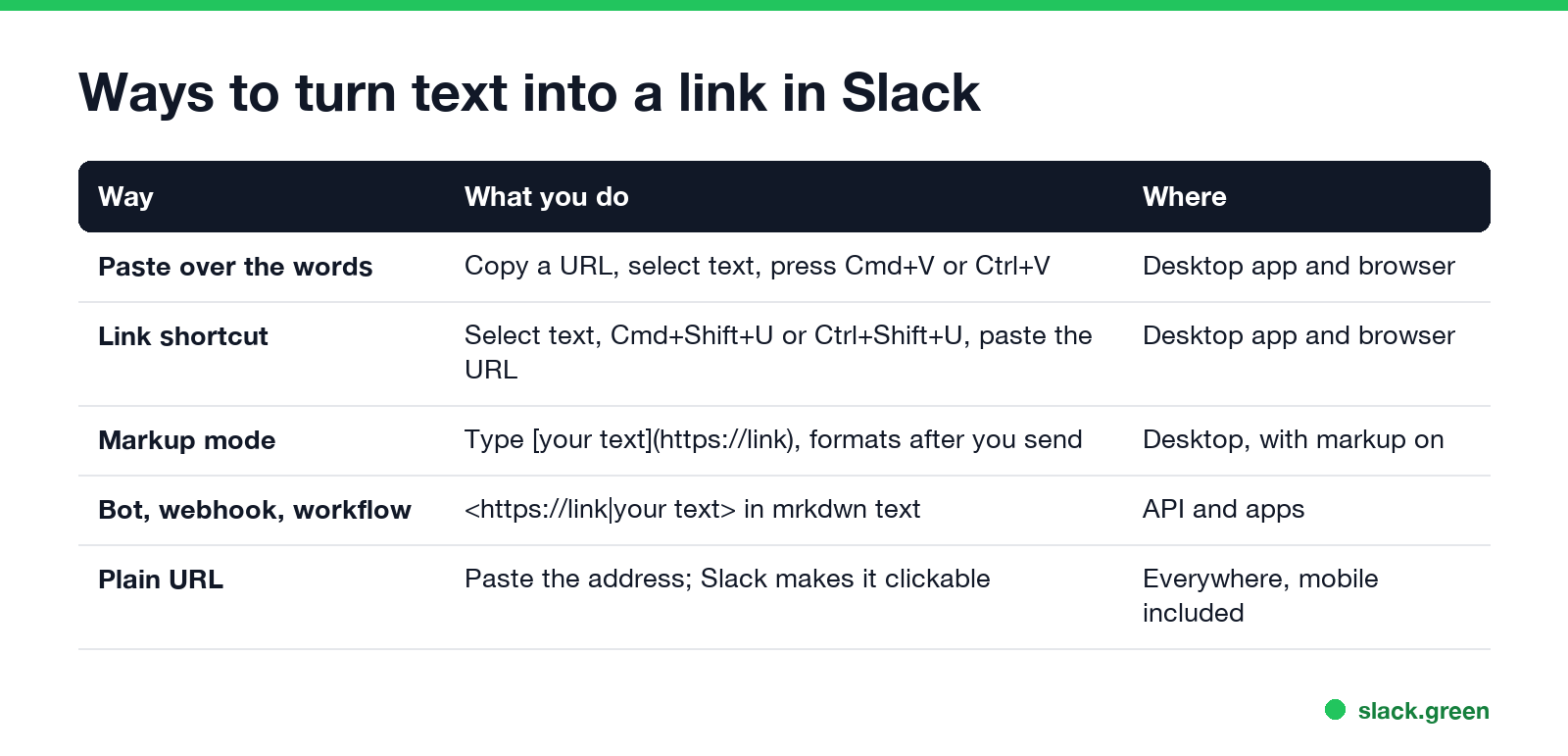
| Way | What you do | Where |
|---|---|---|
| Paste over the words | Copy a URL, select the words, press Cmd+V or Ctrl+V | Desktop app and browser |
| Link shortcut | Select the words, press Cmd+Shift+U or Ctrl+Shift+U, add the URL | Desktop app and browser |
| Markup mode | Type the link as markdown; it formats after you send | Desktop, markup mode on |
| Bot, webhook or workflow | Angle-bracket syntax in mrkdwn text | API and apps |
| Plain URL | Paste the address; Slack makes it clickable | Everywhere, mobile too |
Paste a link over selected text
- Copy the URL from your browser's address bar.
- In the Slack message field, type your sentence, such as "Here is the launch plan".
- Select "launch plan".
- Press Cmd+V or Ctrl+V.
The words turn blue and link to the page. This is the fastest way, and it is the one Slack's shortcut page mentions: if a link is on your clipboard, pasting over selected text makes a hyperlink.
Use the link shortcut
Select the words and press Cmd+Shift+U on a Mac or Ctrl+Shift+U on Windows and Linux. Slack opens a small box for the link. Paste or type the URL and press Enter. The same shortcut sits next to bold, italic and strikethrough in our Slack keyboard shortcuts guide.
Type a markdown link in markup mode
With Format messages with markup turned on under Preferences, Advanced, Slack's help center says you link text by putting it in square brackets and the URL in parentheses right after it:
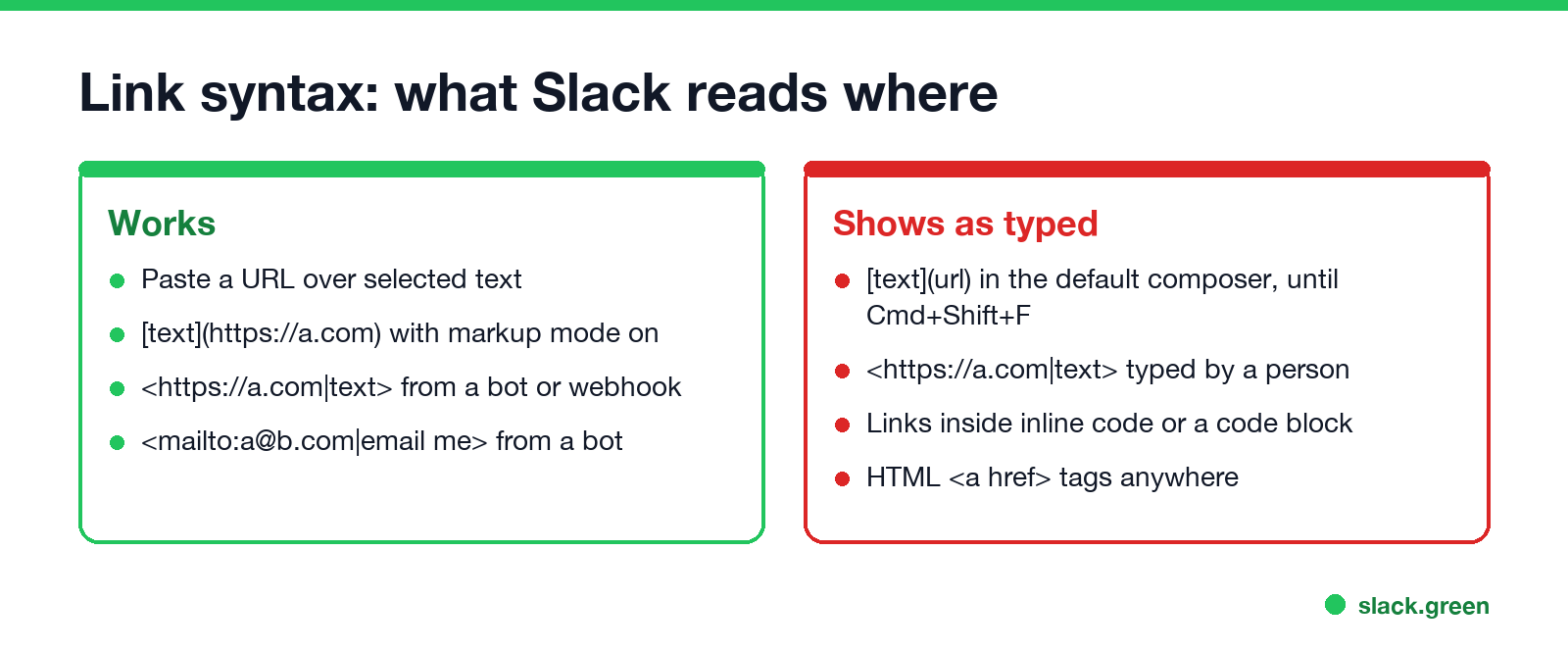
[launch plan](https://example.com/launch)The link appears after you send. In the default composer, typing that syntax leaves the brackets as they are; press Cmd+Shift+F (Ctrl+Shift+F), which Slack calls Apply markdown formatting, to turn it into a link.
Links in Slack bot, webhook and workflow messages
Messages sent through the API, an incoming webhook or Workflow Builder use Slack's mrkdwn syntax, with angle brackets and a pipe between the URL and the text:
{
  "text": "The <https://example.com/launch|launch plan> is ready. Questions? <mailto:team@example.com|Email the team>."
}
Without the pipe and text, the URL itself shows. Escape the characters &, < and > in link text as &, < and >. A plain_text field never makes links. Posting from CI? See how to send a Slack message from GitHub Actions. To check a message before you post it, draft it in our Slack message formatter.
Change or remove link text
Never appear "away" on Slack again
Cloud-based. No downloads. Works 24/7 even when your laptop is off.
To change a link in a message you already sent:
To get rid of the preview card under a link, rather than the link, hover over the card and click the x. All the preview options are in how to turn off link previews in Slack.
Hyperlinks on iPhone and Android
Pasting a URL on its own works everywhere; Slack makes it clickable. For linked words on a phone, select the words in your message and look for a link option in the formatting menu, reached with the Aa button. If your app does not show one, paste the URL after the words, or add the link from desktop by editing the message.
Links that do not work in Slack
FAQ
Never appear "away" on Slack again
Cloud-based. No downloads. Works 24/7 even when your laptop is off.
How do I hyperlink text in Slack? Copy the URL, select the words, and paste. Or select the words and press Cmd+Shift+U (Ctrl+Shift+U).
What is the Slack shortcut for a link? Cmd+Shift+U on Mac, Ctrl+Shift+U on Windows and Linux.
Does Slack support markdown links? Only with markup mode on, or after Cmd+Shift+F. Bots use the angle-bracket syntax with a pipe.
How do I link to a Slack message? Hover over the message, click the three dots, choose Copy link, and paste it anywhere.
Stop Jiggling Your Mouse.
Join hundreds of remote workers who never worry about their Slack status. Set it up once, stay green forever.
Related Articles
Slack Emoji for Announcements, Updates and Reminders
The standard Slack emoji for an announcement is 📣 :mega: or 📢 :loudspeaker: at the start of the post. Use 🚨 :rotating_light: only for real emergencies, 🆕 :new: for updates, ⏰ :alarm_clock: for reminders, and ask readers to react with ✅ :white_check_mark: once they have read it. Templates and a custom emoji idea.
Slack Status for a Doctor Appointment: 24 Statuses and Emoji
A Slack status for a doctor appointment says you are out and when you are back, such as 🏥 'At an appointment, back at 2 PM.' You do not have to say what kind. 24 statuses for doctor, dentist and other appointments, the emoji codes, and how to schedule the status so it clears by itself.
Slack Status for Limited Availability: 30 Statuses to Copy
A Slack status for limited availability says you are around but slow, until when, and how to reach you if it is urgent, such as ⏳ 'Limited availability today, replies after 3 PM. Urgent: @mention me.' 30 statuses for busy days, slow replies and catching up, the emoji to use, and when to pause notifications too.