
Slack API link_names: What It Still Links, Tested on 20 Messages
Slack's docs say link_names now links only user groups. On November 2, 2026 a bot token with link_names=true still turned @name, #channel and @here into real mentions, in plain text, section blocks and incoming webhooks.
link_names is an optional argument of chat.postMessage, chat.update and incoming webhooks that turns plain @name, #channel, @here and @channel text into real mentions before Slack stores the message. Slack's chat.postMessage reference now says it only finds and links user groups and "no longer supports linking individual users", but when we sent 20 test messages on November 2, 2026, a bot token with link_names=true still turned @sieun into <@U0B7L4YK420>. It works, with three traps: the name match is case-sensitive, chat.update drops it unless you send it again, and user groups need a paid plan. For anything you ship, send the ID form <@U...> and treat link_names as a fallback.
What we sent and what Slack stored
Our setup: a test app in a one-person Free workspace, with a bot token (chat:write), a user token (chat:write) and an incoming webhook, all posting into one test channel. For each message we kept the text that Slack stored, which is what decides whether a mention exists.
| # | Sent text | link_names | Stored text |
|---|---|---|---|
| A | hi @sieun | not set | hi @sieun |
| B | hi @sieun | true | hi <@U0B7L4YK420> |
| C | @here | not set | @here |
| D | @here | true | <!here> |
| E | see #all-slack | not set | see #all-slack |
| F | see #all-slack | true | see <#C0B7A5A5N3D> |
| G | @sieun and @cronlab | true | <@U0B7L4YK420> and <@U0CDUGBNRNX> |
| H | @channel | true | <!channel> |
| I | <@U0B7L4YK420> <!here> <#C0B7A5A5N3D> | not set | unchanged, all three are mentions |
| L | hi @sieun | 1 | hi <@U0B7L4YK420> |
| M | @labtesters (a user group handle) | true | @labtesters |
| N | hi @nobody | true | hi @nobody |
| O | hi @Sieun | true | hi @Sieun |
This is how the bot-token messages looked in Slack. Highlighted names are real mentions; the rest is plain text:
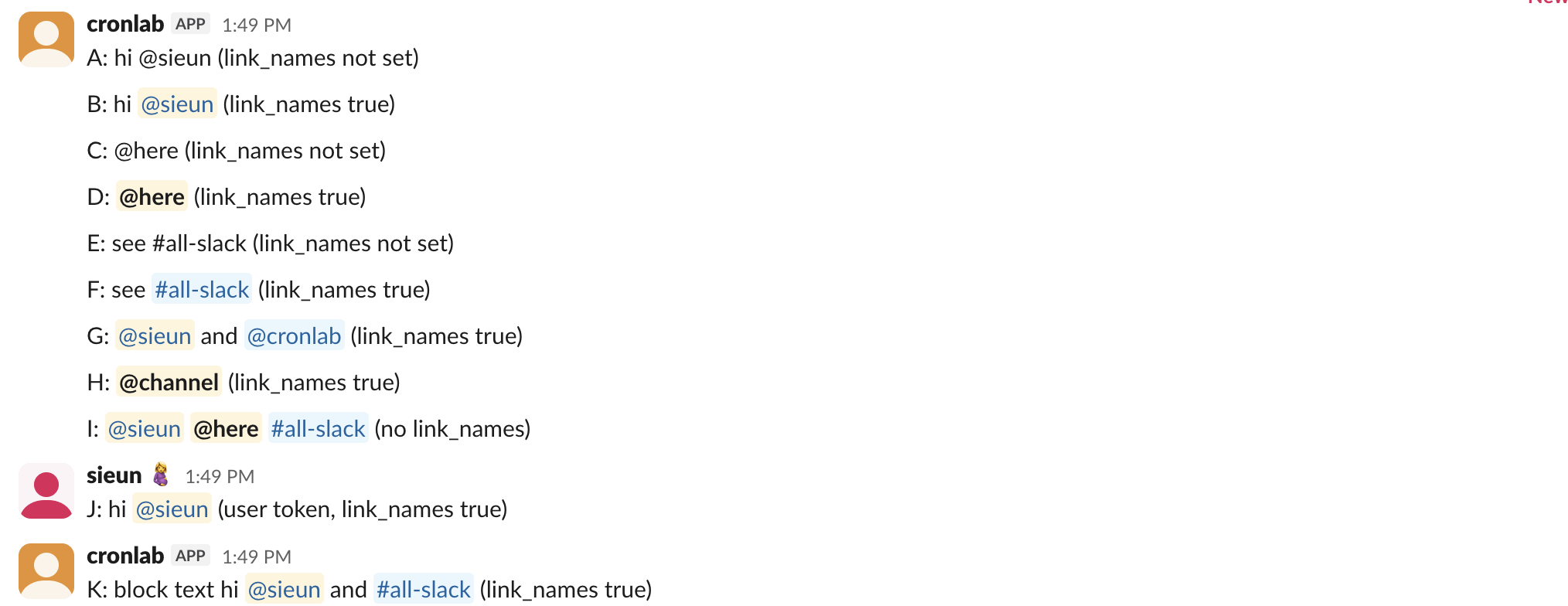
Rows I and B look the same to a reader, and the stored text is the same. The difference is only who did the work: with the ID form you did it, with link_names Slack did it by looking up the name.
Users: it still links them, but only by exact username
The line in Slack's reference suggests @name text should stay plain now. In our test it did not: rows B, G and L all became mentions, with a bot token and with link_names sent as true or as 1. Row G also linked two names in one message. A 2020 issue on the Python SDK, link_names only ever links one name, reported the opposite, so that bug is gone or was never Slack's.
Two results show what the lookup matches:
- •
@Sieunwith a capital S stayed plain text (row O), so the match is case-sensitive on the username. - •
@nobody, a name that does not exist, stayed plain text with no error (row N).chat.postMessagereturnedok: true. Nothing tells you the mention failed.
Our test user has a username of sieun and no display name, so we could not test whether a display name that differs from the username also matches. Treat that as unknown. Because a failed match is silent and Slack's own reference says user linking is gone, look up the ID once and send <@U...>. Our pages on users.lookupByEmail and users.list show both lookups with real responses.
Channels, @here and @channel
#all-slack became <#C0B7A5A5N3D> (row F), and @here and @channel became <!here> and <!channel> (rows D and H). Without link_names all three stayed as text, so a bot that writes @here in plain text pings nobody. The ID forms in row I worked with no argument at all. Which of @here, @channel and @everyone reaches whom is a separate question, covered in @here vs @everyone vs @channel.
Never appear "away" on Slack again
Cloud-based. No downloads. Works 24/7 even when your laptop is off.
User groups need a paid plan
User groups are the one thing Slack's reference still promises link_names will link. We could not create one: usergroups.create returned {"ok": false, "error": "paid_teams_only"} on the Free plan, so @labtesters stayed text (row M). On a paid plan the ID form is <!subteam^S0123ABC>, and our Slack user groups page shows where to find that ID. We did not test link_names with a real group.
Blocks, webhooks and edits
link_names is not limited to the top-level text. A section block with mrkdwn text, sent with link_names=true, came back with <@U0B7L4YK420> and <#C0B7A5A5N3D> inside the block's text (row K).
Incoming webhooks take it too. These four were posted to a webhook URL with JSON bodies:
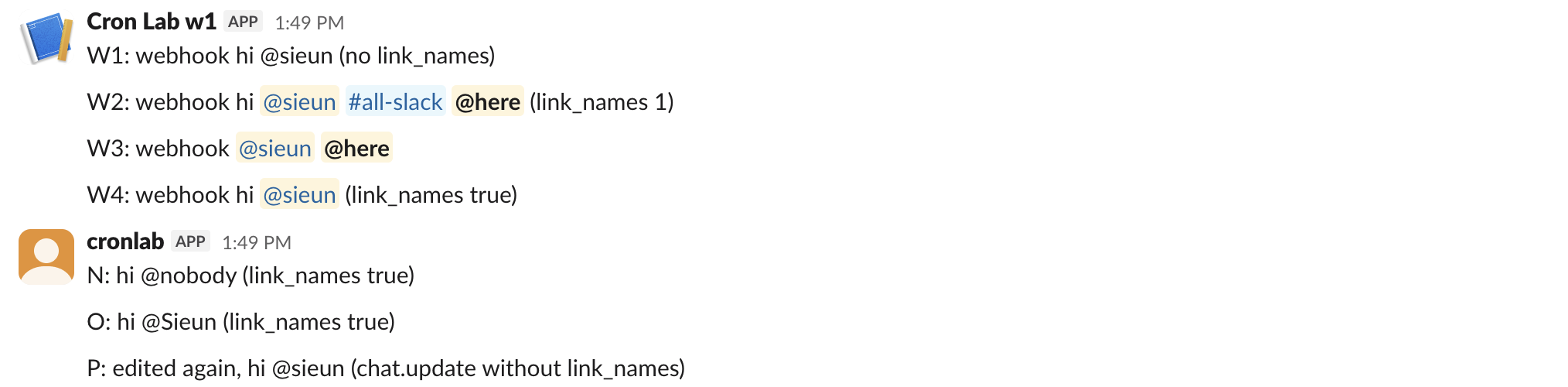
| Webhook body | Stored text |
|---|---|
{"text": "hi @sieun"} | hi @sieun |
{"text": "hi @sieun #all-slack @here", "link_names": 1} | hi <@U0B7L4YK420> <#C0B7A5A5N3D> <!here> |
{"text": "<@U0B7L4YK420> <!here>"} | unchanged, both are mentions |
{"text": "hi @sieun", "link_names": true} | hi <@U0B7L4YK420> |
So JSON 1 and true both work. If your webhook mentions are not working, the body is the first thing to check; our webhook mention guide covers the ID form for webhooks.
Edits are the trap. We posted P: original text, then called chat.update with hi @sieun and link_names=true, and the stored text became hi <@U0B7L4YK420>. A second chat.update with new @sieun text and no link_names stored plain @sieun. Slack does not remember the setting from the first post, so an edit must send it again or use the ID form.
The request we sent
This is the bot-token call for row B, as form fields to https://slack.com/api/chat.postMessage:
Authorization: Bearer xoxb-...
channel=C0CDUG7MRMZ
text=B: hi @sieun (link_names true)
link_names=true
The response's message.text already shows the result, so you can check a mention without a second read:
{"ok": true, "channel": "C0CDUG7MRMZ",
 "message": {"text": "B: hi <@U0B7L4YK420> (link_names true)"}}
The same works with a user token (row J in our test). If you are not sure which token type you hold, our bot token page explains the prefixes and scopes. To preview how <@U...>, <!here> and <#C...> render before you post, paste the text into our Slack message formatter.
Should you use link_names?
Use the ID forms in code you keep: <@U...>, <#C...>, <!here>, <!channel> and <!subteam^S...>. They worked with no argument on every surface we tried, and they survive a user renaming themselves. link_names is fine for a quick script or a human-typed message that you pass through, as long as you accept that a misspelled or capitalized name turns into plain text with no error.
Stop Jiggling Your Mouse.
Join hundreds of remote workers who never worry about their Slack status. Set it up once, stay green forever.
Related Articles
Send a Slack Message From a Cron Job: 4 Failures We Hit and the Fix
A Slack webhook call that works in your terminal often fails from cron. We ran six crontab entries and a launchd agent on a Mac for 10 minutes, logged each failure (empty env var, % in crontab, JSON quoting, macOS privacy block) and the script that posted every minute.
Slack Outgoing Webhooks: Payload, Trigger Words and Timeout, Tested
Slack's legacy Outgoing WebHooks still install on a Free workspace in November 2026. We set one up, sent 15 trigger messages through a tunnel, and logged the exact payload, how trigger words match, which replies Slack posts and when it gives up.
Slack DND API: dnd.setSnooze, dnd.info and endSnooze, Tested
Slack's Do Not Disturb API is five methods: dnd.setSnooze, dnd.endSnooze, dnd.endDnd, dnd.info and dnd.teamInfo. Setting DND needs a user token. We ran each one on October 31 and found that dnd.endSnooze inside a scheduled DND window also ends the schedule.