
Can My Employer See My Copilot Chats? Yes, on a Work Account
Yes, on a work or school account. Microsoft 365 Copilot saves every prompt and answer in a hidden folder of your work mailbox, where compliance admins can search and export it with Microsoft Purview eDiscovery. Your manager cannot open it. Who sees what, how deleting history works, and what a personal Copilot account keeps private.
Yes, if you use Copilot with your work or school account. Microsoft's own privacy page says that when you use Microsoft 365 Copilot, "the stored data includes the user's prompt and Copilot's response", and that "admins can use Content search or Microsoft Purview" to view and manage it. The copies sit in a hidden folder of your work mailbox, next to your email and Teams chats. Your manager cannot open your Copilot history. A compliance admin with an eDiscovery role can search it, export it and keep it after you delete it. On a personal Microsoft account, your employer has no access to your Copilot chats through the account, though a company-managed laptop can still capture what you type.
Microsoft has renamed Microsoft 365 Copilot to Microsoft Copilot, and Microsoft 365 Copilot Chat to Microsoft Copilot Chat. The rules below apply to both, whenever you sign in with a work account. GitHub Copilot is a different product and is not covered here.
The same question for other tools is answered in can my employer see my ChatGPT history and can my employer see my Claude chats. If what you want is less visibility in Slack, Slack Green keeps your Slack status green from a server during the hours you set, with no software on the work laptop.
Who can see your Copilot chats
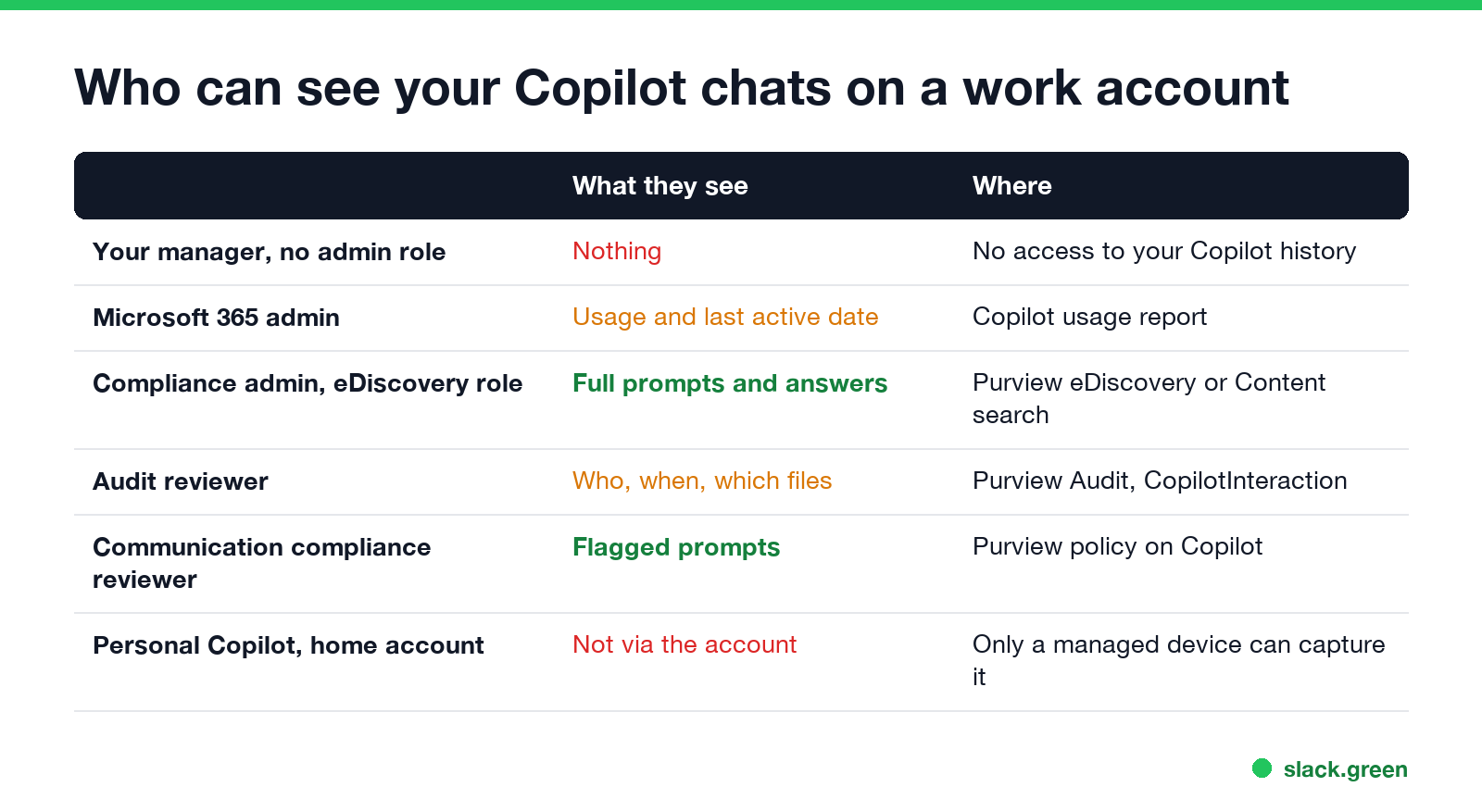
| Who | What they can see | Where |
|---|---|---|
| Your manager, with no admin role | Nothing | Copilot has no manager view of your history |
| Microsoft 365 admin | Whether you use Copilot and your last activity date per app | Copilot usage report in the Microsoft 365 admin center |
| Compliance admin with an eDiscovery role | Your full prompts and Copilot's answers | Microsoft Purview eDiscovery or Content search |
| Audit reviewer | Who used Copilot, when, in which app, and which files it read | Purview Audit, records of type CopilotInteraction |
| Communication compliance reviewer | Prompts and answers that match a policy | Purview Communication Compliance |
| Teams admin or an app using the export API | Copilot chats inside Teams | Microsoft Teams Export APIs |
In a small company one IT person often holds several of these roles, so "IT can read my Copilot chats" is usually true in practice.
Sources are Microsoft Learn pages read on 27 September: "Data, Privacy, and Security for Microsoft Copilot", "Learn about retention for Copilot & AI apps", "Audit logs for Copilot and AI applications", "Configure a Communication Compliance policy to detect generative AI interactions" and "Microsoft Copilot usage report".
Where your Copilot prompts are stored
Every time you ask Copilot something in Word, Excel, PowerPoint, Outlook, Teams or Copilot Chat, Microsoft stores the prompt and the answer, including the citations to the files it used. Microsoft calls this record your Copilot activity history. It is what lets you scroll back through old Copilot chats.
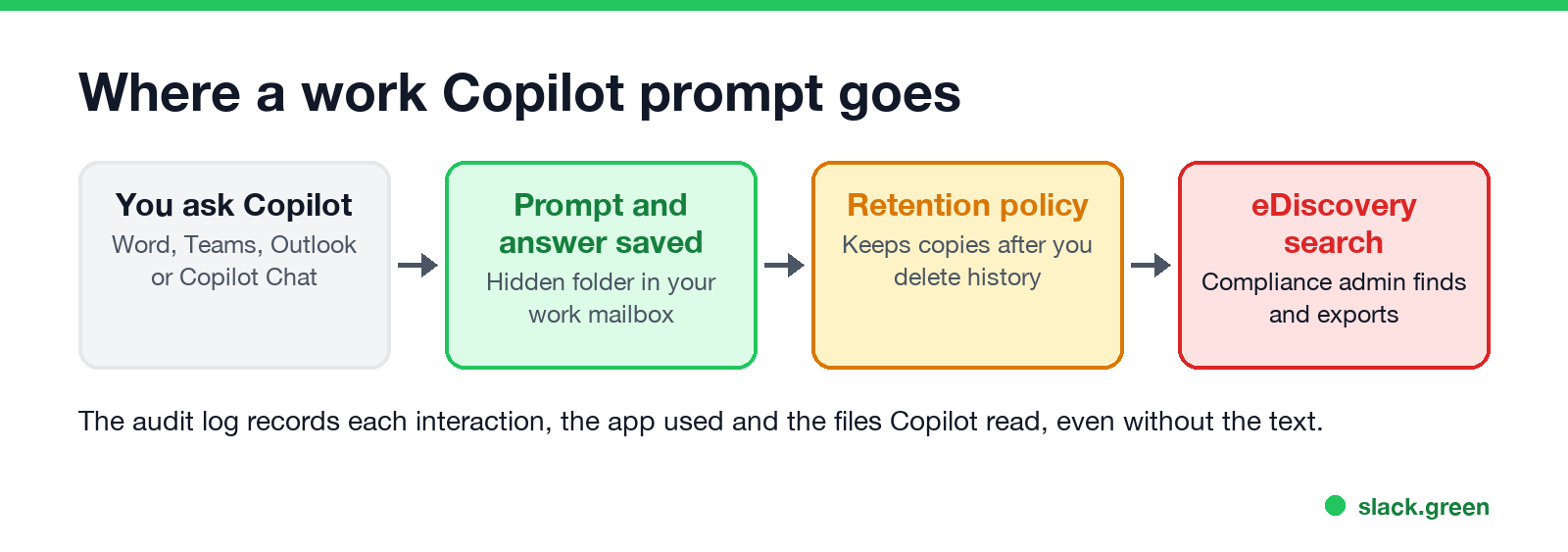
Behind the scenes, Microsoft uses your Exchange Online mailbox. The retention article says the data "is stored in a hidden folder in the mailbox of the user who runs the AI app". Neither you nor an admin can browse that folder in Outlook. It exists so that compliance admins can search it with eDiscovery tools, the same tools they use for email and Teams chats.
That has two consequences:
- • Anything that holds your mailbox holds your Copilot chats. A litigation hold, an eDiscovery hold or a retention policy on your mailbox also keeps your Copilot history.
- • A search for a word finds it in Copilot too. When a legal team searches your mailbox for a project name, your Copilot prompts that mention it come back with your emails.
What admins can do with your Copilot history
Never appear "away" on Slack again
Cloud-based. No downloads. Works 24/7 even when your laptop is off.
Search and export it. A compliance admin opens Microsoft Purview, picks your mailbox and searches for Copilot interactions. The results can be reviewed or exported. This is the same step used for reading Teams chats, so companies that already run eDiscovery get Copilot with no extra setup.
Keep it after you delete it. You can delete your Copilot activity history from the My Account portal. If a retention policy or a hold applies, Microsoft moves the data to another hidden folder, SubstrateHolds, and keeps it there until the policy allows deletion. Your history looks empty to you, while eDiscovery still finds the copies.
Log every interaction. Purview Audit writes a CopilotInteraction record each time you use Copilot. The record names the user, the time, the host app (for example BizChat for Copilot Chat, or Word) and the files, sites and emails Copilot read to answer. It does not carry the prompt text, but it shows which documents you asked about.
Scan it for policy matches. Communication Compliance can analyze Copilot prompts and responses for things like confidential data, harassment or regulatory terms, and send matches to named reviewers. Microsoft says usernames are pseudonymized by default in that tool, and investigators must be opted in by an admin.
Count your usage. The Copilot usage report shows each enabled user's last activity date in each Copilot app, and it can be exported to a spreadsheet. It shows that you use Copilot, not what you asked.
Personal Copilot on a work computer
The consumer Copilot app, signed in with your own Microsoft account, is not part of your company's Microsoft 365. Your employer cannot export or search it through the account.
The device is a separate question. Microsoft's retention article lists "Microsoft Copilot (consumer version)", ChatGPT, Google Gemini and DeepSeek as AI apps that Purview can cover when a company sets up a collection policy that captures content. That capture happens on company-managed devices and browsers. On a work laptop, assume that what you type into any AI website can be recorded. Monitoring software, web filters and screen capture tools add to that; see can my employer see my screen and how employers monitor remote workers. For a work Google account, Gemini chats are searchable in Google Vault; see can my employer see my Gemini chats.
On your own phone or home computer, with your personal Microsoft account, your employer has no access to your Copilot chats.
How to tell which Copilot you are using
Copilot vs ChatGPT vs Claude at work
Never appear "away" on Slack again
Cloud-based. No downloads. Works 24/7 even when your laptop is off.
| Microsoft Copilot (work) | ChatGPT (Business, Enterprise) | Claude (Team, Enterprise) | |
|---|---|---|---|
| Where chats are stored | Hidden folder in your work mailbox | OpenAI workspace | Anthropic organization |
| Who can search your chats | Compliance admins with eDiscovery | Enterprise: owner-granted Compliance API key | The Primary Owner, by export |
| Kept after you delete history | Yes, if a retention policy or hold applies | Enterprise compliance logs, 30 days | Not in later exports |
| Manager reads chats in the app | No | No | No |
Copilot is the most searchable of the three, because it reuses the mailbox tools most companies already run.
FAQ
Can my manager see my Copilot history? Not in Copilot. A manager without an admin role has no view of your history. A compliance admin can search it and share the results with your manager.
Can my employer see what I ask Copilot in Teams? Yes. Copilot chats in Teams are stored like other Copilot interactions, and admins can also read them through the Teams Export APIs.
Does deleting my Copilot history delete it for my employer? Not if a retention policy or a legal hold applies to your mailbox. The copies move to a hidden folder where eDiscovery still finds them.
Can my employer see my Copilot chats on my personal account? Not through the account. On a company-managed laptop or browser, the device can still record what you type.
Stop Jiggling Your Mouse.
Join hundreds of remote workers who never worry about their Slack status. Set it up once, stay green forever.
Related Articles
Can My Employer See What I Watch on YouTube at Work?
On a work laptop or the office network, your employer can see that you used YouTube, when, and for how long. With HTTPS inspection or monitoring software, they can see which videos, because the video address and the browser tab title both name it. On your own phone on mobile data, they see nothing.
Can My Employer See My iMessages on a Work Mac?
Not through device management or the network: Jamf or Intune cannot read Messages, and iMessage is end-to-end encrypted. But if you sign in to Messages on a work Mac, your texts are stored on that Mac, where monitoring screenshots, backups and admin access can reach them. How to check, and how to take iMessage off the Mac without deleting it from your iPhone.
Can My Boss See My Private Outlook Calendar Events?
Usually not the details. When you mark an Outlook event Private, someone who can read your calendar sees only Private appointment, the time and a lock. The exceptions are delegates you gave Can view private items, the people invited to the event, anyone with full access to your mailbox in new Outlook or the web, and compliance admins. How to check who has which access, and what Private does not hide.