
How to Keep Your Computer Awake While Downloading
A download stops when the computer sleeps, not when the screen turns off. Block sleep for the length of the download on Windows or Mac, let the display go dark, and the file finishes. Settings, commands and a script that stops by itself.
To keep your computer awake while downloading, stop it from sleeping and let the screen turn off. Sleep pauses the network and the disk, so a Steam game, a browser file or an update stops where it was. A dark screen stops nothing. On Windows, set Sleep to Never when plugged in, or run PowerToys Awake for a set time. On a Mac, run caffeinate -i in Terminal or start an Amphetamine session that ends when the file is done. Then undo it, because a computer that never sleeps uses power all night.
Keeping a computer awake is a different job from keeping an app active. Slack still shows you away after 10 minutes with no input in the Slack window, awake or not. Slack Green keeps your Slack status green from a server during the hours you pick, with the computer asleep.
Does a download stop when the PC sleeps?
Yes. In sleep, Windows and macOS stop running apps, park the disk and cut most network traffic. Steam shows the download as paused and picks it up after you wake the computer. A browser download often fails with a network error; Chrome and Edge can resume it from the downloads page if the server supports resuming, and some servers do not. Hibernate and shut down stop a download the same way.
The screen is a separate timer. When only the display turns off, the computer keeps running and the download keeps going. A locked screen is the same: apps run behind the lock. That split is the whole trick.
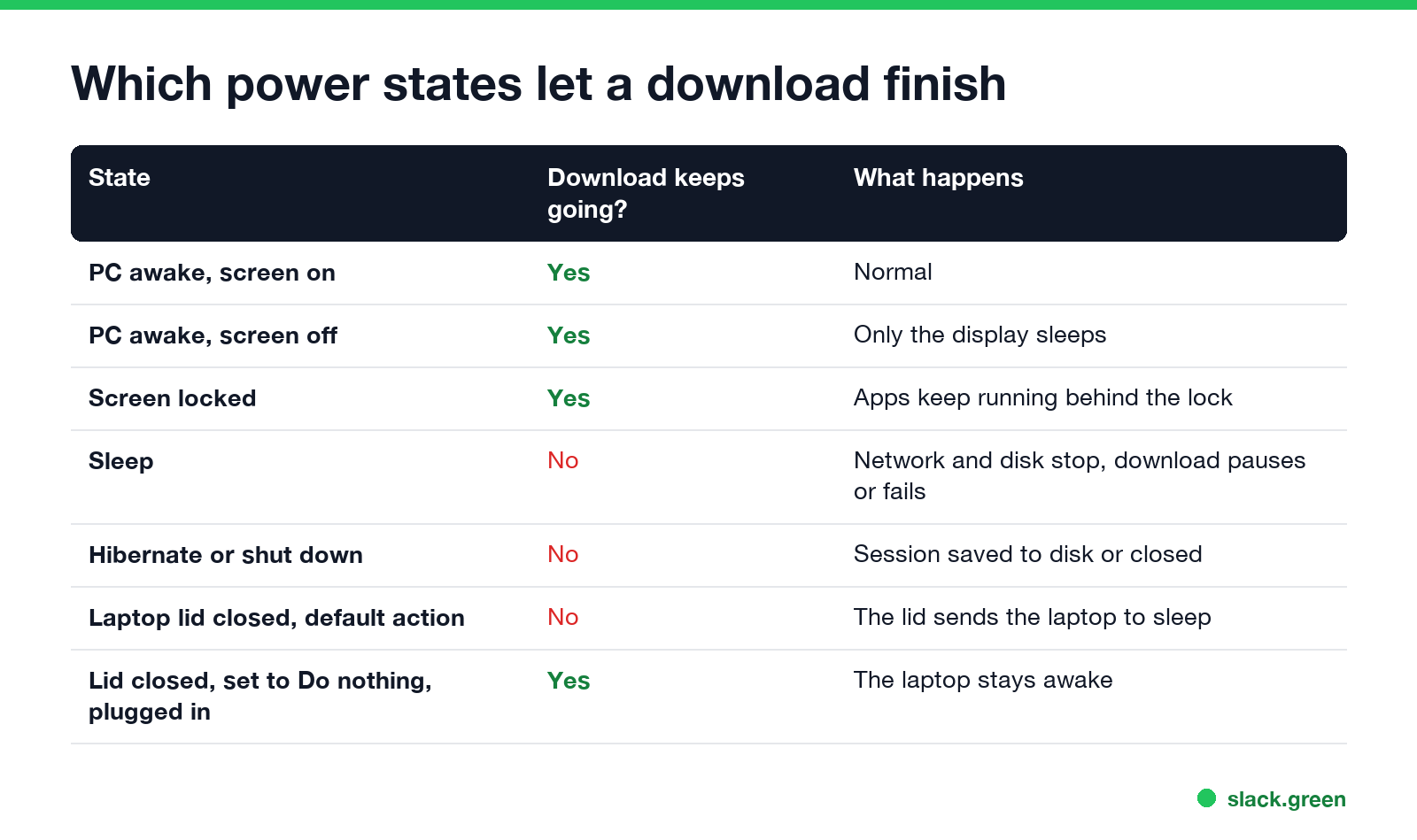
| State | Download keeps going? |
|---|---|
| Awake, screen on | Yes |
| Awake, screen off | Yes |
| Screen locked | Yes |
| Sleep | No, it pauses or fails |
| Hibernate or shut down | No |
| Laptop lid closed, default action | No, the lid starts sleep |
| Lid closed, set to Do nothing, plugged in | Yes |
Windows 11 laptops with Modern Standby keep a thin network link in standby for mail and notifications. It is not built for a 60 GB game, so treat it as sleep.
Keep Windows 11 awake while downloading
The settings route takes a minute and needs no install:
- Open Settings > System > Power & battery.
- Open Screen, sleep & hibernate timeouts (called Screen and sleep on older builds).
- Set When plugged in, put my device to sleep after to Never.
- Leave When plugged in, turn off my screen after at 5 or 10 minutes. The download does not need the screen.
On Windows 10 the same two drop-downs are under Settings > System > Power & sleep. Set sleep back to 30 minutes when the download is done, or the PC stays on until you notice.
The same change from a Command Prompt, no admin rights needed for your own power plan:
:: never sleep on AC power, turn the screen off after 10 minutes
powercfg /change standby-timeout-ac 0
powercfg /change monitor-timeout-ac 10

:: after the download, go back to sleeping after 30 minutes
powercfg /change standby-timeout-ac 30
If the PC still falls asleep, powercfg /requests lists what is holding it awake, and a company laptop may have a sleep policy from IT that wins over your settings. More on that case in how to stop a computer from sleeping.
PowerToys Awake: a timer that turns itself off
Microsoft's free PowerToys has a module called Awake. Pick Keep awake for a time interval, set 3 hours, and Windows goes back to its normal plan when the time is up. Turn off Keep screen on so the display can still sleep. This is the better choice for a one-off download, because you cannot forget to undo it. We tested what Awake does and does not do in PowerToys Awake and Slack.
Steam: keep the computer awake while downloading
Never appear "away" on Slack again
Cloud-based. No downloads. Works 24/7 even when your laptop is off.
Steam does not block sleep while it downloads, and players have asked Valve for that switch on the Steam forums for years. Use one of the Windows or Mac methods on this page for the length of the download. Two Steam habits help:
When the PC wakes after sleeping mid-download, Steam resumes from where it stopped. You lose time, not the downloaded data.
A script that keeps Windows awake until the download stops
A setting you must remember to undo is the weak spot. This PowerShell script blocks sleep while files in a folder are still being written, then lets Windows sleep again. It uses the same Windows call, SetThreadExecutionState, that video players use.
# awake-while-downloading.ps1 - no sleep while files in the folder are still changing
param(
    [string]$Folder = "$env:USERPROFILE\Downloads",
    [int]$QuietMinutes = 5
)
$sig = '[DllImport("kernel32.dll")] public static extern uint SetThreadExecutionState(uint esFlags);'
$power = Add-Type -MemberDefinition $sig -Name 'Power' -Namespace 'Win32' -PassThru

# ES_CONTINUOUS (0x80000000) | ES_SYSTEM_REQUIRED (0x1): no sleep, the screen may still turn off
$null = $power::SetThreadExecutionState([uint32]2147483649)
try {
    do {
        Start-Sleep -Seconds 60
        $since = (Get-Date).AddMinutes(-$QuietMinutes)
        $busy = Get-ChildItem $Folder -Recurse -File -ErrorAction SilentlyContinue |
            Where-Object { $_.LastWriteTime -gt $since } | Select-Object -First 1
    } while ($busy)
} finally {
    $null = $power::SetThreadExecutionState([uint32]2147483648)   # back to normal
}
Write-Host "No writes for $QuietMinutes minutes. Sleep is allowed again."
Start it after the download begins. For Steam, point it at the library's download folder:
.\awake-while-downloading.ps1 -Folder "C:\Program Files (x86)\Steam\steamapps\downloading"If Windows blocks the script, run Set-ExecutionPolicy -Scope CurrentUser RemoteSigned once. The full keep-awake script, with a version that also keeps the screen on, is in keep a computer awake with PowerShell.
Keep a Mac awake while downloading
The built-in caffeinate command blocks idle sleep and lets the display turn off:
# no idle sleep for 3 hours (10800 seconds), the display can still sleep
caffeinate -i -t 10800

# no idle sleep until ~/Downloads has had no writes for 5 minutes
caffeinate -i -w $$ &
while [ -n "$(find ~/Downloads -type f -mmin -5 | head -n 1)" ]; do sleep 60; done
We ran the second version on macOS 26: pmset -g assertions listed the caffeinate hold while files were changing, and the hold ended by itself once they stopped. The flags are explained in caffeinate on Mac.
Two other routes:
A MacBook with the lid closed sleeps unless it has power, an external display and a keyboard or mouse attached. The workarounds are in keep a laptop awake with the lid closed.
Pick a method
Never appear "away" on Slack again
Cloud-based. No downloads. Works 24/7 even when your laptop is off.
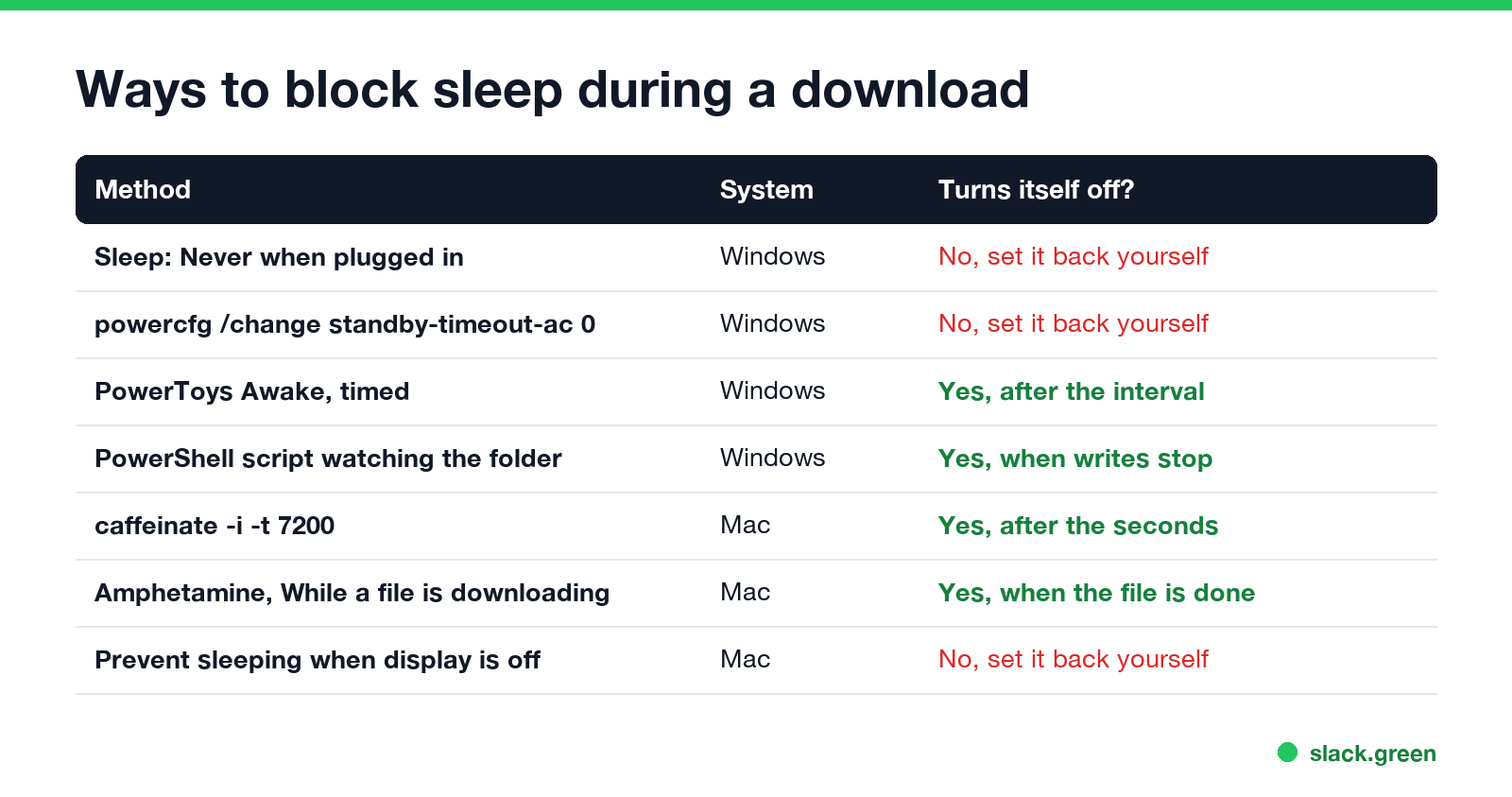
For one download, pick a method that ends by itself: PowerToys Awake with a timer, the script above, caffeinate -t, or Amphetamine's download session. Change the sleep setting to Never only if you download big files often, and keep the screen timeout short so the display does not stay lit all night. If battery is the worry, does keeping a laptop awake drain the battery has the numbers.
FAQ
Does downloading stop when the PC sleeps? Yes. Sleep stops apps, the disk and the network. Steam pauses and resumes on wake; a browser download may fail.
Will my download continue if the screen turns off? Yes. Turning off the display does not stop the computer. Only sleep, hibernate or shutting down stops the download.
Can Windows 11 download while asleep? Not a large download. Modern Standby keeps a small link for notifications, not for games or big files.
Does Steam keep the computer awake while downloading? No. Steam does not block sleep. Set Windows to never sleep when plugged in, or use PowerToys Awake for the length of the download.
Does locking the computer stop a download? No. A locked computer keeps running. Downloads continue behind the lock screen.
Does keeping the computer awake keep Slack green? No. Slack counts only input inside its own window and shows you away after 10 minutes without it.
Stop Jiggling Your Mouse.
Join hundreds of remote workers who never worry about their Slack status. Set it up once, stay green forever.
Related Articles
How to Stop the Screen Turning Off During a Presentation
PowerPoint and Keynote hold the screen on in slide show mode. A PDF, a browser deck or a window shared in Teams or Zoom does not, so the screen dims mid-talk. How to keep it on for the length of the talk on Windows and Mac, without changing your settings for good.
Can My Employer See My Browsing If I Use a VPN? It Depends Whose
A personal VPN hides the sites you visit from the office network, but not from monitoring software, a managed browser or IT on a work laptop. The company VPN shows your employer every site it carries. What each setup hides.
Teams Status on Multiple Devices: The Last Device You Used Wins
Signed in to Teams on a computer and a phone? Your status comes from the device you used most recently. That is why a quick look at your phone can turn you Away, and why a phone in your pocket shows Away instead of Offline at night.