
Side Eye Emoji for Slack: Built-in Picks and a Custom :side-eye:
Slack has no side eye emoji. The closest built-in ones are 🙄 :face_with_rolling_eyes: and 😒 :unamused:, and 🫡 :saluting_face: is built in too. For a real side eye, slay or same emoji, make a custom one from a photo or text and add it with Add Emoji. Codes, meme ideas and the steps.
Slack has no built-in side eye emoji; :side_eye: and :side-eye: both return "invalid name" when you try to react with them. The closest emoji every workspace already has are 🙄 :face_with_rolling_eyes:, 😒 :unamused: and 🤨 :face_with_raised_eyebrow:. For the real meme, add a custom :side-eye: emoji from a photo or a GIF: crop it to the eyes, keep it under 128 KB, and upload it with Add Emoji.
We build Slack Green, which keeps your Slack status green from our servers during the hours you set. We also make the free Slack emoji maker, which turns a photo, GIF or a word into an emoji file Slack accepts, with effects like party and intensifies.
Built-in Slack emoji that work as a side eye
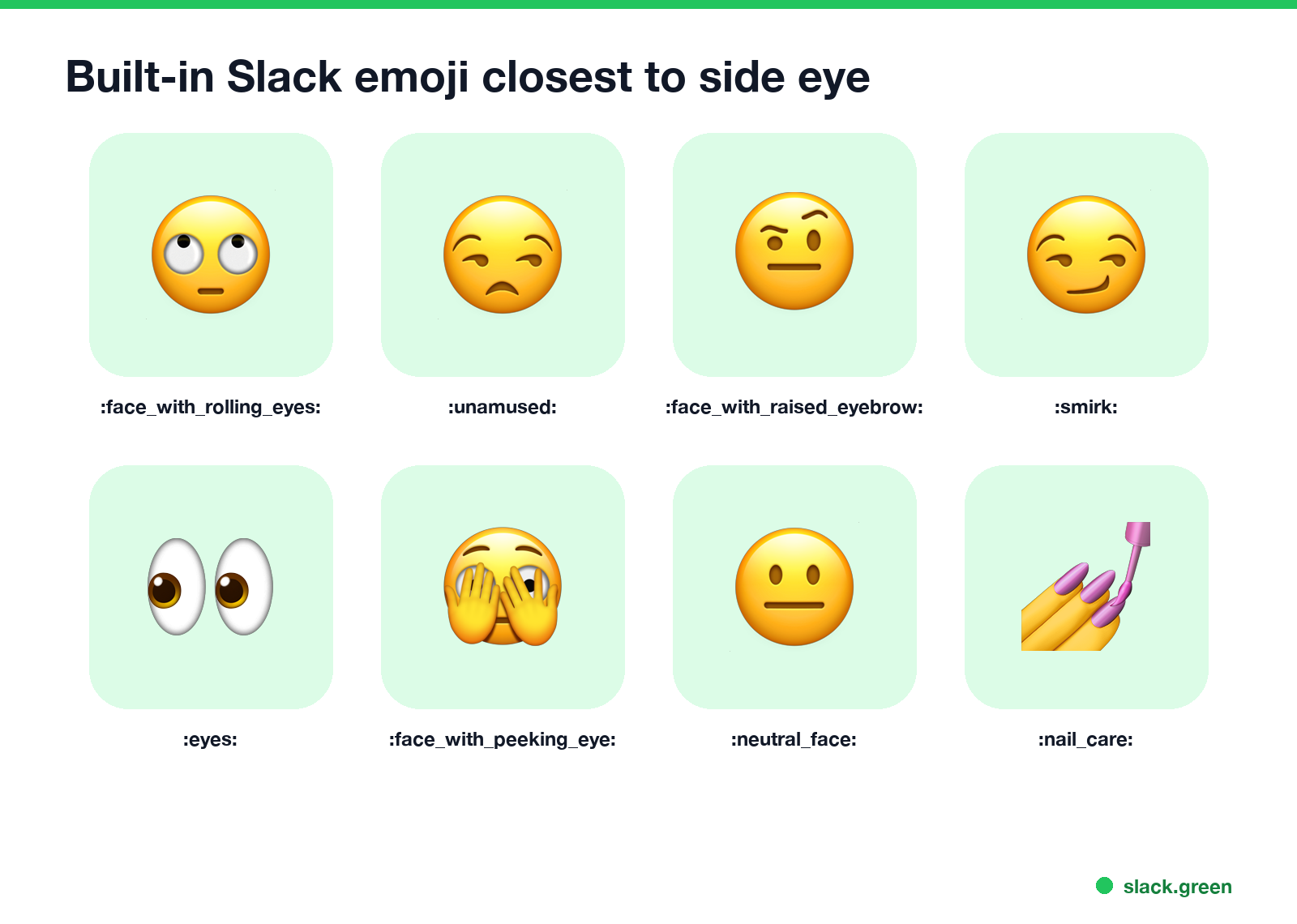
We checked every name below on 28 September 2026 by adding it as a reaction in a Slack workspace. All of them are in the standard set, so they work in every workspace without uploading anything.
| Emoji | Code | How it reads |
|---|---|---|
| 🙄 | :face_with_rolling_eyes: | "Really?" The strongest side eye |
| 😒 | :unamused: | Unimpressed, looking away |
| 🤨 | :face_with_raised_eyebrow: | Suspicious, "hmm" |
| 😏 | :smirk: | Knowing look |
| 👀 | :eyes: | Watching, or "I'm on it" |
| 🫣 | :face_with_peeking_eye: | Peeking, can't look |
| 🫡 | :saluting_face: | Salute, "on it, boss" |
| 💅 | :nail_care: | Slay, unbothered |
At work, 👀 usually means "I'm looking at this", not a side eye. What it means as a reaction is in what does the eyes emoji mean in Slack.
Meme emoji people add to Slack
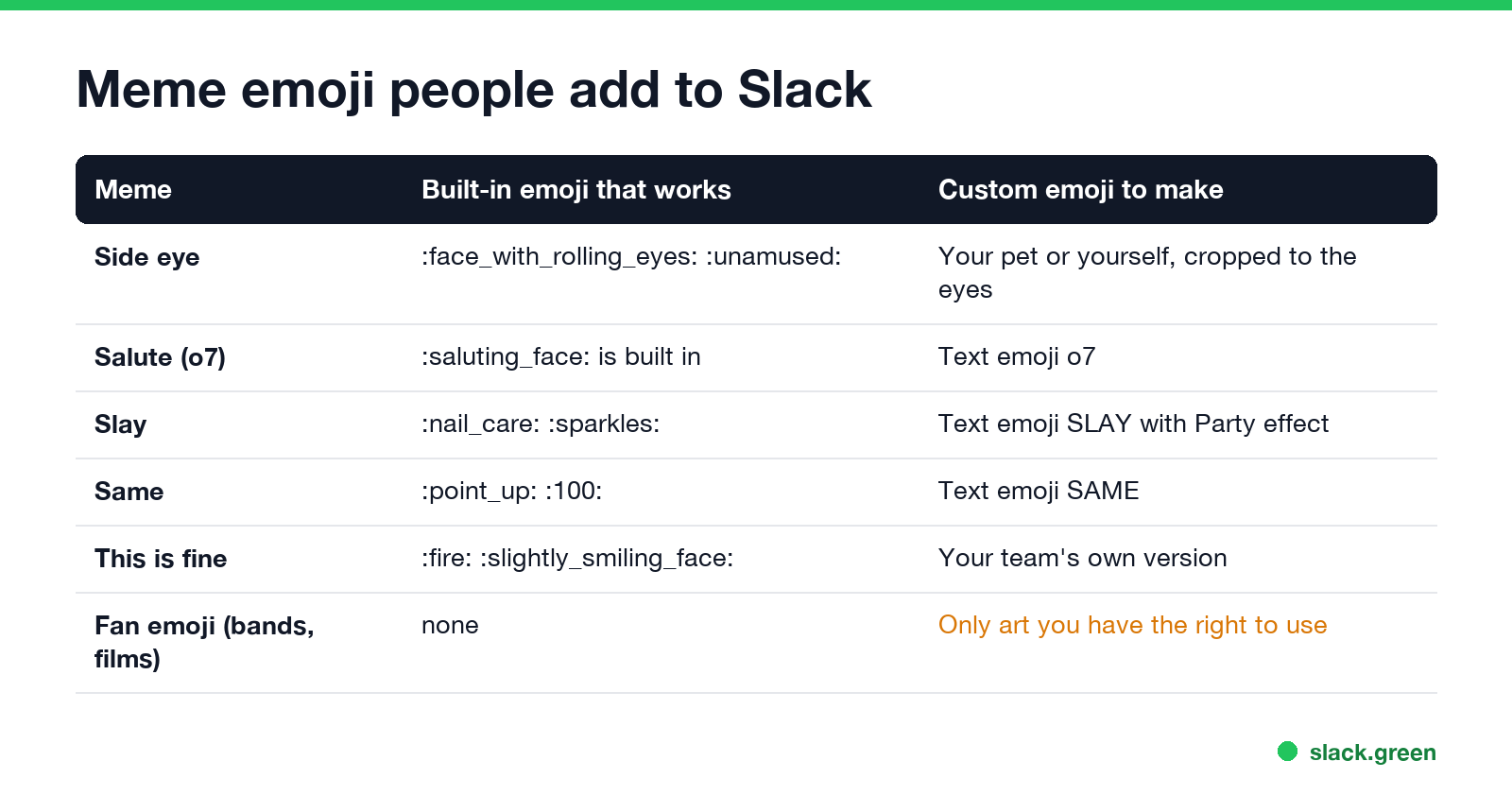
- • Side eye. A photo of your cat, dog or yourself, cropped tight to the eyes. It reads better at 22 pixels than a full face.
- • Salute. 🫡
:saluting_face:is built in. Gamers use the texto7, which works as a text emoji. - • Slay. A text emoji that says SLAY, with the party effect, or 💅
:nail_care:plus ✨:sparkles:. - • Same. A text emoji that says SAME, the quickest "me too" reaction.
- • Fan emoji such as Taylor Swift or Star Wars. Directory sites like slackmojis.com host fan-made versions. Upload only art you have the right to use; every custom emoji is visible to the whole workspace, and admins can remove it.
For more, see our Slack emoji ideas list and the ready-made sets in Slack emoji packs.
Make a custom side eye or slay emoji
Never appear "away" on Slack again
Cloud-based. No downloads. Works 24/7 even when your laptop is off.
This is the emoji maker with the word SLAY in the text tab. It draws the emoji at 128 by 128 pixels, shows it at 16, 22 and 32 pixels on light and dark themes, and checks the 128 KB limit before you download.
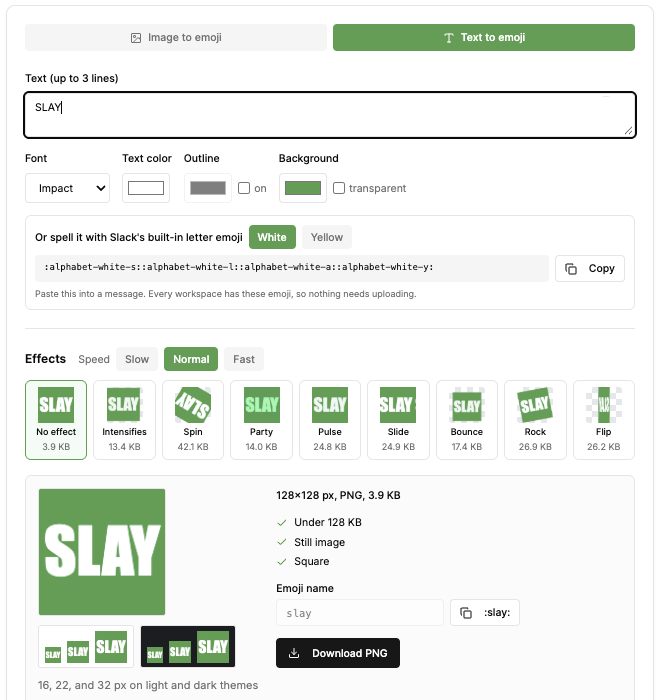
:slay:.If you already have a side eye GIF that is too big, shrink it with the Slack emoji resizer. Transparent backgrounds look cleaner in dark mode; see how to make an emoji background transparent for Slack.
Add it to Slack
side-eye, and click Save.:side-eye: on any message.Slack asks for a square JPG, PNG or GIF under 128 KB, and animated GIFs can have up to 50 frames. If Add Emoji is missing, your admin has limited who can add emoji; the full steps and fixes are in how to add custom emoji to Slack. If it uploads but does not show, see Slack custom emoji not showing.
FAQ
Is there a side eye emoji in Slack?
No. The closest built-in ones are 🙄 :face_with_rolling_eyes: and 😒 :unamused:. For a real side eye, upload a custom emoji.
Does Slack have a salute emoji?
Yes. 🫡 :saluting_face: is in the standard set.
What is the slay emoji in Slack?
There is no built-in slay emoji. Use 💅 :nail_care: or make a SLAY text emoji.
Can I use Taylor Swift or Star Wars emoji in Slack? Only as custom emoji your workspace uploads. Use images you have the right to share, because everyone in the workspace can see them.
Stop Jiggling Your Mouse.
Join hundreds of remote workers who never worry about their Slack status. Set it up once, stay green forever.
Related Articles
Slack Emoji for Approved, Perfect and Sounds Good
The Slack emoji for approved is ✅ :white_check_mark:. For perfect, use 💯 :100: or 🤌 :pinched_fingers:; for sounds good or sure, 👍 :+1: or 👌 :ok_hand:. Every code checked in Slack, what each one means to readers, custom LGTM and SGTM emoji, and a pinned legend for approval channels.
Slack Emoji for OOO, PTO and Days Off
The usual Slack emoji for OOO is 🌴 :palm_tree:, with ✈️ :airplane: for travel and 🗓️ :spiral_calendar_pad: for planned PTO. Enterprise's built-in Out of office status uses ⛔. Codes for vacation, upcoming PTO, sick days, holidays and outages, custom :ooo: and :pto: emoji, and statuses to copy.
Slack Webhook curl Example, Plus Python and Node.js
Send a Slack message with one curl command: POST a JSON body with a text field to your incoming webhook URL, and Slack answers ok. Tested examples for curl, jq, Block Kit, Python with retries and Node.js, how to escape quotes and new lines, and what 400 invalid_payload and 429 mean in code.