
What Font Does Slack Use? Lato in the App, Salesforce Sans on the Site
Slack's desktop app and browser version use Lato for messages and menus, and Roboto Mono for code. slack.com uses Salesforce Sans and Salesforce Avant Garde. The logo is custom lettering. You can switch the app font to one of 10 options in Preferences.
Slack uses Lato for messages, channel names and menus in the desktop app and in the browser. Code and code blocks use Roboto Mono, with Monaco, Menlo or Consolas as backups. The slack.com website is different: body text is Salesforce Sans and headlines are Salesforce Avant Garde. The Slack logo wordmark is custom lettering, so there is no font file to download. You can change the app font in Preferences, Appearance, Font, where Slack offers 10 fonts.
We checked all of this on 28 September by reading the computed CSS in app.slack.com and the stylesheets on slack.com, and by opening the Font menu in a real workspace. Several pages that rank for this question say Slack uses your system font or Larsseit. The app itself says otherwise, and the script below lets you check it in under a minute.
A font change is cosmetic: it does not change how long Slack keeps you active. Slack still sets you to away after about 10 minutes with no input in the Slack window. Slack Green keeps your dot green from a server during the hours you set.
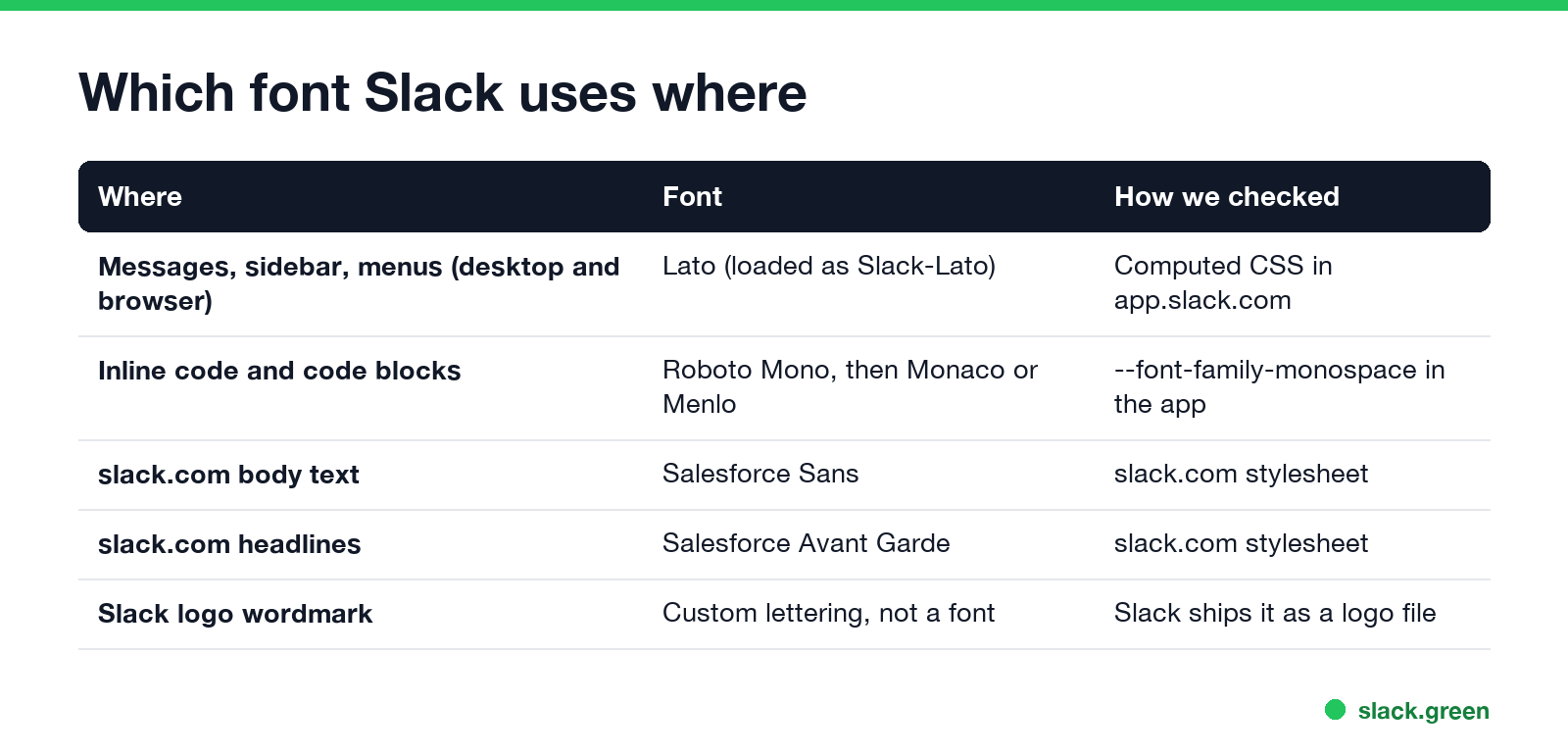
Which font Slack uses where
| Where | Font | Fallbacks in the CSS |
|---|---|---|
| Messages, sidebar, menus | Lato (loaded as Slack-Lato) | Slack-Fractions, appleLogo, sans-serif |
| Inline code and code blocks | Roboto Mono (Slack-Roboto-Mono) | Monaco, Menlo, Consolas, Courier New |
| slack.com body text | Salesforce Sans | system-ui, Segoe UI, Roboto, Helvetica Neue, Arial |
| slack.com headlines | Salesforce Avant Garde | the same system stack |
| Slack logo wordmark | Custom lettering | none, it is a logo file |
A few details from the CSS:
- • Lato is the default, and Slack hosts its own copy. The app loads it under the name
Slack-Latoin the regular, bold and black weights. Lato is a free typeface by Łukasz Dziedzic under the SIL Open Font License, so you can download it from Google Fonts and use it in your own work. - • A second Slack font sits behind Lato.
Slack-Fractionsis next in the stack, thenappleLogo, then the system sans-serif. - • Code has its own stack. The app sets
--font-family-monospaceto"Slack-Roboto-Mono", "Monaco", "Menlo", "Consolas", "Courier New", monospace. That is why a code block looks the same on a Mac and a Windows PC. How to make one is in how to make a code block in Slack. - • Other scripts get other fonts. For Japanese, Korean and Chinese text the site loads Noto Sans JP, KR, SC and TC.
Slack logo font and brand font
The lowercase "slack" wordmark next to the colored hash mark is drawn lettering, not a font you can type with. Use the official logo files from Slack's media kit instead of rebuilding the word in a font.
The brand typefaces on slack.com today are Salesforce Sans and Salesforce Avant Garde. Both are Salesforce's own fonts and are not for public download. If you want a similar look for a slide or a mockup, Lato is the closest free match to what people see in the Slack app every day.
How to change the font in Slack
Never appear "away" on Slack again
Cloud-based. No downloads. Works 24/7 even when your laptop is off.
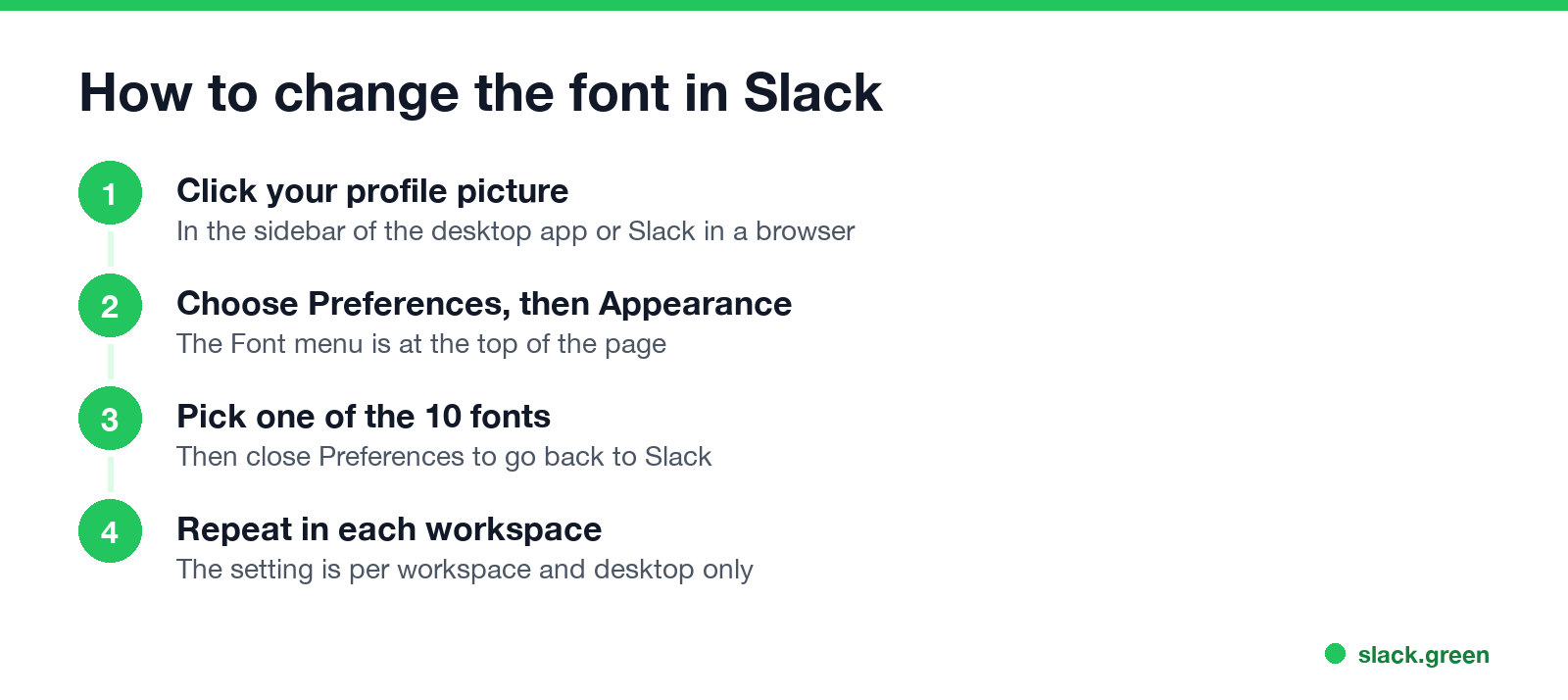
Slack's help center says the font setting is desktop only, works for Latin-based languages, and applies to both the desktop app and the browser. If you are in several workspaces, you set it in each one. The change affects only what you see; your coworkers still see their own font.
The same Appearance page has Custom theme, where you can set your own colors, for example a Halloween or Christmas theme from holiday Slack profile pictures. To make text bigger or smaller instead, use zoom. That is covered in how to change font size in Slack.
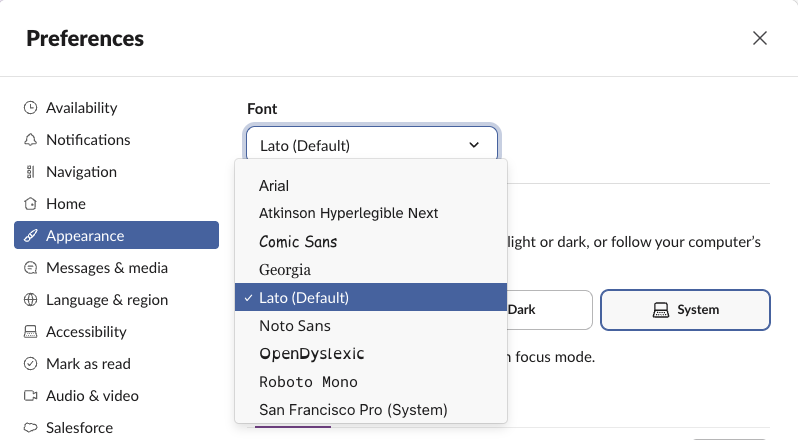
All 10 Slack font options
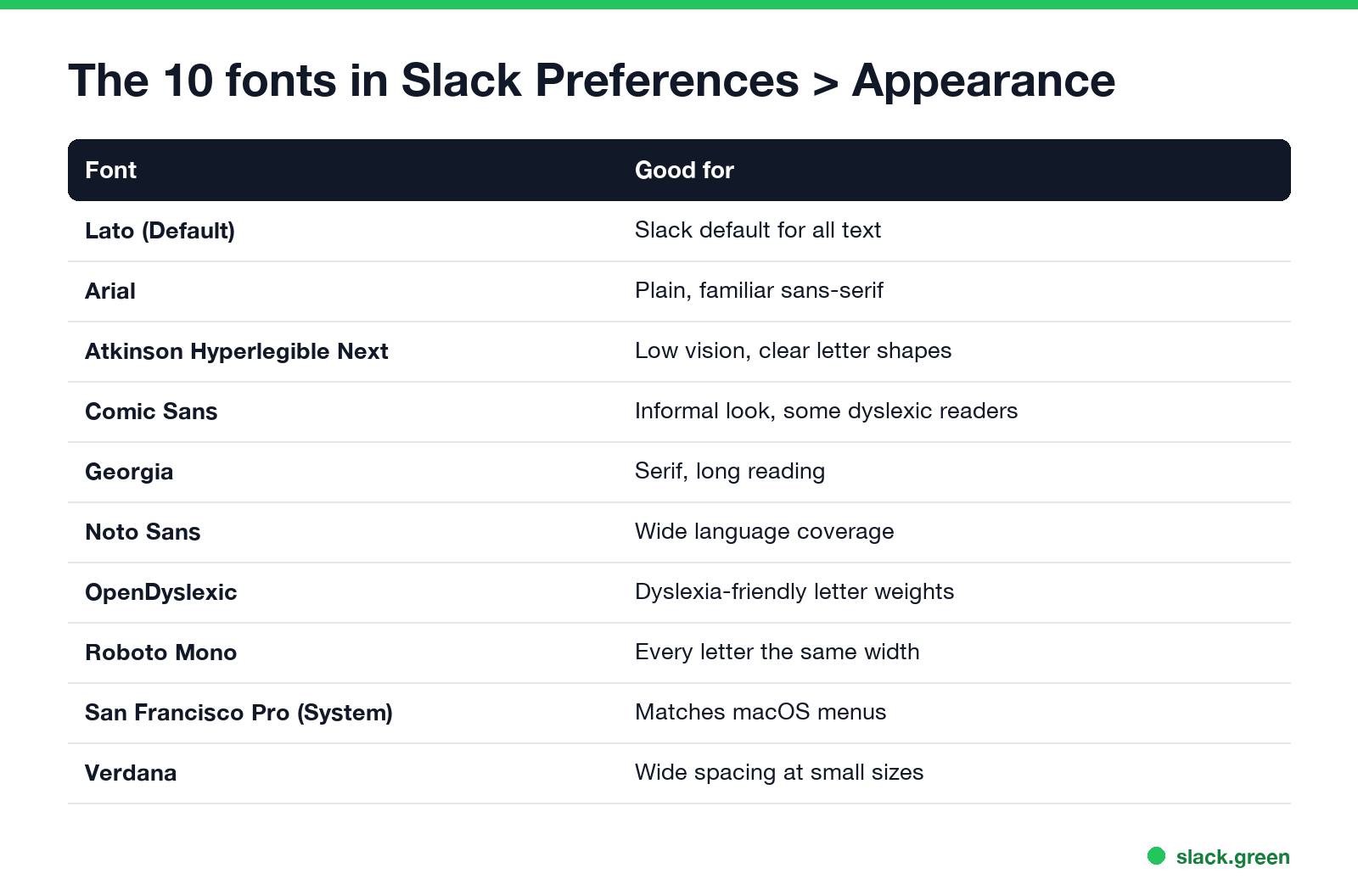
These are the entries in the Font menu, in Slack's order:
| Font | Type | When to pick it |
|---|---|---|
| Arial | Sans-serif | You want the plain look most apps use |
| Atkinson Hyperlegible Next | Sans-serif | You have low vision; the Braille Institute designed it so similar letters look different |
| Comic Sans | Casual | You like a looser look, or find it easier to read |
| Georgia | Serif | You read long threads and prefer serifs |
| Lato (Default) | Sans-serif | Slack's standard |
| Noto Sans | Sans-serif | You mix languages and want one consistent font |
| OpenDyslexic | Sans-serif | You have dyslexia; heavy letter bottoms keep letters from flipping |
| Roboto Mono | Monospace | You want every character the same width, like a code editor |
| San Francisco Pro (System) | Sans-serif | You want Slack to match macOS |
| Verdana | Sans-serif | You want wide spacing that stays clear at small sizes |
Check the font yourself in a browser
You can confirm the font on your own machine. Open Slack in Chrome, Edge or Firefox at app.slack.com, open the developer tools console (in Chrome, Cmd+Option+J on a Mac or Ctrl+Shift+J on Windows), and paste:
// Font stack for message text
console.log(getComputedStyle(document.body).fontFamily);

// Font stack for code
console.log(getComputedStyle(document.documentElement).getPropertyValue("--font-family-monospace"));

// Font files the page has actually loaded
console.log([...new Set([...document.fonts].filter(f => f.status === "loaded").map(f => f.family))]);
With the default setting the first line prints Slack-Lato, Slack-Fractions, appleLogo, sans-serif. After you pick another font in Preferences, run it again to see the new stack. The script only reads styles; it changes nothing.
Can you change the font of a Slack message?
Never appear "away" on Slack again
Cloud-based. No downloads. Works 24/7 even when your laptop is off.
No. Everyone sees messages in the font they picked for themselves, so you cannot send a message in Georgia or Comic Sans. What you can change is the formatting: bold, _italic_, strikethrough, underline, inline code and code blocks. Our free Slack message formatter shows how a message will look before you send it, and Markdown to Slack converts standard Markdown into Slack's format.
Two things to know about formatting:
[your text](the link) links for markup mode, an Underline button (Cmd+U on a Mac) and an Apply markdown formatting shortcut, Cmd+Shift+F on a Mac or Ctrl+Shift+F on Windows.mrkdwn), links still need the <https://example.com|text> form, and there is no underline.Sites that promise "Slack fonts" usually swap your letters for Unicode look-alikes such as 𝐛𝐨𝐥𝐝 or 𝓈𝒸𝓇𝒾𝓅𝓉. They show up in Slack, but screen readers read them letter by letter as math symbols and Slack search will not find the plain word. Use real formatting instead, as shown in how to bold text in Slack and how to underline in Slack.
FAQ
What font does Slack use?
Lato for messages and menus in the desktop app and browser, Roboto Mono for code. slack.com uses Salesforce Sans and Salesforce Avant Garde.
Is the Slack font Lato?
Yes. The app loads Lato under the name Slack-Lato, and the Font menu labels it "Lato (Default)".
What font is the Slack logo?
Custom lettering, not a downloadable font. Use the logo files from Slack's media kit.
Can I change the font in Slack?
Yes, on desktop and in the browser: profile picture, Preferences, Appearance, Font. There are 10 options, and the setting is per workspace.
Can I change the font on the Slack mobile app?
No. Slack's help says the font setting is desktop only. For bigger text on a phone, see how to change font size in Slack.
Can I use a font that is not in the list?
Not in the Slack app. The menu has 10 fixed options.
Why does my Slack font look different after an update?
Check Preferences, Appearance, Font; the setting may have changed or be set per workspace. If only the size changed, reset zoom with Cmd+0 or Ctrl+0.
Stop Jiggling Your Mouse.
Join hundreds of remote workers who never worry about their Slack status. Set it up once, stay green forever.
Related Articles
Slack Emoji for Approved, Perfect and Sounds Good
The Slack emoji for approved is ✅ :white_check_mark:. For perfect, use 💯 :100: or 🤌 :pinched_fingers:; for sounds good or sure, 👍 :+1: or 👌 :ok_hand:. Every code checked in Slack, what each one means to readers, custom LGTM and SGTM emoji, and a pinned legend for approval channels.
Tips for Working Across Time Zones: 10 Habits That Work
Working across time zones works when the team writes things down, keeps a short overlap window for live talk, says the zone with every time, and lets tools deliver messages in each person's working hours. Ten habits, a follow-the-sun handoff note, the Slack settings that help, and a script that shows your team's local times.
Slack Emoji for OOO, PTO and Days Off
The usual Slack emoji for OOO is 🌴 :palm_tree:, with ✈️ :airplane: for travel and 🗓️ :spiral_calendar_pad: for planned PTO. Enterprise's built-in Out of office status uses ⛔. Codes for vacation, upcoming PTO, sick days, holidays and outages, custom :ooo: and :pto: emoji, and statuses to copy.