
Slack: Download All Files From a Channel (Script and Test)
Slack has no download-all button for a channel. We uploaded 8 files, checked what the Files tab and search show, and ran a files.list script that saved all 8, after it first found only 4.
Slack has no button that downloads every file in a channel. In the app you download files one at a time from search results; to get all of them, run a short script against the Slack API. On 22 October 2026 we uploaded 8 files of different types to a test channel and tried both. The script saved all 8, but a run 30 seconds after the uploads found only 4, because Slack had not yet indexed the text files and the PDF.
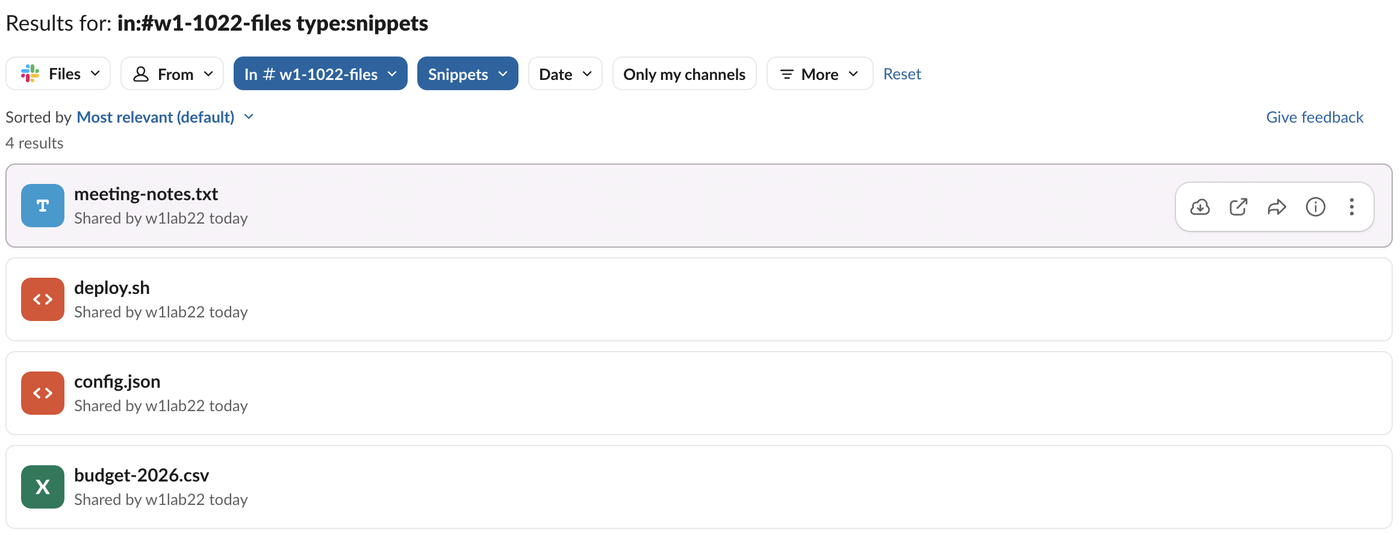
Find a channel's files in Slack
The quickest list is a search:
- Search for
in:#channel-name. - Open the result-type menu at the left of the filter bar (it starts on Messages) and pick Files. The menu shows a count for each type; ours read Messages 0, Files 4 for a snippet search.
- Add
type:to narrow it, for exampletype:snippets,type:pdfsortype:images. Slack search operators lists the rest.
Each result row has its own download button. There is no select-all, so a channel with 200 files means 200 clicks.
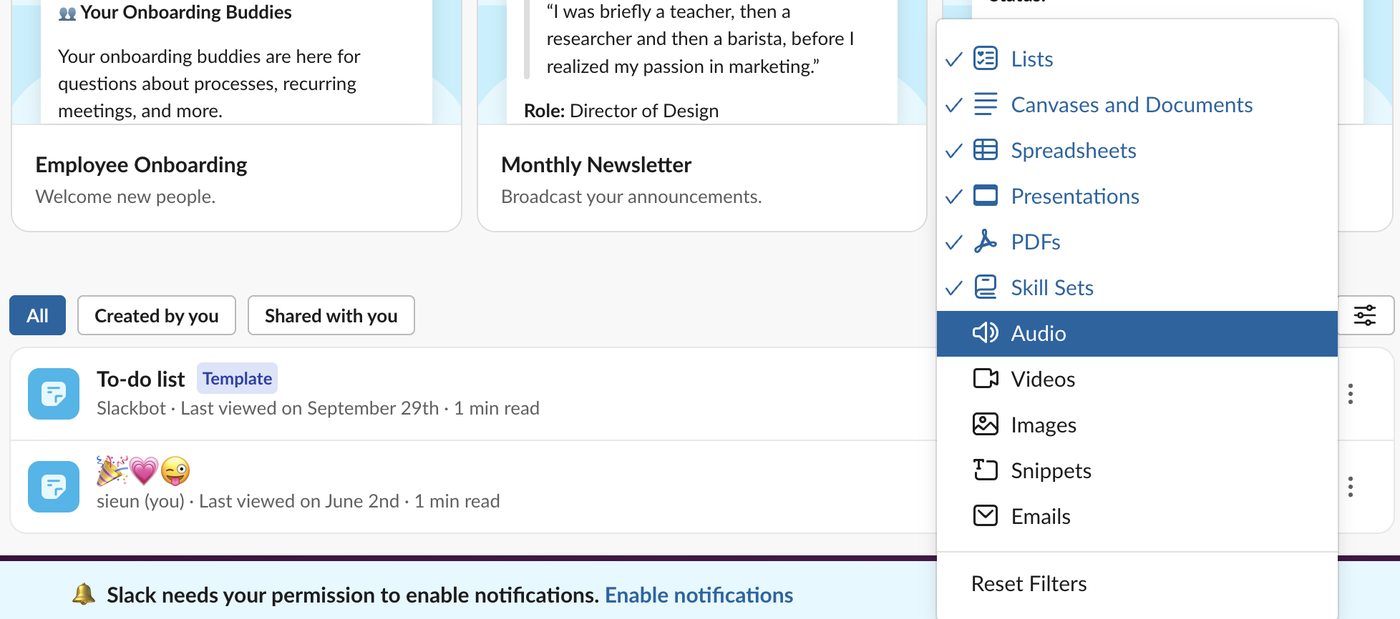
The Files button in the left rail is less useful for this than its name suggests. Its All files page opened on canvases and templates, and its type filter, 6 Types, was set to Lists, Canvases and Documents, Spreadsheets, Presentations, PDFs and Skill Sets. Images, Snippets, Audio, Videos and Emails were unticked, and none of our 8 uploads showed on the page.
Where downloads go
In the web app, the browser decides. Our click on the download button saved meeting-notes.txt straight to the Mac's Downloads folder, with no dialog, as Chrome-based browsers do by default. Change the browser's download setting to be asked each time. We did not test the desktop app's download folder.
Download every file with a script
This script lists a channel's files with files.list and saves each one from its url_private_download address. It needs a token with the files:read scope. Slack bot token shows how to make one.
import json, os, sys, urllib.parse, urllib.request

TOKEN = os.environ["SLACK_TOKEN"]            # needs files:read
CHANNEL = sys.argv[1]
OUT = os.path.join("slack-files", CHANNEL)
os.makedirs(OUT, exist_ok=True)

def api(method, **params):
    url = "https://slack.com/api/" + method + "?" + urllib.parse.urlencode(params)
    req = urllib.request.Request(url, headers={"Authorization": "Bearer " + TOKEN})
    return json.load(urllib.request.urlopen(req, timeout=30))

page, saved, total = 1, 0, 0
while True:
    res = api("files.list", channel=CHANNEL, count=100, page=page)
    if not res["ok"]:
        sys.exit(res["error"])
    for f in res["files"]:
        total += 1
        name = f"{f['id']}-{f['name']}"
        req = urllib.request.Request(f["url_private_download"],
                                     headers={"Authorization": "Bearer " + TOKEN})
        with urllib.request.urlopen(req, timeout=60) as r, open(os.path.join(OUT, name), "wb") as out:
            out.write(r.read())
        saved += 1
        print(f"{f['filetype']:>6} {f['size']:>7} bytes  {name}")
    if page >= res["paging"]["pages"]:
        break
    page += 1
print(f"saved {saved} of {total} files to {OUT}/")
We ran it as python3 download_channel_files.py C0CB4MDNFLN with the token in SLACK_TOKEN. About two minutes after the uploads it printed:
   png    3461 bytes  F0CB1BMSX53-q3-roadmap.png
   jpg    3347 bytes  F0CC11UCG4Q-team-photo.jpg
   csv      38 bytes  F0CBABATBKN-budget-2026.csv
  text      38 bytes  F0CAR953R5M-meeting-notes.txt
 shell      42 bytes  F0CB8H9M35X-deploy.sh
  json      39 bytes  F0CB1BNMT53-config.json
   pdf    9648 bytes  F0CB1BP1H6H-invoice-1042.pdf
   zip    3587 bytes  F0CBABB4ZU4-assets.zip
saved 8 of 8 files to slack-files/C0CB4MDNFLN/
Never appear "away" on Slack again
Cloud-based. No downloads. Works 24/7 even when your laptop is off.
Our test: 4 files, then 8
The first run, about 30 seconds after the 8 uploads, saved 4 files: the PNG, the JPEG, the JSON file and the ZIP. The CSV, the two text files and the PDF were missing, although conversations.history already showed all 8 messages with their files. A second run 20 seconds later still found 4. A run about two minutes after the uploads found 8.
| Time after upload | files.list total for the channel |
|---|---|
| About 30 seconds | 4 of 8 |
| About 50 seconds | 4 of 8 |
| About 2 minutes | 8 of 8 |
So if a fresh upload is missing from the script's output, wait a few minutes and run it again, or read the files from conversations.history, which had them all at once. Get messages from a channel with the API shows that call.
We also compared each saved file with the one we uploaded. Seven were byte-for-byte the same. The JPEG was not: we uploaded 7,567 bytes and got back 3,347 bytes with a different checksum, so Slack had re-encoded it. If you need originals, keep your own copies of photos; does Slack compress images has more tests.
When a download fails
missing_scope needs files:read added and the app reinstalled.FAQ
Can a workspace export include the files?
A workspace export is a different tool, run by Owners and admins. For what it contains and how to read it without admin rights, see export Slack messages without admin.
Does the script download files from private channels?
We ran it on a public channel only. For a private channel the token needs access to that channel, so add the app to it first; we did not test this case.
Stop Jiggling Your Mouse.
Join hundreds of remote workers who never worry about their Slack status. Set it up once, stay green forever.
Related Articles
How to Remove Someone From a Slack Channel (3 Ways, Tested)
Use /remove @name in the channel, the channel details window, or conversations.kick. We tried all three, checked what the removed member could still do, and what the channel saw.
How to Remove an App From Slack, and What Stays Behind
Remove an app from one channel with /remove or channel details, or uninstall it from the workspace in Manage apps. We did both with a test app and checked its tokens, messages and files afterwards.
How to Copy a Slack Thread: What Survives a Paste, and a Script
Slack has no Copy thread button. We selected a 6-reply thread, pasted it, and compared that with Copy message, Copy link and a short conversations.replies script that writes Markdown.