
Slack Z는 알림 일시 중지라는 뜻: 초록 점에 Z가 붙는 이유와 없애는 법
Slack 점에 붙는 Z는 알림이 일시 중지됐다는 뜻입니다. 2026년 9월 30일에 Slack 웹 앱에서 모든 상태를 시험해, 점 네 가지의 스크린샷과 알림 다시 시작, /dnd off, 집중 모드가 실제로 하는 일을 정리했습니다.
Slack 점에 붙는 Z는 그 사람의 알림이 일시 중지되어 있다는 뜻입니다. Z가 있는 초록 점은 지금 Slack에서 활성 상태지만, 배너도 소리도 휴대폰 푸시 알림도 받지 않는 상태입니다. Slack의 표시로는 "Active, notifications snoozed"(활성, 알림 일시 중지됨)입니다. Z는 자고 있다거나 자리를 비웠다는 뜻이 아닙니다.
초록 Z인 사람에게도 평소처럼 메시지를 보내면 됩니다. 메시지는 바로 도착하고 상대의 읽지 않은 메시지에 남습니다. 내 점에 Z가 붙어 있는데 아무것도 멈춘 적이 없다면, 대개 알림 일정 때문입니다.
2026년 9월 30일에 Slack 계정 하나를 Slack 웹 앱에서 모든 상태로 바꿔 보고, Z를 없애는 방법을 하나씩 시험했습니다. 아래 스크린샷은 그때 찍은 것이고, 화면은 영어로 표시되어 있습니다.
네 가지 점과 Slack의 표시
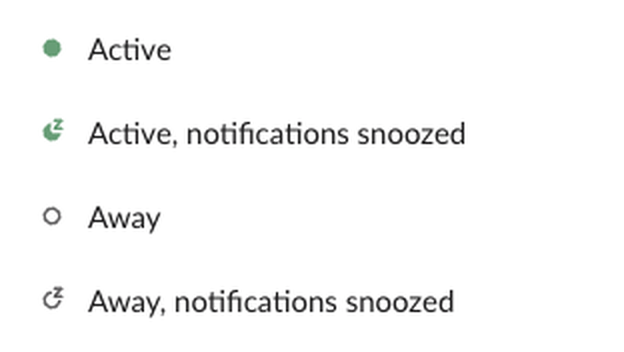
점은 서로 다른 두 가지를 보여 줍니다. 채움은 접속 상태로, 꽉 찬 초록은 활성, 속이 빈 점은 자리 비움입니다. 접속 상태는 Slack이 활동을 보고 정하며, 데스크톱에서는 Slack에서 10분 동안 입력이 없으면 자리 비움이 됩니다. Z는 알림 쪽 표시로, 알림이 멈춰 있는 동안 계속 붙어 있습니다.
| 보이는 것 | Slack의 표시 | 내 DM 알림이 상대에게 가나? |
|---|---|---|
| 꽉 찬 초록 점 | Active(활성) | 간다 |
| Z가 있는 초록 점 | Active, notifications snoozed(활성, 알림 일시 중지됨) | 일시 중지가 끝날 때까지 안 간다 |
| 속이 빈 점 | Away(자리 비움) | 가지만 본인은 Slack에 없다 |
| Z가 있는 속이 빈 점 | Away, notifications snoozed(자리 비움, 알림 일시 중지됨) | 안 가고, 본인도 Slack에 없다 |
두 신호가 따로 움직이기 때문에 Z는 어느 점에나 붙을 수 있습니다. 테스트에서 Set yourself as away(나를 자리 비움으로 설정)를 누르자 점이 초록에서 속이 빈 점으로 바뀌었고 Z는 그대로였습니다. Resume notifications(알림 다시 시작)를 누르자 Z가 사라졌고 점은 속이 빈 채였습니다. 근무 시간이 끝난 사람은 대부분 Z가 있는 속이 빈 점으로 보입니다. 속이 빈 점만 있을 때의 뜻은 Slack 자리 비움의 의미, 이름 옆에 나오는 다른 아이콘은 Slack 상태 아이콘의 의미에 있습니다.
Z가 저절로 켜지는 이유
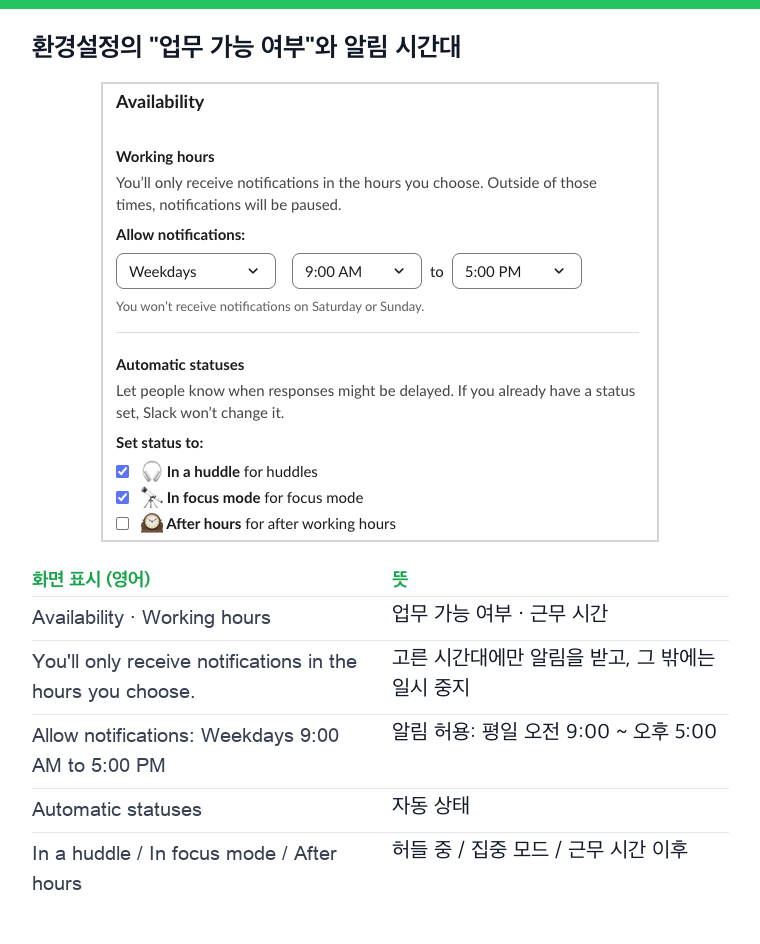
- • 내 알림 일정. Slack은 근무 시간 밖에 알림을 멈춥니다. 설정은 Preferences(환경설정)의 Availability(업무 가능 여부)에 있는 Allow notifications(알림 허용)입니다. 테스트 계정은 평일 오전 9시부터 오후 5시까지만 알림을 허용했고, 저녁 내내 아무것도 누르지 않았는데도 점에 Z가 붙어 있었습니다.
- • 관리자가 정한 기본 일정. 소유자와 관리자는 워크스페이스의 기본 일정을 정할 수 있습니다. 직접 정한 적이 없다면 그 일정이 적용됩니다.
- •
/dnd명령어. 메시지 입력란에/dnd for 2 hours를 입력하자 Slack이 "All set. I've turned on Do Not Disturb for 2 hours."(2시간 동안 방해 금지 모드를 켰습니다)라고 답했고 Z가 나타났습니다. - • 알림 일시 중지를 체크한 상태. Pause notifications until status is cleared(상태가 지워질 때까지 알림 일시 중지)를 체크하고 저장한 상태는, 상태가 지워질 때까지 Z를 유지합니다.
- • 집중 모드. 사이드바 아래의 집중 모드 버튼은 끝나는 시각 없이 알림을 멈춥니다. 사이드바가 회색이 되고, Availability의 자동 상태에서 In focus mode 가 체크되어 있으면 프로필에 "In focus mode"(집중 모드) 줄도 붙습니다.
- • 다시 시작하면 그날 밤 일정의 나머지가 건너뛰어집니다. 21시 55분에 Resume notifications 를 누르자 Slack은 다음 일시 중지를 다음 날 17시부터로 표시했습니다. 그날 밤에는 알림이 계속 켜져 있었습니다.
- •
/dnd off는 스위치처럼 동작합니다. 일정 시간대에 한 번 입력하면 일시 중지가 끝났고, 다시 입력하면 일정에 따른 일시 중지가 돌아왔습니다. 두 번 해서 두 번 모두 같은 답이 왔습니다.
Slack 점에서 Z를 없애는 방법
데스크톱에서 프로필 사진을 누르고, Notifications(알림)에 마우스를 올린 뒤 Resume notifications(알림 다시 시작)를 누릅니다. 메뉴에는 일시 중지가 언제 끝날 예정이었는지도 나옵니다.
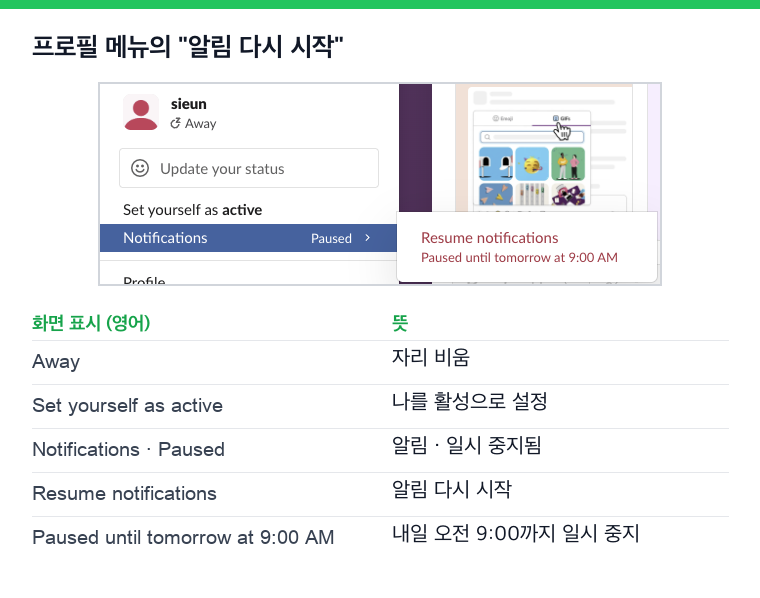
일정 때문에 멈춘 시간대에 해 보고 알게 된 점이 두 가지 있습니다.
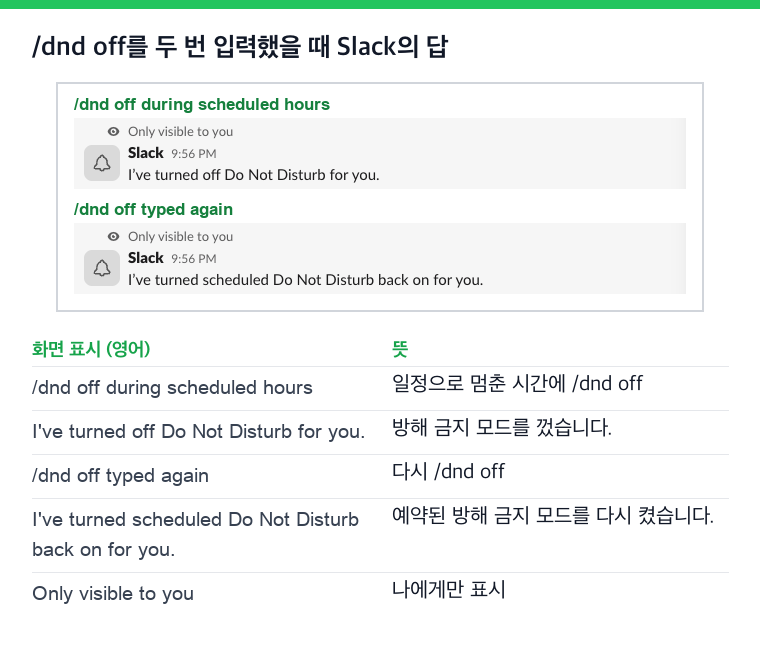
매일 같은 시각에 Z가 다시 생긴다면 원인은 알림 일정입니다. Preferences, Availability 순서로 열고 Allow notifications 의 시간을 넓히세요.
집중 모드를 끝내려면 사이드바 아래의 같은 버튼을 다시 누릅니다. 테스트에서는 집중 모드를 끄자 일정이 원래대로 돌아왔습니다.
Slack에서 다시는 '자리 비움'으로 표시되지 마세요
클라우드 기반. 다운로드 불필요. 노트북이 꺼져 있어도 24시간 작동.
Z가 있을 때 팀원에게 보이는 것
Slack 도움말 센터에 따르면, 알림이 일시 중지된 사람과의 DM을 열면 그 사실이 표시되고, 급한 메시지라면 그래도 알림을 보낼 수 있습니다. 일시 중지 중에 보낸 메시지는 사라지지 않고 읽지 않은 메시지에 남습니다. 특정 사람의 알림만 일시 중지 중에도 받고 싶다면 알림 설정에서 VIP 목록에 추가합니다. 일시 중지 옵션과 한계는 Slack 방해 금지 모드 사용법에 있습니다.
Z가 활성 상태를 바꾸나요?
바꾸지 않습니다. 알림을 멈춰도 접속 상태는 그대로이고, 접속 상태가 알림을 멈추지도 않습니다. 테스트에서 점은 자리 비움으로 설정하기 전까지 Z가 있는 초록 점이었습니다. 오프라인으로 보이고 싶다면 Z는 맞는 도구가 아닙니다. Set yourself as away 를 쓰세요. 방법은 Slack에서 오프라인으로 보이는 방법에 있습니다.
반대도 마찬가지입니다. 알림을 다시 시작해도 10분 뒤 자리 비움이 되는 타이머는 멈추지 않습니다. 이 타이머는 Slack이 금방 자리 비움이 되는 이유에서 다룹니다.
자주 묻는 질문
초록 Z인 사람은 나를 무시하는 건가요?
알 수 없습니다. 초록 점은 Slack을 쓰고 있다는 뜻이고, Z는 알림이 꺼져 있다는 뜻입니다. 몇 주 전에 정한 일정이 그대로인 경우가 많습니다.
일하는 중인데 휴대폰에 Z가 뜨는 이유는 뭔가요?
휴대폰도 같은 알림 일정을 씁니다. 허용한 시간이 끝나면 답장을 하는 중에도 Z가 붙습니다. 없애려면 일정의 시간을 넓히세요.
Related Articles
Slack에서 보내지 않고 줄바꿈하는 법
Slack 메시지에서 보내지 않고 줄을 바꾸려면 Shift+Enter를 누르세요. Enter로 줄을 바꾸고 싶다면 환경설정의 고급에서 메시지 작성 시 Enter 키 동작을 "새 줄 시작"으로 바꾸고, Cmd+Enter나 Ctrl+Enter로 보내세요. 모바일, 목록, 코드 블록, API 줄바꿈도 정리했습니다.
Slack 메시지 글자 수 제한: 최대 40,000자, 권장 4,000자
Slack 메시지 text의 한도는 40,000자이고, 개발자 문서는 4,000자 미만을 권장합니다. API로 시험해 보니 긴 글은 잘리지 않고 4,000자씩 메시지로 나뉘어 올라갔습니다. Block Kit 섹션은 3,000자, 헤더는 150자까지입니다. 긴 메시지에서 일어나는 일, 다른 글자 수 한도, 긴 글 나누는 법을 정리했습니다.
Slack Scheduled Message Didn't Send? 5 Cases We Tested
We scheduled five messages for 4:40 PM on 1 October 2026, then archived, left and deleted their channels and deleted a thread parent before the send time. Two sent, three never did, and Slack gave no notice about the three.