
휴대폰에서 Slack 활성 상태 유지하기 (iPhone·Android)
Slack 앱은 화면에 떠 있는 동안만 나를 활성으로 두고, 잠그거나 다른 앱으로 넘어가면 몇 초 뒤 자리비움이 됩니다. iPhone과 Android에서 몇 시간씩 화면에 띄워 두는 법, 알림이 세지지 않는 이유, 앱을 닫아도 초록으로 남는 법.
데스크톱 앱에서는 어느 앱에서든 마지막 입력 후 점이 회색이 되기까지 10분이 있습니다. 휴대폰에서는 사실상 0초입니다. 앱이 전면에서 벗어나는 순간 초록 점은 죽기 시작하고, 몇 초 안에 사라집니다. Slack Green은 서버에서 동작해서, 휴대폰이 잠겨 있어도 근무 시간 동안 점을 초록으로 유지합니다.
무슨 일이 벌어지는지, 휴대폰 자체에 존재하는 유일한 요령, 그리고 그 요령으로 부족할 때 쓰는 것을 설명합니다. 마지막에 나오는 "책상 없이 초록" 선택지는 우리가 만드는 도구라서, 비교에는 우리 자신의 트레이드오프도 포함했습니다.
모바일이 데스크톱보다 가혹한 이유
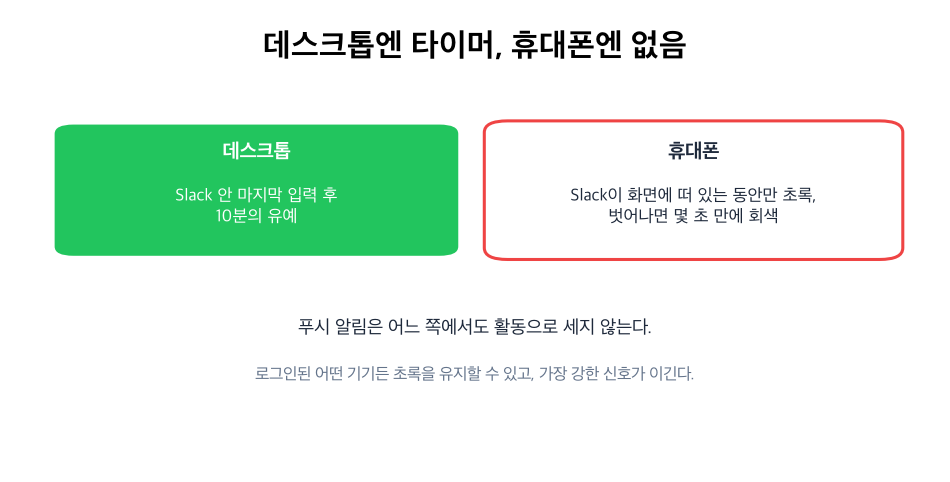
모바일 앱은 열려 있고 화면에 표시되는 동안만 나를 활성으로 보고합니다. 10분의 유예는 없습니다. 앱을 전환하거나, 화면을 잠그거나, 휴대폰이 잠들면 몇 초 안에 자리비움이 됩니다.
푸시 알림은 도움이 되지 않습니다. 수신도, 탭도, Slack이 실제로 열려 있는 순간에만 활동으로 셉니다. iOS는 백그라운드 앱을 적극적으로 멈추고, Android 배터리 세이버도 같은 일을 합니다. 멈춘 프로세스는 표시 상태를 보고할 수 없습니다.
기기별 정확한 수치는 Slack은 얼마나 오래 활성 상태를 유지하나에 있습니다.
화면 켜기 요령
휴대폰 자체로 초록을 유지하는 방법은, 켜져 있고 잠기지 않은 화면에 Slack을 띄워 두는 것뿐입니다.
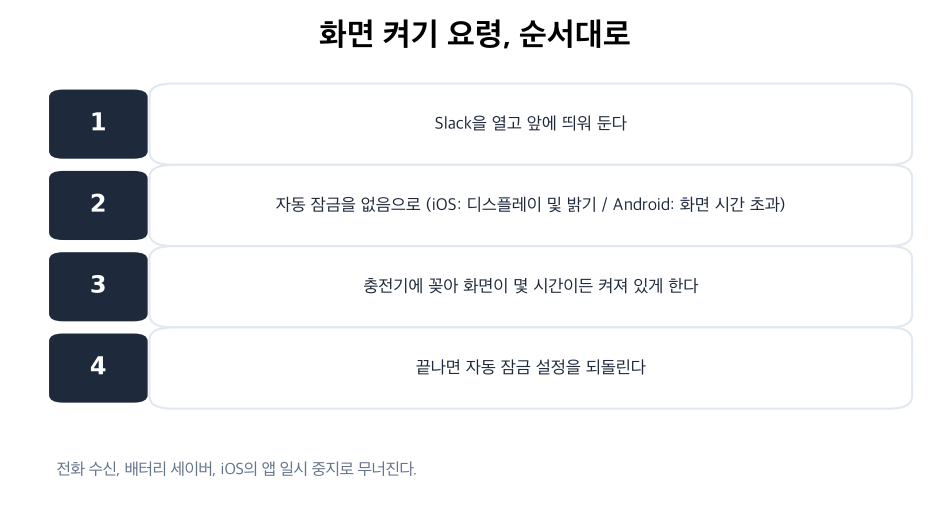
- Slack을 열고 전면에 둔다.
- 자동 잠금을 없음으로. iOS: 설정 → 디스플레이 및 밝기 → 자동 잠금. Android: 설정 → 디스플레이 → 화면 시간 초과.
- 화면이 몇 시간이든 켜져 있도록 충전기에 꽂는다.
- 끝나면 자동 잠금 설정을 되돌린다. 안 그러면 배터리가 대가를 치릅니다.
- • 알림을 켠 채 백그라운드로 보내기. 알림은 표시 상태가 아닙니다. 어차피 몇 초 만에 회색이 됩니다.
- • 저전력 모드 + Slack 열어 두기. 절전은 백그라운드 처리를 더 빨리 멈추고 화면도 더 빨리 어둡게 합니다. 오히려 역효과입니다.
- • "휴대폰으로 일하는 중" 같은 상태 문구. 문구와 점은 별개 시스템입니다.
- • Android "앱 깨워 두기" 류의 꼼수. 개발자 옵션은 CPU를 깨워 둘 뿐 Slack을
통하지만, 깨지기 쉬운 방법입니다. 배터리 세이버, 전화 수신, 화면을 어둡게 하려는 iOS의 판단, 어느 하나로도 끝납니다. 오전 한나절을 버티는 임시방편으로 쓰고, 매일의 시스템으로 삼지는 마세요.
모바일에서 통하지 않는 것
책상 없이 초록을 유지하는 선택지
휴대폰이 주머니에 있는 동안에도 점이 초록이어야 한다면, 표시 상태는 휴대폰이 아닌 곳에서 와야 합니다. 서버 사이드 서비스는 내 Slack 세션(xoxc와 xoxd 쌍)으로 로그인해 서버에서 표시 상태를 계속 보냅니다. 노트북은 닫힌 채, 휴대폰은 잠든 채, 점은 초록입니다.
그게 우리 서비스의 일입니다. 일정에 올리면 점은 근무 시간을 따라갑니다. 이 부류 도구의 공통된 비용으로, 서비스가 세션 토큰을 보관하니 먼저 보안 주의사항을 읽어 보세요. 데스크톱을 포함한 전체 방법 비교는 Slack을 활성 상태로 유지하는 법에 있습니다.
빠른 답변
모바일에서 Slack을 항상 활성으로 두려면? 켜져 있고 잠기지 않은 화면에 앱을 띄워 두거나, 서버 사이드 서비스를 쓰거나. 이 둘뿐입니다. 나머지는 전부 전면 규칙에서 무너집니다.
휴대폰을 잠가도 Slack이 활성으로 유지되나요? 아니요. 화면을 잠그면 앱이 백그라운드로 가고, 몇 초 안에 회색이 됩니다.
푸시 알림이 초록을 유지해 주나요? 아니요. 알림은 멈춘 앱에 배달될 뿐입니다. 표시 상태에는 앱이 화면에 열려 있어야 합니다.
iPhone과 Android가 다른가요? 규칙은 같습니다. iOS가 더 빨리, 더 예측 가능하게 앱을 멈추고 Android는 배터리 세이버에 따라 다르지만, 어느 쪽에도 유예는 없습니다.
잠깐 자리를 비우는 동안 휴대폰으로 초록을 유지할 수 있나요? 몇 분이면 화면 켜기 요령으로 버팁니다. 그보다 길다면, 휴대폰이 이 일을 못 하기 때문에 일정 방식이 존재합니다.
관련 기사
Slack Green vs 마우스 지글러: 정직한 비교
마우스 지글러는 컴퓨터가 깨어 있고 잠기지 않은 동안 Slack 데스크톱 앱을 활성으로 유지하고, 덮개를 닫으면 멈춥니다. 서버 사이드 도구는 컴퓨터가 필요 없습니다. 각각의 비용과 멈추는 곳을 비교했습니다.
Slack 자리비움 안 되게 하는 법: 4가지 원인과 해결
Slack에는 자리비움 표시를 끄는 설정도, 10분 타이머를 바꾸는 설정도 없습니다. 자리비움이 되지 않게 하려면 수동 전환, 유휴 타이머, 절전과 잠금, 다른 기기라는 원인별로 고쳐야 합니다. 각각의 순서와 각 방법이 막는 범위.
Slack 비활성, 비활성화됨, 자리 비움: 각각의 뜻
자리 비움은 회색 점, 비활성은 28일 동안 Slack을 쓰지 않았을 때의 청구 상태, 비활성화됨은 관리자가 끈 계정입니다. 실제 워크스페이스 관리 페이지에서 각각이 어디에 나오는지 확인했습니다.