
How to Keep Slack Active on Your Phone (iPhone and Android)
The Slack app keeps you active only while it is open on screen, and you go away seconds after you lock the phone or switch apps. How to keep it on screen for hours on iPhone and Android, why notifications do not count, and how to stay green with the app closed.
In the desktop app you get 10 minutes after your last input in any app before the dot goes gray. On mobile you get essentially zero. The moment the app leaves the foreground, your green dot starts dying, and it is gone within seconds. Slack Green keeps your dot green from a server through your working hours with the phone locked.
Here is what is going on, the one workaround that exists on the phone itself, and what to use when the workaround is not enough. We build the desk-free option at the end, so the comparison includes our own trade-offs. This is the phone chapter of how to keep Slack active, which covers every device.
Why mobile is harsher than desktop
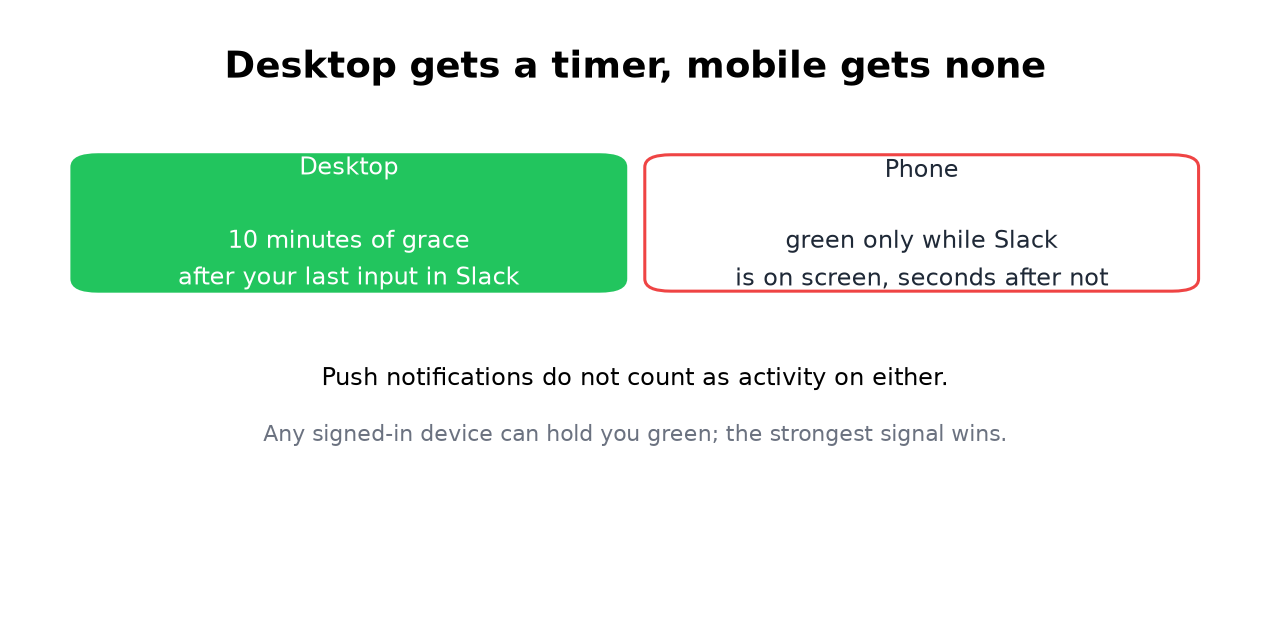
The mobile app reports you active only while it is open and on screen. There is no 10-minute grace period. Switch apps, lock the screen, or let the phone sleep, and Slack flips you to away in seconds.
Push notifications do not help. Receiving one, or even tapping one, counts as activity only for the moment Slack is actually open. iOS suspends backgrounded apps aggressively, Android battery savers do the same, and Slack cannot report presence from a suspended process.
The exact numbers per device are in how long does Slack stay active.
The screen-on workaround
The only way to stay green from the phone itself is to keep Slack on a lit, unlocked screen:
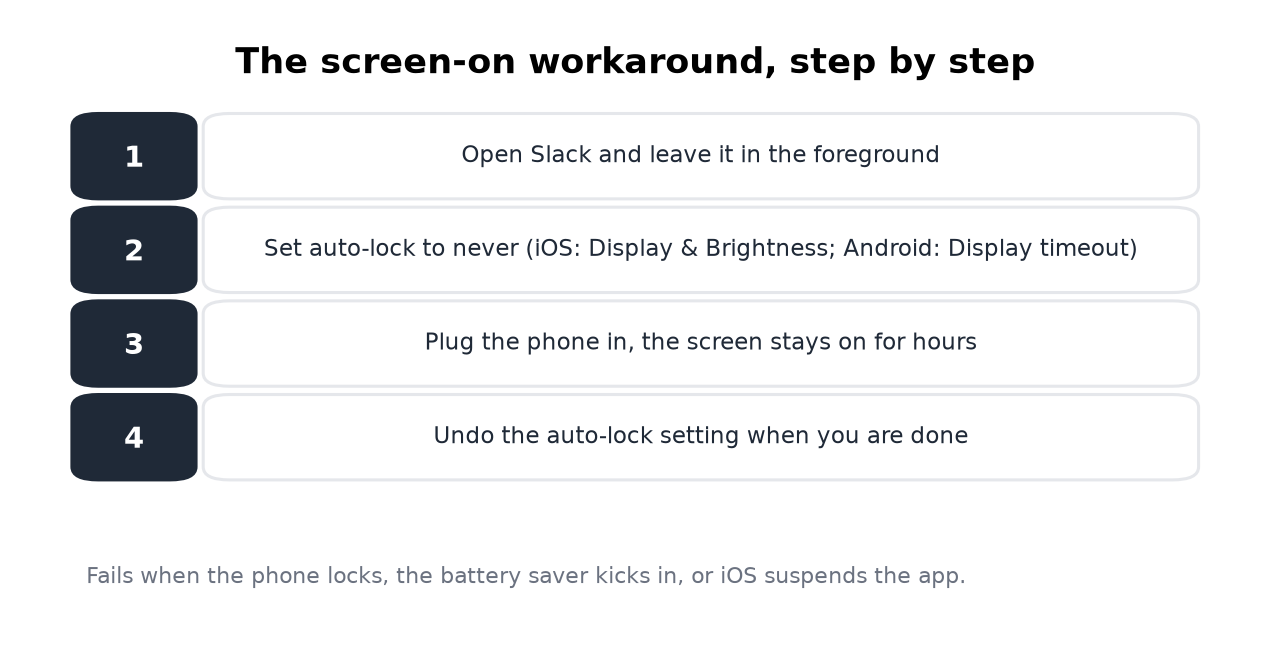
- Open Slack and leave it in the foreground.
- Set auto-lock to never. iOS: Settings, Display and Brightness, Auto-Lock. Android: Settings, Display, Screen timeout.
- Plug the phone in so the screen can stay on for hours.
- Undo the auto-lock change when you are done, or your battery will pay.
- • Backgrounding Slack with notifications on. Notifications are not presence. You go gray in seconds anyway.
- • Low power mode plus Slack open. Power saving suspends background processes sooner and dims the screen faster. It works against you.
- • A status text like "working from phone". Status text and the dot are separate systems.
- • Android "keep app awake" hacks. Developer-option tweaks keep the CPU
It works, and it is fragile. A battery saver, an incoming call, or iOS deciding to dim the screen ends it. Treat it as the duct-tape option for a morning, not a system for every day.
What does not work on mobile
The desk-free option
If you need the dot green while the phone sits in your pocket, presence has to come from somewhere that is not the phone. A server-side service signs in with your own Slack session, the xoxc and xoxd pair, and feeds presence from a server. Laptop shut, phone asleep, dot green.
That is what our service does. Put it on a schedule and the dot follows your working hours. The honest cost, same as every tool in the class: a service holds a session token for you, so read the security notes first. The full method comparison, desktop included, is in how to keep Slack active.
Quick answers
How do I keep Slack always active on mobile? Keep the app on a lit, unlocked screen, or use a server-side service. Those are the only two. Everything else fails on the foreground rule.
Does Slack stay active if I lock my phone? No. Locking the screen backgrounds the app, and you go gray within seconds.
Do push notifications keep me green? No. They are delivered to a suspended app. Presence needs the app open on screen.
iPhone or Android, does it matter? The rule is the same. iOS suspends the app faster and more predictably, Android varies by battery saver, but neither gives you a grace period.
Can I keep Slack active on my phone while walking away from my desk? For a few minutes, the screen-on workaround holds. For longer than that, the schedule approach exists precisely because phones cannot do this job.
Related Articles
Slack Active on Multiple Devices: Which One Sets Your Status?
When you use Slack on a phone and a computer at once, one active device keeps you green, and a manual away set on any device makes you away on all of them. We measured connection_count per browser tab and a manual away across four connections.
How to Stop Slack From Showing You as Away or Going Idle
No Slack setting turns the away status off or changes the 10-minute timer. You stop Slack from showing you as away by fixing each trigger: the manual toggle, the idle timer, sleep and lock, and extra devices. Steps for each, and what each method covers.
Why Slack Keeps Showing You as Away While You Work
Slack sets you away about 10 minutes after your last keyboard or mouse input, at once when the last Slack window closes, and for as long as a manual away is on, even while you type. We measured each in a real workspace.