
Slack Calls API: calls.add, the Call Block and calls.end, Tested
The Slack Calls API shows a call from your own video or phone service as a card in Slack. We ran calls.add, the call block, participants and calls.end in a test workspace and list every response and error.
The Slack Calls API lets an app show a call from its own video or phone service as a card in a Slack channel. You register the call with calls.add, post a message with a call block that points at it, keep the card current with calls.participants.add and calls.update, and close it with calls.end. Slack does not carry any audio or video: the card's Join button opens the join_url you gave it. We ran every method on 6 October 2026 in our free-plan test workspace, with a bot token that had calls:write, calls:read and chat:write. The card below is what Slack showed in the web app while the call was open.
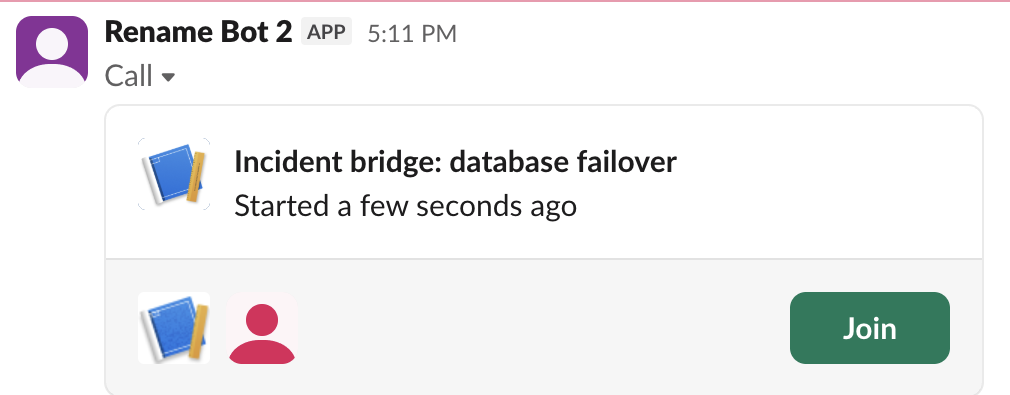
The calls we ran, in order
This is the sequence from our second run. The call() helper sends a JSON body with the bot token, which every Calls method we ran accepted:
import json, os, time, requests

TOKEN = os.environ["SLACK_BOT_TOKEN"]  # calls:write, calls:read, chat:write
CHANNEL = os.environ["SLACK_CHANNEL"]

def call(method, **body):
    r = requests.post(
        f"https://slack.com/api/{method}",
        headers={"Authorization": f"Bearer {TOKEN}",
                 "Content-Type": "application/json; charset=utf-8"},
        data=json.dumps(body), timeout=30)
    return r.json()

start = int(time.time())
added = call("calls.add", external_unique_id=f"sg-fin-{start}",
             join_url="https://example.com/join/sg-fin",
             title="Fresh test call", date_start=start)
call_id = added["call"]["id"]

posted = call("chat.postMessage", channel=CHANNEL, text="Fresh test call",
              blocks=[{"type": "call", "call_id": call_id}])

joined = call("calls.participants.add", id=call_id, users=[
    {"slack_id": "U0B7L4YK420"},
    {"external_id": "guest-1", "display_name": "Guest One"}])

left = call("calls.participants.remove", id=call_id, users=[
    {"external_id": "guest-1", "display_name": "Guest One"}])

ended = call("calls.end", id=call_id, duration=60)
again = call("calls.end", id=call_id)

print("add", added["ok"], call_id)
print("post", posted["ok"])
print("participants after add", len(joined["call"]["users"]))
print("participants after remove", len(left["call"]["users"]))
print("end", ended["ok"], "date_end - date_start =",
      ended["call"]["date_end"] - ended["call"]["date_start"])
print("end again", again["ok"], again.get("error"))
What came back:
add True R0C724DDL4S
post True
participants after add 2
participants after remove 2
end True date_end - date_start = 60
end again False inactive_call
Two lines in that output are not what the method names suggest. The remove call returned ok but the guest stayed in the list, and the end time came from duration, not from when we called calls.end. Both are explained below.
Register the call with calls.add
calls.add needs two fields, external_unique_id (your own ID for the call) and join_url. Without join_url it fails with invalid_arguments and the message [ERROR] missing required field: join_url. title, date_start and desktop_app_join_url are optional. When we left out date_start, Slack used the time of the request. Times are Unix seconds; to read one, paste it into our Slack timestamp converter.
The response holds the call ID, which starts with R:
{"ok": true, "call": {"id": "R0C724DDL4S", "date_start": 1791281561, "external_unique_id": "sg-fin-1791281561", "join_url": "https://example.com/join/sg-fin", "title": "Fresh test call"}}Slack does not check that external_unique_id is unique. We sent calls.add twice with the same value and got two calls with two different IDs, and no error or warning. If your service retries a failed request, look up your own record of the call first, or you will end up with two cards.
Show the call in a channel
A call shows up only when a message carries a call block: {"type": "call", "call_id": "R0C724DDL4S"}. In the chat.postMessage response, Slack expands that block with a call.v1 object (the call's fields plus the app's icon URLs) and "api_decoration_available": false.
The card changes in place. After calls.participants.add and a calls.update with a new title, the open Slack tab showed the new title and the participant avatars within a few seconds, without a new message. In the web app, Join opened join_url in a new browser tab. We had also set a desktop_app_join_url; the web app ignored it and opened join_url. We did not test the desktop app.
Never appear "away" on Slack again
Cloud-based. No downloads. Works 24/7 even when your laptop is off.
Participants: who Slack keeps in the list
calls.participants.add takes a users array. A Slack member is {"slack_id": "U..."}. Someone outside Slack is an external_id with a display_name, plus an optional avatar_url. The card in the screenshot above shows a guest (Guest Caller, with an image from avatar_url) and our own account.
Removing someone needs the same shape. With only external_id, calls.participants.remove failed: invalid_arguments, [ERROR] failed to match exactly one allowed schema [json-pointer:/users/0]. With display_name added it returned ok: true, but the users array in the response, in calls.info and in calls.end still listed the guest, and the ended card still read "2 people joined". We got the same result in both runs. So users works as a list of everyone who joined, not who is on the call now. Removing a Slack member who was never added returned bad_users.
End the call with calls.end
calls.end closes the card. Pass duration in seconds and Slack sets date_end to date_start plus duration, whatever the clock says. In our second run we called calls.end with duration=60 about 4 seconds after calls.add, and the card said "Ended at 7:13 PM - Lasted 1 minute", a minute after the start. Without duration, date_end was the time of the request.
After the end:
- • A second
calls.endreturnedinactive_call. - •
calls.participants.addreturnedinactive_call. - •
calls.updatestill worked. We changed the title of an ended call toafter end, and the ended card showed the new title.
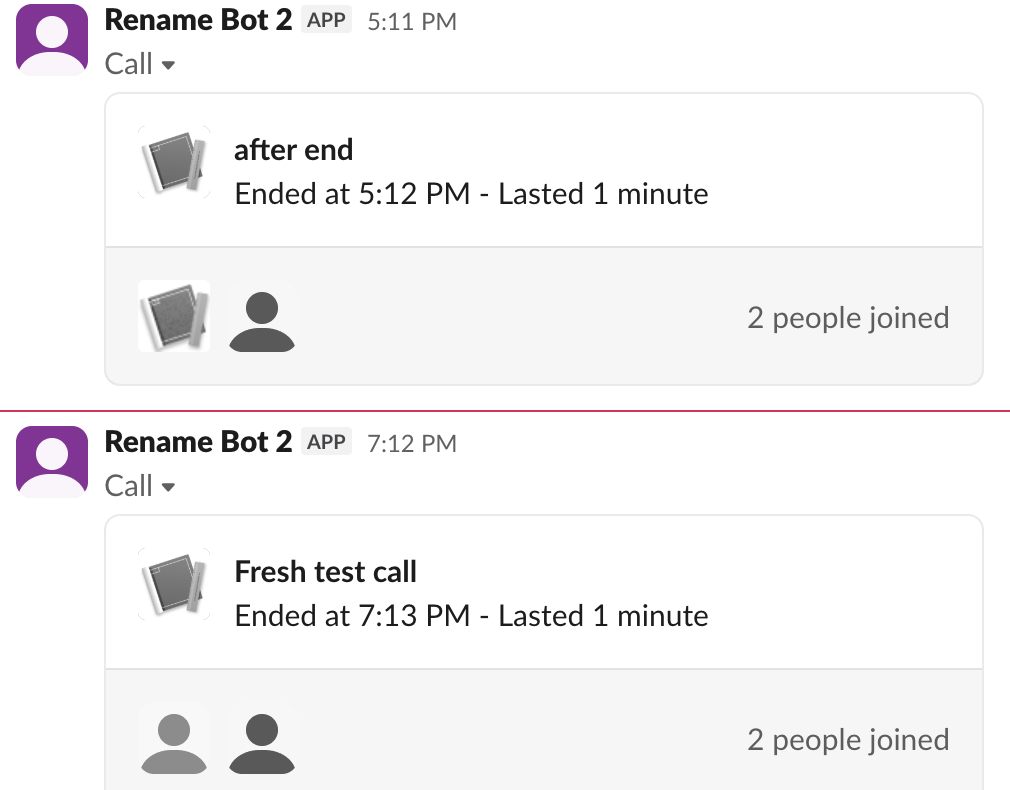
The top card is the first run's call, renamed after it ended. The bottom card is the run above: its guest was removed before the end, and Slack still counts two people.
Errors we got
| What we sent | Response |
|---|---|
calls.add without join_url | invalid_arguments, missing required field: join_url |
calls.add with a user token that lacked calls:write | missing_scope, "needed": "calls:write" |
calls.participants.remove with external_id only | invalid_arguments, failed to match exactly one allowed schema [json-pointer:/users/0] |
calls.participants.remove for a member who was never added | bad_users |
calls.end on an ended call | inactive_call |
calls.participants.add on an ended call | inactive_call |
calls.info with a made-up ID, R000BADID | internal_error |
The internal_error for a wrong ID is easy to mistake for an outage on Slack's side; check the ID first. For the scope error, add the scope in the app settings and reinstall, as in Slack missing_scope error. Which token goes where is in Slack bot token.
FAQ
Can the Calls API start or join a Slack huddle?
No. The Calls API only shows calls that run on your own service. Huddles have no start or join method; apps can only read who is in one, as covered in Slack huddle API.
Which scopes does the app need?
calls:write to add, update and end calls, calls:read for calls.info, and chat:write to post the message with the call block. In a manifest they go under oauth_config.scopes.bot, as in our Slack app manifest example.
Stop Jiggling Your Mouse.
Join hundreds of remote workers who never worry about their Slack status. Set it up once, stay green forever.
Related Articles
Export a Slack Canvas to PDF or Markdown: What Works, Tested
Slack has no download or export button for canvases. We checked every menu on a test canvas, used Print canvas for PDF, and turned the API's HTML download into clean Markdown with a script we ran.
Slack Forward Multiple Messages: No Multi-Select, 3 Workarounds Tested
Slack forwards one message at a time. We checked the message menu, shift-click and the forward dialog, then tested three ways to move 10 messages at once: a thread, a copied range, and a script that posts links.
Send a Slack Message From PowerShell: Webhook, Bot Token and Files
Working PowerShell for Slack: Invoke-RestMethod to a webhook, chat.postMessage with a bot token, Block Kit, and a file upload. Every script was run in PowerShell 7.6.6 against a real Slack workspace, with its output.