
Slack API in C#: HttpClient vs SlackNet, With Tested .NET 10 Code
Slack has no official .NET SDK. We posted to Slack from C# two ways on .NET 10 on 5 November 2026: plain HttpClient with System.Text.Json, and the SlackNet package with a Block Kit section. Both versions, their real output and how each reports a bad channel.
To call the Slack API from C#, send a POST with a bot token to a method URL such as https://slack.com/api/chat.postMessage, either with HttpClient and System.Text.Json or with SlackNet, the most used .NET client for Slack. Slack does not publish a .NET SDK. On 5 November 2026 we ran both in one console app on .NET SDK 10.0.403 with SlackNet 0.20.0, posted to a test channel, sent a Block Kit section, and tried a channel ID that does not exist. The program and its output are below.
Which .NET package to use
From the NuGet gallery on 5 November 2026:
| Package | Latest version | Released | Total downloads | What it covers |
|---|---|---|---|---|
SlackNet | 0.20.0 | 2026-11-01 | 17,344,737 | Web API, Block Kit, Events, interactivity, Socket Mode |
SlackNet.AspNetCore | 0.20.0 | 2026-11-01 | 1,828,524 | Plugs SlackNet's event handling into ASP.NET Core |
Slack.Webhooks | 1.1.6 | 2026-06-10 | 16,387,658 | Incoming webhooks only |
Slack.NetStandard | 11.6.0 | 2026-07-22 | 2,401,759 | Web API and Block Kit models |
SlackAPI | 1.1.14 | 2022-08-29 | 8,068,139 | Older client, no release since 2022 |
SlackNet has the most downloads and the newest release of the full clients, so it is the one we tested. For a one-way alert into one channel, an incoming webhook needs no package; see our Slack webhook guide.
Setup
Create a Slack app with a bot user and the chat:write scope, install it, copy the Bot User OAuth Token (xoxb-, see our bot token guide) and invite the bot to your channel. Then:
dotnet new console -n SlackDemo
cd SlackDemo
dotnet add package SlackNet
The program
Both ways in one Program.cs. The token and channel ID come from environment variables:
using System.Net.Http.Headers;
using System.Net.Http.Json;
using System.Text.Json;
using SlackNet;
using SlackNet.WebApi;

var token = Environment.GetEnvironmentVariable("SLACK_BOT_TOKEN")!;
var channel = Environment.GetEnvironmentVariable("SLACK_CHANNEL")!;

// 1. Plain HttpClient
using var http = new HttpClient();
http.DefaultRequestHeaders.Authorization = new AuthenticationHeaderValue("Bearer", token);
foreach (var ch in new[] { channel, "C000BAD" })
{
    var body = JsonContent.Create(new { channel = ch, text = "Hello from C# (HttpClient)" });
    var resp = await http.PostAsync("https://slack.com/api/chat.postMessage", body);
    using var doc = JsonDocument.Parse(await resp.Content.ReadAsStringAsync());
    var ok = doc.RootElement.GetProperty("ok").GetBoolean();
    Console.WriteLine($"HttpClient {ch}: HTTP {(int)resp.StatusCode}, ok={ok}, " +
        (ok ? $"ts={doc.RootElement.GetProperty("ts")}" : $"error={doc.RootElement.GetProperty("error")}"));
}

// 2. SlackNet
var api = new SlackServiceBuilder().UseApiToken(token).GetApiClient();
var posted = await api.Chat.PostMessage(new Message
{
    Channel = channel,
    Text = "Hello from C# (SlackNet)",
    Blocks = { new SlackNet.Blocks.SectionBlock { Text = new SlackNet.Blocks.Markdown("*Hello* from SlackNet blocks") } }
});
Console.WriteLine($"SlackNet: ts={posted.Ts}");
try
{
    await api.Chat.PostMessage(new Message { Channel = "C000BAD", Text = "x" });
}
catch (SlackException e)
{
    Console.WriteLine($"SlackNet error: {e.GetType().Name}, ErrorCode={e.ErrorCode}, Message={e.Message}");
}
Never appear "away" on Slack again
Cloud-based. No downloads. Works 24/7 even when your laptop is off.
The output
HttpClient C0CEX6YV01H: HTTP 200, ok=True, ts=1793864959.482319
HttpClient C000BAD: HTTP 200, ok=False, error=channel_not_found
SlackNet: ts=1793864959.901119
SlackNet error: SlackException, ErrorCode=channel_not_found, Message=Slack returned an error response: channel_not_found.
The two lines for C000BAD show the main difference. Slack answers a failed call with HTTP 200 and "ok": false, so the plain HttpClient version sees a successful response and must read ok and error itself; checking IsSuccessStatusCode alone would miss every Slack error. SlackNet reads the same body and throws SlackException, with the Slack error string in ErrorCode, so a wrong channel or a missing scope stops your code instead of failing quietly. Our missing_scope guide covers the most common error after channel_not_found.
The SlackNet message also carried a Block Kit section built from typed classes (SectionBlock with Markdown text):
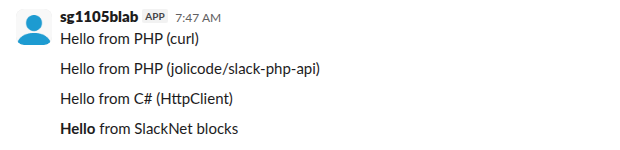
Slack rendered "Hello" in bold and did not show the Text we also sent ("Hello from C# (SlackNet)"). When a message has blocks, Slack displays the blocks and keeps Text for notifications and screen readers, so put real words in it rather than leaving it empty. With HttpClient you would write the same blocks as anonymous objects or JSON. Our Block Kit markdown guide shows which formatting renders.
Notes from the run
- •
JsonContent.Createlives inSystem.Net.Http.Json. Our first build failed witherror CS0103: The name 'JsonContent' does not exist in the current contextuntil we added thatusing. - • Slack's JSON body needs the token in the
Authorization: Bearerheader, not in the body. - •
posted.Tsis the message ID. Keep it to reply in a thread (ThreadTs) or to edit the message later withapi.Chat.Update. - • For events and slash commands in ASP.NET Core, add
SlackNet.AspNetCore, and verify every request with your signing secret as our signing secret guide explains.
FAQ
Is there an official Slack SDK for C#?
No. Slack's official SDKs are for Python, Node.js and Java. SlackNet is a community package, and the one with the most recent release among the .NET clients above.
Does SlackNet work on .NET 10?
Yes. Our test built and ran with the .NET SDK 10.0.403 and SlackNet 0.20.0.
Stop Jiggling Your Mouse.
Join hundreds of remote workers who never worry about their Slack status. Set it up once, stay green forever.
Related Articles
Slack API in PHP: Plain curl vs jolicode/slack-php-api (Tested Code)
Two tested ways to call the Slack API from PHP: plain curl with a bot token, and the jolicode/slack-php-api client. We ran both on PHP 8.5 on 5 November 2026, posted a message, read history and caught a bad channel ID. Code and output below.
Slack Notifications From Rails: slack-notifier, slack-ruby-client and Net::HTTP Tested
Three ways to post to Slack from Rails, run on Ruby 3.4 and Rails 8.1 on 5 November 2026: plain Net::HTTP to a webhook, the slack-notifier gem (last release 2021, still works), and slack-ruby-client with a bot token. Plus exception_notification sending a real error to Slack.
Sign in with Slack (OpenID Connect): A Tested Python Example
Sign in with Slack is OpenID Connect on top of OAuth 2.0: send the user to slack.com/openid/connect/authorize, swap the code at openid.connect.token, and check the RS256 id_token. We ran the whole flow on 5 November 2026 and show the real claims and errors.