
Slack Context, Header, Divider and Actions Blocks: Limits and How They Render
We posted context, header, divider and actions blocks with a bot token and measured the limits, the errors and how Slack's web app draws each one, including the '+ N more' button cut-off.
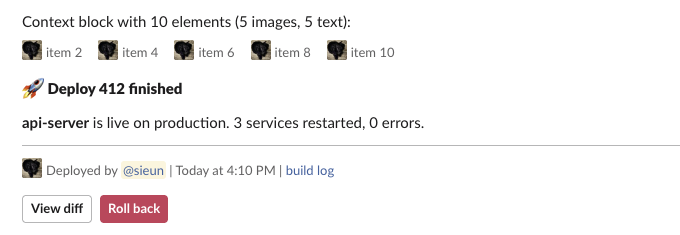
A Slack context block is a row of up to 10 small elements, each an image or a text object, that Slack draws in grey 13 px text under the main content. It is the place for "posted by", timestamps and build links. On 5 October 2026 we posted context, header, divider and actions blocks from a throwaway app with a bot token in our free-plan test workspace, pushed each one past its limit, and measured how Slack's web app drew the messages that passed.
The four blocks in one message
This is the payload we posted, a deploy report that uses all four blocks:
[
  {"type": "header", "text": {"type": "plain_text", "text": ":rocket: Deploy 412 finished", "emoji": true}},
  {"type": "section", "text": {"type": "mrkdwn", "text": "*api-server* is live on production. 3 services restarted, 0 errors."}},
  {"type": "divider"},
  {"type": "context", "elements": [
    {"type": "image", "image_url": "https://picsum.photos/id/237/64/64", "alt_text": "avatar"},
    {"type": "mrkdwn", "text": "Deployed by <@U0B7L4YK420> | <!date^1791184200^{date_short_pretty} at {time}|Oct 5> | <https://slack.green|build log>"}
  ]},
  {"type": "actions", "elements": [
    {"type": "button", "text": {"type": "plain_text", "text": "View diff"}, "action_id": "approve"},
    {"type": "button", "text": {"type": "plain_text", "text": "Roll back"}, "style": "danger", "action_id": "rb"}
  ]}
]
What we measured in the page's styles:
| Block | Font size | Weight | Notes |
|---|---|---|---|
| header | 15 px | 900 | Same size as body text, only heavier |
| section | 15 px | 400 | Normal message text |
| context text | 13 px | 400 | Grey |
| context image | 20 x 20 px | Our 64 x 64 image was scaled down |
The header is not bigger than the rest of the message in Slack's web app. It is the same 15 px as a section, drawn in a heavier weight. If you need a visual break, the divider does more than the header does.
The context line rendered the <@user> mention, the <!date> token in the reader's time zone, and the link. One thing we did not expect: a link inside a context element still unfurls. Our first post showed a full slack.green preview card under the message until we sent it again with "unfurl_links": false.
Limits and the exact errors
Every failing payload came back as HTTP 200 with "ok": false and "error": "invalid_blocks". The reason is in response_metadata.messages:
| Test | Result | Message from Slack |
|---|---|---|
| Header, 150 characters | posted | |
| Header, 151 characters | invalid_blocks | must be less than 151 characters [json-pointer:/blocks/0/text/text] |
Header with mrkdwn text | invalid_blocks | must be a valid enum value [json-pointer:/blocks/0/text/type] |
Header with \n in the text | posted | drawn as two lines |
| Context, 10 elements (5 images, 5 text) | posted | |
| Context, 11 elements | invalid_blocks | no more than 10 items allowed [json-pointer:/blocks/0/elements] |
| Context, 0 elements | invalid_blocks | must provide at least 1 items [json-pointer:/blocks/0/elements] |
Context image without alt_text | invalid_blocks | missing required field: alt_text [json-pointer:/blocks/0/elements/0] |
| Context with a button | invalid_blocks | unsupported type: button [json-pointer:/blocks/0/elements/0/type] |
Divider with a text field | invalid_blocks | invalid additional property: text [json-pointer:/blocks/0] |
| Actions, 25 buttons | posted | |
| Actions, 26 buttons | invalid_blocks | no more than 25 items allowed [json-pointer:/blocks/0/elements] |
The header accepts only plain_text, so *bold* in a header is an error, not plain asterisks. Emoji codes such as :rocket: work when "emoji": true. Sending a header and a section with no top-level text still posted, and Slack filled the message text from the blocks: :rocket: Deploy 412 finished *api-server* is live on production.... That stored text is what notifications fall back to, so set text yourself if you want a cleaner notification line.
The Block Kit checker flags the same limits before you post, and the invalid_blocks guide lists the limits of the other block types.
Never appear "away" on Slack again
Cloud-based. No downloads. Works 24/7 even when your laptop is off.
What happens to a long actions block
Slack accepts 25 elements in an actions block, but the web app does not draw them all. We posted actions blocks with 5, 6, 7, 8 and 10 buttons:
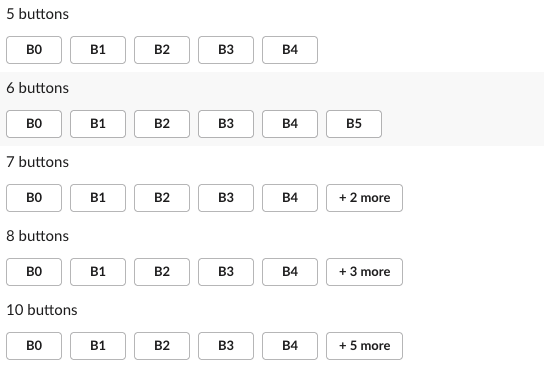
Up to 6 buttons, all of them show. From 7 on, Slack shows the first 5 and replaces the rest with a "+ N more" button. Clicking it expanded all 25 buttons of our largest block in place. So in a 7-button block, buttons 6 and 7 stay hidden until a reader clicks. Put the action people need most in the first five, or split the buttons over two actions blocks.
The same screenshot run caught the 150-character header wrapping onto a second line and the 10-element context row, 5 images and 5 text items in one line:

When to use which block
- • Context for metadata under a message: who, when, a source link, a status icon. It cannot hold buttons or menus.
- • Header for a title line, plain text only. It wraps; it does not shrink.
- • Divider as a thin line between sections. It takes no fields other than
typeandblock_id. - • Actions for buttons, menus and pickers. Keep it at 6 elements or fewer if every button must be visible.
For pictures larger than 20 px use an image block instead of a context image, and for formatted text with lists or quotes use a rich text block.
FAQ
Can a context block contain a button?
No. We got unsupported type: button. Context takes only image and text objects (plain_text or mrkdwn). Put buttons in an actions block or as a section accessory.
Can I make a Slack header block bigger?
No. There is no size option, and in Slack's web app the header is 15 px, the same as body text, at weight 900. Button colours are covered in Slack button style.
Stop Jiggling Your Mouse.
Join hundreds of remote workers who never worry about their Slack status. Set it up once, stay green forever.
Related Articles
Slack IP Ranges for Webhooks and Events: 80 Requests Logged
Slack publishes no fixed IP range for the requests it sends to your app. We logged 80 real requests from Slack over 73 minutes: 58 different addresses, all in AWS us-east-1. What that means for a firewall allowlist, and what to check instead.
Slack Bolt With FastAPI: A Working App, the 3-Second Rule and 401s, Tested
A complete Slack app on FastAPI with Bolt for Python's adapter: a slash command, a button and an app mention, run behind a tunnel in a real workspace. We timed the acks, pushed one past 3 seconds and broke the signature on purpose.
Set Your Slack Status From Apple Shortcuts: A Working Shortcut, Tested
Apple Shortcuts has no Slack status action, but its Get Contents of URL action can call Slack's API. We built a shortcut that sets a 60-minute status, ran it on macOS 26.5.2, and added a second one that posts a message through a webhook.