
Slack Text Color: You Cannot Color Text, but 3 Things Show Color
Slack has no text color option in messages or canvases, and the API rejects a color style. We tested every route on 29 September 2026. A hex code gets a color swatch, inline code is red, and app messages can carry a colored bar.
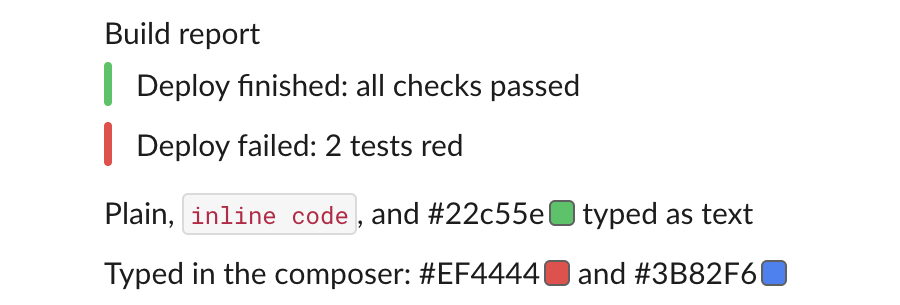
You cannot change the color of text in Slack. The message box has no color button, no Markdown or Slack syntax sets a color, canvases have no text color menu, and the API refuses a color style. Three things do put color in a message: a hex code like #22c55e gets a small color square next to it, inline code shows in red, and messages sent by an app can carry a colored bar on the left.
We tried each route on 29 September 2026 in Slack in the browser, in a one-person test workspace, by typing in the message box and by sending messages through chat.postMessage. Everything below is from those runs.
Every route we tried
| Route | Colors the text? | What you see |
|---|---|---|
| Message box formatting bar | No | Bold, italic, underline, strikethrough, link, lists, quote, code and code block; no color |
HTML <span> and <font> tags, Jira {color:red} | No | The tags stay as typed |
| Canvas text | No | No text color or highlight menu; see our canvas formatting test |
rich_text block with a color style | No | The API refuses the message |
Hex code such as #22c55e | No | A swatch in that color after the code |
| Inline code in backticks | Fixed red | Dark red text on a light gray box |
Attachment with a color field | No, the bar only | A colored bar left of the text |
The API refuses a color style
Slack's rich_text blocks let each piece of text carry a style: bold, italic, strike and code. We added a color to the style and sent it with chat.postMessage:
{
  "type": "text",
  "text": "red text",
  "style": { "color": "#ff0000" }
}
The response:
{
  "ok": false,
  "error": "invalid_blocks",
  "errors": [
    "invalid additional property: color [json-pointer:/blocks/0/elements/0/elements/0/style]"
  ]
}
So apps cannot send colored words either.
Never appear "away" on Slack again
Cloud-based. No downloads. Works 24/7 even when your laptop is off.
Hex codes get a color swatch
When a message contains a hex color code, Slack draws a square in that color right after it. We typed "#ef4444 and #3b82f6" in the message box. Slack changed both to capitals and showed a red and a blue square. Reading the message back with conversations.history shows why: Slack stored each code as its own color element, not as text:
{"type": "color", "value": "#EF4444"}A plain chat.postMessage with "#22c55e" in the text got the same element and the same green square. Apps can also send {"type": "color", "value": "#22c55e"} inside a rich_text block, and Slack accepted it. Designers use this to share a palette: the code stays copyable and the square shows the color. It does not color the words around it.
Inline code shows in red
Text between backticks is the only way to get colored words in a normal message, and the color is fixed. In Slack's light theme we read the computed style of an inline code element: text rgb(192, 19, 67), which is #C01343, a dark red, on a light gray background, in the Slack-Roboto-Mono font. You cannot choose another color, and a reader may take red code for an error. More about backticks and code blocks is in how to bold text in Slack.
Apps can add a colored bar
Messages sent through the API can include legacy attachments, and each attachment takes a color. This is the part of our test message that drew the green and red bars in the screenshot above:
"attachments": [
  {"color": "#22c55e", "text": "Deploy finished: all checks passed"},
  {"color": "#ef4444", "text": "Deploy failed: 2 tests red"}
]
The text stays black. Only the bar takes the color. Build and alert bots use this for pass and fail. You need an app or a token to send it, and Slack calls attachments a legacy feature, though it still rendered them in our test. The Slack message formatter shows what the formatting marks do before you send.
Stop Jiggling Your Mouse.
Join hundreds of remote workers who never worry about their Slack status. Set it up once, stay green forever.
Related Articles
Slack Member ID: Where to Copy It, and What the U Means
A Slack member ID is the U... code that identifies a person. Copy it from their profile under the three-dot menu, or look it up with users.info and users.list. Tested in two workspaces, with the ID formats we found.
Slack API Rate Limits: What We Hit, and the 429 You Get Back
Slack answers too many calls with HTTP 429 and a Retry-After header. We burst chat.postMessage, conversations.history and an incoming webhook from an internal app and logged every response: where the 429s started, the bodies, and a retry loop that never hit one.
Slack files.upload Deprecated: The 3-Step Upload That Replaces It
files.upload now returns method_deprecated. Use files.getUploadURLExternal, POST the bytes, then files.completeUploadExternal, or files_upload_v2 in the SDK. Tested with curl and Python, including two silent failures.