
What Can a Google Workspace Admin See? Email, Drive, Chrome
A Google Workspace admin can see activity logs for Gmail, Drive, Chat, Meet, Calendar and sign-ins, and on editions with Google Vault can search and export your work email and chat messages. They cannot see your screen or keystrokes, and they do not get your full browsing history unless your Chrome browser or profile is managed and reporting. What is visible, app by app.
A Google Workspace admin can see a lot of what you do in your work Google account. The Admin console keeps activity logs for Gmail, Google Chat, Drive, Meet, Calendar, sign-ins and devices, and on editions that include Google Vault an admin can search, hold and export your work email and Chat messages, including ones you deleted while a retention rule keeps them. What they cannot see from the console is your screen, your keystrokes, or your personal Google account. Your browsing history is visible only in part, and only if the company manages your Chrome browser or Chrome profile.
The same rule holds for the other work apps you are signed in to. Slack, for example, shows your green or grey dot to every coworker and turns it grey after 10 minutes without input in the Slack window. Slack Green keeps your Slack status active during the hours you set, from the cloud.
What a Workspace admin can see, app by app
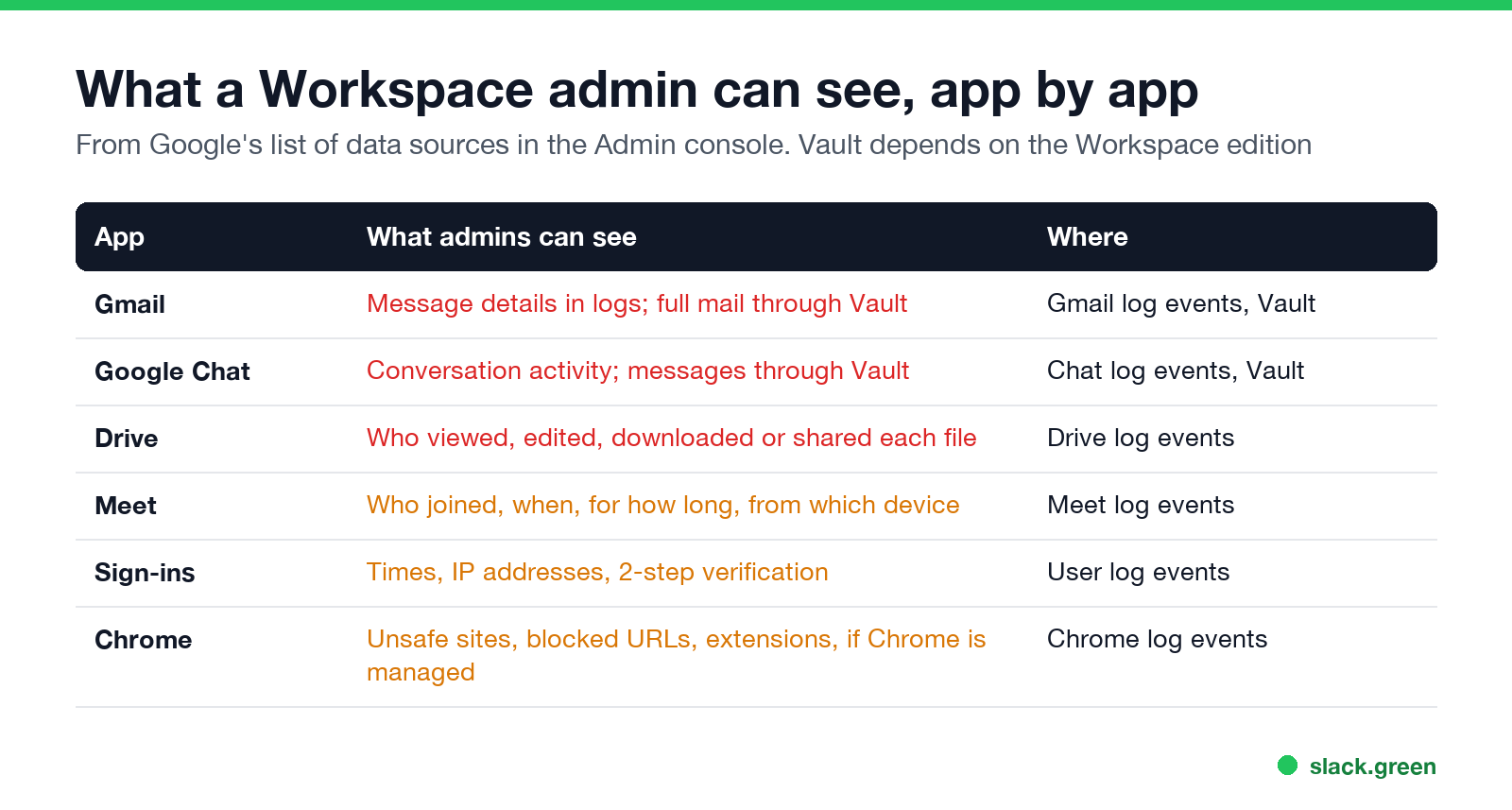
Google's help center lists more than 30 data sources in the Admin console's investigation tool. The ones that matter to most employees:
| App | What admins can see | Where in the Admin console |
|---|---|---|
| Gmail | Message details such as sender, recipient and time in the logs; full messages through Vault | Gmail log events, Gmail messages, Vault |
| Google Chat | Conversation and space activity; message content through Vault | Chat log events, Vault |
| Drive | Who viewed, edited, downloaded or shared each file, and when | Drive log events |
| Meet | Who joined each call, when, for how long, and from what device | Meet log events |
| Calendar | Changes to events | Calendar log events |
| Sign-ins | Sign-in times, IP addresses, 2-step verification | User log events |
| Chrome | Browser and profile details, extensions, and security events, if Chrome is managed | Chrome browsers, Chrome log events, Chrome Sync log events |
| Devices | Phones and computers signed in to the work account | Devices, Device log events |
| Third-party apps | Which apps you connected to your work account | OAuth log events |
Google describes the tool as a way "to review user and administrator activity in your organization". Some data sources depend on the Workspace edition and on which admin role the person has.
Can a Google Workspace admin read my email?
Yes, on most editions. Google Vault, included in Business Plus, Enterprise and Education editions, lets authorized admins search every mailbox in the organization and export the messages. Vault exports carry "a comprehensive copy of the data that matched your search criteria" plus the metadata that links it to each user. A retention rule or legal hold keeps messages after you delete them. Without Vault, admins still have the Gmail logs, and a super admin can reset your password and sign in to the account, an action the admin log records.
The same applies to Google Chat messages in your work account. What Chat itself shows other users, such as read receipts, is in Google Chat read receipts.
Personal email is a separate question: a Workspace admin has no access to a personal Gmail account, even if you open it on a work laptop. What a work laptop can still expose is in can my employer see my personal email on my work computer.
Can a Google Workspace admin see my browsing history?
Never appear "away" on Slack again
Cloud-based. No downloads. Works 24/7 even when your laptop is off.
Not the full history, from the Admin console alone. What they can see depends on how Chrome is set up:
- • Chrome managed by the company (Chrome Enterprise Core, or a Chromebook on the company domain): admins see browser versions, extensions and policies, and with reporting turned on, security events such as visits to unsafe sites, blocked URLs and risky downloads. Google's setup guide describes "a detailed view of Chrome browsers and extensions used in your organization".
- • Signed in to Chrome with your work account and Chrome Sync on: your history syncs to the work account. Admins see Chrome Sync log events, a record of sync actions, not a list of sites. Anyone who signs in to your work account can open the synced history.
- • A browser the company does not manage, signed in to nothing: Workspace sees nothing. Other tools on a company laptop, such as a web proxy or monitoring software, may still see it; see can my employer see my browsing history.
Google searches work the same way. If you search while signed in to your work account with Web & App Activity on, the searches are stored in that account, and anyone with access to the account can read them.
What the Admin console does not show
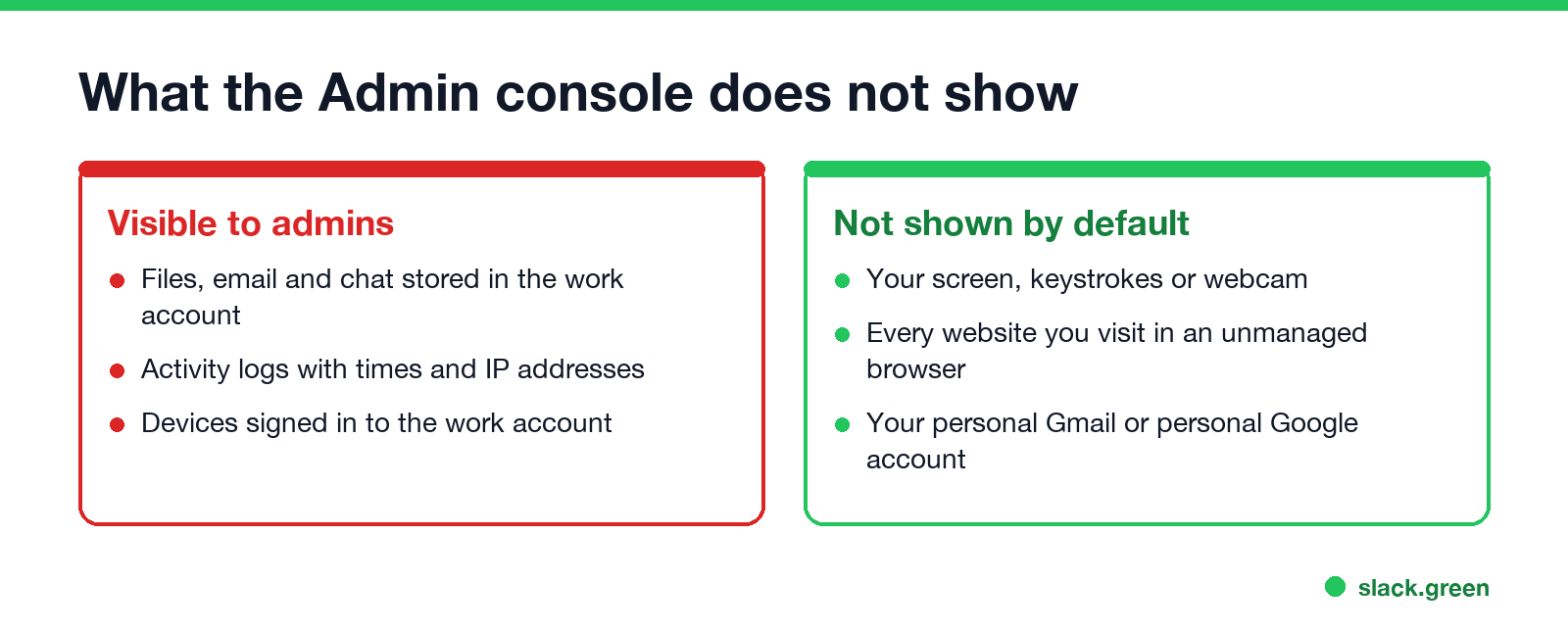
Google Workspace is not employee monitoring software. It has no screenshots, no keystroke logging, no webcam access and no idle-time tracking. If your employer has those, they come from a separate product installed on the laptop; see how to tell if you are being monitored at work.
It also cannot see what you do in apps outside Google, such as Slack, Zoom or a personal browser profile, except where they connect to your Google account through sign-in or OAuth.
Admins see data, managers usually do not
Admin rights are split into roles. A super admin can see everything above; a help desk admin may only reset passwords; a Vault user may only search mail for legal cases. Your manager usually has no admin role, and gets information only by asking IT. Every admin action, including Vault searches, is logged, and those logs are visible to other admins.
For the other big work suite, the Microsoft answers are in can my employer read my Teams chats, and for Slack in can Slack admins see DMs.
FAQ
Never appear "away" on Slack again
Cloud-based. No downloads. Works 24/7 even when your laptop is off.
Can a Google Workspace admin read my emails? Yes, through Google Vault on editions that include it, or by signing in to your account. Both actions are logged.
Can a Google Workspace admin see my browsing history? Not in full from the Admin console. With a managed Chrome browser or profile they see extensions and security events. Synced history lives in the work account.
Can my employer see my Google search history? Only if you searched while signed in to your work account with Web & App Activity on, and someone opens that account.
Can a Google admin see my Google Drive files? Yes. Files in a work Drive belong to the organization, and the Drive log shows who viewed, edited and shared them.
Can a Google Workspace admin see my personal Gmail? No. A personal Google account is outside the organization's Admin console.
Stop Jiggling Your Mouse.
Join hundreds of remote workers who never worry about their Slack status. Set it up once, stay green forever.
Related Articles
Can My Employer See What I Watch on YouTube at Work?
On a work laptop or the office network, your employer can see that you used YouTube, when, and for how long. With HTTPS inspection or monitoring software, they can see which videos, because the video address and the browser tab title both name it. On your own phone on mobile data, they see nothing.
Can My Employer See My iMessages on a Work Mac?
Not through device management or the network: Jamf or Intune cannot read Messages, and iMessage is end-to-end encrypted. But if you sign in to Messages on a work Mac, your texts are stored on that Mac, where monitoring screenshots, backups and admin access can reach them. How to check, and how to take iMessage off the Mac without deleting it from your iPhone.
Can My Boss See My Private Outlook Calendar Events?
Usually not the details. When you mark an Outlook event Private, someone who can read your calendar sees only Private appointment, the time and a lock. The exceptions are delegates you gave Can view private items, the people invited to the event, anyone with full access to your mailbox in new Outlook or the web, and compliance admins. How to check who has which access, and what Private does not hide.