
What Does Tentative Mean in Outlook? A Maybe, on Invites and Calendars
Tentative in Outlook means maybe: you might attend the meeting, or the time might be booked. Where Tentative shows up, why unanswered invites land on your calendar as Tentative, how it differs from Busy, and why it does not turn your Teams or Outlook status red.
Tentative in Outlook means maybe. When you answer a meeting invite with Tentative, you tell the organizer you might attend, and the meeting stays on your calendar marked as tentatively booked. As a calendar status, Tentative sits between Free and Busy: people checking your schedule see a striped block, so they know you might be taken, but it does not block the time the way Busy does. Tentative does not change your status dot in Outlook or Teams; only a Busy event turns you red, In a meeting.
The same word appears in Microsoft Teams, which uses your Outlook calendar, with the same meaning. If your calendar also drives a Slack status, see Slack Outlook Calendar integration. Slack Green keeps your Slack dot green during your working hours, from our servers.
Where you see Tentative in Outlook
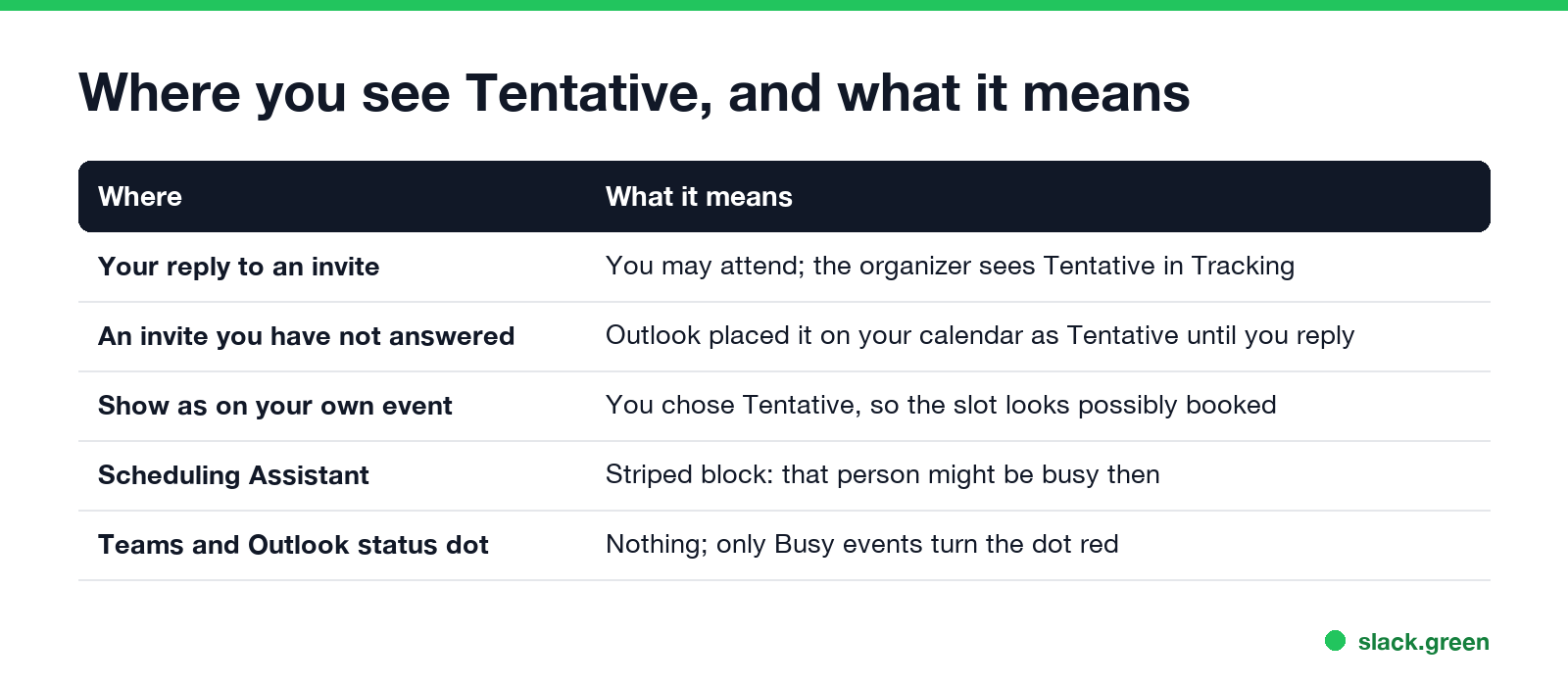
| Where | What it means |
|---|---|
| Your reply to an invite | You may attend. The organizer sees Tentative next to your name in the meeting's tracking list. |
| An invite you have not answered yet | Outlook placed it on your calendar as Tentative until you reply |
| Show as on your own event | You chose Tentative, so the slot looks possibly booked to others |
| Scheduling Assistant | A striped block: that person might be busy then |
| Outlook and Teams status dot | No change; only Busy events turn the dot red |
Tentative as a reply to a meeting invite
In an invite, pick Tentative from the response buttons. Outlook asks whether to send the response now, edit it with a note, or not send a response. The meeting stays on your calendar, marked Tentative, and the organizer's tracking list counts you as a maybe. From the Tentative button you can also pick Propose new time, which sends the organizer a different slot while keeping your maybe.
Organizers read it as "planning to come if nothing better lands". If you know you will attend, Accept is clearer; if you know you will not, Decline frees the organizer to plan without you. Teams calendar invites have the same three options, with RSVP labels Accept, Tentative and Decline.
Why unanswered invites show as Tentative
Never appear "away" on Slack again
Cloud-based. No downloads. Works 24/7 even when your laptop is off.
When an invite arrives, Exchange puts it on your calendar right away as Tentative, so the time does not look free while you decide. This is why a meeting you never answered still shows up, striped, in your day. It is controlled by the mailbox setting AddNewRequestsTentatively, which is on by default. An Exchange admin can check it in Exchange Online PowerShell:
Get-CalendarProcessing -Identity alex@contoso.com | Format-List AddNewRequestsTentativelyWhen you answer, the entry changes to Busy (Accept), stays Tentative, or disappears (Decline).
Tentative vs Busy
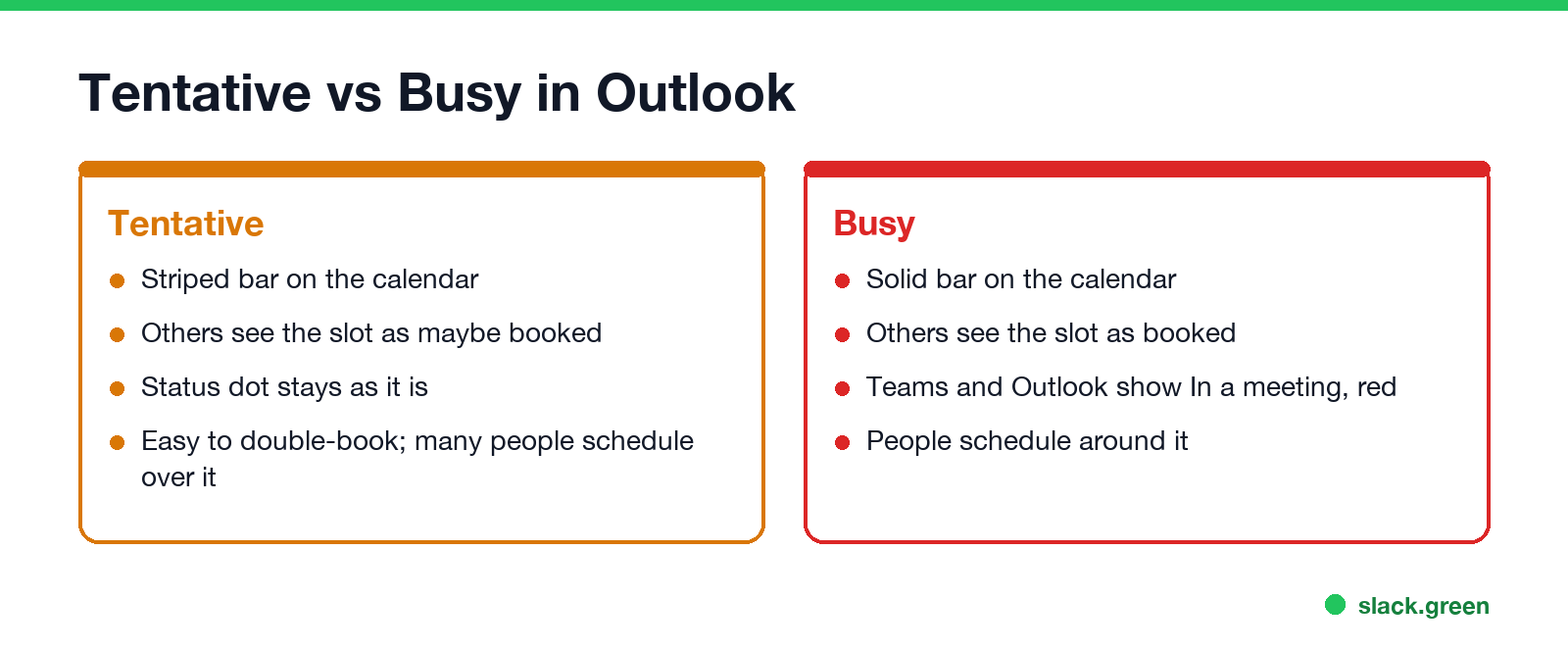
| Tentative | Busy | |
|---|---|---|
| Calendar look | Striped bar | Solid bar |
| What others read | Might be booked | Booked |
| Status dot in Outlook and Teams | No change | In a meeting, red |
| Double-booking | Common; people often schedule over it | People schedule around it |
Outlook's other Show as values are Free, Working elsewhere and Out of office; what each does to your status dot is in Outlook status colors meaning.
How to change a Tentative meeting to Accepted
- Open the meeting on your calendar.
- Select Accept, or Respond > Accept in newer Outlook versions.
- Choose whether to send the response. The bar turns solid, and Teams shows you In a meeting when it starts.
To mark your own event Tentative, open it and set Show as to Tentative. Outlook on the web and the new Outlook for Windows put Show as in the event's toolbar or its ... menu.
FAQ
Never appear "away" on Slack again
Cloud-based. No downloads. Works 24/7 even when your laptop is off.
What does Tentative mean in Outlook? Maybe. You might attend the meeting, and the time shows as possibly booked on your calendar.
What does Tentative mean in Teams? The same. A Tentative RSVP tells the organizer you might attend. It does not change your Teams presence.
Does Tentative block my calendar? Partly. The time shows as a striped, possibly-booked block. Busy blocks it fully.
Why does a meeting show Tentative when I never replied? Exchange adds new invites to your calendar as Tentative until you answer, so the time does not look free.
Does the organizer see if I respond Tentative? Yes, if you send the response. They see Tentative next to your name in the meeting's tracking list.
Stop Jiggling Your Mouse.
Join hundreds of remote workers who never worry about their Slack status. Set it up once, stay green forever.
Related Articles
KeepingYouAwake vs Amphetamine: Which Mac Keep-Awake App to Use
KeepingYouAwake is a free, open-source menu bar switch that runs Apple's caffeinate for you. Amphetamine is a free App Store app with triggers, schedules and a closed-lid mode. Pick KeepingYouAwake for one click and Homebrew, Amphetamine for automation. Neither keeps Slack or Teams active.
Computer Locks After 15 Minutes? How to Tell If Group Policy Set It
A work laptop that locks after exactly 15 minutes, with screen settings greyed out, is almost always following a policy from IT: the Windows machine inactivity limit, a forced screen saver, or an Intune device lock. Security baselines and PCI DSS ask for 15 minutes. How to see which policy it is, and what you can and cannot change.
How to Keep a Citrix Session Active: Find Which Timeout Logs You Out
A Citrix session can end from four different timers: Windows locking inside the virtual desktop, the Citrix session idle timer, the Citrix Gateway session time-out, and the StoreFront web page timeout. Only input from your own device into the Citrix window resets them. How to tell which one hit you and what keeps each one quiet.