
Can My Employer See My Google Chat Messages? Yes, in Vault
On a work Google account, yes. Workspace admins can search, export and keep your Google Chat DMs, group chats and spaces with Google Vault, often including messages you deleted. Messages sent with history off are not covered: they disappear after 24 hours. A personal Google account is out of your employer's reach.
Yes, if you use Google Chat with your work Google account. Google Workspace admins can use Google Vault to search your direct messages, group chats and messages in spaces, export them, and keep them for years under a retention rule or a legal hold. A Vault search returns the matching messages plus the messages 12 hours before and after them in the same conversation, for context. You are not told when a search runs.
There is one real exception. Messages sent with history off are not covered by Vault, and Google Chat deletes them after 24 hours. Your admin decides whether you can turn history off at all. A personal Google account, the Chat in your personal Gmail, is out of your employer's reach, though a work laptop can still record what you type into it.
We build Slack Green, which keeps your Slack status green from our servers with nothing installed on the work laptop, so we track what employers can see across chat tools. The same question for Teams is in can my employer read my Teams chats, and for Slack in can Slack admins see DMs.
What your employer can read in Google Chat
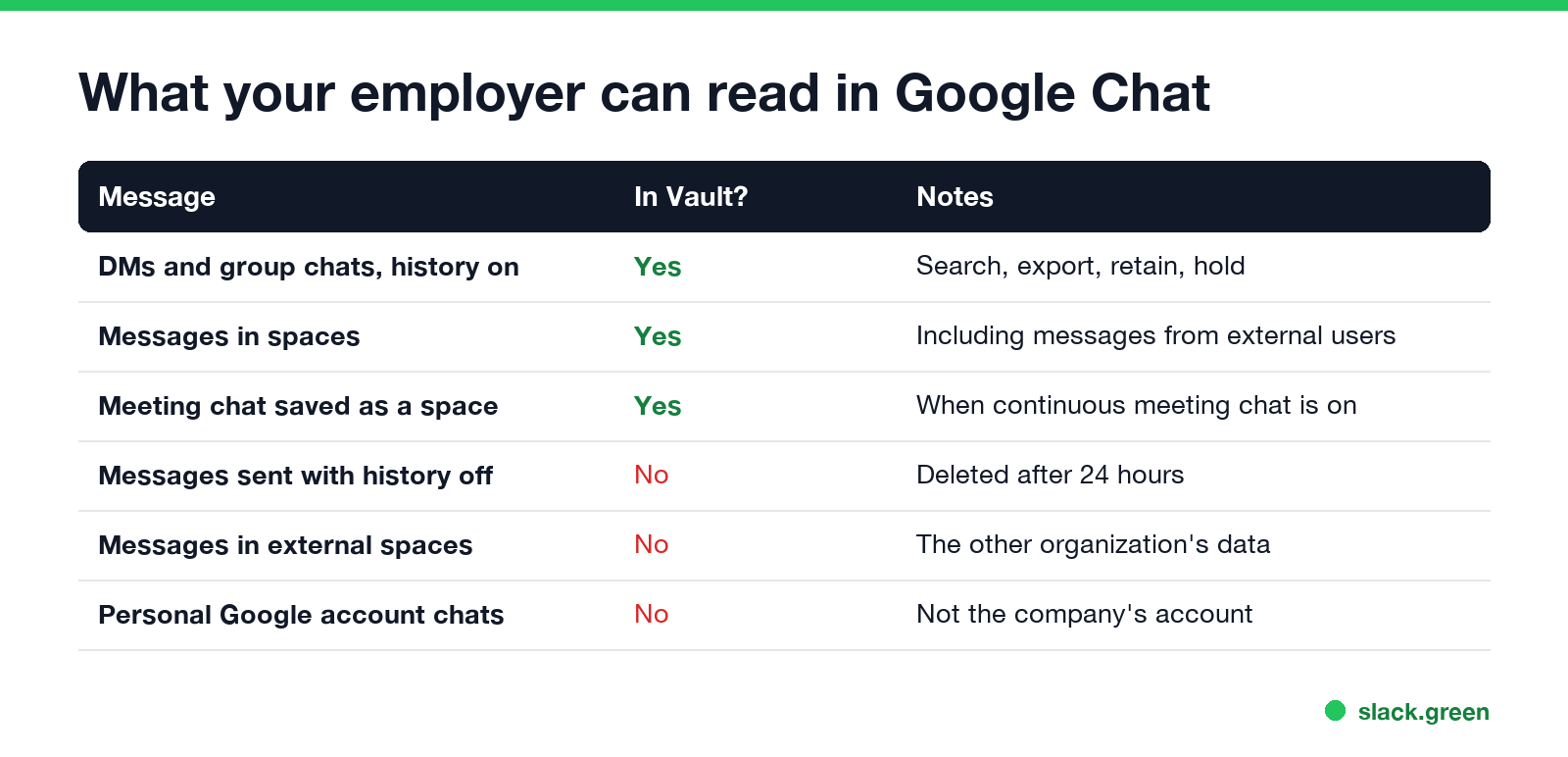
Google's Vault help page lists what it covers and what it does not:
| Message | Covered by Vault? | Notes |
|---|---|---|
| DMs and group chats sent with history on | Yes | Search, export, retention rules and holds |
| Messages in your organization's spaces | Yes | Including messages from external people in them |
| Meeting chat saved as a space | Yes | When continuous meeting chat is on in Google Meet |
| Messages sent with history off | No | Deleted after 24 hours |
| Messages in another organization's spaces | No | They belong to the other company |
| Chats on a personal Google account | No | Not the company's account |
Linked files, such as a Google Doc you share in a chat, are not part of the Chat record, but Vault covers them separately through Drive.
How admins read Google Chat messages
Vault search and export. An admin or investigator with Vault rights picks Google Chat, names the accounts or an organizational unit, and searches by words, people and dates. Results show each message with its sender and time. An export packs the conversation into documents, with the context messages around each match.
Retention and holds. A retention rule keeps Chat messages for a set time, or forever. A hold keeps a person's messages for a lawsuit or investigation, even ones they delete. Vault works the same way for every Workspace service: when a retention rule or hold applies, a message you delete leaves your view, and Vault keeps its copy.
Audit logs. The Admin console's Chat log events record activity such as spaces created and people added, with who did it and when. They are for tracing actions, not for reading messages.
Data loss prevention. Chat DLP rules can scan messages as they are sent and block or warn on things like card numbers or confidential labels.
Your manager cannot do any of this by being your manager. It takes an admin role or Vault access, and in most companies a request from HR, legal or security.
History on vs history off
Never appear "away" on Slack again
Cloud-based. No downloads. Works 24/7 even when your laptop is off.
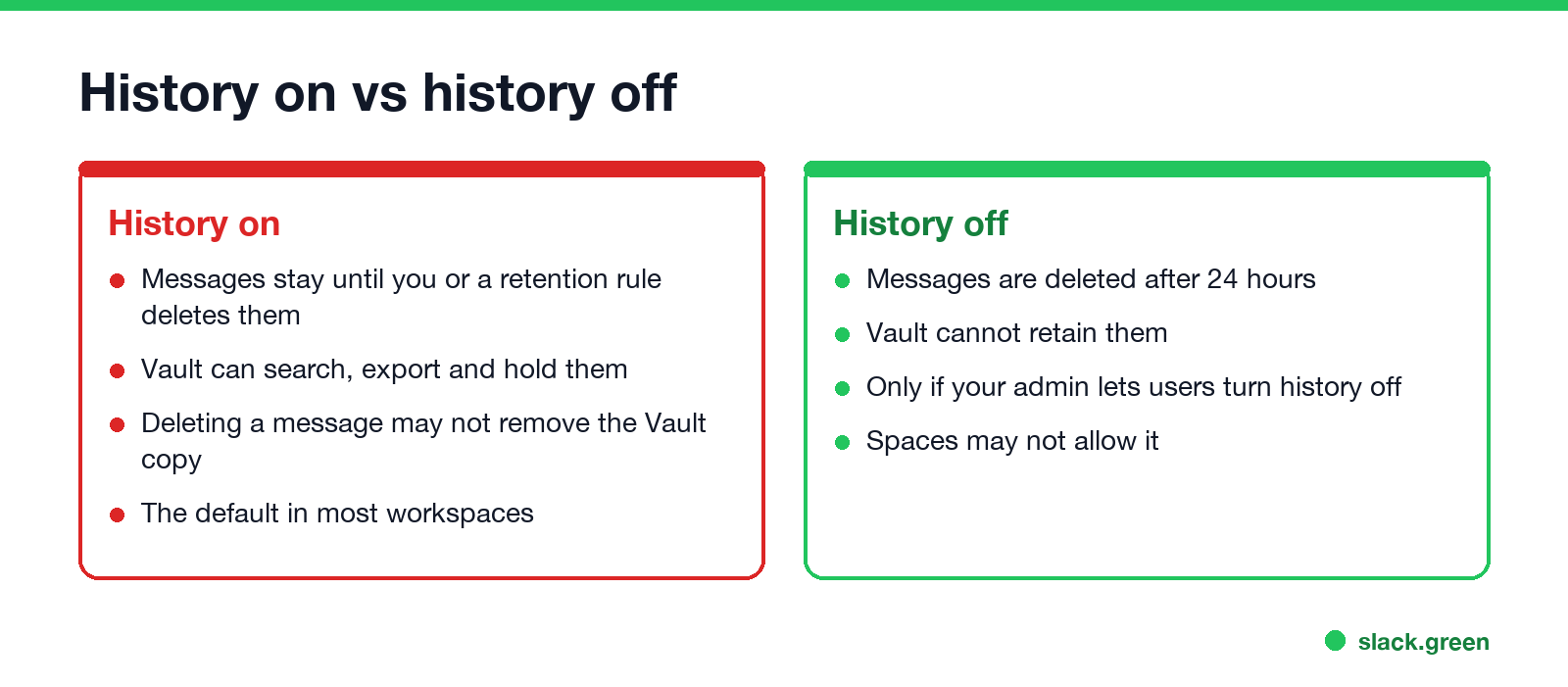
In a DM or group chat, the history setting shows at the top of the conversation or in its menu. With history off, Chat deletes messages after 24 hours, and Vault cannot keep them. Admins can force history on for everyone, which is common in regulated companies, and then the option is missing or grey for you.
History off does not make a message private from the device. On a work laptop, monitoring software, screenshots and HTTPS inspection see what you type before it is sent, whatever Chat does with it later. What the laptop itself reports is in how to tell if you are being monitored at work.
Does Google Chat show you are active to your employer?
Your presence dot is visible to coworkers, and it follows your activity. How long before it turns to away, and what each dot means, is in how long before Google Chat shows away and Google Chat status icons meaning. Google Chat keeps no "last seen" history for coworkers; see Google Chat last seen.
Keep personal messages personal
- • Use a personal Google account on your own phone for personal chats.
- • Do not add personal contacts to your work Chat; a DM with an outside person on a work account is still stored in the company's Vault.
- • If your admin allows history off, use it for small talk you would rather not keep, but assume the device can still see it.
- • Treat anything on a work account as company records. The same goes for email; see can my employer read my work email.
FAQ
Never appear "away" on Slack again
Cloud-based. No downloads. Works 24/7 even when your laptop is off.
Can my boss read my Google Chat messages? Not directly. A Workspace admin or Vault user can search and export them and share the results with your manager or HR.
Can my employer see deleted Google Chat messages? Yes, if a Vault retention rule or hold covered them when you deleted them. Without Vault retention, a deleted message is gone.
Are Google Chat messages with history off private? From Vault, yes: they are not retained and disappear after 24 hours. From software on a work laptop, no.
Can my employer see Google Chat on my personal phone? They can search your work account's chats, which live on Google's servers, whatever device you use. They cannot see a personal account's chats.
Can my employer see my Gemini chats too? On a work account, often yes, also through Vault; see can my employer see my Gemini chats.
Stop Jiggling Your Mouse.
Join hundreds of remote workers who never worry about their Slack status. Set it up once, stay green forever.
Related Articles
Can My Employer See What I Watch on YouTube at Work?
On a work laptop or the office network, your employer can see that you used YouTube, when, and for how long. With HTTPS inspection or monitoring software, they can see which videos, because the video address and the browser tab title both name it. On your own phone on mobile data, they see nothing.
Can My Employer See My iMessages on a Work Mac?
Not through device management or the network: Jamf or Intune cannot read Messages, and iMessage is end-to-end encrypted. But if you sign in to Messages on a work Mac, your texts are stored on that Mac, where monitoring screenshots, backups and admin access can reach them. How to check, and how to take iMessage off the Mac without deleting it from your iPhone.
Can My Boss See My Private Outlook Calendar Events?
Usually not the details. When you mark an Outlook event Private, someone who can read your calendar sees only Private appointment, the time and a lock. The exceptions are delegates you gave Can view private items, the people invited to the event, anyone with full access to your mailbox in new Outlook or the web, and compliance admins. How to check who has which access, and what Private does not hide.