
Can My Employer See My Telegram Messages on a Work Computer?
Not from the office network: Telegram traffic is encrypted, so IT sees only that you use Telegram. On a work laptop, monitoring software can capture your screen and keystrokes, and Telegram Desktop keeps chats and a logged-in session on the disk. What each method sees, how Telegram differs from WhatsApp, and how to keep it private.
Your employer cannot read your Telegram messages from the office network. Telegram encrypts its traffic with its own MTProto protocol, so the firewall shows that you used Telegram, when, and how much data moved, but not what you wrote. A work laptop is different. Monitoring software can screenshot the chat on your screen and log what you type, and Telegram Desktop keeps a copy of your chats and a logged-in session in a folder on the company's disk. Telegram also differs from WhatsApp in one way that matters here: normal Telegram chats are not end-to-end encrypted, and they sync in full to every computer you log in on.
Chat apps you use for work show your presence too. Slack turns your dot grey after 10 minutes without input in the Slack window. Slack Green keeps your Slack status active during the hours you set, from the cloud, with nothing installed on the work laptop.
What your employer can see, method by method
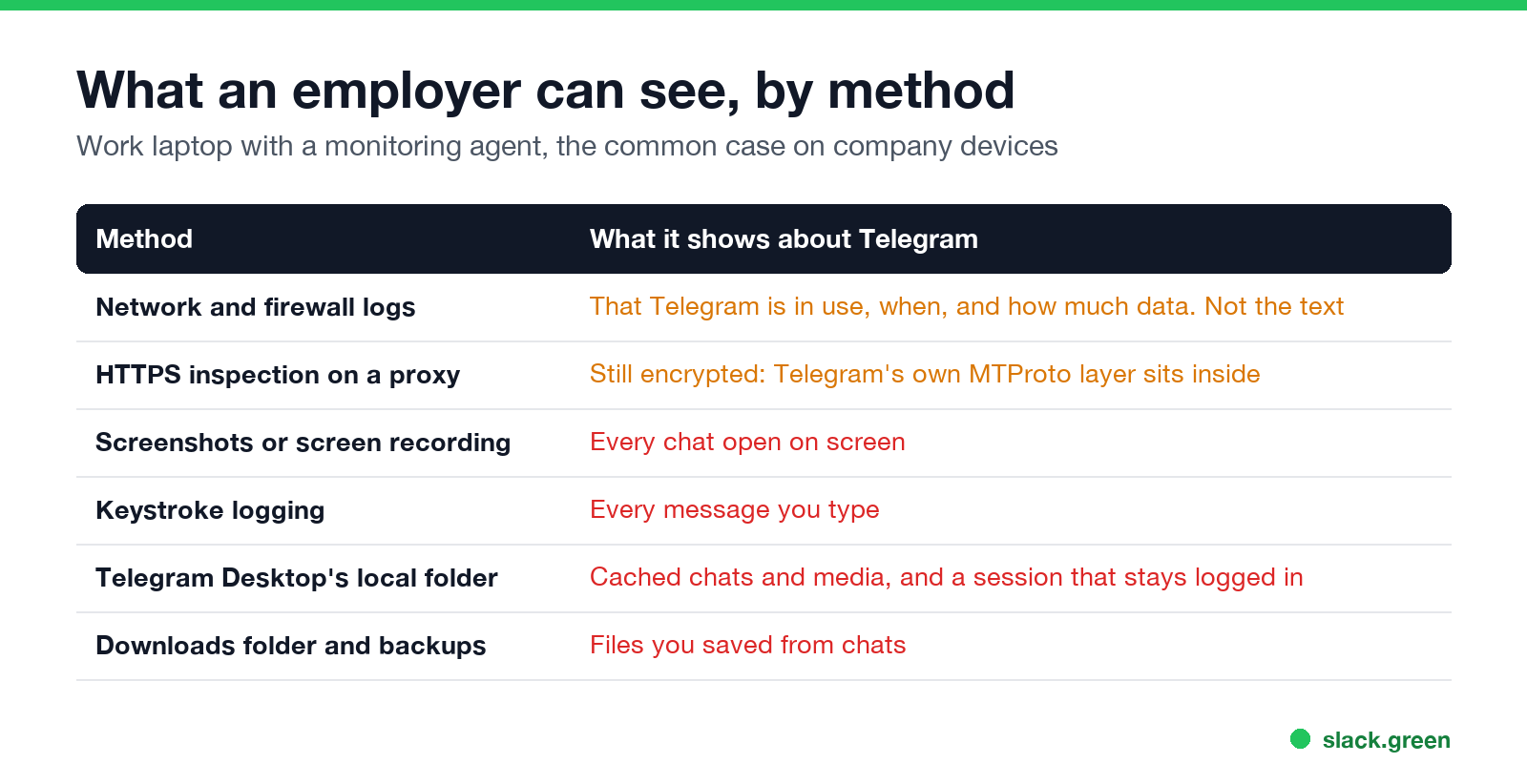
| Method | What it shows about Telegram | Where it applies |
|---|---|---|
| Network, firewall and DNS logs | That you used Telegram, at what times, and how much data | Office network and company VPN |
| HTTPS inspection on a web proxy | Encrypted MTProto data, not the messages | Office network and company VPN |
| Screenshots or screen recording | Every chat open on screen | Work laptop with a monitoring agent |
| Keystroke logging | Every message you type | Work laptop, some monitoring suites |
| Telegram Desktop's local folder | Cached messages and media, and the login session | Work laptop, anyone with admin access |
| Downloads folder and backups | Files you saved from chats | Work laptop with backups |
| Your personal phone on mobile data | Nothing | The company is not in the path |
The pattern is the same as for any chat app: on the wire it is encrypted, and on the laptop it is not.
Why the network cannot read Telegram
Telegram's FAQ describes two layers. Server-client encryption protects cloud chats, which are all normal private and group chats, between your device and Telegram's servers. Secret chats add client-to-client, end-to-end encryption on top.
For company IT that means:
- • Firewall and DNS logs show connections to Telegram's servers and domains such as telegram.org and web.telegram.org. A report can list "Telegram, 35 minutes". It cannot list contacts or messages.
- • HTTPS inspection can remove the outer TLS layer of Telegram Web, but the payload inside is still MTProto-encrypted. Telegram Desktop does not use normal HTTPS at all, so many companies block it by address instead of reading it.
So the risk is not the Wi-Fi. What a VPN changes, and how HTTPS inspection works, is in can my employer see my browsing if I use a VPN.
Where Telegram is exposed on a work laptop
Never appear "away" on Slack again
Cloud-based. No downloads. Works 24/7 even when your laptop is off.
Monitoring software. Suites such as Teramind, ActivTrak and Hubstaff record which apps you use and for how long, and depending on settings take screenshots, record the screen, or log keystrokes. A screenshot of an open Telegram chat is as readable as the chat. More in can my employer see my screen and can my employer see my keystrokes.
Your whole history comes with you. Cloud chats sync to every device you log in on. Logging in to Telegram Desktop or Telegram Web on a work laptop puts your full chat history on that laptop, not just today's messages.
Telegram Desktop's local folder. Telegram Desktop stores its data in a folder named tdata (in ~/Library/Application Support/Telegram Desktop on a Mac, and in %APPDATA%\Telegram Desktop on Windows). It holds cached messages and media, and the session that keeps you logged in. Without a local passcode, anyone who copies that folder can open your account on another computer; this is why malware targets it. Set a passcode in Settings > Privacy and Security > Local passcode.
Downloads. Files you save from chats land in Downloads or Telegram's own download folder, where company backup and data-loss tools can index them.
The desktop app and Telegram Web differ mostly in where the traces sit. The web version leaves browser history and browser storage. The desktop app leaves the tdata folder and shows up by name in app-usage reports.
Secret chats, and why they do not help on a work laptop
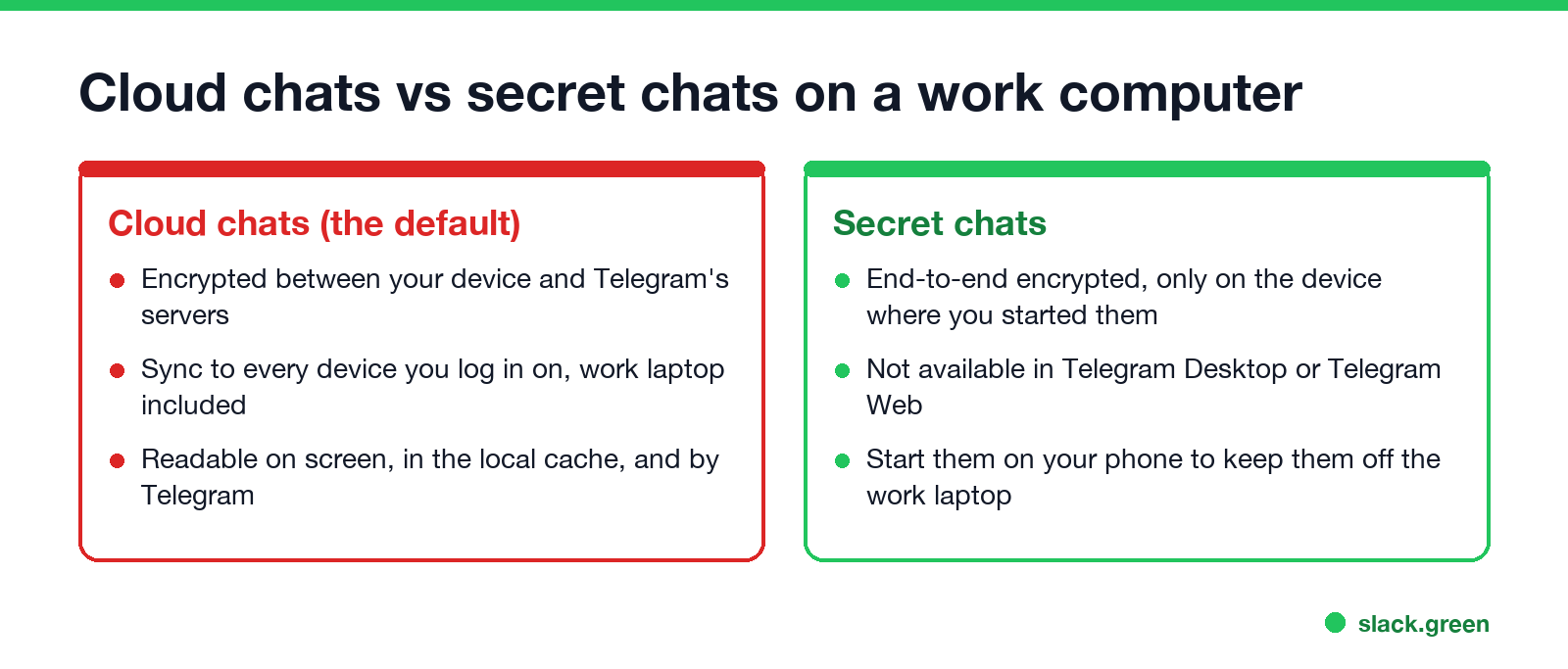
Secret chats are end-to-end encrypted and, in Telegram's words, "can only be accessed on their devices of origin". They are not available in Telegram Desktop or Telegram Web, only in the phone apps and the native macOS app. So a secret chat started on your phone never reaches the work laptop, which is what you want. Everything you open on the work laptop is a cloud chat.
Two limits: secret chats are one-to-one only, and screen capture on the laptop still sees whatever you open there.
Telegram vs WhatsApp on a work computer
| Telegram | ||
|---|---|---|
| Default encryption | Device to server (cloud chats) | End to end, all chats |
| What the network sees | Encrypted traffic | Encrypted traffic |
| History on a new computer | Full cloud history | Recent history from the phone |
| Local session to protect | tdata folder, local passcode | Browser session, screen lock |
| Log out remotely | Settings > Devices | Settings > Linked devices |
The WhatsApp side, including WhatsApp Web's screen lock, is in can my employer see my WhatsApp Web.
How to keep Telegram private at work
Never appear "away" on Slack again
Cloud-based. No downloads. Works 24/7 even when your laptop is off.
Whether the monitoring is legal where you live, and what notice the employer owes you, is in is it legal for my employer to monitor me. On a personal phone, see can my employer see what I do on my phone. The same question for Facebook Messenger is answered in can my employer see my Facebook messages.
FAQ
Can my employer see my Telegram messages on work Wi-Fi? No. They can see that you use Telegram and how much data moves. The messages are encrypted.
Can IT see Telegram Web on my work computer? Not through the network. Screenshots, screen recording and keystroke logging on the laptop can capture it, and the browser keeps your session.
Is Telegram end-to-end encrypted? Only secret chats. Normal chats are encrypted between your device and Telegram's servers, and Telegram can decrypt them.
Can my employer see Telegram on my personal phone? Not unless the phone is enrolled in company device management with Telegram in a work profile, or they have the phone.
Does Telegram tell me if someone logs in on my work laptop? Telegram sends a login notice to your other devices when a new session starts, and lists every session in Settings > Devices.
Stop Jiggling Your Mouse.
Join hundreds of remote workers who never worry about their Slack status. Set it up once, stay green forever.
Related Articles
Can My Employer See What I Watch on YouTube at Work?
On a work laptop or the office network, your employer can see that you used YouTube, when, and for how long. With HTTPS inspection or monitoring software, they can see which videos, because the video address and the browser tab title both name it. On your own phone on mobile data, they see nothing.
Can My Employer See My iMessages on a Work Mac?
Not through device management or the network: Jamf or Intune cannot read Messages, and iMessage is end-to-end encrypted. But if you sign in to Messages on a work Mac, your texts are stored on that Mac, where monitoring screenshots, backups and admin access can reach them. How to check, and how to take iMessage off the Mac without deleting it from your iPhone.
Can My Boss See My Private Outlook Calendar Events?
Usually not the details. When you mark an Outlook event Private, someone who can read your calendar sees only Private appointment, the time and a lock. The exceptions are delegates you gave Can view private items, the people invited to the event, anyone with full access to your mailbox in new Outlook or the web, and compliance admins. How to check who has which access, and what Private does not hide.