
How Long Does Google Chat Stay Active? Idle at 5 Minutes, Away at 10
Google Chat stays active for 5 minutes after your last activity in Gmail or Chat on a computer, then shows Idle, and Away after more than 10 minutes. Its status menu has no always-available option. How the status works, what you can set, and what keeps it green.
Google Chat keeps you active for 5 minutes after your last activity in Gmail or Chat on a computer. Then it shows Idle, and after more than 10 minutes without activity it shows Away, according to Google Chat Help. No setting keeps you active. Away also shows when you lose your internet connection or choose Set as away. To stay green, keep Gmail or Chat open and use it, keep your computer from sleeping, and keep your status on Automatic. On Google Workspace, a meeting on your calendar also shows in Chat.
We opened the status menu in Google Chat on 8 October 2026, signed in to a Google account. Automatic carries the note "Based on chat activity", and the other choices are Do not disturb and Set as away. Nothing in the menu keeps you active:
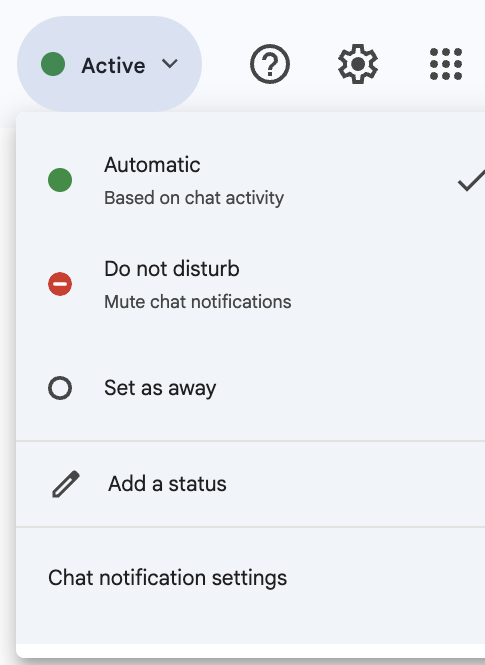
How Google Chat decides your status
| Status | When Google Chat shows it |
|---|---|
| Active | Gmail or Google Chat is open |
| Idle | No activity in Gmail or Chat for the last 5 minutes (desktop only) |
| Away | Idle for more than 10 minutes, offline, or Set as away |
| Do not disturb | Notifications muted for a time you choose |
The three options you can pick are Automatic, Do not disturb and Set as away. Automatic is the only one that ever shows you as active.
How to keep Google Chat active
- Set your status to Automatic. In Gmail or Chat, click the down arrow next to your status indicator and choose Automatic. A leftover Set as away keeps you away no matter what you do. (Set as away on purpose is how to look offline; see how to appear offline on Google Chat.)
- Keep Gmail or Chat open in a tab or the app. Active means Gmail or Chat is open. Pin the tab, or install Google Chat as an app from the browser so it has its own window.
- Use it now and then. Idle starts after 5 minutes without activity in Gmail or Chat. Reading and answering mail in Gmail counts, since Gmail and Chat share the status.
- Stop the computer from sleeping or locking. Going offline shows Away. See keep a work computer awake without admin rights.
- On a phone, keep the Chat or Gmail app open on screen if you are answering from it.
- • A keep-awake app. It stops sleep, so you do not drop offline, but it creates no activity in Gmail or Chat.
- • Do not disturb. It mutes notifications; it does not make you active.
- • A calendar event. It shows "In a meeting", not Active.
- • A mouse jiggler in another window. The Automatic status is "based on chat activity", per the menu above, so movement in other apps may not count.
A custom status message ("Heads down until 3") explains an Idle or Away status to others, and Google Chat Help shows how to add one from the same status menu.
Google Chat inactive after how long?
Idle after 5 minutes, Away after more than 10 minutes. There is no setting to change either, for users or admins. The full timeline, and why you can go Away sooner, is in how long before Google Chat shows Away.
What does not keep Google Chat active
Google Chat vs Slack vs Teams
| App | Idle or away after | What counts |
|---|---|---|
| Google Chat | Idle at 5 min, Away at 10 min | Activity in Gmail or Chat |
| Slack | Away at 10 min | Input anywhere on the computer (desktop app) |
| Microsoft Teams | Away after 5 minutes (Teams client code, 4 Nov 2026) | Input anywhere on the computer (desktop app) |
The Slack rules are in how long does Slack stay active, and the Teams rules in how long before Teams shows you as Away. Zoom waits 15 minutes and lets you turn Away off; see how to keep your Zoom status active. What each Google Chat icon means, including the orange clock, is in Google Chat status icons meaning. Coworkers see only your current status, never a last seen time; see Google Chat last seen.
FAQ
Can I set my Google Chat status to always available?
No. The only options are Automatic, Do not disturb and Set as away, as the menu screenshot above shows.
How long until Google Chat shows Away?
Idle after 5 minutes without activity in Gmail or Chat, and Away after more than 10 minutes.
Does having Gmail open keep Google Chat active?
Gmail open counts as Active, but after 5 minutes without activity in Gmail or Chat you show as Idle.
Why does Google Chat say I am away?
You set yourself as away, your computer went offline or slept, or you were idle for more than 10 minutes.
Related Articles
8x8 Status Icons Meaning: Every Color and Symbol
In 8x8 Work, a green check means Available, solid red means Busy, red with a phone means On Call, red with a bar means Do Not Disturb, an amber clock means Away, and a grey X means Offline or Invisible. What each status does to your calls, which ones change by themselves, and the Contact Center agent statuses.
How to See When Someone Was Last Active on Google Chat
You can't. Google Chat has no last seen or last active time. It shows only whether someone is active now, idle for 5 minutes on a computer, or away, and in direct messages it shows how far they have read. The clues you can use, what each one proves, and what Workspace admins see that coworkers do not.
How to Appear Offline on Google Chat: Set as Away
Google Chat has no invisible mode, but Set as away gives the same result: your status shows Away, which is also what people see when you are offline, and messages keep arriving. Steps for Gmail, the Chat app and phones, what others can still see, and how blocking and calendar status change it.