
How to See All Your DMs in Slack, Including the Hidden Ones
The DMs tab lists your direct messages with people. App DMs, Slackbot and DMs with deleted accounts sit elsewhere. We compared the tab with the full list the Slack API returned.
To see all your direct messages in Slack, click DMs in the rail on the far left of the desktop or web app. It opens a list of your DMs with people, with a Find a DM search box and an Unreads switch. That list leaves out three kinds of DM: chats with apps, Slackbot, and chats with accounts that were deleted. On 10 October 2026 our test account's DMs tab showed 1 conversation, while the Slack API listed 36.
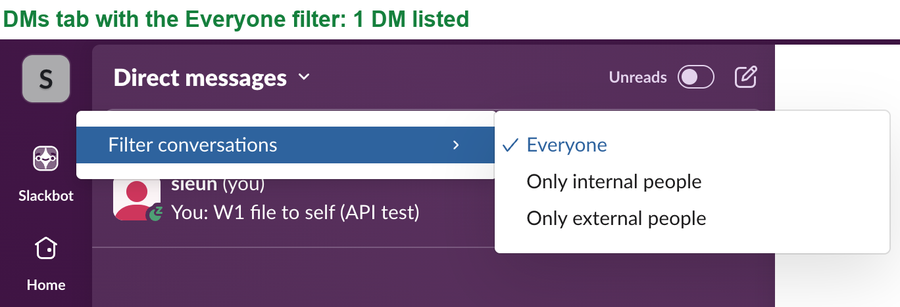
The DMs tab
The tab has three controls:
- • The Find a DM box searches the list by name.
- • The Unreads switch hides every DM you have already read.
- • The Direct messages title opens a menu with Filter conversations: Everyone, Only internal people or Only external people.
If a DM you expect is missing, set the filter back to Everyone and turn Unreads off first. Those two are the only filters on the tab.
The Activity tab also has a DMs view. It lists new DM messages, not conversations, so it is the place for "what did people send me today".
Where app and Slackbot DMs are
A DM with an app is not in the DMs tab. Our test app sent us a DM, and it showed under Apps in the sidebar, next to Slack's own system app.
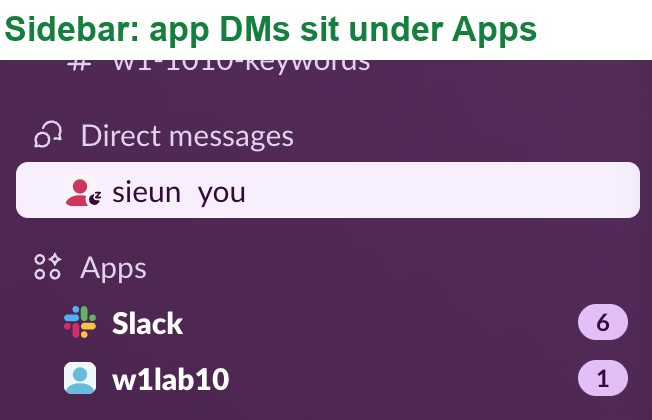
Slackbot has its own button at the top of the left rail. So a complete check of your DMs means three places: the DMs tab, the Apps section of the sidebar, and Slackbot.
Never appear "away" on Slack again
Cloud-based. No downloads. Works 24/7 even when your laptop is off.
The full list from the Slack API
The API returns every one-to-one DM your account has, including those the app hides. We ran this with a user token that had the im:read and users:read scopes:
import requests
H = {"Authorization": "Bearer " + USER_TOKEN}   # user token with im:read and users:read
def call(method, **params):
    return requests.get("https://slack.com/api/" + method, headers=H, params=params).json()

dms = call("conversations.list", types="im", limit=200)["channels"]
rows = []
for dm in dms:
    u = call("users.info", user=dm["user"]).get("user", {})
    rows.append((dm["id"], u.get("name", dm["user"]), u.get("deleted"), u.get("is_bot")))
print(len(rows), "DMs")
print("with deleted accounts:", sum(1 for r in rows if r[2]))
for r in rows[-4:]:
    print(r)
Output:
36 DMs
with deleted accounts: 32
('D0C557Z5D8E', 'api_error_lab', True, True)
('D0BAU7V1AKB', 'slack', False, False)
('D0B7EEAMNH4', 'slackbot', False, False)
('D0B7D4VDCUD', 'sieun', False, False)
32 of the 36 DMs were with accounts that no longer exist, here old test apps. None of them shows in the DMs tab. The 4 live ones were our test app, Slack's system user, Slackbot and our own self-DM.
Group DMs need one more scope. Asking for types=im,mpim with only im:read returned missing_scope; add mpim:read to include them. For reading the messages inside each DM, see get messages from a channel with the API, which works the same way with a DM's ID.
Finding an old DM
To find your own notes, open the DM with yourself; how to message yourself on Slack shows where it is.
Questions
Can a workspace admin see a list of my DMs?
Not from the DMs tab, which shows only your own. What admins can reach depends on the plan and its export tools; can Slack admins see your DMs explains each case.
Why is a DM with a deleted account missing?
Slack keeps the conversation, as the API list shows, but the DMs tab left all 32 such DMs out in our test. Our deleted accounts were apps; search for a word from the chat to reach the messages.
Stop Jiggling Your Mouse.
Join hundreds of remote workers who never worry about their Slack status. Set it up once, stay green forever.
Related Articles
Slack Images Not Showing? 5 Causes We Reproduced
We uploaded images to a Slack test channel and then switched each image setting off, ran /collapse, and posted from a bot that was not in the channel. Five causes, each reproduced.
How to Message Yourself on Slack (and What It Notifies)
Your own name under Direct messages opens a private DM with yourself. We sent it a note, a file, a scheduled message and a reminder, and checked which ones raised a badge.
Slack Keyword Notifications: What Triggers Them, Tested
We added three Slack keywords and had a bot post 12 test messages. Capitals and links matched; plurals, longer words, muted channels and unfollowed threads did not.