
Set a Slack Status With the API: users.profile.set, With Code
To set a Slack status through the API, call users.profile.set with a user token that has users.profile:write and a profile containing status_text, status_emoji and status_expiration. Curl and Python examples, how to read and clear a status, and why a bot token cannot set yours.
To set a Slack status with the API, call users.profile.set with a user token that has the users.profile:write scope, and send a profile object with status_text, status_emoji and, optionally, status_expiration as a Unix timestamp. Slack's developer docs say status text holds up to 100 characters without formatting, the emoji must be installed in the workspace, and an expiration of 0 means the status never clears. To clear a status, set both text and emoji to empty strings. Bot users have no profile, so a bot token cannot set your status; admins on paid plans can set another user's status by passing user.
Status is the emoji and text. Your green or grey dot is presence, a separate API with different rules: users.setPresence takes only auto or away. If you want the dot green during working hours, Slack Green handles that from the cloud.
Slack status fields
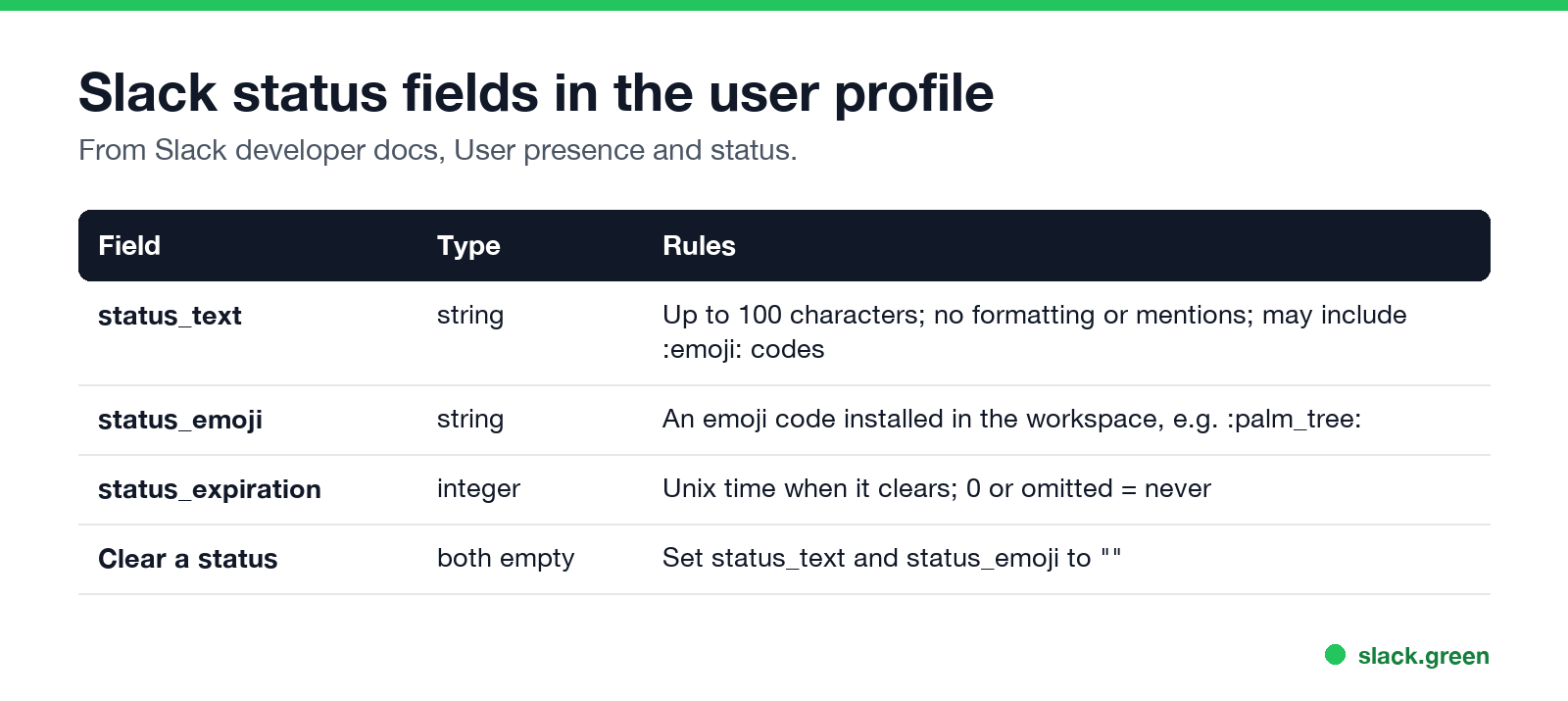
| Field | Type | Rules |
|---|---|---|
status_text | string | Up to 100 characters, no formatting or mentions |
status_emoji | string | An emoji code in the workspace, such as :palm_tree: |
status_expiration | integer | Unix time when it clears; 0 means never |
Set your status with curl
Use a user token (xoxp-) with users.profile:write:
curl -s -X POST https://slack.com/api/users.profile.set \
  -H "Authorization: Bearer $SLACK_USER_TOKEN" \
  -H "Content-Type: application/json; charset=utf-8" \
  -d '{"profile": {"status_text": "Focus time", "status_emoji": ":headphones:", "status_expiration": 0}}'
Slack recommends JSON; with a form-encoded POST, profile must be a URL-encoded JSON string.
To clear it:
curl -s -X POST https://slack.com/api/users.profile.set \
  -H "Authorization: Bearer $SLACK_USER_TOKEN" \
  -H "Content-Type: application/json; charset=utf-8" \
  -d '{"profile": {"status_text": "", "status_emoji": ""}}'
Set a status that expires, in Python
لا تظهر أبداً كـ "غائب" على Slack
يعمل على السحابة. بدون تنزيلات. يعمل 24/7 حتى عندما يكون الكمبيوتر مغلقاً.
import os, time
from slack_sdk import WebClient

client = WebClient(token=os.environ["SLACK_USER_TOKEN"])

# "In a meeting" for the next 45 minutes
client.users_profile_set(profile={
    "status_text": "In a meeting",
    "status_emoji": ":calendar:",
    "status_expiration": int(time.time()) + 45 * 60,
})
Wire this to a calendar or a cron job to build your own status automation. Slack's Google Calendar and Outlook apps already do it for meetings; see sync Slack status with Google Calendar. To copy your Microsoft Teams presence into your Slack status, see how to connect Slack and Teams.
Read a user's status
profile = client.users_profile_get(user="U0123ABCD")["profile"]
print(profile["status_emoji"], profile["status_text"], profile["status_expiration"])
users.profile.get needs users.profile:read. Profiles returned by users.list and users.info also include status, with users:read. To be told when a status changes, subscribe to user_change in the Events API.
Which method and scope to use
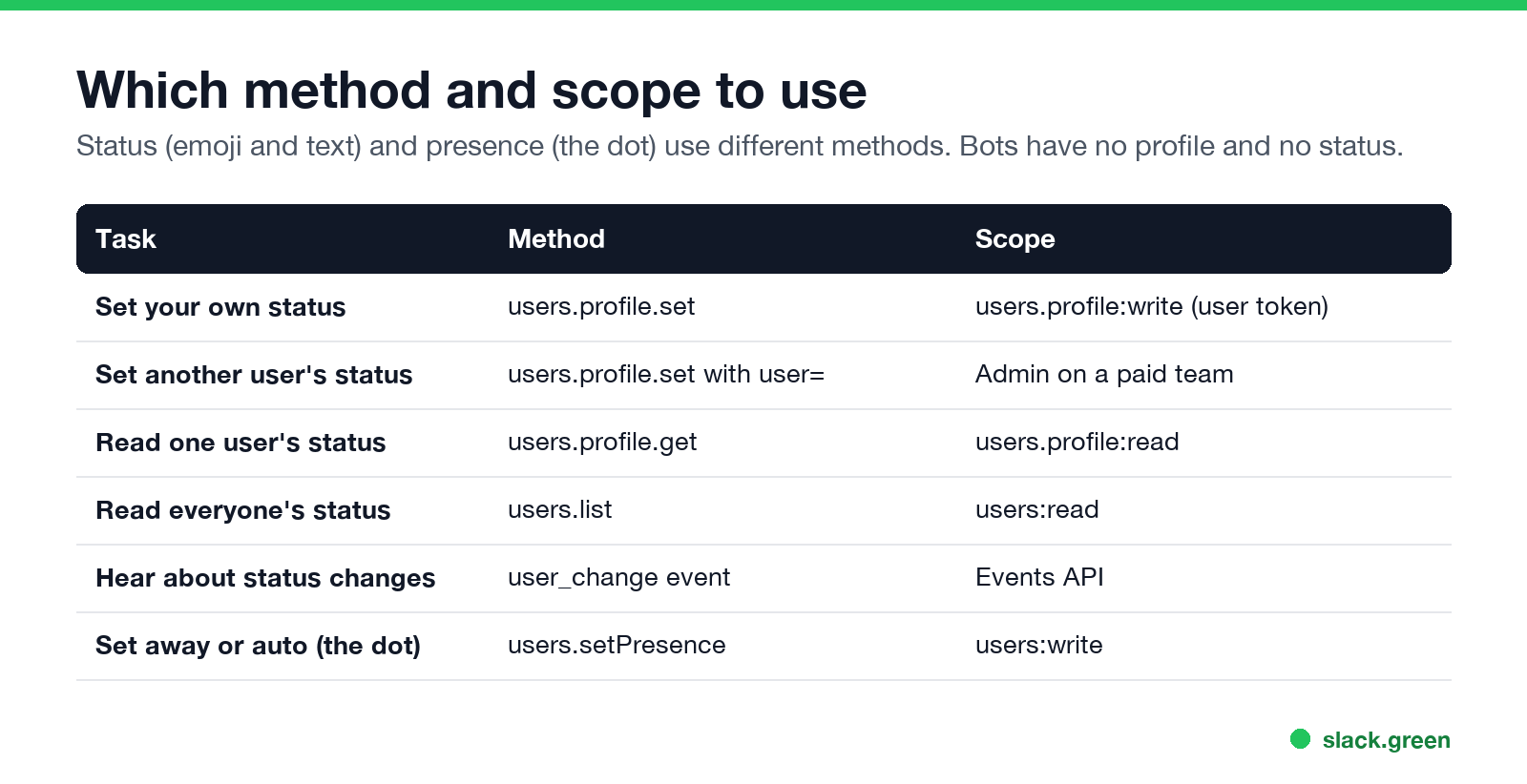
| Task | Method | Scope |
|---|---|---|
| Set your own status | users.profile.set | users.profile:write (user token) |
| Set another user's status | users.profile.set with user | Admin on a paid team |
| Read one status | users.profile.get | users.profile:read |
| Read everyone's | users.list | users:read |
| Status changes | user_change event | Events API |
| Set away or auto | users.setPresence | users:write |
Getting a user token is covered in Slack bot token: xoxb vs xoxp. Presence methods, fields and rate limits are in our Slack presence API guide.
Set a Slack status from the terminal
لا تظهر أبداً كـ "غائب" على Slack
يعمل على السحابة. بدون تنزيلات. يعمل 24/7 حتى عندما يكون الكمبيوتر مغلقاً.
Put the curl command in a shell alias or script:
slack_status() {
  curl -s -X POST https://slack.com/api/users.profile.set \
    -H "Authorization: Bearer $SLACK_USER_TOKEN" \
    -H "Content-Type: application/json; charset=utf-8" \
    -d "{\"profile\": {\"status_text\": \"$1\", \"status_emoji\": \"$2\"}}"
}
slack_status "Deploying" ":rocket:"
Keep the token in your keychain or an environment variable, never in the script file.
FAQ
How do I set my Slack status with the API?
Call users.profile.set with a user token that has users.profile:write, sending status_text and status_emoji inside profile.
Can a bot set my Slack status?
No. Bots have no profile. Use a user token; admins on paid plans can set other users' statuses.
How do I make an API status expire?
Set status_expiration to a Unix timestamp. 0 means it never clears.
How do I get a user's status with the API?
users.profile.get with users.profile:read, or read profile from users.info.
Can the API set me to active?
No. users.setPresence accepts only auto or away; see script to keep Slack active.
توقف عن تحريك الماوس.
مئات العاملين عن بعد لم يعودوا قلقين بشأن حالة Slack. قم بالإعداد مرة واحدة، ابقَ أخضر للأبد.
Related Articles
Slack User Groups: How to Create, Mention and Manage Them
A Slack user group is a named list of people with one @handle, like @designers, that notifies all of them and can add them to up to 100 default channels. How to create one, who can, how to mention it, and how it differs from a channel.
How to Contact Slack Support: Form, Chat, Email and /feedback
To contact Slack support, open slack.com/help/requests/new and click Contact support, or use Help > Contact us inside Slack, or type /feedback in any message box. Email feedback@slack.com if you cannot sign in. Slack lists no support phone line. Response times by plan and what to include.
How to Make a Private Slack Channel Public, and Who Can
Open the channel, click its name, go to Settings, and choose Change to a public channel. By default only Workspace Owners, Org Owners and Org Admins can do it. The whole history and every file become visible to the workspace.