
Set a Slack Status With the API: users.profile.set, With Code
To set a Slack status through the API, call users.profile.set with a user token that has users.profile:write and a profile containing status_text, status_emoji and status_expiration. Curl and Python examples, how to read and clear a status, and why a bot token cannot set yours.
To set a Slack status with the API, call users.profile.set with a user token that has the users.profile:write scope, and send a profile object with status_text, status_emoji and, optionally, status_expiration as a Unix timestamp. Slack's developer docs say status text holds up to 100 characters without formatting, the emoji must be installed in the workspace, and an expiration of 0 means the status never clears. To clear a status, set both text and emoji to empty strings. Bot users have no profile, so a bot token cannot set your status; admins on paid plans can set another user's status by passing user.
Status is the emoji and text. Your green or grey dot is presence, a separate API with different rules: users.setPresence takes only auto or away. If you want the dot green during working hours, Slack Green handles that from the cloud.
Slack status fields
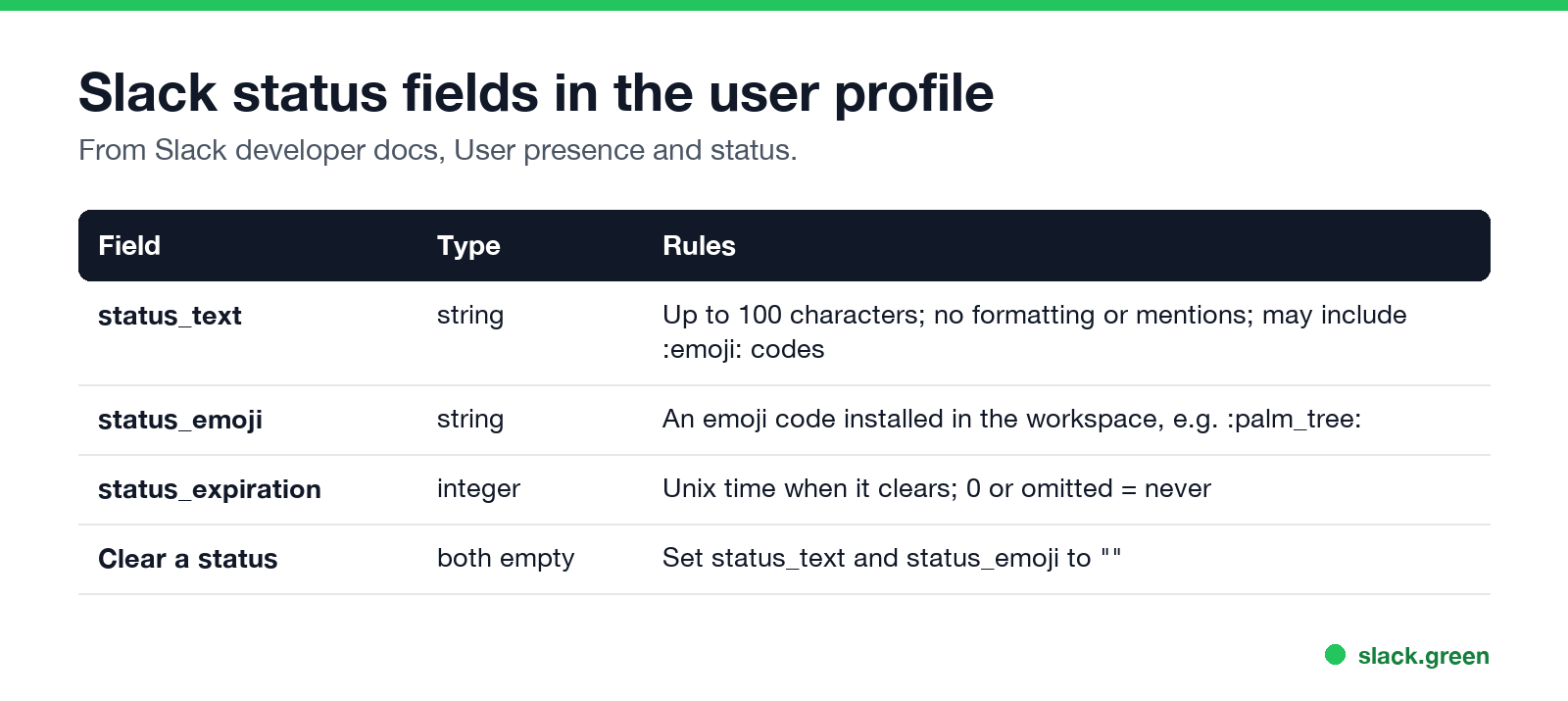
| Field | Type | Rules |
|---|---|---|
status_text | string | Up to 100 characters, no formatting or mentions |
status_emoji | string | An emoji code in the workspace, such as :palm_tree: |
status_expiration | integer | Unix time when it clears; 0 means never |
Set your status with curl
Use a user token (xoxp-) with users.profile:write:
curl -s -X POST https://slack.com/api/users.profile.set \
  -H "Authorization: Bearer $SLACK_USER_TOKEN" \
  -H "Content-Type: application/json; charset=utf-8" \
  -d '{"profile": {"status_text": "Focus time", "status_emoji": ":headphones:", "status_expiration": 0}}'
Slack recommends JSON; with a form-encoded POST, profile must be a URL-encoded JSON string.
To clear it:
curl -s -X POST https://slack.com/api/users.profile.set \
  -H "Authorization: Bearer $SLACK_USER_TOKEN" \
  -H "Content-Type: application/json; charset=utf-8" \
  -d '{"profile": {"status_text": "", "status_emoji": ""}}'
Set a status that expires, in Python
import os, time
from slack_sdk import WebClient

client = WebClient(token=os.environ["SLACK_USER_TOKEN"])

# "In a meeting" for the next 45 minutes
client.users_profile_set(profile={
    "status_text": "In a meeting",
    "status_emoji": ":calendar:",
    "status_expiration": int(time.time()) + 45 * 60,
})
Wire this to a calendar or a cron job to build your own status automation. Slack's Google Calendar and Outlook apps already do it for meetings; see sync Slack status with Google Calendar. To copy your Microsoft Teams presence into your Slack status, see how to connect Slack and Teams.
Read a user's status
profile = client.users_profile_get(user="U0123ABCD")["profile"]
print(profile["status_emoji"], profile["status_text"], profile["status_expiration"])
users.profile.get needs users.profile:read. Profiles returned by users.list and users.info also include status, with users:read. To be told when a status changes, subscribe to user_change in the Events API.
Which method and scope to use
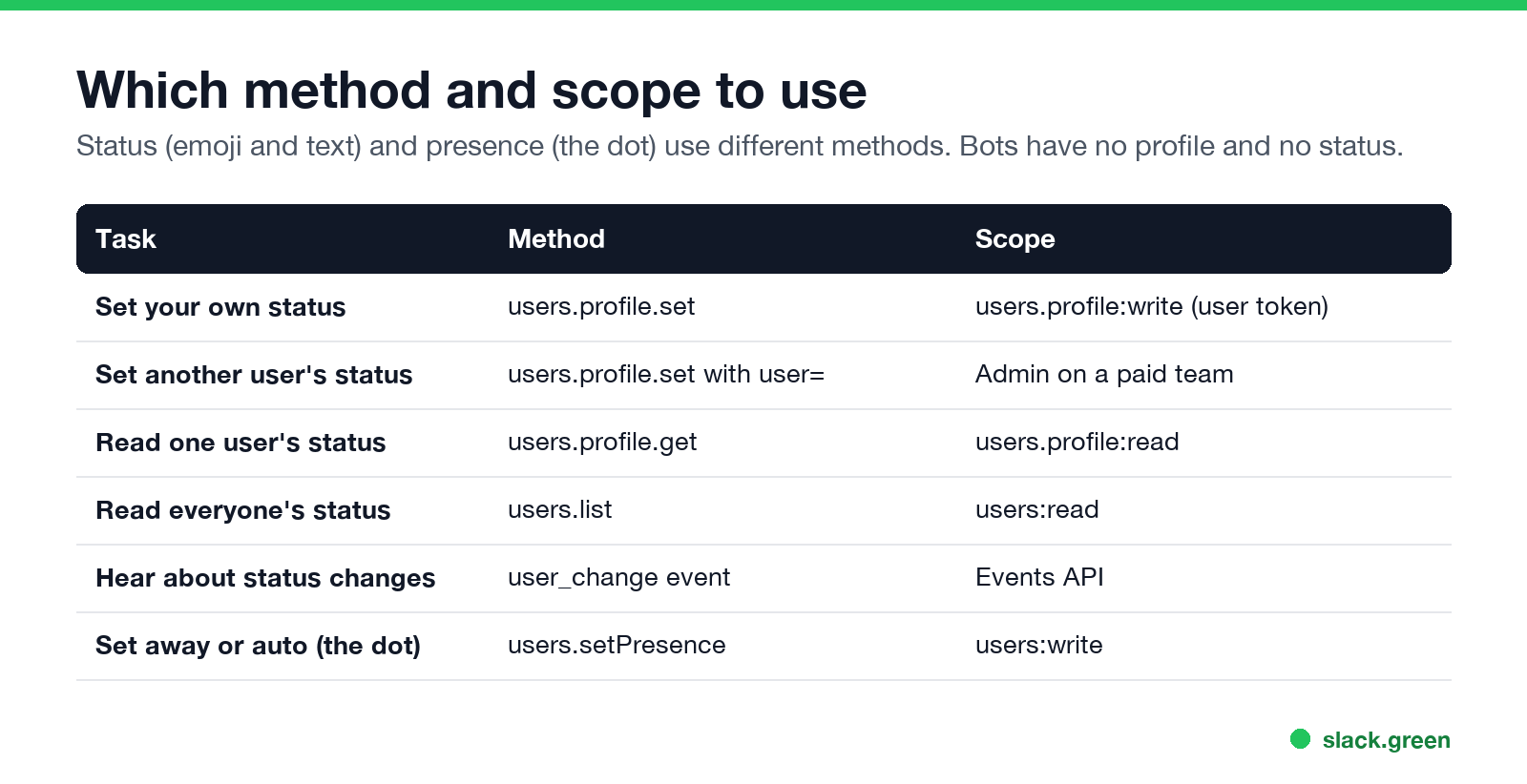
| Task | Method | Scope |
|---|---|---|
| Set your own status | users.profile.set | users.profile:write (user token) |
| Set another user's status | users.profile.set with user | Admin on a paid team |
| Read one status | users.profile.get | users.profile:read |
| Read everyone's | users.list | users:read |
| Status changes | user_change event | Events API |
| Set away or auto | users.setPresence | users:write |
Getting a user token is covered in Slack bot token: xoxb vs xoxp. Presence methods, fields and rate limits are in our Slack presence API guide.
Set a Slack status from the terminal
Put the curl command in a shell alias or script:
slack_status() {
  curl -s -X POST https://slack.com/api/users.profile.set \
    -H "Authorization: Bearer $SLACK_USER_TOKEN" \
    -H "Content-Type: application/json; charset=utf-8" \
    -d "{\"profile\": {\"status_text\": \"$1\", \"status_emoji\": \"$2\"}}"
}
slack_status "Deploying" ":rocket:"
Keep the token in your keychain or an environment variable, never in the script file.
FAQ
How do I set my Slack status with the API?
Call users.profile.set with a user token that has users.profile:write, sending status_text and status_emoji inside profile.
Can a bot set my Slack status?
No. Bots have no profile. Use a user token; admins on paid plans can set other users' statuses.
How do I make an API status expire?
Set status_expiration to a Unix timestamp. 0 means it never clears.
How do I get a user's status with the API?
users.profile.get with users.profile:read, or read profile from users.info.
Can the API set me to active?
No. users.setPresence accepts only auto or away; see script to keep Slack active.
Related Articles
Slack User Groups: How to Create, Mention and Manage Them
A Slack user group is a named list of people with one @handle, like @designers, that notifies all of them and can add them to up to 100 default channels. How to create one, who can, how to mention it, and how it differs from a channel.
How to Contact Slack Support: Form, Chat, Email and /feedback
To contact Slack support, open slack.com/help/requests/new and click Contact support, or use Help > Contact us inside Slack, or type /feedback in any message box. Email feedback@slack.com if you cannot sign in. Slack lists no support phone line. Response times by plan and what to include.
How to Make a Private Slack Channel Public, and Who Can
Open the channel, click its name, go to Settings, and choose Change to a public channel. By default only Workspace Owners, Org Owners and Org Admins can do it. The whole history and every file become visible to the workspace.