
Teams Status Message Not Showing? Check These Five Things
A Teams status message that others cannot see usually has one of five causes: Show when people message me is off, the message cleared itself, it is hiding your Outlook out-of-office reply, a scheduled out of office has not started, or the Teams app shows an old copy. Where the message appears, and how to fix each case.
If your Microsoft Teams status message is not showing, check the Show when people message me box first. Without it, the message appears only on your profile card, so people who chat with you never see it above the message box. The other common causes: the message cleared itself at the time set under Clear status message after, a status message is hiding your Outlook out-of-office reply, a scheduled out of office has not started yet, or your Teams app or a coworker's is showing an old copy. Each has a one-minute fix below.
A status message changes the words next to your name, not your presence dot, which Teams turns yellow after about 5 minutes without input. In Slack, Slack Green keeps your dot green during the hours you set, from the cloud.
Where a Teams status message shows up
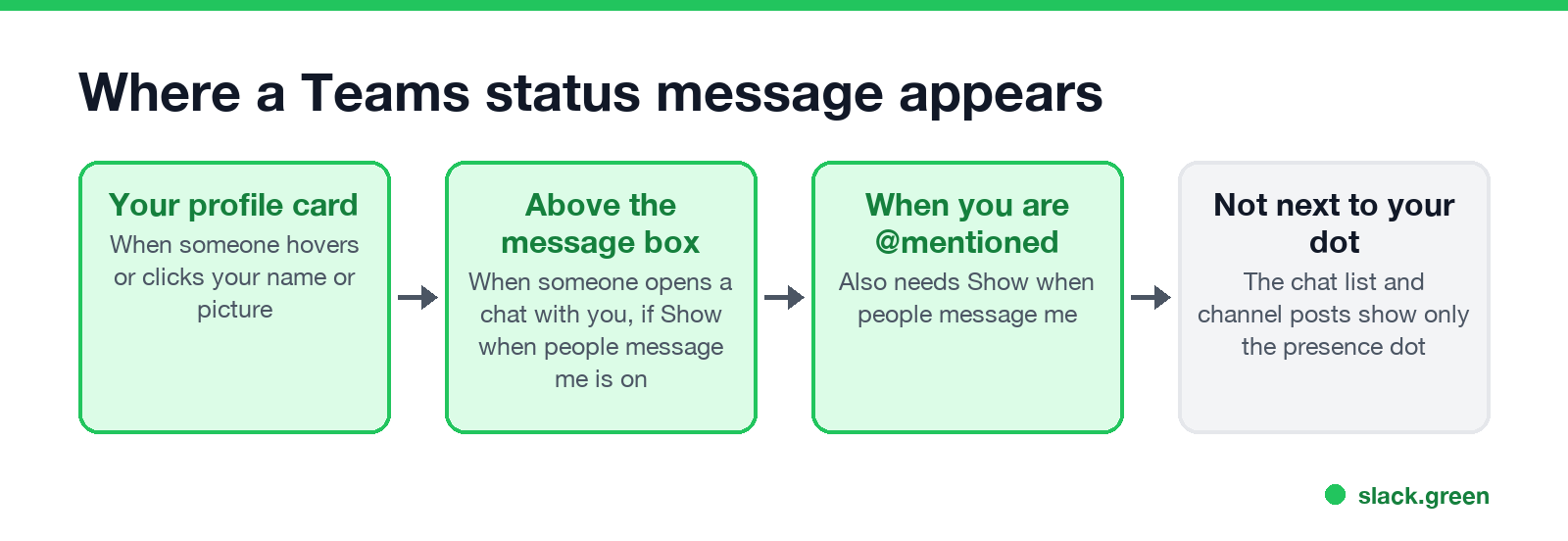
Knowing where the message is supposed to appear settles half of these reports:
- • Your profile card. Anyone who hovers over or clicks your name or picture sees it. This works whatever the checkbox says.
- • Above the message box. When someone opens a chat with you, Teams shows your message there, but only with Show when people message me on.
- • When someone @mentions you. Same checkbox.
- • Not in the chat list or next to your dot. Those show only your presence. A coworker who looks at the list of chats will not see the text.
- • Windows: Settings > Apps > Installed apps > Microsoft Teams > Advanced options > Reset.
- • Mac: quit Teams, then delete its cache folders in Terminal and open Teams again:
Status message not showing: causes and fixes
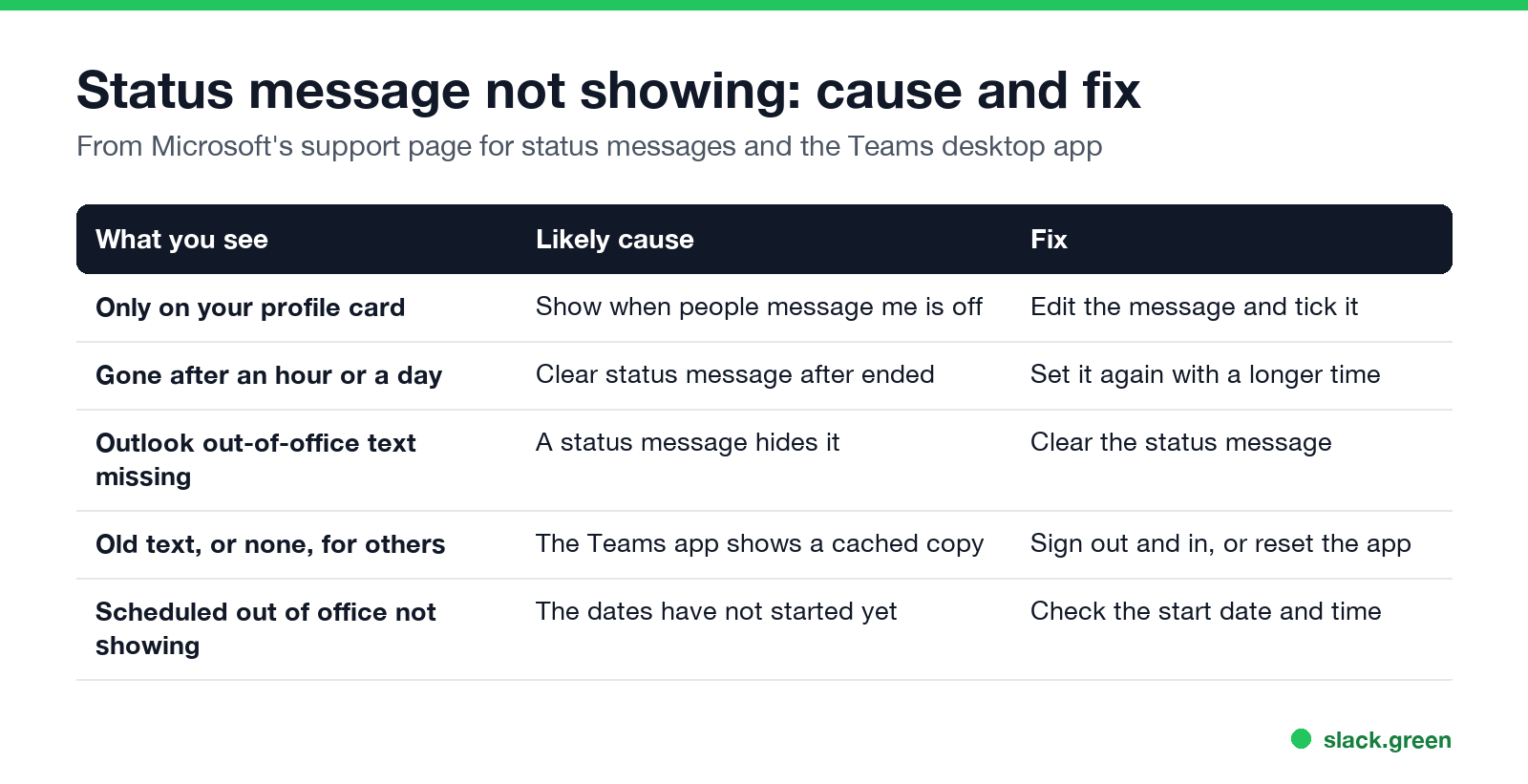
| What you see | Likely cause | Fix |
|---|---|---|
| Only on your profile card | Show when people message me is off | Edit the message and tick the box |
| Gone after an hour or a day | Clear status message after ended | Set it again with a longer time or Never |
| Your Outlook out-of-office text is missing | A Teams status message hides it | Clear the status message |
| Scheduled out of office not showing | The start date has not come | Check the dates in Schedule out of office |
| Others see old text, or none | A cached copy in the Teams app | Sign out and back in, or reset the app |
1. Turn on Show when people message me. Click your profile picture, then your status message, and tick Show when people message me. Microsoft's support page says this is what makes people "see your status when they message or @mention you".
2. Check Clear status message after. A message set to clear after 1 hour, 4 hours, Today or This week disappears on time, often before the reader looks. Pick Never for anything that should stay, and clear it by hand later.
3. Clear the status message to show your Outlook reply. Microsoft states: "If you have a status message set in Teams, it will not show your automatic out-of-office reply from Microsoft Outlook." If your holiday message from Outlook is missing in Teams, a leftover status message is the cause. The full out-of-office setup is in how to set an away message in Teams.
4. Check the dates of a scheduled out of office. A scheduled out of office shows only between its start and end times, so it is not visible the day before you leave.
5. Refresh Teams. Presence and status messages sync through Microsoft's servers, and an app that has been open for days can show stale data. On both ends, sign out of Teams and back in. If that does not help, reset the new Teams app:
rm -rf ~/Library/Group\ Containers/UBF8T346G9.com.microsoft.teams
rm -rf ~/Library/Containers/com.microsoft.teams2
Resetting signs you out and clears local settings, not your chats or your status message, which live in your account.
Status message vs status: two different things
Never appear "away" on Slack again
Cloud-based. No downloads. Works 24/7 even when your laptop is off.
People often expect a status message to change their dot, or the other way round. They are separate:
| Status (presence) | Status message | |
|---|---|---|
| What it is | Available, Busy, Away, Be right back, Do not disturb, Offline | Up to 280 characters of text |
| Set by | You, or Teams from your activity and calendar | Only you |
| Shows | Everywhere your picture appears | Profile card, and chats if the box is ticked |
| Ends | When activity changes, or after a duration | At the Clear after time |
If the problem is the dot, not the text, see Teams status stuck on Away or Teams status stuck on Offline. What each icon means is in Microsoft Teams status icons meaning.
Teams status message ideas that get read
Put the useful part first, because the banner above the message box is one line:
Longer lists, including lighter ones, are in funny Teams status messages and Teams status for lunch.
FAQ
Why can't others see my Teams status message? Most often Show when people message me is off, so it appears only on your profile card. Tick it in the status message settings.
Why did my Teams status message disappear? The Clear status message after time ran out. Set it again and choose a longer time or Never.
Why is my Outlook out of office not showing in Teams? A Teams status message is set. Microsoft says a status message hides the Outlook automatic reply. Clear it.
Does a Teams status message change my status to Away? No. The text and the presence dot are separate. Set Away or Be right back from your status menu.
How long can a Teams status message be? Up to 280 characters. The banner in chats shows the start of it, so put the key facts first.
Stop Jiggling Your Mouse.
Join hundreds of remote workers who never worry about their Slack status. Set it up once, stay green forever.
Related Articles
Can My Employer See What I Watch on YouTube at Work?
On a work laptop or the office network, your employer can see that you used YouTube, when, and for how long. With HTTPS inspection or monitoring software, they can see which videos, because the video address and the browser tab title both name it. On your own phone on mobile data, they see nothing.
Can My Employer See My iMessages on a Work Mac?
Not through device management or the network: Jamf or Intune cannot read Messages, and iMessage is end-to-end encrypted. But if you sign in to Messages on a work Mac, your texts are stored on that Mac, where monitoring screenshots, backups and admin access can reach them. How to check, and how to take iMessage off the Mac without deleting it from your iPhone.
Can My Boss See My Private Outlook Calendar Events?
Usually not the details. When you mark an Outlook event Private, someone who can read your calendar sees only Private appointment, the time and a lock. The exceptions are delegates you gave Can view private items, the people invited to the event, anyone with full access to your mailbox in new Outlook or the web, and compliance admins. How to check who has which access, and what Private does not hide.