
What Is a Mouse Jiggler? How It Works, and What It Does Not Do
A mouse jiggler is a USB device, app or small platform that moves your pointer a few pixels on a timer, so the computer never counts you as idle. How it works, the three types, what people use one for, and why it keeps Teams green but not Slack.
A mouse jiggler is a small USB device, an app, or a motorized platform that moves your mouse pointer a pixel or two every 30 to 60 seconds. The computer treats each nudge as input, the same as a hand on the mouse, so it never counts you as idle. The screen stays on, the computer does not sleep or lock, and apps that read idle time, such as Microsoft Teams, keep showing you as Available. People also call it a mouse mover or mouse wiggler.
A jiggler does not keep Slack green on its own. Slack counts only input inside its own window, so the nudge helps only while the pointer sits over Slack. Slack Green keeps your Slack status active from our servers during the hours you set, with nothing on your computer. To try the idea for free, our online mouse jiggler keeps a screen awake from a browser tab.
How a mouse jiggler works
Every computer keeps an idle timer: the number of seconds since the last key press or mouse move. Windows exposes it through the GetLastInputInfo call. macOS keeps it as HIDIdleTime, which you can read in Terminal:
# seconds since your last keyboard or mouse input (macOS)
ioreg -c IOHIDSystem | awk '/HIDIdleTime/ {print $NF/1000000000; exit}'
Run it, wait 10 seconds without touching anything, and run it again: the number grows. Move the mouse and it drops to near 0. The screen saver, display sleep, the lock screen and apps that show Away all read this timer, and each acts when it passes its limit, often 5 or 10 minutes.
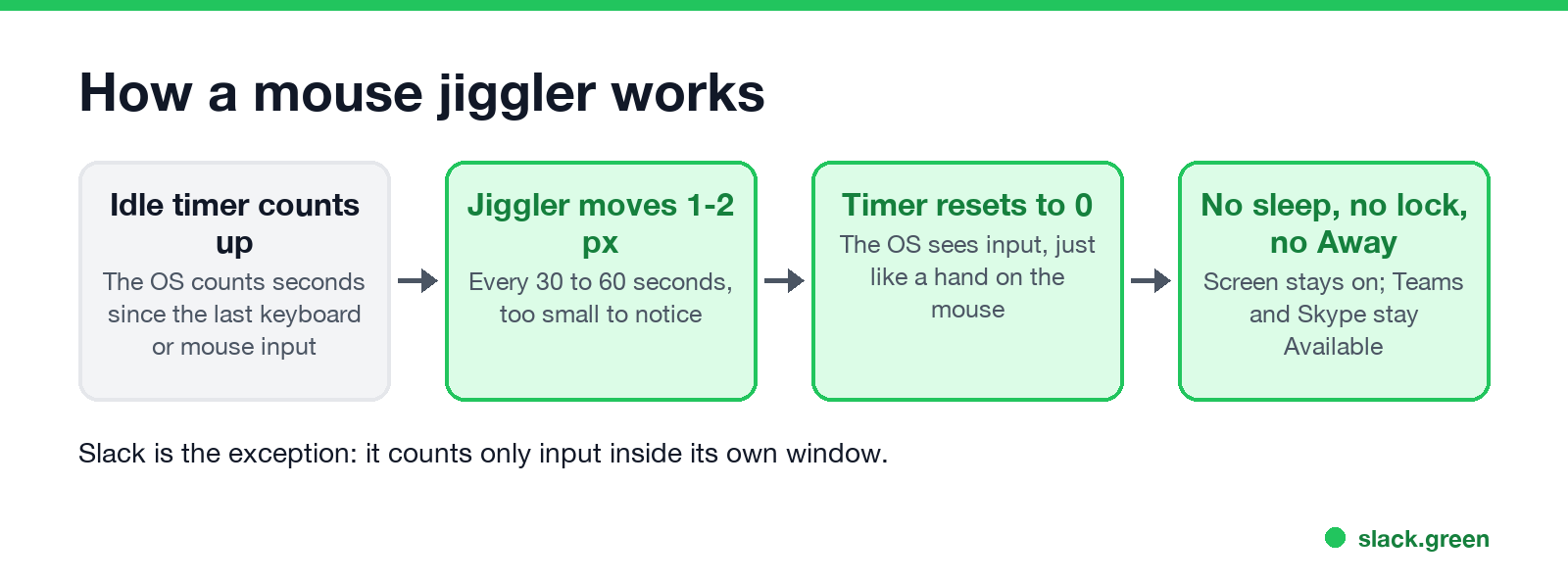
A mouse jiggler resets the timer before it reaches any limit. Most move the pointer by 1 or 2 pixels and back, so you cannot see it while you work, and many pause when you move the mouse yourself.
The three types of mouse jiggler
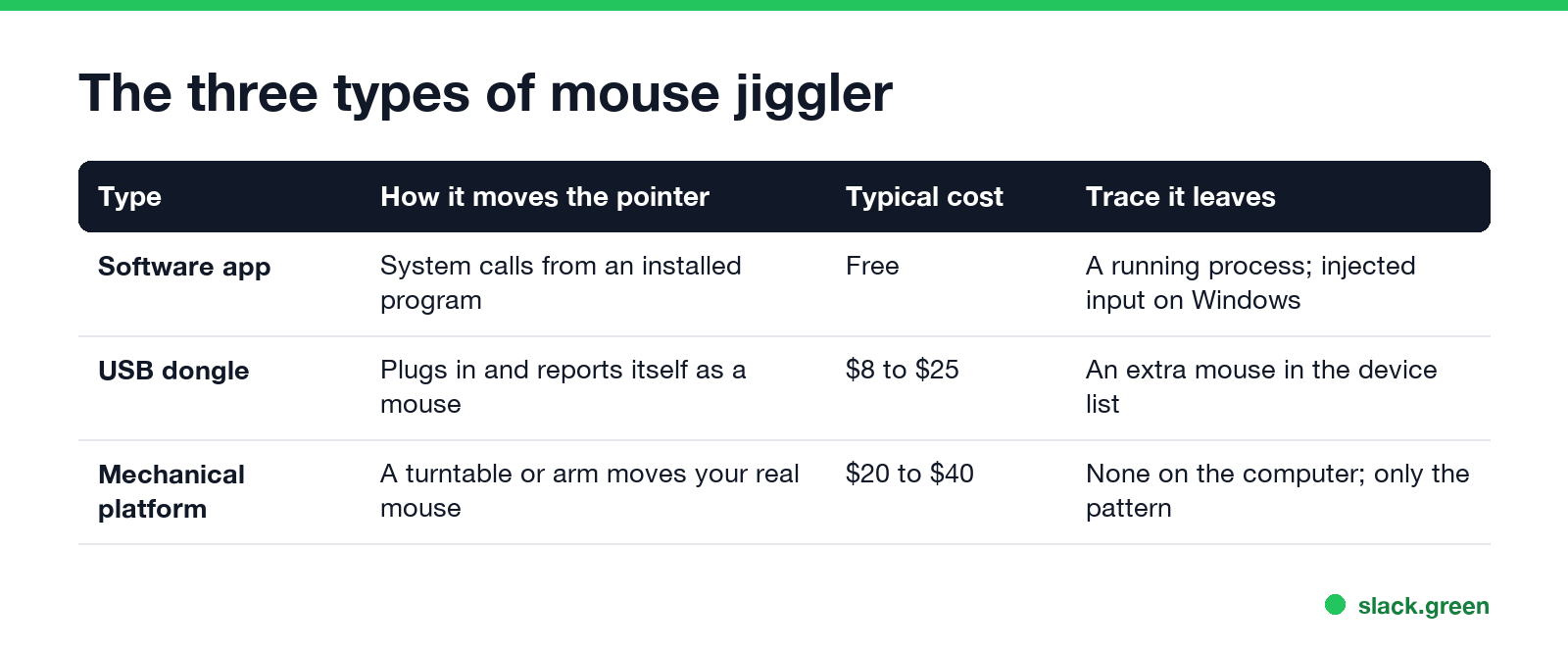
| Type | How it moves the pointer | Typical cost | Trace it leaves |
|---|---|---|---|
| Software app | An installed program moves the pointer with system calls | Free | A running process; input marked as injected on Windows |
| USB dongle | Plugs into a USB port and reports itself as a mouse | $8 to $25 | An extra mouse in the device list |
| Mechanical platform | A turntable or arm moves your real mouse | $20 to $40 | Nothing on the computer; only the movement pattern |
- • Software: Mouse Jiggler by Arkane Systems on Windows, Jiggler on a Mac, or a few lines of script. See mouse jiggler for Windows and mouse jiggler for Mac.
- • USB dongle: plug and play, no install or admin rights, usually with an on/off switch.
- • Mechanical: sits under your mouse and plugs into a wall socket, not the computer.
Which one to pick for your situation is in the best mouse jiggler by type. You can also build one from a $5 board; see DIY mouse jiggler.
What people use a mouse jiggler for
Never appear "away" on Slack again
Cloud-based. No downloads. Works 24/7 even when your laptop is off.
For the first two, a keep-awake tool does the same job without fake input: PowerToys Awake on Windows, caffeinate on a Mac. Those keep the computer awake but do not touch the idle timer, so chat apps still show you Away. The difference is covered in how to stop your computer from sleeping.
What a mouse jiggler does not do
FAQ
What does a mouse jiggler do? It moves your pointer a tiny amount on a timer, so the computer does not go idle, sleep or lock, and apps like Teams keep you Available.
What is the point of a mouse jiggler? To keep a computer awake and active without touching it: during downloads, presentations, reading, or to keep a Teams status green.
Is a mouse jiggler the same as an auto clicker? No. A jiggler only moves the pointer. An auto clicker clicks, which can press buttons in your apps; see auto clicker vs mouse jiggler.
Does a mouse jiggler keep Slack green? Only while the pointer is over the Slack window. Slack counts only input inside its own window.
Can my employer tell I use a mouse jiggler? Often, yes. A software jiggler shows as a running app, a USB one as an extra mouse, and all types leave a regular movement pattern.
Stop Jiggling Your Mouse.
Join hundreds of remote workers who never worry about their Slack status. Set it up once, stay green forever.
Related Articles
KeepingYouAwake vs Amphetamine: Which Mac Keep-Awake App to Use
KeepingYouAwake is a free, open-source menu bar switch that runs Apple's caffeinate for you. Amphetamine is a free App Store app with triggers, schedules and a closed-lid mode. Pick KeepingYouAwake for one click and Homebrew, Amphetamine for automation. Neither keeps Slack or Teams active.
Computer Locks After 15 Minutes? How to Tell If Group Policy Set It
A work laptop that locks after exactly 15 minutes, with screen settings greyed out, is almost always following a policy from IT: the Windows machine inactivity limit, a forced screen saver, or an Intune device lock. Security baselines and PCI DSS ask for 15 minutes. How to see which policy it is, and what you can and cannot change.
How to Keep a Citrix Session Active: Find Which Timeout Logs You Out
A Citrix session can end from four different timers: Windows locking inside the virtual desktop, the Citrix session idle timer, the Citrix Gateway session time-out, and the StoreFront web page timeout. Only input from your own device into the Citrix window resets them. How to tell which one hit you and what keeps each one quiet.