
Does Microsoft Teams Track Your Activity? What Admins Can See
Teams admins can see activity counts per person: messages in channels and chats, meetings, 1:1 calls, audio, video and screen share time, and your last activity date. Your status follows keyboard and mouse activity on the whole computer. Teams does not log keystrokes, your screen, or other apps.
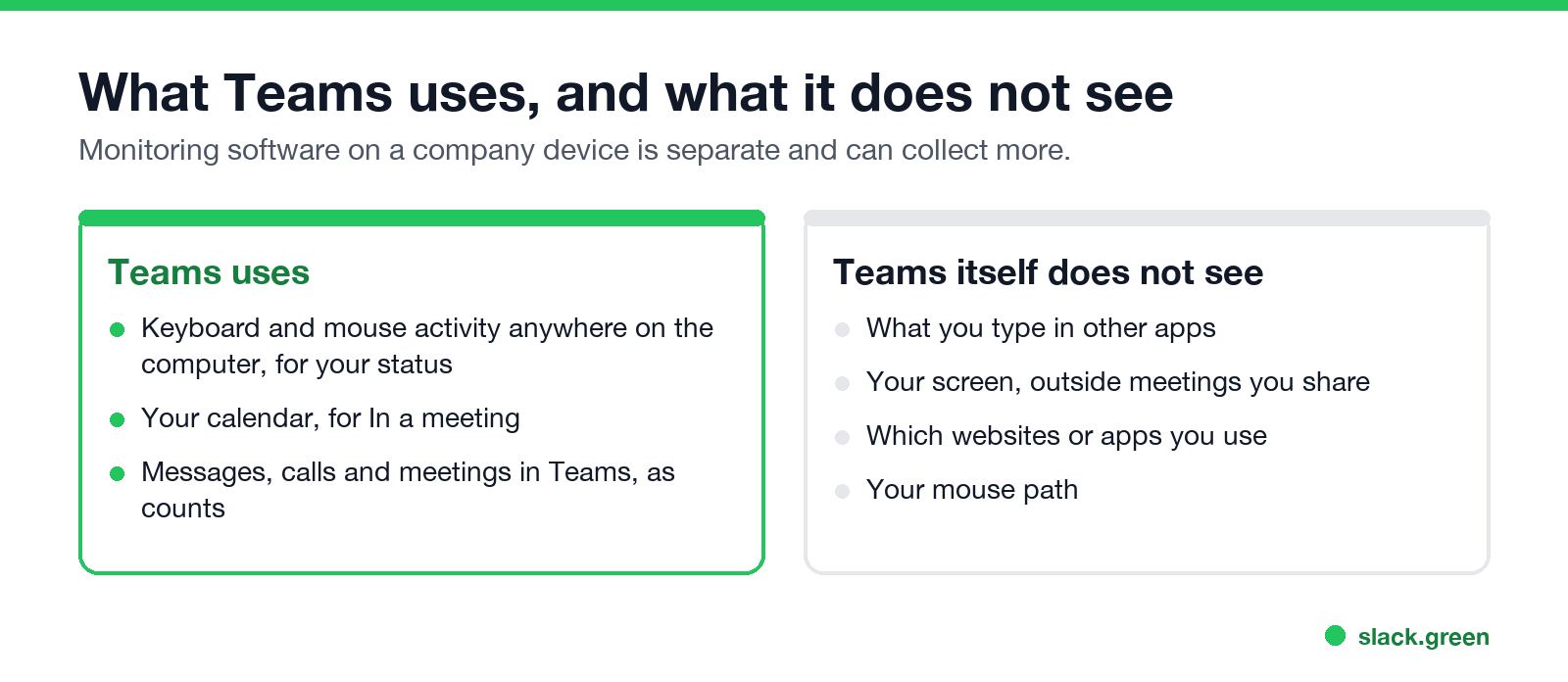
Microsoft Teams tracks activity in two ways. Admins can open the Teams user activity report, which Microsoft Learn describes: per person, it counts channel posts and replies, chat messages, meetings organized and joined, 1:1 calls, audio, video and screen share time, and the last date you did anything in Teams. Your status, meanwhile, uses keyboard and mouse activity on the whole computer: Teams shows Away after a few minutes without input or when you lock the computer. Teams does not log what you type in other apps, record your screen outside meetings you share, or list the websites you visit. Monitoring software your company installs is a separate thing and can collect more.
If you use Slack too, its rules differ: Slack's dot follows only input inside the Slack window. Slack Green keeps your Slack presence active during the working hours you set, from the cloud.
What the Teams user activity report shows
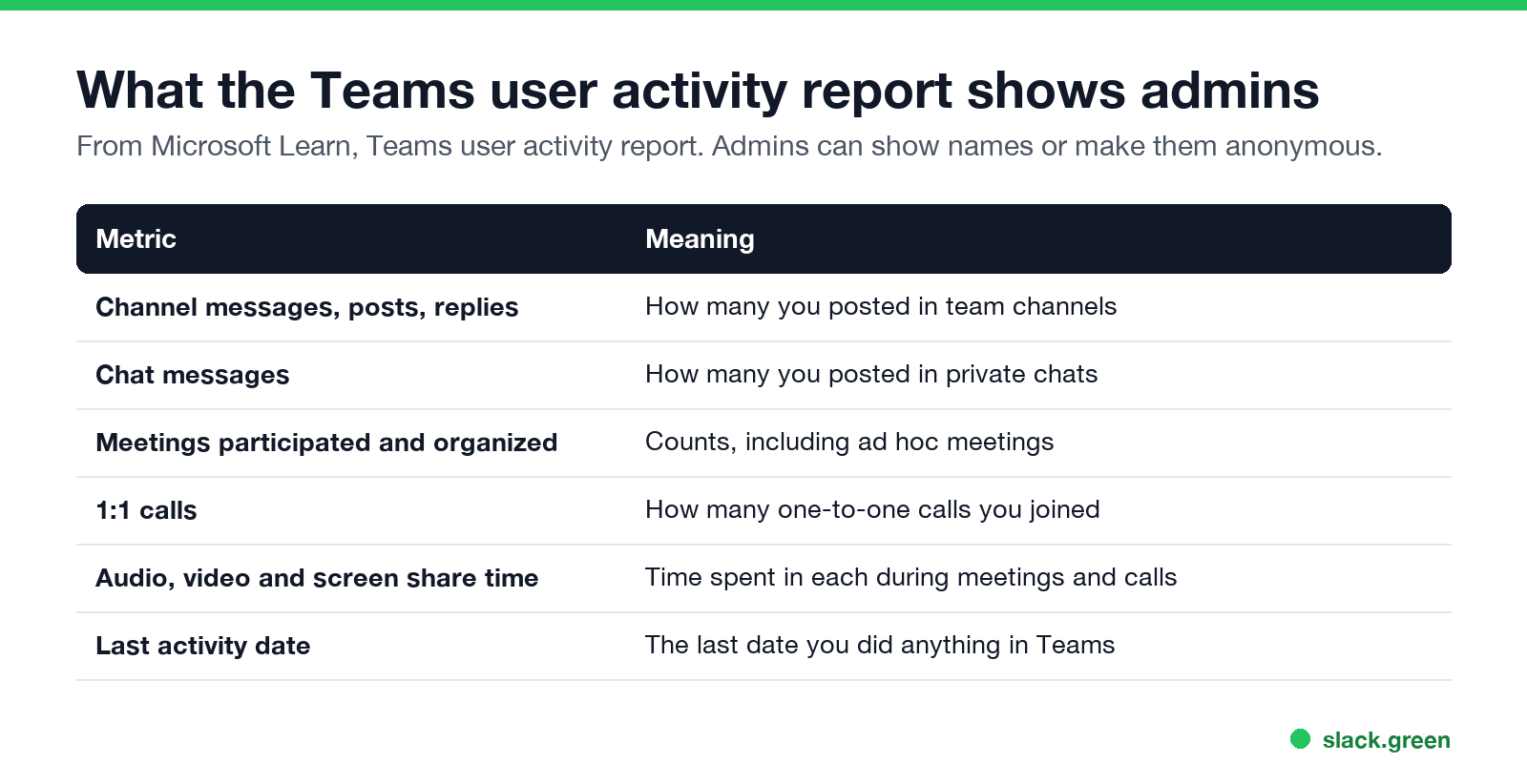
| Metric | Meaning |
|---|---|
| Channel messages, posts, replies | How many you posted in team channels |
| Chat messages | How many you posted in private chats |
| Meetings participated and organized | Counts, including ad hoc meetings |
| 1:1 calls | How many one-to-one calls you joined |
| Audio, video and screen share time | Time spent in each |
| Last activity date | The last date you did anything in Teams |
These are counts over a period, not a timeline of your day. Microsoft notes that admins can show the report with real names or make user names anonymous.
Does Teams track activity outside of Teams?
For your status, yes, in a limited way: the desktop app reads whether the computer has keyboard or mouse input, in any app, to decide Available or Away. Microsoft's support page says Teams sets you to Away when you lock the computer or it enters idle or sleep. It does not record which apps you used or what you did in them. Timings are in how long before Teams shows you as Away.
Does Teams track mouse activity?
Nie wieder "abwesend" auf Slack erscheinen
Cloud-basiert. Keine Downloads. Funktioniert 24/7 auch wenn Ihr Laptop aus ist.
Only as "was there input recently" for your status. It does not record mouse movement, clicks or position. A mouse jiggler therefore keeps Teams Available, which is also why monitoring software, not Teams, is how jigglers get caught; see can a mouse jiggler be detected.
Does Teams track activity on your phone?
On mobile, Teams shows Away whenever the app is in the background and Offline after 24 hours of inactivity. Your phone activity counts in the same usage reports as desktop activity.
Can my employer see what I do on Teams?
- • Your status, live, like everyone else.
- • Activity counts in the user activity report.
- • Message content, through Microsoft Purview compliance tools such as eDiscovery, if your organization uses them. That works like Slack exports; compare can Slack be used to monitor employees.
- • Everything else only if your company installs separate monitoring software on your device.
FAQ
Nie wieder "abwesend" auf Slack erscheinen
Cloud-basiert. Keine Downloads. Funktioniert 24/7 auch wenn Ihr Laptop aus ist.
Does Microsoft Teams track your activity?
It counts messages, meetings and calls for admin reports, and uses computer-wide input for your status. It does not log keystrokes or screens.
Can Teams see what I am doing on my computer?
No. It only knows whether there was recent keyboard or mouse input.
Does Teams tell my boss when I am away?
Your boss sees your status like anyone else. There is no separate away report in the user activity report.
Can my manager see how long I was in a meeting?
Admins see audio, video and screen share time totals in the activity report.
Does Teams track activity like Slack?
Differently. Teams uses input anywhere on the computer; Slack only counts input in the Slack window.
Hör auf, die Maus zu Bewegen.
Hunderte Remote-Arbeiter sorgen sich nicht mehr um ihren Slack-Status. Einmal einrichten, für immer grün bleiben.
Related Articles
How Do Employers Monitor Remote Workers? What Each Tool Sees
Employers monitor remote workers through five layers: work apps like Slack and Teams, laptop management, monitoring software, the network, and your output. What each one sees, how to check your own laptop, and what the law says.
Slack vs Teams: Prices, Limits, Calls and Which to Pick
Teams is cheaper if your company already pays for Microsoft 365. Slack is better when most work happens in chat, threads and apps. Prices, free plan limits, calls, apps and how each app decides you are away, side by side.
How to Keep Your Outlook Status Green (It Comes From Teams)
Your Outlook status shows your Microsoft Teams presence, so to keep Outlook green you keep Teams Available: Teams signed in and running, input on the computer, no lock or sleep, and no leftover status. What sets you Away, and what you can change.