
Teams Status for Sick Days: What to Set, With 12 Examples
Microsoft Teams has no Out sick status. For a full sick day, schedule Out of office with an automatic reply that names a backup; your dot turns purple and clears on the date you set. If you are sick but working, set a status message and Appear away until the end of the day. Steps for desktop and phone, and 12 status messages to copy.
Microsoft Teams has no built-in "Out sick" status. For a day off sick, use Schedule out of office: turn on automatic replies, write one line that names a backup, set the end time, and save. Your status turns to the purple Out of office arrow, and people who open a chat with you see your message. If you are sick but still working, keep your normal status, add a status message such as "Under the weather, replies will be slow", and set Appear away with a Duration that ends today. Either way, the message clears by itself, so you do not come back to a stale status.
Below: which option fits which kind of sick day, the steps on desktop and phone, and 12 status messages to copy.
Statuses are what we work on. We build Slack Green, which keeps your Slack status green during the hours you set. The Slack version of this page is Slack status for sick days.
Which Teams setting fits which sick day
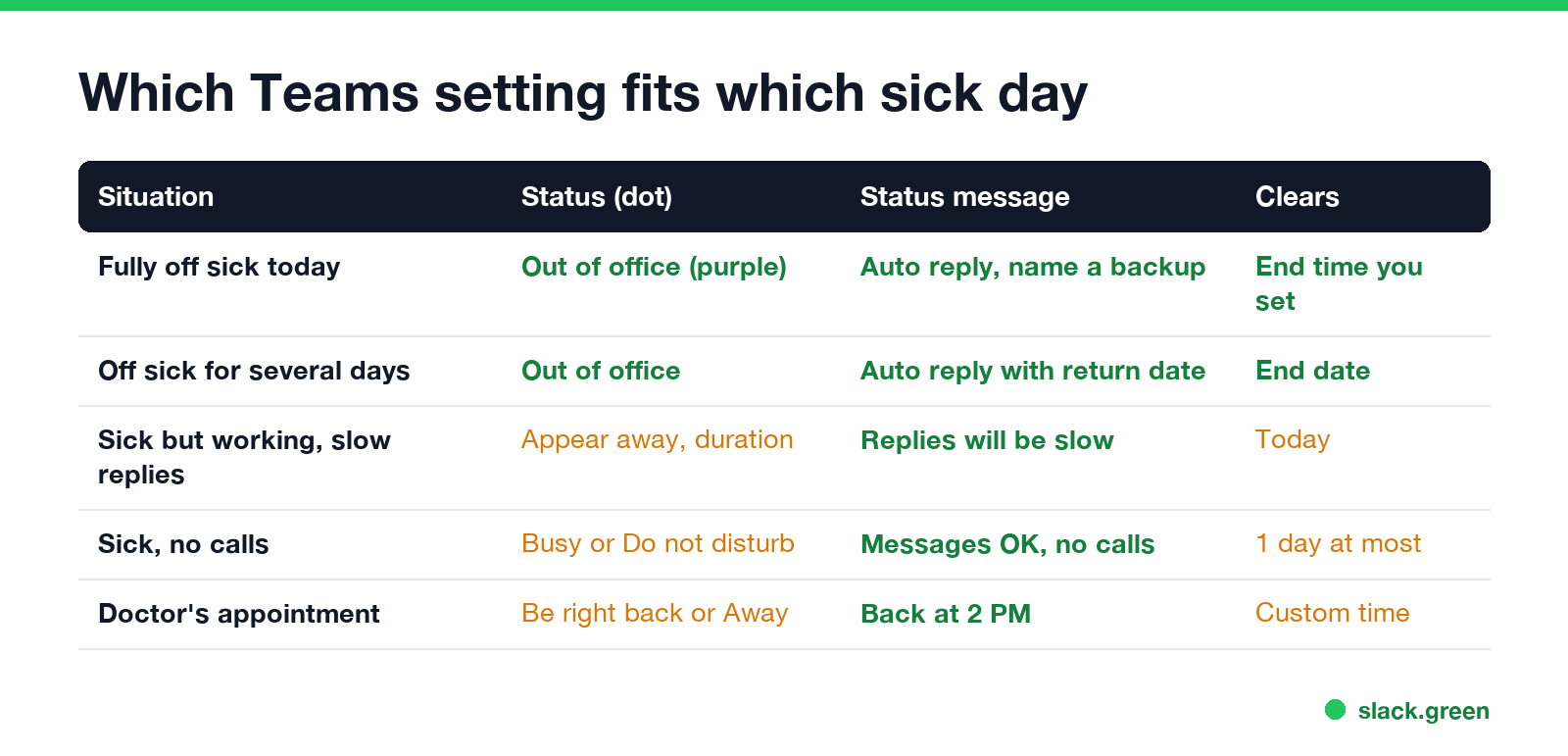
| Situation | Status (the dot) | Status message | When it clears |
|---|---|---|---|
| Fully off sick today | Out of office, through Schedule out of office | Automatic reply naming a backup | The end time you set |
| Off sick for several days | Out of office | Automatic reply with your return date | The end date |
| Sick but working, slow replies | Appear away, with a Duration | "Replies will be slow" | Today |
| Sick, no calls | Busy or Do not disturb | "Messages OK, no calls" | Up to 1 day |
| Doctor's appointment | Be right back or Appear away | "Back at 2 PM" | A custom time |
Out of office is the one to use when you are not working at all. It shows in Teams and in Outlook, it sends an automatic reply to people who email you, and a change in either app shows in the other. The purple icon is explained in what the purple arrow means on Teams.
How to set a sick status in Teams on desktop
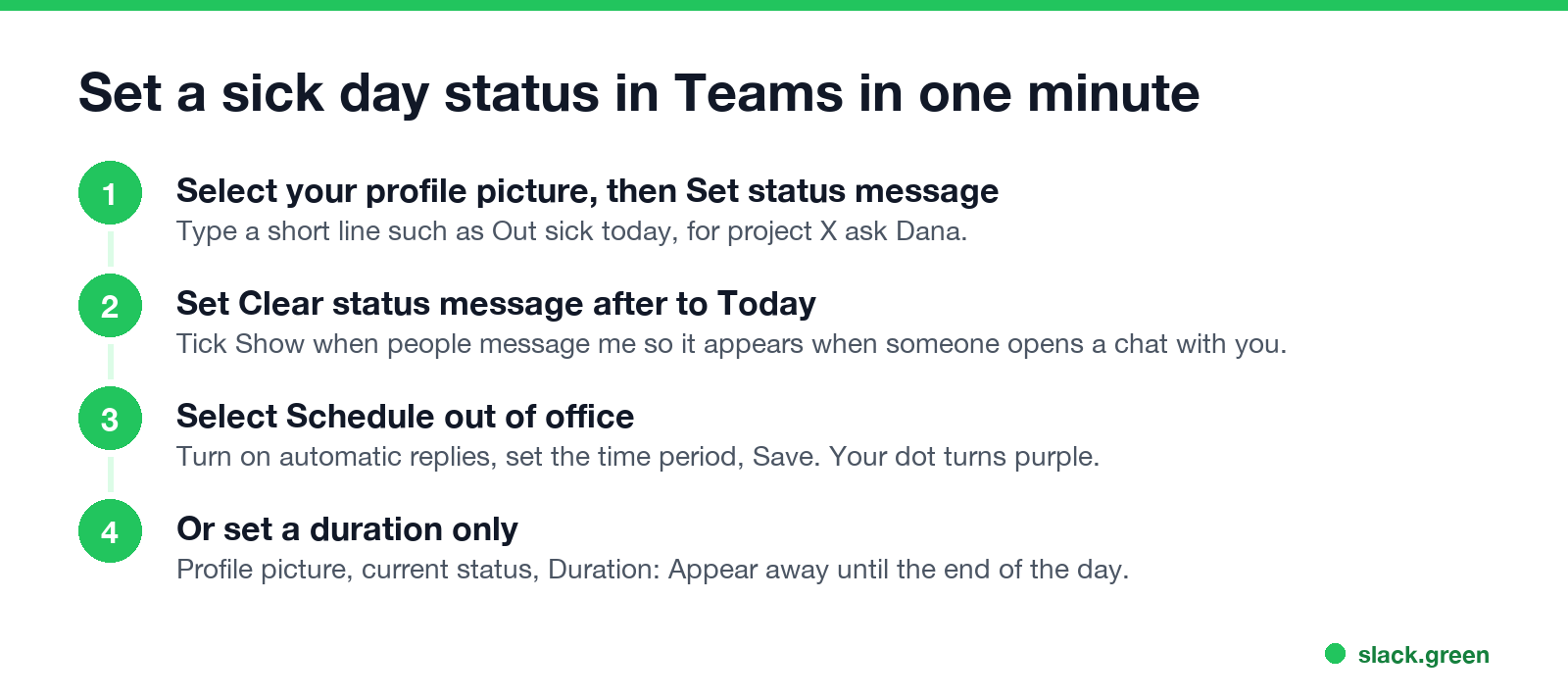
Out sick for the day (recommended):
- Select your profile picture at the top right of Teams.
- Select Set status message, then Schedule out of office at the bottom.
- Turn on Turn on automatic replies and type your message. Microsoft says a message is required for the status to sync with Outlook.
- Select Send replies only during a time period and set the end to the end of your working day, or to the day you expect to be back.
- Select Save.
- Select your profile picture, then Set status message.
- Type the message, and turn on Show when people message me so it appears when someone opens a chat with you or @mentions you.
- Under Clear status message after, select Today, then Done.
- Select your profile picture, then your current status, then Duration. Choose Appear away and under Reset status after choose Today. Select Done.
Sick but working:
At the end of the duration, Teams resets your status from your activity, your calendar and the state of your computer. You can also type /away or /brb in the search box for a quick change. Microsoft's article "Change your status in Microsoft Teams" lists these commands.
How to set a sick status in the Teams mobile app
Never appear "away" on Slack again
Cloud-based. No downloads. Works 24/7 even when your laptop is off.
For a status message only, tap your profile picture, then Set status message, and use Clear after to end it today. Doing it from your phone in bed works the same as from a computer; the status syncs to every device.
12 Teams status messages for sick days
Add an emoji with your keyboard's emoji picker: Windows key + . on Windows, Control + Command + Space on a Mac.
Fully off sick
Sick but working
Appointments and half days
Longer absences
For a full out of office reply and more away message examples, see how to set an away message in Teams. Lighter ones are in funny Teams status messages.
What to put in a sick status
What a sick status does not change
Never appear "away" on Slack again
Cloud-based. No downloads. Works 24/7 even when your laptop is off.
A status message does not change your dot by itself. If you leave Teams open on a computer at home, you show as Available whenever you use it, and as Away once the computer locks or goes idle. Appear offline hides you completely, but Microsoft notes you "still receive notifications if anyone messages you"; the steps are in how to appear offline on Teams.
Out of office also does not stop notifications on your phone. If you want silence, turn on Do not disturb as well, as in Teams do not disturb, or sign out of the mobile app for the day.
FAQ
Is there a sick status in Teams? No. Use Out of office with an automatic reply, or a status message with Appear away.
How do I show I am sick but working in Teams? Set a status message such as "Under the weather, replies will be slow" and set Appear away or Busy with a duration of Today.
Does Out of office in Teams send an email reply? Yes. It uses your Outlook automatic reply, so people who email you get the same message.
Will my sick status clear automatically? Yes, if you set Clear status message after and an end time for Out of office. Otherwise the message stays until you remove it.
Stop Jiggling Your Mouse.
Join hundreds of remote workers who never worry about their Slack status. Set it up once, stay green forever.
Related Articles
Can My Employer See What I Watch on YouTube at Work?
On a work laptop or the office network, your employer can see that you used YouTube, when, and for how long. With HTTPS inspection or monitoring software, they can see which videos, because the video address and the browser tab title both name it. On your own phone on mobile data, they see nothing.
Can My Employer See My iMessages on a Work Mac?
Not through device management or the network: Jamf or Intune cannot read Messages, and iMessage is end-to-end encrypted. But if you sign in to Messages on a work Mac, your texts are stored on that Mac, where monitoring screenshots, backups and admin access can reach them. How to check, and how to take iMessage off the Mac without deleting it from your iPhone.
Can My Boss See My Private Outlook Calendar Events?
Usually not the details. When you mark an Outlook event Private, someone who can read your calendar sees only Private appointment, the time and a lock. The exceptions are delegates you gave Can view private items, the people invited to the event, anyone with full access to your mailbox in new Outlook or the web, and compliance admins. How to check who has which access, and what Private does not hide.