
Terraform Slack Provider: Channels Tested with Plan, Import and Destroy
We ran the pablovarela/slack Terraform provider against a real Slack workspace: create, update, drift, import, adopt and destroy a channel, plus the exact errors for bad names and missing scopes.
The Terraform provider most people use for Slack is pablovarela/slack. It manages channels (slack_conversation) and user groups (slack_usergroup) with a bot token, and it still works. On 6 October 2026 we ran it, version 1.2.2 with Terraform 1.5.7, against our free-plan test workspace and a throwaway Slack app. Create, update, import, adopt and destroy all worked. Five things did not behave the way the docs suggest, and the errors are below.
Check the maintenance status first. Version 1.2.2 came out on 14 April 2023, and the GitHub repository is now archived (read-only). It still has about 5.4 million downloads on the Terraform Registry. Two newer providers exist, but neither replaces it for channels:
| Provider | Latest release | What it manages |
|---|---|---|
pablovarela/slack | 1.2.2, 14 Apr 2023 (repo archived) | slack_conversation, slack_usergroup |
Essent/slack | 1.0.3, 18 Sep 2026 | slack_usergroup only, plus user and conversation data sources |
gfnogueira/slack | 0.2.0, 6 Nov 2025 | slack_channel |
We tested only pablovarela/slack. Release dates are from the registry API on 6 October 2026.
The config we applied
terraform {
  required_providers {
    slack = {
      source  = "pablovarela/slack"
      version = "~> 1.2"
    }
  }
}

provider "slack" {}  # reads SLACK_TOKEN

resource "slack_conversation" "deploys" {
  name              = "sglab-tf-deploys"
  topic             = "Deploy notices from CI"
  purpose           = "Created by Terraform on 6 Oct 2026"
  is_private        = false
  action_on_destroy = "archive"
}
The provider reads the token from the SLACK_TOKEN environment variable, or from token in the provider block. We used a bot token (xoxb-) from an app with channels:manage, channels:read, channels:join, groups:read and users:read. If you do not have one yet, our bot token guide shows where Slack shows it.
terraform init downloaded the provider in a few seconds. terraform apply printed Creation complete after 4s [id=C0C72E17H1S]. The channel had the topic and description, and the bot was its creator and only member. Each change shows up in the channel as a system message:
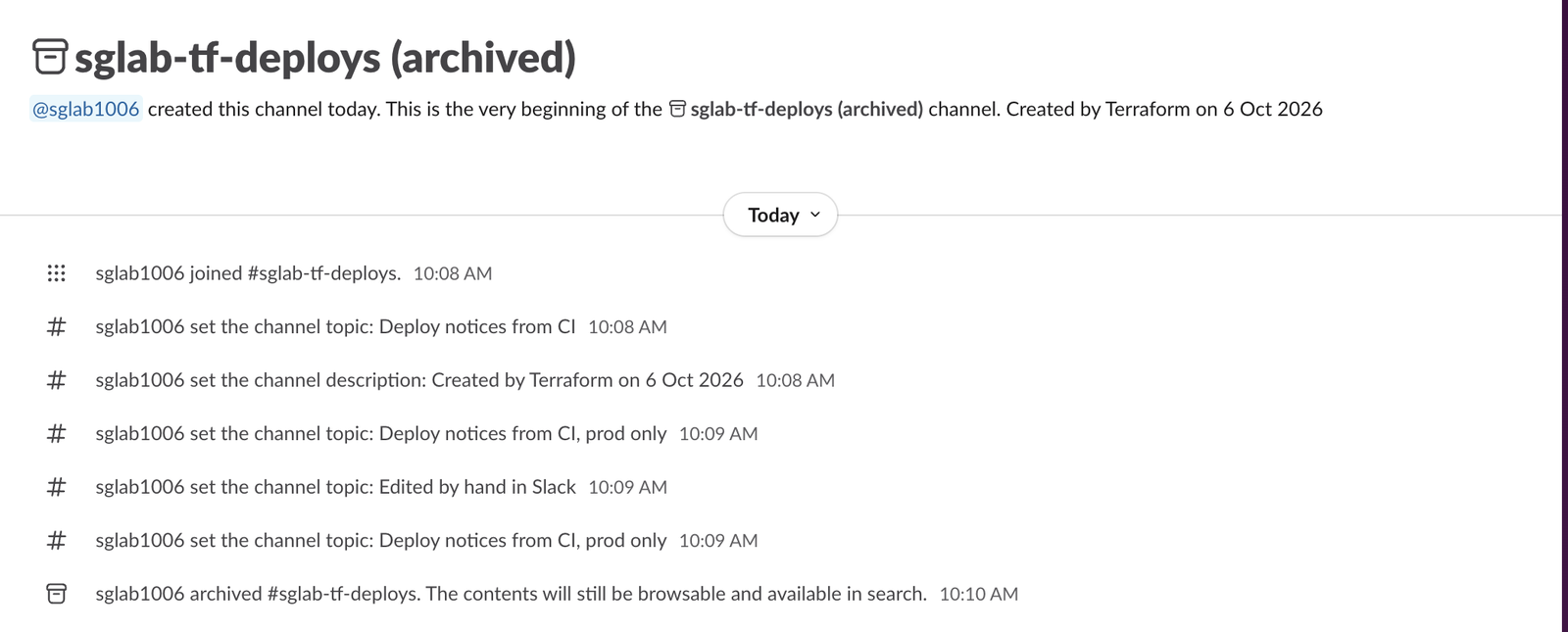
Updates and drift
We changed topic and ran terraform plan:
  ~ resource "slack_conversation" "deploys" {
      ~ topic = "Deploy notices from CI" -> "Deploy notices from CI, prod only"
Plan: 0 to add, 1 to change, 0 to destroy.
The apply took 2 seconds and changed the topic in place, so the channel ID and history stayed. Then we edited the topic by hand through the API, as a person would in Slack. The next plan put it back:
~ topic = "Edited by hand in Slack" -> "Deploy notices from CI, prod only"So once a channel is in Terraform, people's edits to the topic or description get overwritten on the next apply. If people should own the topic, leave topic out of the config.
Import and adopt an existing channel
There are two ways to put a channel someone made by hand under Terraform: terraform import, or adopt_existing_channel = true. We tried both.
Import. We made #sglab-tf-existing with a description, added a matching resource with only name and is_private, and ran terraform import slack_conversation.existing C0C72E6429J. The import worked. The first apply then failed:
Error: couldn't set conversation purpose : not_in_channelImport does not add the bot to the channel, and the bot cannot change a channel it is not in. After the bot joined, the apply worked. It also set the description to empty, because our config had no purpose. The plan had said so (- purpose = "Made by hand before Terraform" -> null), but that line is easy to miss. Copy the current topic and purpose into the config before you import.
Adopt. With adopt_existing_channel = true and the name of a channel that already exists, apply reported Creation complete on our hand-made #sglab-tf-adopt. The provider found the channel by name, joined it (the bot was not a member before), and set the topic. No import command and no channel ID needed. This is the easier path for public channels.
Never appear "away" on Slack again
Cloud-based. No downloads. Works 24/7 even when your laptop is off.
Destroy, and the name that stays taken
terraform destroy with the default action_on_destroy = "archive" archived all three channels in about 1 second each. Slack keeps archived channels, and their names stay taken. Running the same config again failed:
Error: could not create conversation sglab-tf-deploys: name_takenAdding adopt_existing_channel = true did not help, because the provider looks only at channels that are not archived:
Error: could not create conversation sglab-tf-deploys: could not find channel with name sglab-tf-deploysTo reuse the name, unarchive the channel in Slack and adopt it, or delete it first. A Workspace Admin can delete a channel from its settings. With action_on_destroy = "none" Terraform leaves the channel as it is, and the next apply with the same name fails with name_taken.
Errors we got, and what each means
Every error comes back from Slack's conversations.create and the provider prints it after the channel name:
| What we tried | Error |
|---|---|
name = "Deploys Prod!" | invalid_name_specials |
name = "sglab-TF-Upper" (capital letters) | invalid_name_specials |
| A name of 81 characters | invalid_name_maxlength |
| A name already used by a channel, archived or not | name_taken |
is_private = true with a bot that has no groups:write | missing_scope |
Same config with a user token that has no channels:manage | missing_scope |
slack_usergroup with a bot that has no usergroups:write | missing_scope |
| Change a channel the bot is not in | not_in_channel |
Capital letters fail. Slack does not lowercase the name for you through the API, so Deploys will not work and deploys will. Use lowercase letters, numbers, hyphens and underscores, up to 80 characters. For missing_scope, add the scope in your app's OAuth & Permissions page and reinstall the app, then use the token it gives you. The missing_scope page shows how to read which scope Slack wanted.
User groups are a paid feature. On our free workspace, Slack's own API refused to create one with paid_teams_only when we tested it for our user groups page, so slack_usergroup is for paid workspaces.
Slack notifications from Terraform
None of these providers sends messages. For "notify Slack when Terraform runs", post to an incoming webhook from your CI job after terraform apply. Terraform cannot create the webhook either: Slack makes webhooks only during an app install.
FAQ
Is the pablovarela Slack provider still safe to use?
It works with Slack's current API as of 6 October 2026: create, update, import, adopt and destroy all worked in our test. The repository is archived, so bugs will not be fixed and new Slack features will not be added. Pin the version (~> 1.2) so a fork does not replace it by surprise.
Can Terraform create a Slack app?
No. None of the three providers manages apps. Slack's App Manifest API (apps.manifest.create) can, but it needs an app configuration token, and no provider wraps it.
Which token type should I use?
A bot token. A user token also works if it carries the same scopes, but every change then shows your name in the channel instead of the bot's.
Stop Jiggling Your Mouse.
Join hundreds of remote workers who never worry about their Slack status. Set it up once, stay green forever.
Related Articles
Alertmanager Slack Config: slack_configs Example and Templates, Tested
A tested alertmanager.yml for Slack, the messages Prometheus alerts produced, a custom title and text template, and what send_resolved, group_by and color changed. Plus a typo amtool did not catch.
Grafana Slack Alerts: Webhook vs Bot Token, Templates, Tested
We sent Grafana alerts to Slack through both kinds of contact point, then replaced the default message with a notification template. The messages Slack showed, the delays, the template we used and the errors Grafana logged.
Jenkins Slack Notification: slackSend Pipeline Tested with a Bot Token
We ran the Jenkins Slack Notification plugin against a real Slack app: the pipeline that worked, the botUser setting that makes slackSend fail with a 404, threads, Block Kit, and the errors for channels the bot cannot see.