
Slack Bolt Logging: What DEBUG Shows in Python and JS
We turned on DEBUG in Bolt for Python and Bolt for JavaScript and sent one @mention. Python printed 17 lines, JS 11, both masked the token, and a missed ack produced a misleading 'Unhandled request'.
Bolt for Python logs through the standard logging module, so logging.basicConfig(level=logging.DEBUG) before you create App turns on everything Bolt has to say. Bolt for JavaScript takes a logLevel option instead: new App({ ..., logLevel: LogLevel.DEBUG }). Both mask the token in the Authorization header, and in both the logger argument that a listener receives writes to the same output.
We ran both on 29 November 2026 with slack_bolt 1.30.0 (slack_sdk 3.48.0, Python 3.14) and @slack/bolt 4.7.3 (Node 26), on one throwaway app in HTTP mode in a Free test workspace. A second member of the workspace sent @sg-lab-1129 hello once per run, and the listener answered "Got it". Everything below is pasted from those runs, with the user and channel IDs shortened.
How much one @mention logs at each level
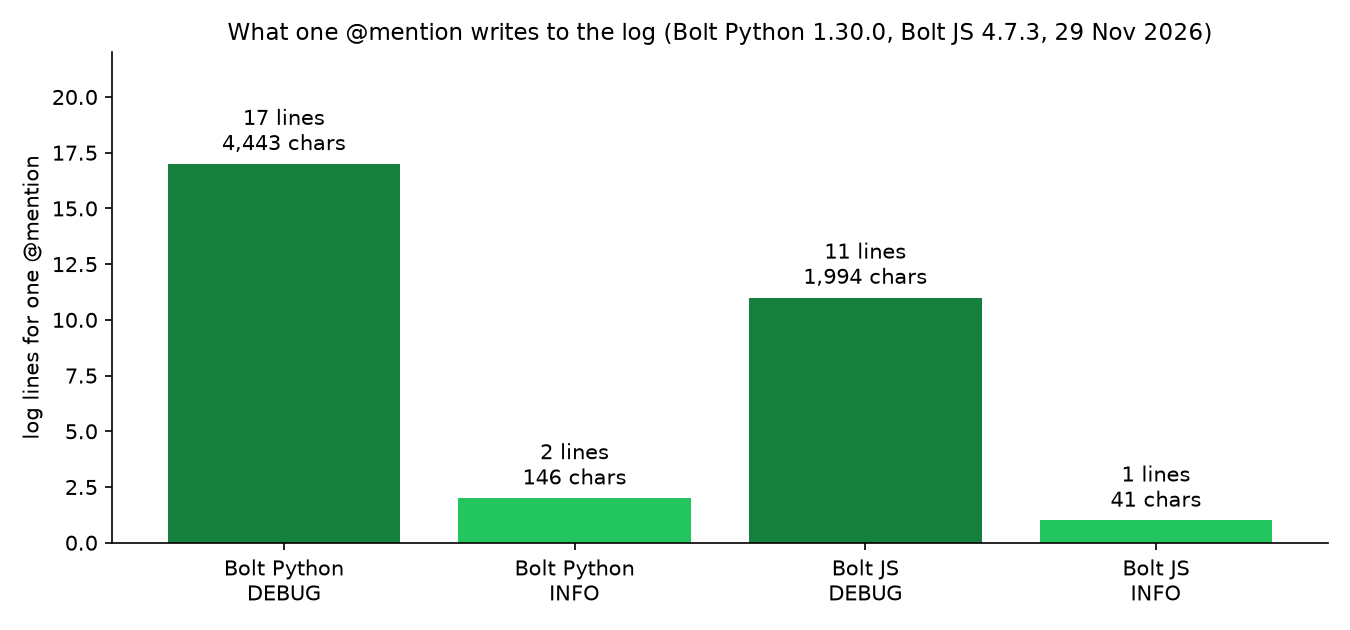
At DEBUG, Bolt for Python printed 15 DEBUG lines, our one INFO line and the dev server's access line for a single event. Most of the 4,443 characters are the response to chat.postMessage, which Bolt logs with every header Slack sent back. At INFO the same event wrote 2 lines. Bolt JS was quieter at DEBUG (11 lines), because it logs the request body and result but not the response headers.
Bolt for Python: turn on DEBUG
import logging, os
from slack_bolt import App

logging.basicConfig(level=os.environ.get("LOG_LEVEL", "INFO"),
                    format="%(asctime)s %(levelname)s %(name)s %(message)s")

app = App(token=os.environ["SLACK_BOT_TOKEN"],
          signing_secret=os.environ["SLACK_SIGNING_SECRET"])

@app.event("app_mention")
def mention(event, say, logger):
    logger.info("mention from %s", event["user"])
    say("Got it")

app.start(port=3031)
This is what one mention printed with LOG_LEVEL=DEBUG (the two long Received the following response lines are cut):
DEBUG slack_bolt.App Applying slack_bolt.middleware.ssl_check.ssl_check.SslCheck
DEBUG slack_bolt.App Applying slack_bolt.middleware.request_verification.request_verification.RequestVerification
DEBUG slack_bolt.App Applying slack_bolt.middleware.authorization.single_team_authorization.SingleTeamAuthorization
DEBUG slack_bolt.App Applying slack_bolt.middleware.ignoring_self_events.ignoring_self_events.IgnoringSelfEvents
DEBUG slack_bolt.App Applying slack_bolt.middleware.url_verification.url_verification.UrlVerification
DEBUG slack_bolt.App Applying slack_bolt.middleware.attaching_function_token.attaching_function_token.AttachingFunctionToken
DEBUG slack_bolt.App Checking listener: open_modal ...
DEBUG slack_bolt.App Checking listener: mention ...
DEBUG slack_bolt.App Running listener: mention ...
INFO app_modal.py:mention mention from U0123ABCD
DEBUG slack_bolt.App Sending a request - url: https://slack.com/api/chat.postMessage, query_params: {}, body_params: {}, files: {}, json_body: {'channel': 'C0123LAB', 'text': 'Got it', 'team_id': 'T0123TEAM'}, headers: {'Content-Type': 'application/json;charset=utf-8', 'Authorization': '(redacted)', 'User-Agent': 'Python/3.14.3 slackclient/3.48.0 Darwin/27.0.0'}
DEBUG slack_bolt.App Responding with status: 200 body: "" (0 millis)
127.0.0.1 - - [29/Nov/2026 10:18:25] "POST /slack/events HTTP/1.1" 200 -
DEBUG slack_bolt.App Received the following response - status: 200, headers: {...}, body: {"ok":true, ...}
Three things in that output are worth knowing:
- • The middleware chain and listener matching are visible. "Checking listener" runs once per registered listener, in order, until one matches. If your handler never fires, this is where you see which listener Bolt tried.
- • The ack comes before your API call finishes. "Responding with status: 200" is the HTTP answer to Slack, written 0 ms after the listener started, while
say()was still waiting forchat.postMessage. - • The injected
loggeris named after your file and function (app_modal.py:mention), so you can filter one listener's lines without setting up named loggers yourself.
To debug Bolt without DEBUG output from every other library, keep the root level at INFO and raise only Bolt: logging.getLogger("slack_bolt").setLevel(logging.DEBUG). In our run the API request and response lines of the listener's client also came out under slack_bolt.App, because Bolt hands its own logger to the WebClient it creates.
Bolt for JavaScript: logLevel and a custom logger
const { App, LogLevel } = require('@slack/bolt');

const app = new App({
  token: process.env.SLACK_BOT_TOKEN,
  signingSecret: process.env.SLACK_SIGNING_SECRET,
  logLevel: LogLevel.DEBUG,
});

app.event('app_mention', async ({ event, say, logger }) => {
  logger.info('mention from', event.user);
  await say('Got it (js)');
});
One mention at DEBUG:
[DEBUG]  web-api:WebClient:1 initialized
[DEBUG]   ack() call begins (body: undefined)
[DEBUG]   ack() response sent (body: undefined)
[INFO]  bolt-app mention from U0123ABCD
[DEBUG]  web-api:WebClient:1 apiCall('chat.postMessage') start
[DEBUG]  web-api:WebClient:1 http request url: https://slack.com/api/chat.postMessage
[DEBUG]  web-api:WebClient:1 http request body: {"team_id":"T0123TEAM","text":"Got it (js)","channel":"C0123LAB"}
[DEBUG]  web-api:WebClient:1 http request headers: {"Accept":"application/json, text/plain, */*","query":"{}","User-Agent":"@slack:socket-mode/2.0.7 @slack:bolt/4.7.3 @slack:web-api/7.19.0 node/26.12.1 darwin/27.0.0","Authorization":"[[REDACTED]]"}
[DEBUG]  web-api:WebClient:1 http response received
[DEBUG]  web-api:WebClient:1 http request result: {"ok":true,"channel":"C0123LAB","ts":"1795918935.704349", ...}
[DEBUG]  web-api:WebClient:1 apiCall('chat.postMessage') end
Bolt JS logs the ack explicitly ("ack() response sent"), and the event body itself is not printed. At startup the auth.test call logs its body as {"token":"[[REDACTED]]"}.
For JSON logs or a log service, pass an object with the Logger methods as logger. Bolt then routes its own lines and every WebClient line through it. This is the one we ran; it also masks anything that looks like a token:
const mask = (s) => String(s).replace(/xox[abposr]-[A-Za-z0-9-]+/g, 'xox?-****');
const jsonLogger = {
  level: LogLevel.DEBUG,
  name: 'bolt',
  setLevel(l) { this.level = l; },
  getLevel() { return this.level; },
  setName(n) { this.name = n; },
  debug(...m) { this.write('debug', m); },
  info(...m) { this.write('info', m); },
  warn(...m) { this.write('warn', m); },
  error(...m) { this.write('error', m); },
  write(level, m) {
    const order = ['debug', 'info', 'warn', 'error'];
    if (order.indexOf(level) < order.indexOf(this.level)) return;
    console.log(JSON.stringify({ t: new Date().toISOString(), level, name: this.name,
      msg: mask(m.map((x) => (typeof x === 'string' ? x : JSON.stringify(x))).join(' ')) }));
  },
};

const app = new App({ token, signingSecret, logLevel: LogLevel.DEBUG, logger: jsonLogger });
Output for the same mention, one JSON object per line:
{"t":"2026-11-29T02:22:36.245Z","level":"debug","name":"bolt","msg":"ack() response sent (body: undefined)"}
{"t":"2026-11-29T02:22:36.246Z","level":"info","name":"bolt","msg":"mention from U0123ABCD"}
{"t":"2026-11-29T02:22:36.246Z","level":"debug","name":"bolt","msg":"apiCall('chat.postMessage') start"}
Every line came out with name "bolt": with a custom logger, the WebClient lines no longer carry their web-api:WebClient:1 prefix, so put that context into the message yourself if you need it.
Never appear "away" on Slack again
Cloud-based. No downloads. Works 24/7 even when your laptop is off.
What a missed ack looks like in the log
A slash command handler that does slow work before ack() is the most common Bolt bug, and the log names it, then adds a misleading second warning. Our handler slept 4 seconds and never acked:
@app.command("/sg-slow")
def slow(body, logger):
    time.sleep(4)          # no ack() before the work
    logger.info("finished without ack")
10:18:40,393 DEBUG slack_bolt.App Running listener: slow ...
10:18:43,401 WARNING slack_bolt.App slow didn't call ack()
10:18:43,402 WARNING slack_bolt.App Unhandled request ({'type': None, 'command': '/sg-slow'})
[Suggestion] You can handle this type of event with the following listener function:
@app.command("/sg-slow")
def handle_some_command(ack, body, logger):
ack()
logger.info(body)
127.0.0.1 - - [29/Nov/2026 10:18:43] "POST /slack/events HTTP/1.1" 404 -
10:18:44,398 INFO app_modal.py:slow finished without ackBolt waited 3.0 seconds, logged "didn't call ack()", then treated the request as unhandled and answered Slack with HTTP 404. The member who typed the command got operation_timeout. The "Unhandled request" line and its suggestion are a side effect: the listener exists, it just did not ack in time. The fix is ack() first, then the work, or a lazy listener (Bolt lazy listeners show both). Other failures land in the same log as ERROR lines with a traceback; our Bolt error handling page covers catching them.
Keep tokens out of your own log lines
Bolt redacts the Authorization header in both languages, but it cannot redact what you log yourself. The suggestion Bolt prints above, logger.info(body), writes the whole request body, and a slash command or interaction body includes the legacy token field (the verification token; the payload keys we logged from a modal submission were api_app_id, enterprise, is_enterprise_install, response_urls, team, token, trigger_id, type, user, view). A filter on the root handler catches both that field and any xoxb- or xapp- string:
import logging, re

TOKEN = re.compile(r"xox[abposr]-[A-Za-z0-9-]+|xapp-[A-Za-z0-9-]+")

class MaskTokens(logging.Filter):
    def filter(self, record):
        record.msg = TOKEN.sub("xox?-****", record.getMessage())
        record.args = ()
        if isinstance(record.msg, str) and "'token': '" in record.msg:
            record.msg = re.sub(r"'token': '[^']+'", "'token': '****'", record.msg)
        return True

handler = logging.StreamHandler()
handler.addFilter(MaskTokens())
logging.basicConfig(level=logging.INFO, handlers=[handler],
                    format="%(levelname)s %(name)s %(message)s")
log = logging.getLogger("app")

body = {"token": "Xy12verificationTokenAbc", "command": "/sg-slow", "user_id": "U0123ABCD"}
log.info(body)
log.info("retrying with %s", "xoxb-EXAMPLE-not-a-real-token")
INFO app {'token': '****', 'command': '/sg-slow', 'user_id': 'U0123ABCD'}
INFO app retrying with xox?-****Because the filter sits on the handler, it also covers slack_bolt and slack_sdk records, which propagate to the root logger. If you want Slack errors in a channel rather than a terminal, a Python logging handler that posts to Slack uses the same logging setup, and Slack API error codes explains what the ERROR lines mean.
FAQ
Should DEBUG stay on in production? No. Apart from volume (4,443 characters for one mention), the DEBUG lines print API request and response bodies, which contain message text, file names and user IDs.
Why do I see the same listener names on every request? "Checking listener" lists every listener Bolt compares the request against until one matches. Many lines mean many listeners registered before the one that matched.
Does Socket Mode log differently? The listener and WebClient lines are the same. Socket Mode adds its own connection lines from slack_sdk.socket_mode (Python) or @slack/socket-mode (JS); we ran this test in HTTP mode only.
Stop Jiggling Your Mouse.
Join hundreds of remote workers who never worry about their Slack status. Set it up once, stay green forever.
Related Articles
Slack MSI Installer: Gone After 4.48.102, Use MSIX
Slack's last MSI is 4.48.102 from March 2026; every later version 404s. We read both old MSIs and the current MSIX package to show what each installs and how to move a deployment to MSIX.
Slack LaTeX and Math: What Renders, What Doesn't, What Works
Slack shows LaTeX as raw text in messages and canvases, even though its web client ships KaTeX. We tested every route and give the two that work: Unicode math and a formula rendered to an image with 15 lines of Python.
Slack Canvas Images: Add, Size and Insert Them by API
We inserted a PNG, an animated GIF and a 6000 px image into a Slack canvas with canvases.edit. Slack files rendered; an outside image URL became a link card even though the API said ok.