
Slack Bolt with TypeScript: A Typed App We Ran
A strict TypeScript Bolt app with typed message, button, slash command and modal listeners, run in a real Slack workspace, plus the two type errors almost everyone hits first.
Bolt for JavaScript is written in TypeScript and ships its own types, so npm i @slack/bolt is all you need; there is no separate @types package to install for it. The types do the most good in three places: narrowing message before you read message.user, telling app.action which payload a listener gets, and reading view.state.values in a modal. Get those three right and tsc --strict stays quiet.
We built the app below on 26 November 2026 with @slack/bolt 5.1.0 and TypeScript 7.0.2 (the newest on npm that day), compiled it with strict on, and ran it in Socket Mode on a throwaway app in a Free test workspace. A second member of the workspace triggered every listener.
Setup
mkdir bolt-ts && cd bolt-ts
npm init -y
npm pkg set type=module
npm i @slack/bolt
npm i -D typescript @types/node
npx tsc -p .        # compiles src/app.ts to dist/app.js
node dist/app.jstsconfig.json. module and moduleResolution are nodenext so top-level await app.start() works in an ES module. TypeScript 7 refused to build until rootDir was set, with error TS5011: The common source directory of 'tsconfig.json' is './src'.
{
  "compilerOptions": {
    "target": "ES2023",
    "module": "nodenext",
    "moduleResolution": "nodenext",
    "strict": true,
    "rootDir": "src",
    "outDir": "dist",
    "skipLibCheck": true,
    "esModuleInterop": true
  },
  "include": [
    "src/app.ts"
  ]
}
Socket Mode needs two tokens: the bot token (xoxb-) and an app-level token (xapp-) with the connections:write scope, made under Basic Information > App-Level Tokens. The scopes and events this app used were chat:write, commands, groups:history and the message.groups event, because the test channel was private.
The app: src/app.ts
import { App, LogLevel, type BlockAction, type ButtonAction } from "@slack/bolt";

const app = new App({
  token: process.env.SLACK_BOT_TOKEN,
  appToken: process.env.SLACK_APP_TOKEN,
  socketMode: true,
  logLevel: LogLevel.INFO,
});

// 1. Message listener: `message` is a union of every message subtype.
app.message("deploy", async ({ message, say }) => {
  if (message.subtype !== undefined) return; // narrows to a plain user message
  await say({
    text: `Deploy requested by <@${message.user}>`,
    thread_ts: message.ts,
    blocks: [
      { type: "section", text: { type: "mrkdwn", text: `Deploy requested by <@${message.user}>` } },
      {
        type: "actions",
        elements: [
          { type: "button", action_id: "approve", text: { type: "plain_text", text: "Approve" }, value: "v2.4.1", style: "primary" },
        ],
      },
    ],
  });
  console.log("message ->", new Date().toISOString());
});

// 2. Action listener: the generic tells TypeScript which payload this is.
app.action<BlockAction<ButtonAction>>("approve", async ({ ack, body, action, client }) => {
  await ack();
  if (!body.channel || !body.message) return;
  await client.chat.update({
    channel: body.channel.id,
    ts: body.message.ts,
    text: `Approved ${action.value} by <@${body.user.id}>`,
    blocks: [],
  });
  console.log("approve ->", action.value);
});

// 3. Slash command opens a modal; the view listener reads typed state.
app.command("/sg-report", async ({ ack, command, client }) => {
  await ack();
  await client.views.open({
    trigger_id: command.trigger_id,
    view: {
      type: "modal",
      callback_id: "report_view",
      private_metadata: command.channel_id,
      title: { type: "plain_text", text: "Weekly report" },
      submit: { type: "plain_text", text: "Post" },
      blocks: [
        {
          type: "input",
          block_id: "period",
          label: { type: "plain_text", text: "Period" },
          element: { type: "plain_text_input", action_id: "value" },
        },
      ],
    },
  });
});

app.view("report_view", async ({ ack, view, client }) => {
  const period = view.state.values.period?.value?.value ?? "";
  if (period.trim().length < 3) {
    await ack({ response_action: "errors", errors: { period: "Type at least 3 characters" } });
    return;
  }
  await ack();
  await client.chat.postMessage({ channel: view.private_metadata, text: `Report queued for ${period}` });
  console.log("view ->", period);
});

await app.start();
console.log("bolt ts connected");
npx tsc -p . finished with no output and exit code 0. Then the second member typed deploy api to production, and the bot answered in the thread:
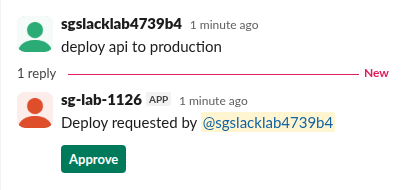
A click on Approve ran the typed action listener, which replaced the message with Approved v2.4.1 by @sgslacklab4739b4. Then /sg-report opened the modal. We typed Q4, which our view listener rejects, and Slack showed the error under the field:
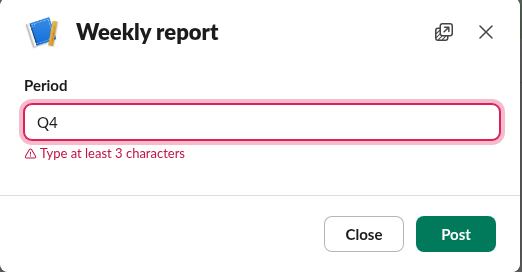
Q4 2026 went through, and the bot posted Report queued for Q4 2026 in the channel. The run log:
bolt ts connected
message -> 2026-11-26T07:16:52.237Z
approve -> v2.4.1
view -> Q4 2026
The two type errors you will hit first
We put the two most common mistakes in a second file and compiled it with the same strict settings:
import { App } from "@slack/bolt";

const app = new App({ token: process.env.SLACK_BOT_TOKEN, appToken: process.env.SLACK_APP_TOKEN, socketMode: true });

// Mistake 1: no generic on app.action, then reach into body.actions
app.action("approve", async ({ ack, body }) => {
  await ack();
  console.log(body.actions[0].value);
});

// Mistake 2: read message.user without narrowing the subtype
app.message("deploy", async ({ message, say }) => {
  await say(`Deploy requested by <@${message.user}>`);
});
src/bad.ts(8,20): error TS2339: Property 'actions' does not exist on type 'SlackAction'.
Property 'actions' does not exist on type 'DialogSubmitAction'.
src/bad.ts(13,46): error TS2339: Property 'user' does not exist on type 'KnownEventFromType<"message">'.
Property 'user' does not exist on type 'MessageChangedEvent'.body.actions does not exist on SlackAction. Without a generic, app.action types body as a union of every action payload, including old dialog submissions that have no actions. Fix it by naming the payload: app.action<BlockAction<ButtonAction>>(...). Then action.value, body.user.id, body.channel and body.message are all typed. body.channel and body.message are still optional, because a button in a modal or on the App Home has neither, so check them before you use them.
user does not exist on the message type. message covers every subtype, such as message_changed and bot_message, and most of them have no user. A check of message.subtype !== undefined with an early return narrows it to a plain user message. Our message_changed event guide shows what those other subtypes carry.
Never appear "away" on Slack again
Cloud-based. No downloads. Works 24/7 even when your laptop is off.
What TypeScript does not catch
A missing ack() compiles fine. We removed await ack() from the action listener, rebuilt with no errors, and clicked Approve again. In Socket Mode, Bolt 5.1.0 at log level INFO printed nothing about the missing ack, Slack sent no retry, and the chat.update call still changed the message. A missing ack shows up only as a 3-second timeout in other places: a slash command shows operation_timeout (we measured that one in Python), and a modal submit needs its view_submission ack within the same 3 seconds to close or show field errors (we did not time that case). Our lazy listener guide shows the slash command failure and the fix in Bolt for Python.
Block typos, on the other hand, are caught when the blocks are written inline. We passed say() one section with txt in place of text and one with type: "secton":
src/chk.ts(4,78): error TS2561: Object literal may only specify known properties, but 'txt' does not exist in type 'MrkdwnElement'. Did you mean to write 'text'?
src/chk.ts(5,53): error TS2353: Object literal may only specify known properties, and 'text' does not exist in type 'Block'.
The second message is less helpful than the first: a misspelled type makes TypeScript fall back to the generic Block type, so it blames the next field instead. Blocks built in a plain JavaScript object or loaded from JSON skip this check and fail at run time with invalid_blocks (how to read that error).
Types worth importing
Import from @slack/bolt | Use it for |
|---|---|
BlockAction<ButtonAction> | button clicks (StaticSelectAction, OverflowAction and others for other elements) |
SlackCommandMiddlewareArgs | a slash command handler defined outside app.command |
SlackViewMiddlewareArgs | a view_submission handler defined outside app.view |
AllMiddlewareArgs | the client, logger and context part of any listener |
LogLevel | LogLevel.DEBUG when you need to see each payload |
For what changed in the Bolt 5 release itself, see our Bolt JS v5 notes, and for calling the Web API without Bolt, the Node Web API client guide.
FAQ
Do I need @types packages for Slack Bolt?
No. @slack/bolt and the @slack/web-api client it uses ship their own .d.ts files. Add @types/node for Node globals such as process.env.
Why is process.env.SLACK_BOT_TOKEN allowed when it can be undefined?
The App options accept string | undefined for token and appToken, so it compiles. With no token, new App() throws AppInitializationError: Apps used in a single workspace can be initialized with a token, which also talks about OAuth installer options. Check the variables yourself at start if you want a clearer error.
Can I use ts-node or tsx instead of compiling?
Yes, for development. We compiled with tsc to show the exact errors strict mode gives, and ran the output with plain node.
Stop Jiggling Your Mouse.
Join hundreds of remote workers who never worry about their Slack status. Set it up once, stay green forever.
Related Articles
Slack MSI Installer: Gone After 4.48.102, Use MSIX
Slack's last MSI is 4.48.102 from March 2026; every later version 404s. We read both old MSIs and the current MSIX package to show what each installs and how to move a deployment to MSIX.
Slack LaTeX and Math: What Renders, What Doesn't, What Works
Slack shows LaTeX as raw text in messages and canvases, even though its web client ships KaTeX. We tested every route and give the two that work: Unicode math and a formula rendered to an image with 15 lines of Python.
Slack Canvas Images: Add, Size and Insert Them by API
We inserted a PNG, an animated GIF and a 6000 px image into a Slack canvas with canvases.edit. Slack files rendered; an outside image URL became a link card even though the API said ok.