
Slack "This File Isn't Visible to You": Why and How to Fix
We shared a link to a file from a private channel and recorded what the other person saw. Only the file's owner can make it visible, and here is what each Slack file error means.
"This file isn't visible to you" means the file was shared only in a conversation you are not a member of, such as a private channel or a DM between other people. A Slack file is visible to the members of the conversations it was shared in, and nobody else. Posting the file's link somewhere else does not change that, unless the person posting it is the file's owner. So the fix is to ask the person who uploaded the file to share it into a channel or DM you are in, or to ask someone in the original private channel to add you.
The full message in Slack's web client is "This file isn't visible to you." with the line "This file is only visible to members of the conversation where it was originally shared" under it. We read those strings in the client's code and then rebuilt the situation on 26 November 2026 in a Free test workspace, with a test app as one user and a regular member as the other.
What we did
- The app uploaded two images into a private channel the member was not in.
- The member pasted the link of the second image into a channel both of them were in.
- The app posted the link of the first image into the same channel.
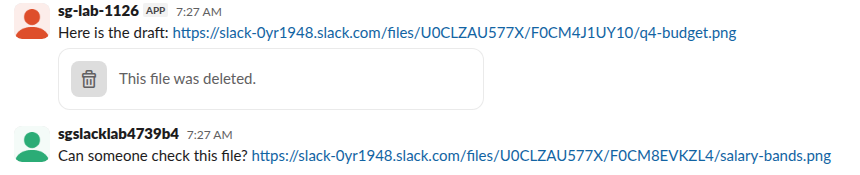
- The app deleted the first image.
What the member saw
When the member pasted the link, Slack showed no preview at all, only the bare URL. Opening that link in the browser gave a generic error page, not a permission message:
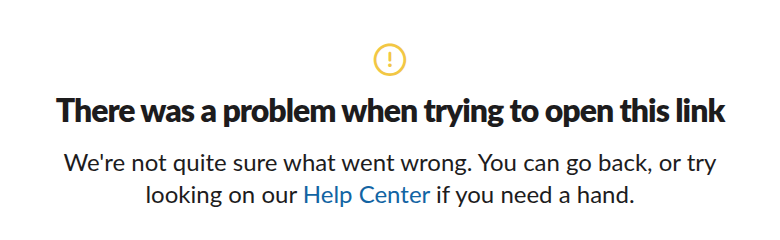
When the app, the file's owner, posted its own link, Slack attached the file to that message and the member could open it. So the same action has two results depending on who does it: the owner's link shares the file, anyone else's link does not. The API agreed:
files.info as the member, before the file was shared to a channel they are in
{"ok": false, "error": "file_not_found"}

files.info as the member, after the file's owner posted the link in that channel
{"ok": true, ...}

files.info after files.delete, as the member and as the owner
{"ok": false, "error": "file_deleted"}
After the owner deleted the shared image, its message kept the link and showed a tombstone in place of the preview, while the member's link to the never-shared file stayed a bare URL:
Each file message and what causes it
These are the file messages in the web client's code, and the case each one belongs to:
| Message | Cause | Fix |
|---|---|---|
| This file isn't visible to you. | Shared only in a conversation you are not in | Owner shares it to you, or someone adds you to that channel |
| You don't have access to this file. | The client marks the file as private to you (file_private in its code), for example under a Slack Connect or admin rule | Ask the owner or an admin |
| This file was not found. | The ID in the link does not exist for you; the API answers file_not_found | Check the link; treat it like the first row if the file is real |
| This file was deleted. | The owner or an admin deleted it; the API answers file_deleted | Ask the owner to upload it again; a deleted file cannot be restored |
| There was a problem when trying to open this link | A file link opened in the browser by someone who cannot see the file | Same as the first row |
On the Free plan there is one more reason an old file disappears: messages and files older than the plan's history window are hidden. Our Free plan limits test covers that window.
Never appear "away" on Slack again
Cloud-based. No downloads. Works 24/7 even when your laptop is off.
How to share a file from a private channel the right way
If you own the file, post its link in the channel or DM where people need it, as the app did in our test. The file is then shared into that conversation and its members can open it. The same paste by anyone else leaves a bare link that nobody new can open.
If you do not own the file, you cannot share it to people outside the private channel. Download it and upload a copy, if that is allowed in your workspace, or ask the owner. For a link that works outside Slack altogether, see our public file link test, and for where Slack keeps the file itself, where Slack files are stored.
Removing a "This file was deleted" box
The tombstone belongs to the message that shared the file. To get rid of it, delete or edit that message; the file itself is already gone. If it is someone else's message, only they or an admin can remove it.
FAQ
Why does a bot get file_not_found for a file in a channel?
Bots follow the same rule: a bot sees a file only if it is in a conversation where the file was shared. Invite the bot to that channel, or have the owner share the file where the bot is.
Does deleting a file from one channel delete it everywhere?
Yes. Deleting a file deletes it in every conversation it was shared in, and each sharing message shows "This file was deleted." To remove a file from one place only, delete just that message instead.
Stop Jiggling Your Mouse.
Join hundreds of remote workers who never worry about their Slack status. Set it up once, stay green forever.
Related Articles
Slack MSI Installer: Gone After 4.48.102, Use MSIX
Slack's last MSI is 4.48.102 from March 2026; every later version 404s. We read both old MSIs and the current MSIX package to show what each installs and how to move a deployment to MSIX.
Slack LaTeX and Math: What Renders, What Doesn't, What Works
Slack shows LaTeX as raw text in messages and canvases, even though its web client ships KaTeX. We tested every route and give the two that work: Unicode math and a formula rendered to an image with 15 lines of Python.
Slack Canvas Images: Add, Size and Insert Them by API
We inserted a PNG, an animated GIF and a 6000 px image into a Slack canvas with canvases.edit. Slack files rendered; an outside image URL became a link card even though the API said ok.