
Slack Verification Token: Deprecated, Still Sent, Tested
The Verification Token still arrives in every slash command, event and button payload, but Slack calls it deprecated. We regenerated it on 17 November 2026: slash commands switched at once, events lagged, and only the signing secret check kept working through the change.
The Slack Verification Token is a fixed 24-character string that Slack puts in the token field of every slash command, event and interactive payload sent to your app. Slack marks it deprecated and tells you to verify the X-Slack-Signature header with your signing secret instead. It still works: on 17 November 2026 every request to our test app carried it, and a server that compared it got a match. We then regenerated it and logged what each request type sent, because that is the moment an app that still relies on the token breaks.
Where to find it
Open your app at api.slack.com/apps, then Basic Information, then App Credentials. The token sits under Client Secret and Signing Secret. Unlike those two, it shows in plain text with no Show button. The help icon next to it reads: "This deprecated Verification Token can still be used to verify that requests come from Slack, but we strongly recommend using the above, more secure, signing secret instead."
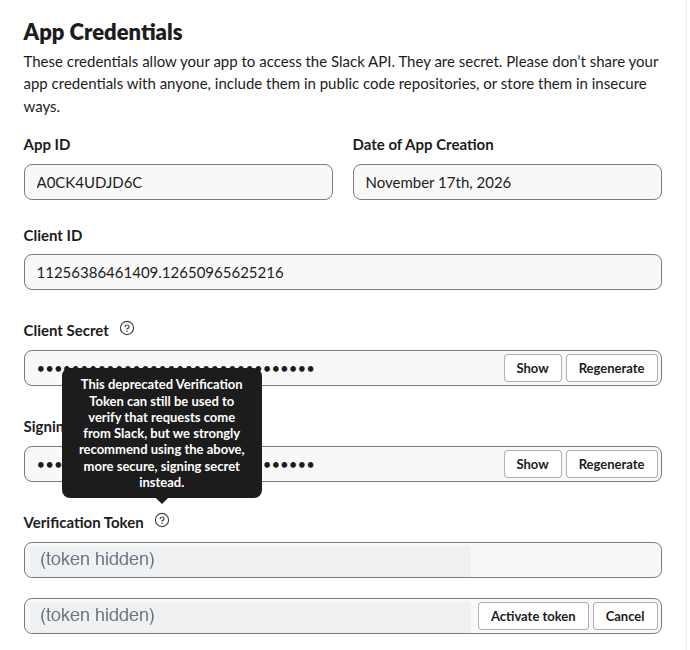
Where it shows up in requests
We pointed the app's slash command, Event Subscriptions and Interactivity URLs at a small Python server on a test box (through a Cloudflare quick tunnel) and logged the token field of every request next to the signature check:
def signature_ok(headers, body):
    ts = headers.get("X-Slack-Request-Timestamp", "0")
    base = b"v0:" + ts.encode() + b":" + body
    mine = "v0=" + hmac.new(SIGNING_SECRET, base, hashlib.sha256).hexdigest()
return hmac.compare_digest(mine, headers.get("X-Slack-Signature", ""))| Request type | Where the token is | Example log line |
|---|---|---|
| Slash command | Form field token | token_matches: true, signature_ok: true |
Events API (event_callback) | Top-level JSON token | token_matches: true, signature_ok: true |
Button click (block_actions) | token inside the JSON in the payload form field | token_matches: true, signature_ok: true |
So the old check, if body["token"] != VERIFICATION_TOKEN: reject, still passes today. The signing secret page has a full verification function and the timestamp rule.
What happens when you regenerate it
Regenerate does not swap the token at once. It shows the new value in a second field with Activate token and Cancel. Until you activate, requests still carry the old token: a slash command we sent at that point matched the old value. Activate token opens a confirmation:
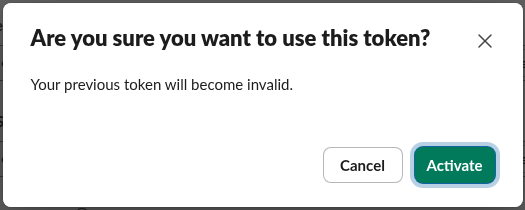
After we clicked Activate, the requests changed like this:
| Time after Activate | Request | token in the body |
|---|---|---|
| About 1 s | Slash command | New token |
| 1 to 2 s | Two message events | Old token |
| 29 s | Message event | New token |
| 61 s and 92 s | Message events | New token |
For a minute or so, then, a server can receive both values depending on the request type. Our server still held the old value, so the next slash command answered with the mismatch, while the signature kept passing:

The signing secret did not change, so X-Slack-Signature verified on every request before and after the token change. An app that checks only the signature never noticed. An app that checks only the token would have rejected every slash command from the moment of activation until someone deployed the new value.
Never appear "away" on Slack again
Cloud-based. No downloads. Works 24/7 even when your laptop is off.
Verification token vs signing secret
| Verification Token | Signing secret | |
|---|---|---|
| Sent how | In the request body, readable by anyone who sees one request | Never sent; Slack sends an HMAC-SHA256 of the timestamp and body |
| Replay protection | None; the same value repeats forever | Timestamp in the signature; reject requests older than 5 minutes |
| Shown in settings | Plain text | Hidden behind Show |
| Change it | Regenerate, then Activate token | Regenerate |
| Slack's status | Deprecated | Recommended |
Anyone who logs or proxies a single request learns the Verification Token and can then forge requests that pass a token check. The signature cannot be copied that way, because it covers the exact body and a fresh timestamp. Bolt for JavaScript and Bolt for Python verify the signature for you when you give them signingSecret or signing_secret.
Moving off the token
- Add the signature check from the signing secret page next to your token check, and log both results for a day.
- When the signature check passes on every request, remove the token comparison.
- Regenerate and activate the Verification Token so that any copy left in old code, logs or proxies is dead. Our test shows no request needs it once the signature check is in place.
A bot token is a different thing: it is the xoxb- credential your app sends to Slack's Web API. The Verification Token only goes the other way, from Slack to you.
FAQ
Does Slack still send the verification token in 2026?
Yes. On 17 November 2026 it was in slash commands, Events API callbacks and block_actions payloads.
Does the url_verification challenge depend on the token?
The challenge request also carries a token field, but Slack only checks that you echo the challenge value. Our URL verification test covers that handshake.
Can I turn the token off? The App Credentials page has no switch for it, only Regenerate. Regenerating is how you make an old copy useless.
Stop Jiggling Your Mouse.
Join hundreds of remote workers who never worry about their Slack status. Set it up once, stay green forever.
Related Articles
Slack Token Regex: Formats of xoxb, xoxp, xapp and Webhooks, Tested With gitleaks
We minted a bot token, user token, app-level token and webhook URL in a new Slack workspace and ran gitleaks 8.30.1 and betterleaks 1.7.4 over them. Both missed the xoxb and xoxp tokens, because the workspace IDs are 14 digits and the rules allow 13.
Slack App Configuration Token: Generate, Rotate and Revoke
An app configuration token lets a script create Slack apps from manifests. We generated one, rotated it five times and tested it again 28 hours later.
Slack App Collaborators: Add, Remove and Transfer Ownership
Collaborators are the people who can edit a Slack app. We added and removed one on 20 November 2026 as a regular member of a test workspace, recorded who can be added and what Slack asks you to do after a removal, and wrote down the hand-over path Slack documents.