
White Circle With a Red Outline on Teams: What It Means
An open red circle next to a name in Microsoft Teams means the person is Busy, In a call or In a meeting while their Out of office is on. A red circle with a white bar is Do not disturb. How to tell the red icons apart, and how to clear the ring on your own dot.
A white circle with a red outline on Microsoft Teams means the person is Busy, In a call or In a meeting while their Out of office is on. Teams draws the Out of office version of a status as an open icon: the same colour, with the middle left empty. Microsoft's own presence page lists this icon as "In a call, out of office" and describes it as an open red circle. A red circle with a white bar through it is a different status, Do not disturb, and a plain solid red dot is Busy with no Out of office.
If you also use Slack, its presence dot works another way: solid green for active and a hollow circle for away. Slack Green keeps the Slack dot green during your working hours, from the cloud, with no app running on your laptop.
What the open red circle means
Teams shows two things in one small icon: your availability and whether Out of office is on. The colour gives availability. When Out of office is on and you are still using Teams, the icon switches from filled to outlined.
Microsoft Learn, in its list of presence states for admins, shows these Out of office variants:
- • Available, Out of Office: an open green circle with a check mark. Details in white circle with a green check on Teams.
- • In a call, out of office: an open red circle. This is the white circle with a red outline.
- • Out of Office: a purple circle with an arrow, shown when the person is not active in Teams.
- • Do not disturb. A red circle with a white horizontal bar. At small sizes the white bar can make it look like a ring, so look for the bar. What Do not disturb blocks, and how long it lasts, is in Teams Do not disturb.
- • Status unknown. An open grey circle, used for people whose presence Teams cannot read, often outside your organization. It has no red. Causes are in Teams status unknown.
Microsoft's note says Out of office "is automatically set for the periods of time where the user sets automatic replies", and that someone who uses Teams during that time has their presence "shown alongside the Out of Office indicator". The open ring is that combination: the person has automatic replies on, and Teams also sees them in a call or a meeting.
The same mapping is in Microsoft's Fluent UI design system, the icon library its apps draw from. In the PresenceBadge component, a busy status with outOfOffice set renders the open "unknown" ring in the busy colour, and do-not-disturb with outOfOffice renders an outlined red circle with a bar.
Red Teams icons, side by side
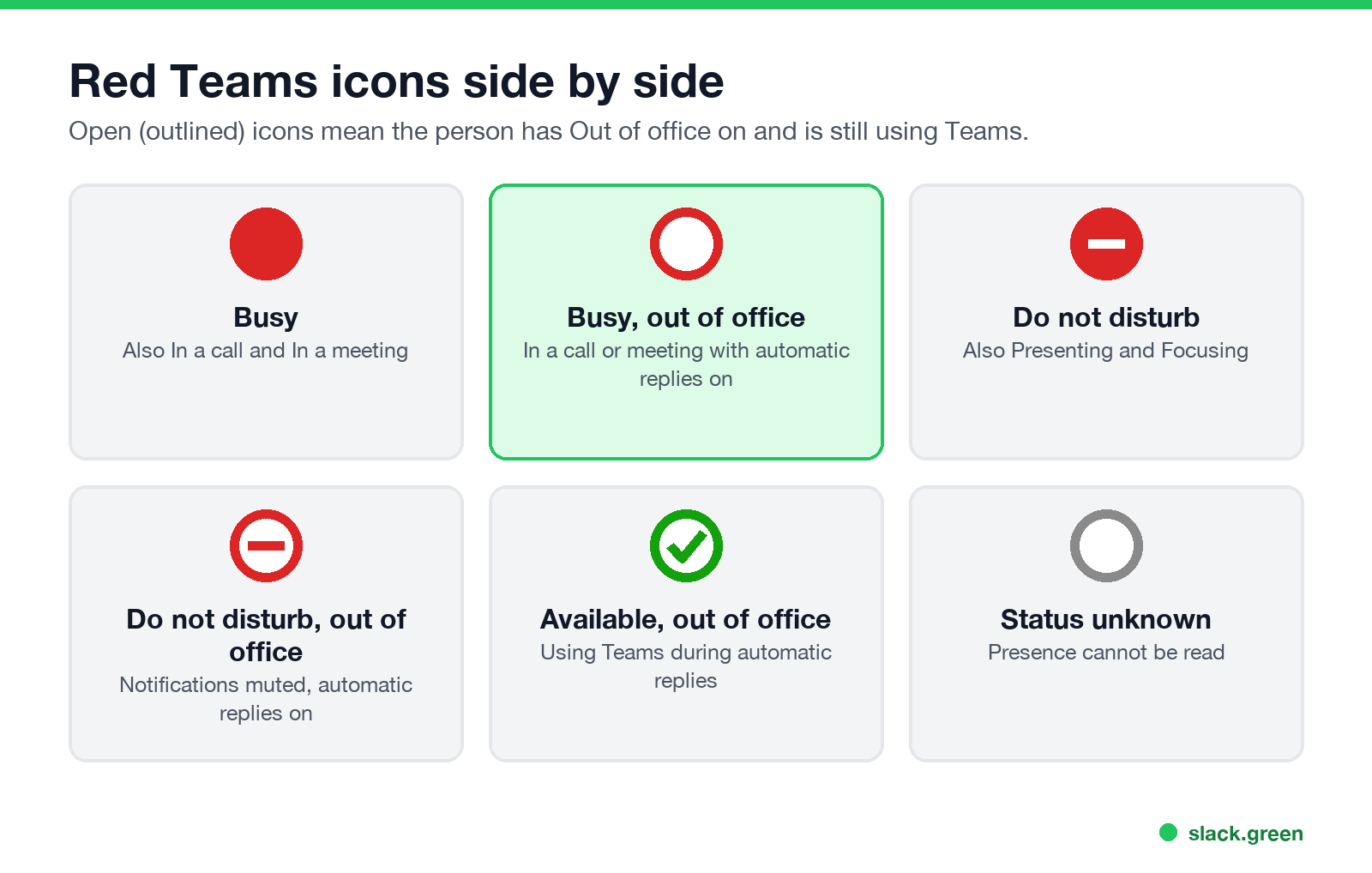
| Icon | Status | Notifications |
|---|---|---|
| Solid red circle | Busy, In a call, In a meeting | Come through |
| Open red circle (white middle) | Busy, In a call or In a meeting, with Out of office on | Come through |
| Red circle with a white bar | Do not disturb, Presenting, Focusing | Muted, except priority contacts |
| Open red circle with a red bar | Do not disturb with Out of office on | Muted |
| Open green circle with a check | Available, with Out of office on | Come through |
| Open grey circle | Status unknown | Not applicable |
Two icons get mixed up with the open red circle most often:
Hover over the picture or open the profile card to settle it. Teams writes the status in words there, including "Out of office" and the date the automatic reply ends.
The full set of icons, with the order Teams uses when two statuses clash, is in Microsoft Teams status icons meaning.
Why the ring appears, and when it goes away
Never appear "away" on Slack again
Cloud-based. No downloads. Works 24/7 even when your laptop is off.
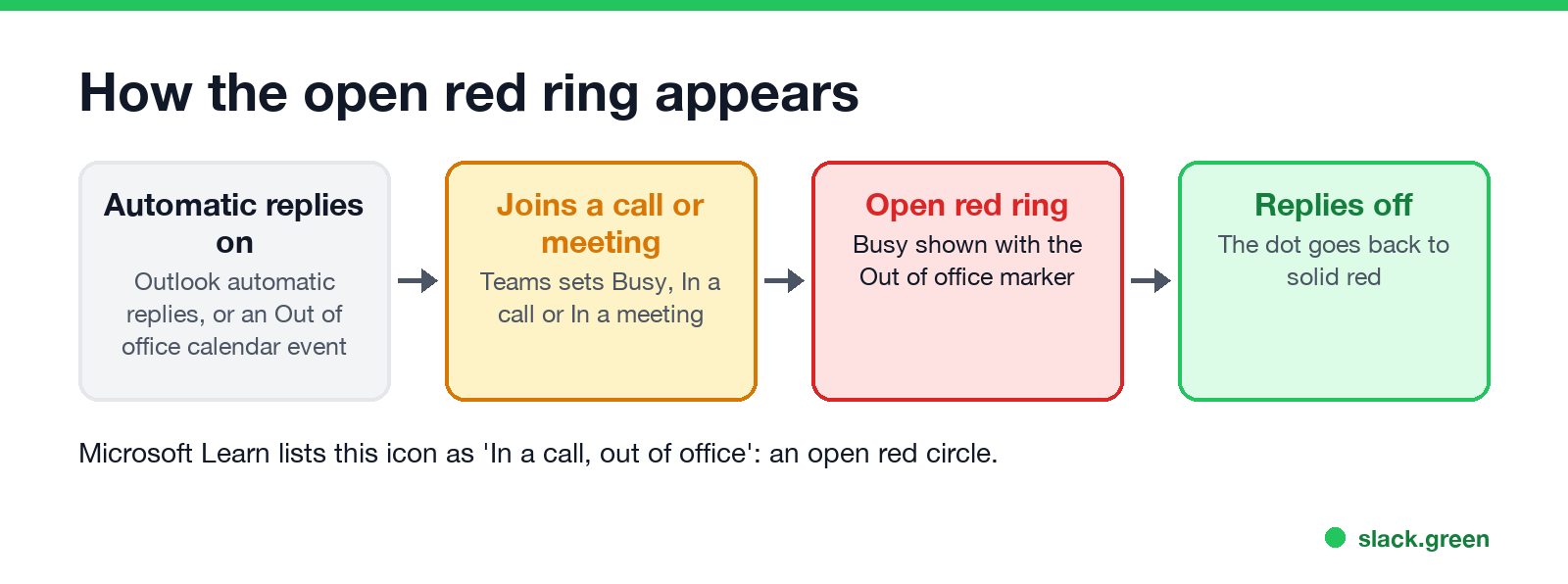
The open red circle needs two things at the same time:
When the call ends, the icon goes back to the purple Out of office arrow or the open green check, depending on whether the person is active in Teams. When automatic replies end, the ring becomes a solid red dot again. How Busy, In a meeting and In a call differ is in Teams Busy vs In a meeting.
A common case: someone on holiday joins one call, and colleagues see a red ring they have not seen before. Nothing is broken. The person is on a call and still has Out of office on.
How to remove the red outline from your own status
If your own dot shows the open red circle and you are not away, Out of office is still on somewhere.
After that the icon follows your normal status again: solid red while you are in a call or meeting, a green check when you are free. The purple arrow on its own, and how to clear it, is in what the purple arrow means on Teams.
What a white dot or white circle means on Teams
A white circle with no coloured outline is not a presence status. Three things look like it:
If the circle has any red in it, it is one of the red statuses in the table above.
FAQ
Never appear "away" on Slack again
Cloud-based. No downloads. Works 24/7 even when your laptop is off.
What does a white circle with a red outline mean on Teams? The person is Busy, In a call or In a meeting while their Out of office is on. Microsoft calls it "In a call, out of office".
Is the white circle with a red outline Do not disturb? No. Do not disturb is a red circle with a white bar. The open ring with no bar is Busy with Out of office on.
Can I still message someone with a red outline? Yes. Messages are delivered and notifications come through. Teams also shows their out-of-office note above the message box in your chat with them.
Does the red outline mean I am blocked? No. The open red ring means Busy with Out of office on. Teams does not use it to show a block.
Why does my own Teams status have a red circle with a white middle? Automatic replies or an Out of office calendar event are still on. Turn them off in Teams or Outlook, and the dot goes back to solid red during calls.
Stop Jiggling Your Mouse.
Join hundreds of remote workers who never worry about their Slack status. Set it up once, stay green forever.
Related Articles
Don't Sleep for Windows: Download, Settings and Start Parameters
Don't Sleep is a free, portable 267 KB Windows app from SoftwareOK that blocks standby, hibernate, the screen saver, log off and shutdown while it runs, with a timer and CPU or network rules. Where to get the real one, what each option does, the command line for a batch file, and what it does not do for Slack or Teams.
Skype Status Icons Meaning: Every Color in Skype and Skype for Business
In Skype for Business, green means Available, yellow means Inactive, Away, Be right back or Off work, red means Busy, In a call or In a meeting, red with a bar means Do not disturb or Presenting, and grey means Offline or Unknown. A red star means Out of office. Consumer Skype used a green check, yellow clock, red minus and an empty circle.
Best Chrome Extensions for Remote Workers, by the Job They Do
14 Chrome extensions for remote work, grouped by the job: async video, meetings, focus, writing, passwords, tabs, screenshots, time tracking and keeping the screen on. Each checked on the Chrome Web Store, with user counts, cost, and the extensions to avoid on a work laptop.