
Can My Employer Track My Work Laptop's Location? Yes, Roughly
Yes. Every time your work laptop signs in to company systems or the VPN, the logs keep its IP address and an approximate city. On managed Windows laptops, IT can also use Microsoft Intune's Locate device action to put the laptop on a map through Wi-Fi. Most laptops have no GPS chip, so the result is usually a city or a street, not a live trail. Every method, how accurate it is, and how to check.
Yes, your employer can track your work laptop's location, but usually only roughly. Every time the laptop signs in to company email, Microsoft 365, Google Workspace or the VPN, the logs record its IP address, and the admin consoles turn that into an approximate city and country. On a Windows laptop managed with Microsoft Intune, an IT admin can also run the Locate device action and see the laptop as a pin on a map, placed through nearby Wi-Fi networks. Most laptops have no GPS chip, so there is no live GPS trail as with a phone. What your company sees depends on which tools it runs, and IT does not have to tell you each time it looks.
The usual reason an employer checks is to confirm you are working from the country or state you are allowed to work from, for tax and data rules. Theft recovery is the other one.
Location is one signal among many. Your Slack status is another: Slack Green keeps it green from a server during the hours you set, with nothing installed on the work laptop, so it adds no software to the machine that IT inspects.
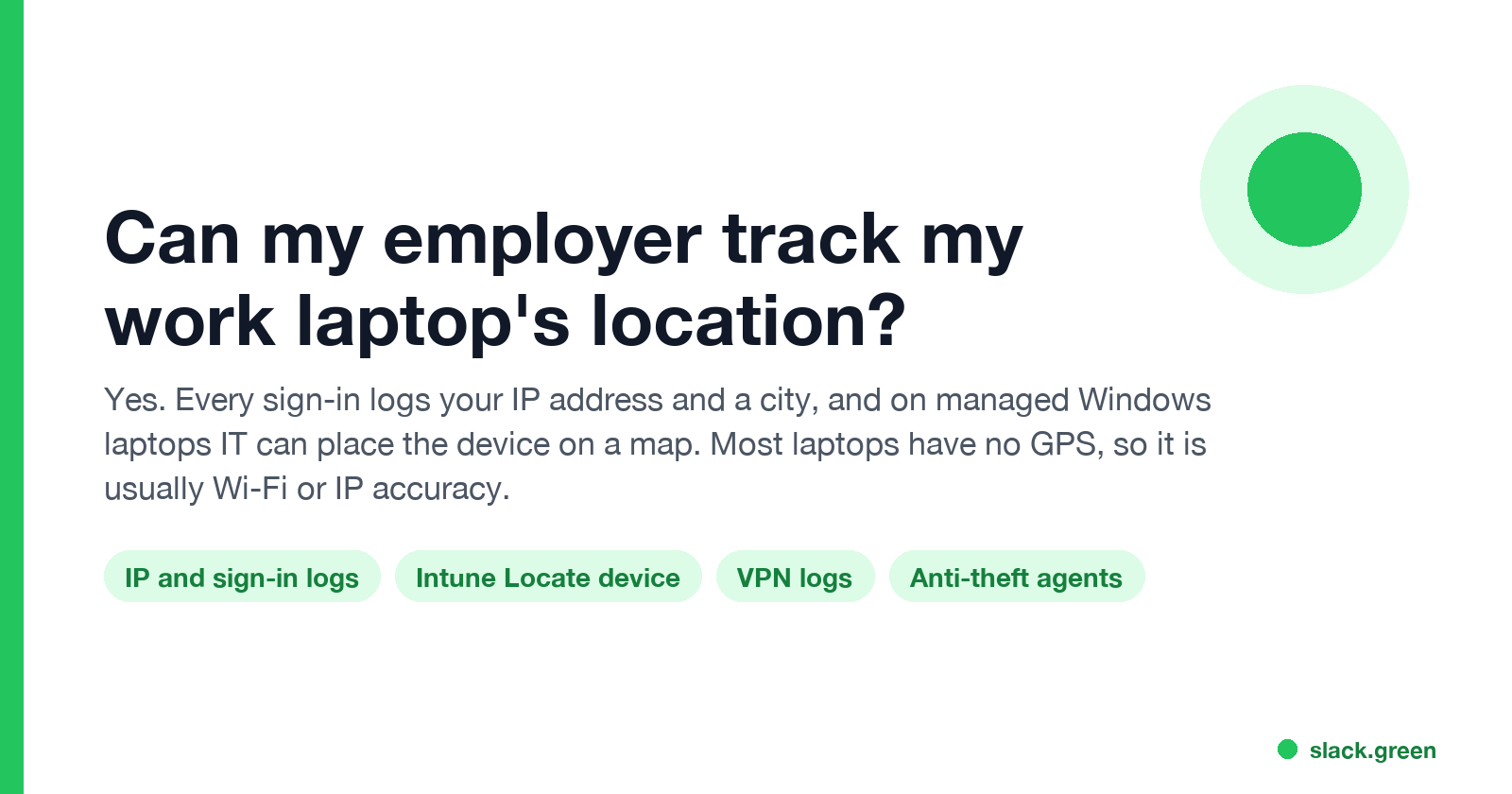
How your employer can find your work laptop
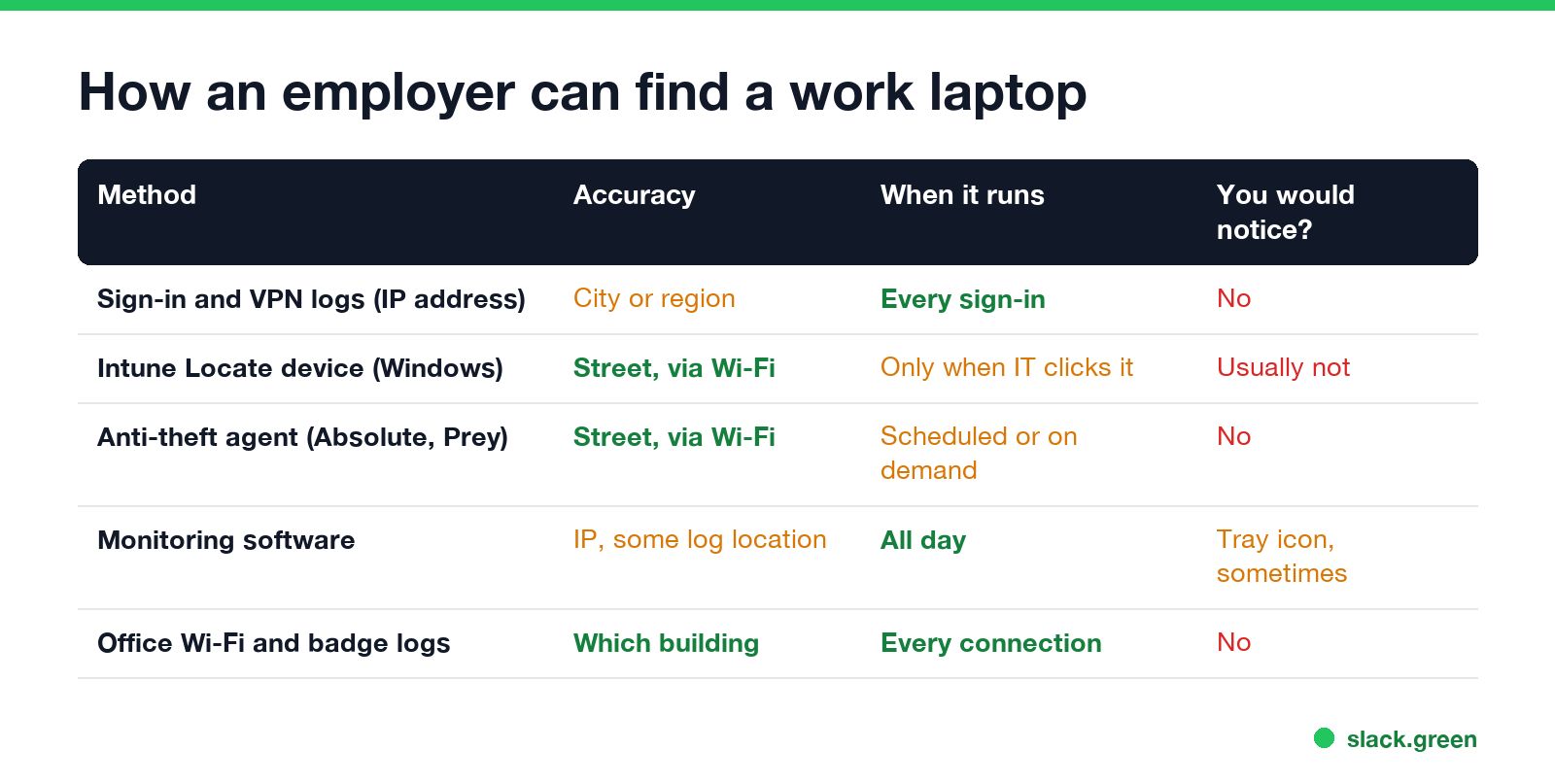
| Method | Accuracy | When it runs | Would you notice? |
|---|---|---|---|
| Sign-in and VPN logs (IP address) | City or region | Every sign-in | No |
| Microsoft Intune Locate device (Windows) | Street level, through Wi-Fi | Only when an admin runs it | Usually not |
| Anti-theft agents such as Absolute or Prey | Street level, through Wi-Fi | On a schedule or on demand | No |
| Employee monitoring software | IP address, some tools log location | All working hours | Sometimes a tray icon |
| Office Wi-Fi, Ethernet and badge logs | Which building and floor | Every connection | No |
IP address in sign-in logs. This is the method every company has, with no extra software. Microsoft Entra ID sign-in logs record the IP address and a location (city, state, country) for each sign-in. Google Workspace and Okta keep the same data. The VPN adds its own log of the public IP each session came from. An IP address points to your internet provider's network in a city, not to your house, and a mobile hotspot can show a city far from where you are.
Intune Locate device. Microsoft's documentation lists Windows, supervised iPhones and iPads, and corporate-owned Android devices as supported. On Windows, the company has to turn on a policy that lets apps use location. The admin opens the device in the Intune admin center, clicks Locate device, and gets a pin with an address and coordinates. Microsoft says the location is collected only when an admin runs the action, and it is stored for 24 hours.
Anti-theft and asset agents. Tools like Absolute Secure Endpoint and Prey report the laptop's location to the company so a lost or stolen machine can be found. They use Wi-Fi positioning and IP addresses, and some run whenever the laptop is online.
Monitoring software. Employee monitoring tools such as ActivTrak, Teramind or Hubstaff record activity, and most log the IP address of each session. GPS tracking in those tools is usually a phone feature. More on these tools in how employers monitor remote workers.
Does a work laptop have GPS?
Almost never. Standard business laptops from Dell, Lenovo, HP and Apple have no GPS receiver. A few models with a built-in cellular modem have one, and Windows can use it. Every other laptop finds its location from nearby Wi-Fi networks, which Windows and macOS compare with a database of known access points. In a city that is usually accurate to a street or a building. Without Wi-Fi, the only signal left is the IP address.
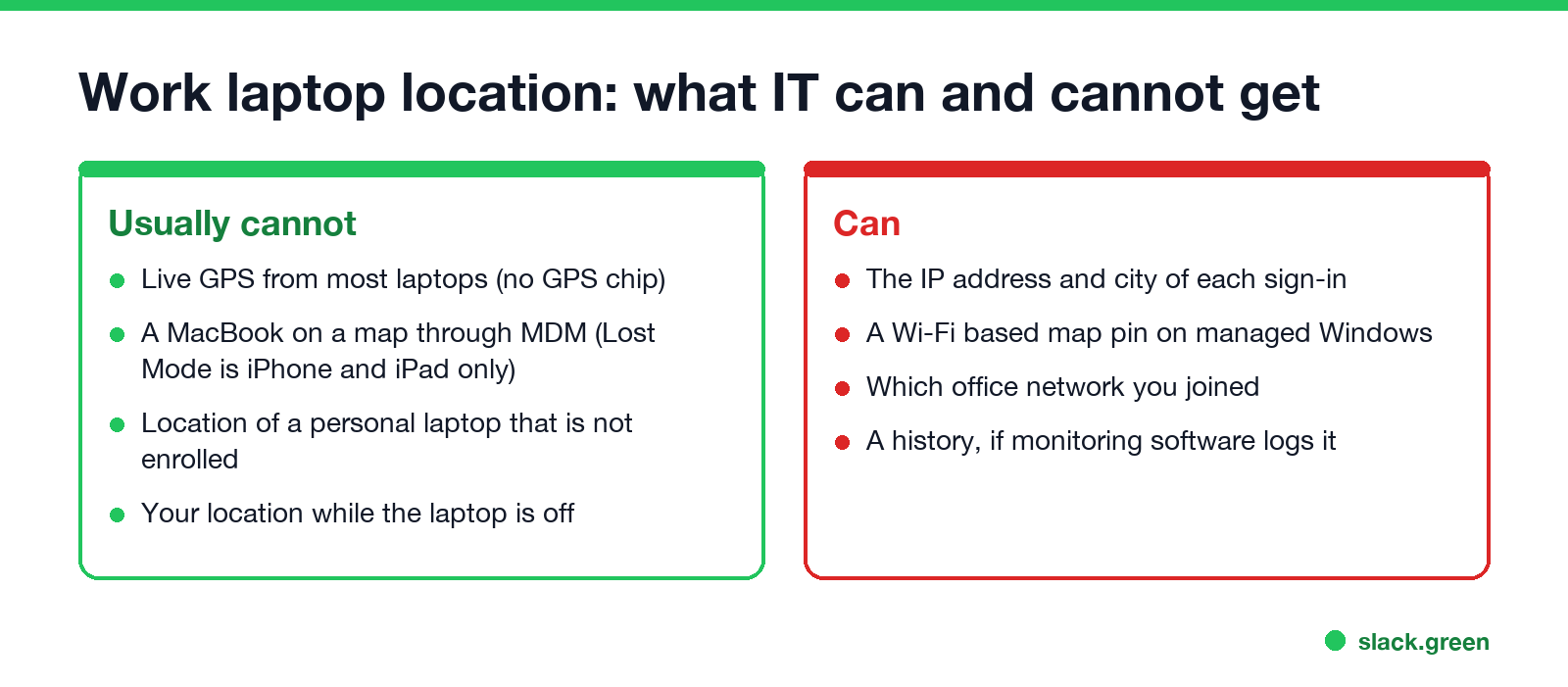
Mac, Windows and personal laptops
Never appear "away" on Slack again
Cloud-based. No downloads. Works 24/7 even when your laptop is off.
Windows work laptops are the easiest to locate, because Intune's Locate device supports them once location access is allowed by policy.
MacBooks are harder. Apple's MDM Lost Mode, which reports location, works on iPhone and iPad, not on Mac, and Intune's Locate device list does not include macOS. Find My Mac belongs to whoever signed in with their Apple Account, so a company only uses it if the laptop is signed in to a company-controlled account. On a Mac, expect IP addresses from sign-in logs and whatever an installed agent reports.
Your own laptop is not tracked by your employer unless you enrolled it in the company's device management or installed its software. Signing in to company apps still logs your IP address, whichever computer you use.
A laptop that is off or asleep reports nothing. Some tools store the last known location from when it was last online.
Can your employer see if you use a VPN?
A personal VPN changes the IP address that company systems log. Sign-in logs then show the VPN server's city, not yours. Many companies treat that as a warning sign: a sign-in from a known VPN provider can be blocked by conditional access or flagged for review. Company VPNs cannot be used to hide location, because they are the company's own logs. Details in can my employer see my browsing if I use a VPN.
Wi-Fi-based location ignores the VPN. When Intune or an anti-theft agent locates the laptop, it looks at the Wi-Fi networks around it, not at the IP address.
Is it legal for an employer to track a work laptop?
In the United States, an employer can generally monitor company-owned equipment, including its location. Some states require notice: New York's electronic monitoring law (Civil Rights Law section 52-c) requires written notice to employees, and Connecticut and Delaware have their own notice rules. In the EU and UK, location tracking has to be necessary and proportionate under data protection law, and employees must be told. Tracking your personal device, or tracking outside working hours, gets much more scrutiny. The wider rules are in is it legal for my employer to monitor me.
How to check what your laptop reports
Never appear "away" on Slack again
Cloud-based. No downloads. Works 24/7 even when your laptop is off.
- Look for management. On Windows, open Settings > Accounts > Access work or school. On a Mac, open System Settings > General > Device Management (older macOS: System Settings > Privacy & Security > Profiles). An entry there means the laptop is enrolled.
- Check location access. On Windows, open Settings > Privacy & security > Location. If location services are on and greyed out with "Some settings are managed by your organization", the company controls them.
- Look at installed agents. Absolute, Prey, ActivTrak, Teramind or similar names in the app list or running processes mean more than sign-in logs.
- Read the IT or remote work policy. Location tracking is usually written there, often next to rules about working abroad.
For a full checklist of monitoring signs, see how to tell if you are being monitored at work. Location inside Teams and Slack is a separate question, covered in does Teams show your location and does Slack track your location.
FAQ
Can my employer see where I am working from? Roughly, yes. Sign-in logs show the city of the IP address each time you connect, and managed Windows laptops can be located more precisely.
Can my employer track my laptop without Wi-Fi? Not in real time, unless the laptop has a cellular modem. Location is reported the next time the laptop goes online.
Does turning off location services stop tracking? It stops Wi-Fi-based location, if the company lets you change it. It does not change the IP address in sign-in and VPN logs.
Can my employer track my personal laptop? Only if you enrolled it in company device management or installed company software. Signing in to company apps logs your IP address on any device.
Stop Jiggling Your Mouse.
Join hundreds of remote workers who never worry about their Slack status. Set it up once, stay green forever.
Related Articles
Can My Employer See What I Watch on YouTube at Work?
On a work laptop or the office network, your employer can see that you used YouTube, when, and for how long. With HTTPS inspection or monitoring software, they can see which videos, because the video address and the browser tab title both name it. On your own phone on mobile data, they see nothing.
Can My Employer See My iMessages on a Work Mac?
Not through device management or the network: Jamf or Intune cannot read Messages, and iMessage is end-to-end encrypted. But if you sign in to Messages on a work Mac, your texts are stored on that Mac, where monitoring screenshots, backups and admin access can reach them. How to check, and how to take iMessage off the Mac without deleting it from your iPhone.
Can My Boss See My Private Outlook Calendar Events?
Usually not the details. When you mark an Outlook event Private, someone who can read your calendar sees only Private appointment, the time and a lock. The exceptions are delegates you gave Can view private items, the people invited to the event, anyone with full access to your mailbox in new Outlook or the web, and compliance admins. How to check who has which access, and what Private does not hide.