
Jenkins Slack Notification: slackSend Pipeline Tested with a Bot Token
We ran the Jenkins Slack Notification plugin against a real Slack app: the pipeline that worked, the botUser setting that makes slackSend fail with a 404, threads, Block Kit, and the errors for channels the bot cannot see.
To send Slack notifications from a Jenkins pipeline, install the Slack Notification plugin, save a Slack bot token as a Secret text credential, and call slackSend in a post block. If you use a bot token from your own Slack app, set botUser: true. Without it, our first build failed with ERROR: Slack notification failed and a 404 in the Jenkins log. On 6 October 2026 we ran Jenkins 2.580.1 (Docker image jenkins/jenkins:lts-jdk21) with Slack Notification plugin 795.v4b_9705b_e6d47 against a throwaway app in our free-plan test workspace. Everything below comes from those builds.
What you need in Slack
Create a Slack app, add the bot scope chat:write (and chat:write.public if Jenkins should post in public channels without joining them), install it, and copy the Bot User OAuth Token (xoxb-). Our bot token guide shows where Slack keeps it. Invite the bot to every private channel it should post in.
Configure the plugin
In Jenkins, add the token under Manage Jenkins > Credentials as kind Secret text. Then open Manage Jenkins > System > Slack and fill in the workspace (your <name>.slack.com subdomain), the credential, and tick Custom slack app bot user. We set the same values with Configuration as Code:
credentials:
  system:
    domainCredentials:
      - credentials:
          - string:
              scope: GLOBAL
              id: slack-bot
              secret: "${SLACK_BOT_TOKEN}"
unclassified:
  slackNotifier:
    teamDomain: slack-0yr1948
    tokenCredentialId: slack-bot
    botUser: true
The ticked box is botUser: true. We left it false on the first run on purpose.
The botUser trap
With botUser: false and a bot token, slackSend printed this in the console:
Slack Send Pipeline step running, values are - baseUrl: <empty>, teamDomain: slack-0yr1948, channel: #sglab-1006, color: good, botUser: false, tokenCredentialId: slack-bot, ...
ERROR: Slack notification failed. See Jenkins logs for details.
The Jenkins log had Slack post may have failed. Response: null and Response Code: 404. With botUser: false the plugin posts to https://<workspace>.slack.com/services/hooks/jenkins-ci?token=..., the endpoint of Slack's old Jenkins CI app (we found that URL in the plugin's StandardSlackService class). A token from your own app gets a 404 there. With botUser: true it calls chat.postMessage on https://slack.com/api/. The build itself did not fail on that line. It failed on the next one, because slackSend returned null:
java.lang.NullPointerException: Cannot get property 'threadId' on null objectSetting botUser: true (globally, or in each slackSend call) fixed it. The next build posted all three messages.
Never appear "away" on Slack again
Cloud-based. No downloads. Works 24/7 even when your laptop is off.
The pipeline that worked
pipeline {
  agent any
  parameters { booleanParam(name: 'FAIL', defaultValue: false, description: 'force a failure') }
  stages {
    stage('Build') {
      steps {
        echo 'building'
        script { if (params.FAIL) { error('forced failure for the Slack test') } }
      }
    }
  }
  post {
    success {
      script {
        def r = slackSend(channel: '#sglab-1006', color: 'good', botUser: true,
          message: "Build passed: ${env.JOB_NAME} #${env.BUILD_NUMBER} (<${env.BUILD_URL}|open>)")
        echo "threadId=${r.threadId} ts=${r.ts} channelId=${r.channelId}"
        slackSend(channel: r.threadId, botUser: true,
          message: "Deploy step started for #${env.BUILD_NUMBER}")
        def blocks = [
          [type: 'header', text: [type: 'plain_text', text: "Build #${env.BUILD_NUMBER} passed"]],
          [type: 'section', text: [type: 'mrkdwn', text: "*Job:* ${env.JOB_NAME}\n*Branch:* main"]],
          [type: 'actions', elements: [[type: 'button', text: [type: 'plain_text', text: 'Open build'], url: "${env.BUILD_URL}"]]]
        ]
        slackSend(channel: '#sglab-1006', botUser: true, blocks: blocks)
      }
    }
    failure {
      slackSend(channel: '#sglab-1006', color: 'danger', botUser: true,
        message: "Build failed: ${env.JOB_NAME} #${env.BUILD_NUMBER} (<${env.BUILD_URL}console|console>)")
    }
  }
}
The console printed the return value of the first call:
threadId=C0C7T45CQ1W:1791252925.515999 ts=1791252925.515999 channelId=C0C7T45CQ1WthreadId is the channel ID and the message timestamp joined by a colon. Passing it as channel posts a reply in that message's thread. Build #3 ran with FAIL=true and posted the red message from the failure block:
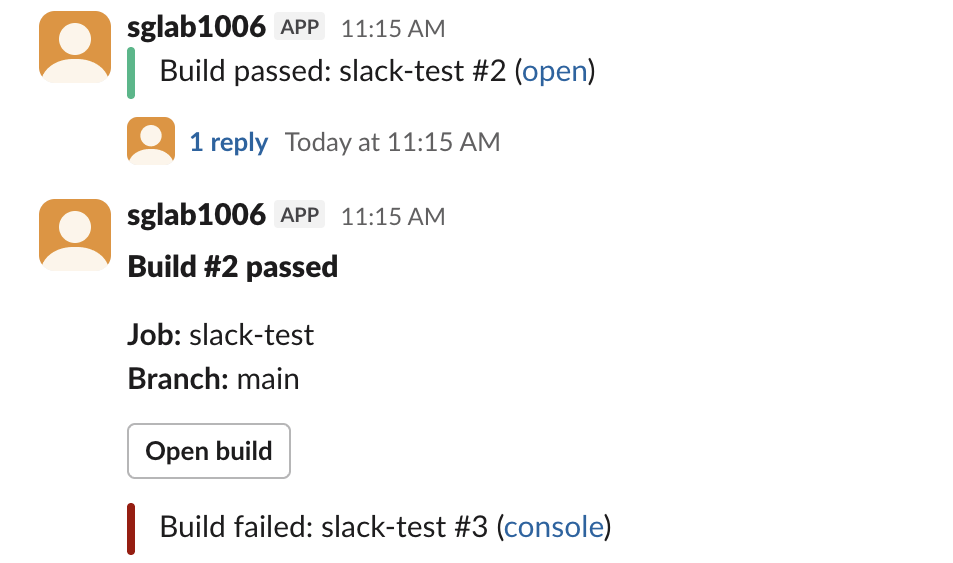
color: 'good' and color: 'danger' draw the green and red bar. The plugin sends them as a legacy attachment. In our channel the attachment text was empty in conversations.history, because the message lives in the attachment, so search the attachment if you read these messages back with the API. The Block Kit header showed in bold at the same size as the body text, which is how Slack's web app draws every header block.
Errors for channels the bot cannot use
A second job sent slackSend to channels the bot could not post in, then printed each return value:
channel: | Console output | Return value |
|---|---|---|
| A private channel the bot is not in | Slack notification failed with exception: {"ok":false,"error":"channel_not_found"} | null |
| A channel that does not exist | same channel_not_found | null |
A member ID (U0B7L4YK420) | no error, posted as a DM from the bot | channel D0C72DQ3D6Y |
Private channel with failOnError: true | same error, and the build ended FAILURE | none |
Slack answers channel_not_found for a private channel the bot was never invited to, not not_in_channel, so the message looks like a typo even when the name is right. Invite the bot with /invite @your-app in that channel. Without failOnError: true, a failed slackSend does not fail the build; it returns null, and any later r.threadId throws the NullPointerException above. Add failOnError: true if a missing notification should stop the build, or check for null before you use the result. For the other errors Slack can return, see our missing_scope page.
FAQ
Can I use an incoming webhook instead of a bot token?
Yes, from an sh step with curl, as in our webhook curl example. Keep the webhook URL in a Secret text credential and read it with withCredentials. A webhook posts only to its one channel and returns no message timestamp, so you cannot reply in a thread.
How do I mention someone in a Jenkins Slack message?
Put the member ID in the message as <@U0B7L4YK420>; this page shows how to find it. notifyCommitters: true asks the plugin to look up committers by email, which needs the users:read.email scope; we did not test it.
Stop Jiggling Your Mouse.
Join hundreds of remote workers who never worry about their Slack status. Set it up once, stay green forever.
Related Articles
Alertmanager Slack Config: slack_configs Example and Templates, Tested
A tested alertmanager.yml for Slack, the messages Prometheus alerts produced, a custom title and text template, and what send_resolved, group_by and color changed. Plus a typo amtool did not catch.
Grafana Slack Alerts: Webhook vs Bot Token, Templates, Tested
We sent Grafana alerts to Slack through both kinds of contact point, then replaced the default message with a notification template. The messages Slack showed, the delays, the template we used and the errors Grafana logged.
n8n Slack Credentials: Bot Token, User Token or OAuth2, Tested
We ran 8 Slack node operations in n8n with a bot token, a user token and the OAuth2 credential. What each one can do, the errors you get, and two traps: the OAuth2 callback and the status expiration time zone.